Majorsoft.Blazor.Components.Typeahead
1.6.1
dotnet add package Majorsoft.Blazor.Components.Typeahead --version 1.6.1
NuGet\Install-Package Majorsoft.Blazor.Components.Typeahead -Version 1.6.1
<PackageReference Include="Majorsoft.Blazor.Components.Typeahead" Version="1.6.1" />
<PackageVersion Include="Majorsoft.Blazor.Components.Typeahead" Version="1.6.1" />
<PackageReference Include="Majorsoft.Blazor.Components.Typeahead" />
paket add Majorsoft.Blazor.Components.Typeahead --version 1.6.1
#r "nuget: Majorsoft.Blazor.Components.Typeahead, 1.6.1"
#:package Majorsoft.Blazor.Components.Typeahead@1.6.1
#addin nuget:?package=Majorsoft.Blazor.Components.Typeahead&version=1.6.1
#tool nuget:?package=Majorsoft.Blazor.Components.Typeahead&version=1.6.1
Blazor Components Typeahead controls



About
Blazor component that renders an HTML <input> or Blazor provided InputText with Typeahead panel with optional debounce (delay) and minimal required chars. All components work with WebAssembly and Server hosted models.
For code examples see usage.
You can try it out by using the demo app.
Typeahead with pre-loaded string model
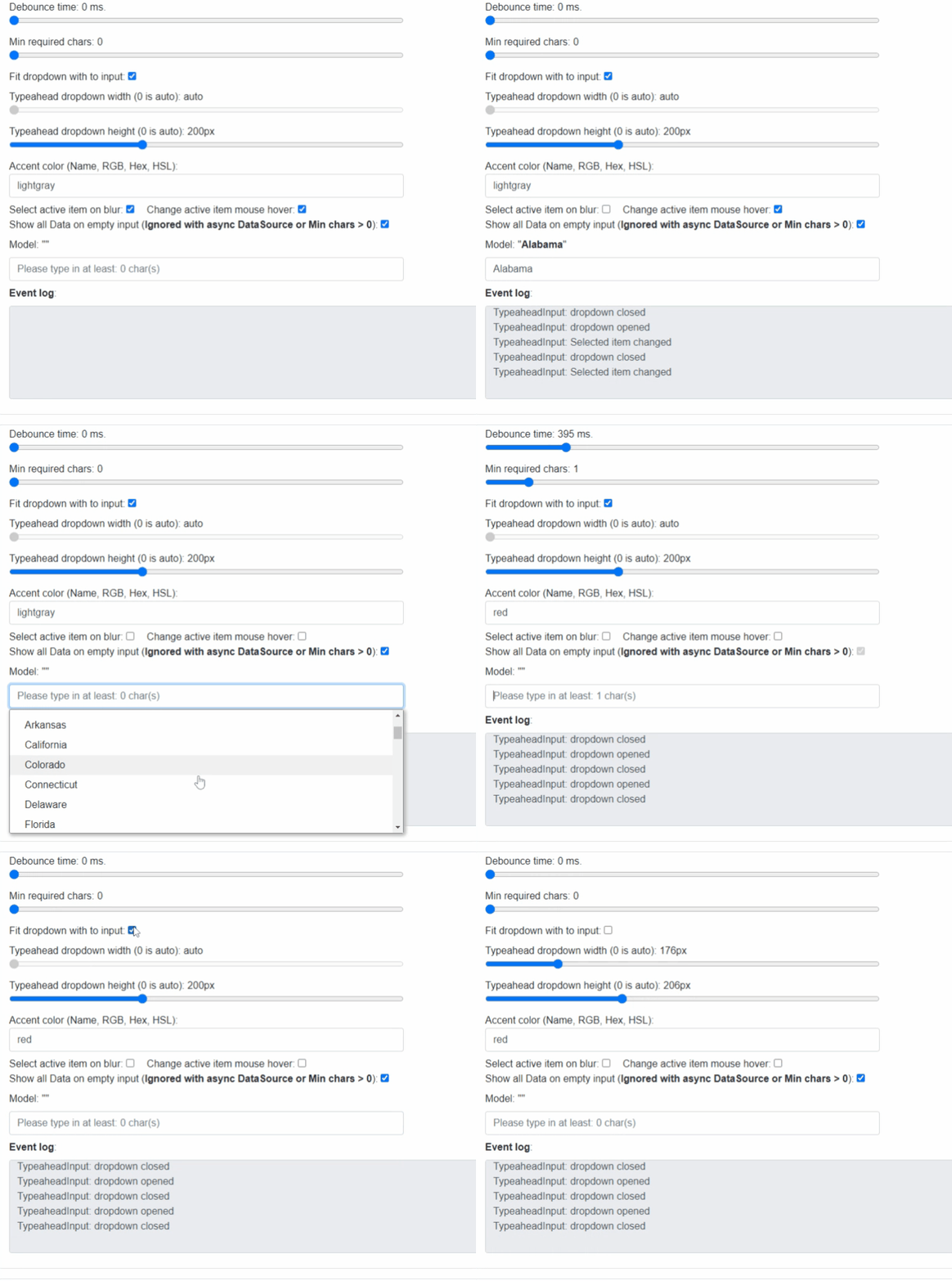
Typeahead with async custom model
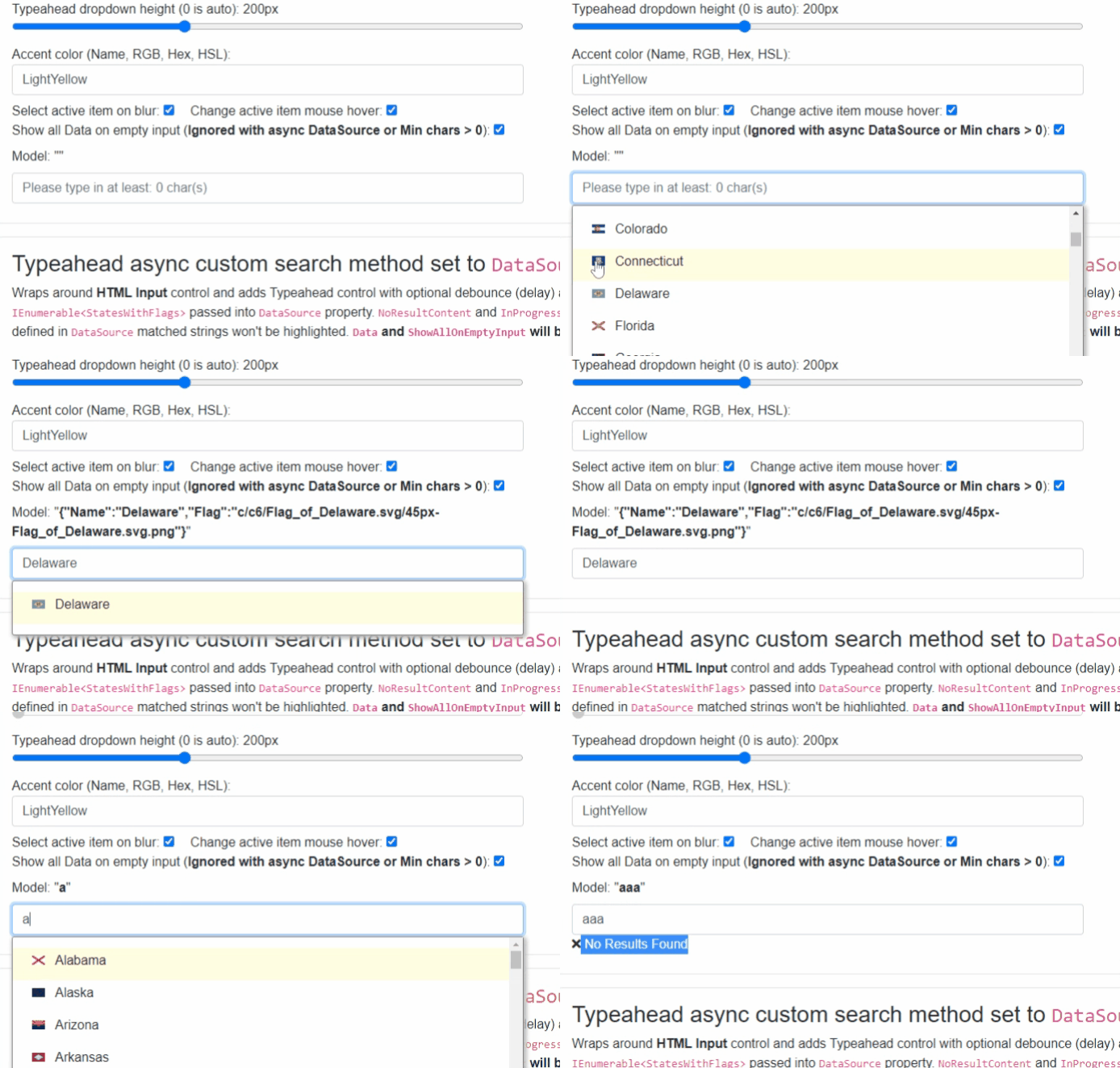
Components
TypeaheadInput: Wraps around HTML<input>control and adds Typeahead control with optional debounce (delay) and minimal required chars.TypeaheadInputText: Wraps around BlazorInputTextcontrol which enables form validation and adds Typeahead control with optional debounce (delay) and minimal required chars.
TypeaheadInput and TypeaheadInputText components
Blazor components that are wrapping around standard HTML <input>, Blazor InputText elements and provide
dropdown list of given searched items with optional debounce notification functionality.
Both components can work as Sync (pre-loaded) by using Data or Async (real time loaded data e.g. HTTP request result)
via DataSource properties. But not both! Also check Properties and Usage examples when you need provide LabelPropertySelector, etc.
Properties
All components have exactly the same features only rendering different HTML elements, hence they have the same properties, events and functions as well.
TItem:@typeparam TItem- Required <br /> Type of the component template data. Must be declared the same time asData,DataSourceorSelectedItemproperties.Value:string? { get; set; }<br /> Value of the rendered HTML element (chars typed into<input>element). Initial field value can be set to given string or omitted (leave empty). Also control actual value can be read out (useful when MinLenght not reached).SelectedItem:TItem SelectedItem { get; set; }<br /> The value of the user selectedTItemitem.Data:IEnumerable<TItem> Data { get; set; }<br /> Sync (pre-loaded) data to use for in the component for search and show in the Dropdown.DataSource:Func<string, Task<IEnumerable<TItem>>> DataSource { get; set; }<br /> Async (real time loaded data e.g. HTTP request result) Func to call when on user input. It should provide search result (if any match) to show in typeahead. NOTE: this will overrideDataproperty value! Also since you can implement any kind of Search match highlight will not work!LabelPropertySelector:Func<TItem, string> LabelPropertySelector { get; set; }<br /> Required when type ofTItemis notstringselector will be executed during built in search (if used withData) and selected field will be used for display. NOTE: ifTItemis notstringand not provided an Exception will be thrown.SelectOnBlur:bool SelectOnBlur { get; set; }(default: true) <br /> Determines if active item should be selected when control loses focus.ShowAllOnEmptyInput:bool ShowAllOnEmptyInput { get; set; }(default: true) <br /> Show all data when text input clicked (got focus) or when value got empty (characters removed until got empty). NOTE: this won't work with AsyncDataSourceunless you send back all data. Also be careful if you have huge amount of data.ChangeActiveItemOnHover:bool ChangeActiveItemOnHover { get; set; }(default: true) <br /> Determines if on mouse hover should mark the item as Active. (It will be selected by enter or on blur).AccentColor:string AccentColor { get; set; }(default: gray)` <br /> Color theme will be used on Active and hovered items. Later on the Multi select background as well.DropdownHeight:double DropdownHeight { get; set; }(default: 150) <br /> Typeahead dropdown Height inpx.DropdownWidth:double DropdownWidth { get; set; }(default: 0) <br /> Typeahead dropdown Width inpx.0means auto width.FitDropdownWidth:bool FitDropdownWidth { get; set; }(default: false) <br /> Typeahead dropdown Width should be set automatically to the exact witdth of the input control.DebounceTime:int { get; set; }(default: 0) <br /> Notification debounce timeout in ms. If set to0notifications happens immediately.-1disables automatic notification completely. Notification will only happen by pressingEnterkey oronblur, if set.MinLength:int { get; set; }(default: 0) <br /> Minimal length of text to start notify, if value is shorter than MinLength, there will be notifications with empty value"".ItemTemplate:RenderFragment<TItem> ItemTemplate { get; set; }<br /> Optional HTML content which overrides the default Item template. Your code will receive aTItemso any property will can be used to show in any format. NOTE: Since any property can be used to show match highlight won't work.NoResultContent:RenderFragment NoResultContent { get; set; }<br /> Optional HTML content to show when Search has no result.InProgressContent:RenderFragment InProgressContent { get; set; }<br /> Optional HTML content to show when Search is in progress.InnerElementReference:ElementReference { get; }<br /> Exposes a BlazorElementReferenceof the wrapped around HTML element. It can be used e.g. for JS interop, etc.
Arbitrary HTML attributes e.g.: id="input1" class="form-control w-25" will be passed to the corresponding rendered HTML element <input>.
<TypeaheadInput
	id="in1"
	class="form-control w-25"
	OnValueChanged="e => { DebounceInputValue = e; }"
	placeholder="@("Please type in at least: " + @MinCharsLength + " char(s)")"
	... />
Will be rendered to:
<input id="in1" class="form-control w-25" placeholder="Please type in at least: 2 char(s)" ... />
Events
OnInput:EventCallback<string>delegate <br /> Callback function called when value was changed (optional debounced) with field value passed into.OnSelectedItemChanged:EventCallback<TItem>delegate - Required <br /> Callback function called when item selected with type param Item passed into.OnDropdownOpen:EventCallbackdelegate <br /> Callback function called when typeahead dropdown panel opened.OnDropdownClose:EventCallbackdelegate <br /> Callback function called when typeahead dropdown panel opened.OnFocus:EventCallback<FocusEventArgs>delegate <br /> Callback function called when typeahead textbox got focus.
Functions
DisposeAsync():@implements IAsyncDisposableinterface <br /> Component implementsIAsyncDisposableinterface Blazor framework will call it when parent removed from render tree.
Configuration
Installation
Majorsoft.Blazor.Components.Typeahead is available on NuGet.
dotnet add package Majorsoft.Blazor.Components.Typeahead
Use the --version option to specify a preview version to install.
Usage
Add using statement to your Blazor <component/page>.razor file. Or globally reference it into _Imports.razor file.
@using Majorsoft.Blazor.Components.Typeahead
Dependences
Majorsoft.Blazor.Components.Typeahead package depends on other Majorsoft Nuget packages:
- Majorsoft.Blazor.Components.Debounce which provides the base input control with Debounce feature.
- Majorsoft.Blazor.Components.Common.JsInterop which handles JS Interop for many features e.g. scrolling, etc.
In case of WebAssembly project register services in your Program.cs file:
using Majorsoft.Blazor.Components.Common.JsInterop;
...
public static async Task Main(string[] args)
{
	var builder = WebAssemblyHostBuilder.CreateDefault(args);

	//Register dependencies
	builder.Services.AddJsInteropExtensions();
}
In case of Server hosted project register services in your Startup.cs file:
using Majorsoft.Blazor.Components.Common.JsInterop;
...

public void ConfigureServices(IServiceCollection services)
{
	//Register dependencies
	services.AddJsInteropExtensions();
}
Common code to supply Data to show.
@using System.Linq
@using System.Text.Json

@code {
	private StatesWithFlags[] _testData = null;
	protected override void OnInitialized()
	{
		_testData = JsonSerializer.Deserialize<StatesWithFlags[]>(jsonData);
	}

	//Common Data
	private class StatesWithFlags
	{
		public string Name { get; set; }
		public string Flag { get; set; }
	}
	private const string jsonData = "[{\"Name\":\"Alabama\",\"Flag\":\"5/5c/Flag_of_Alabama.svg/45px-Flag_of_Alabama.svg.png\"},{\"Name\":\"Alaska\",\"Flag\":\"e/e6/Flag_of_Alaska.svg/43px-Flag_of_Alaska.svg.png\"},{\"Name\":\"Arizona\",\"Flag\":\"9/9d/Flag_of_Arizona.svg/45px-Flag_of_Arizona.svg.png\"},{\"Name\":\"Arkansas\",\"Flag\":\"9/9d/Flag_of_Arkansas.svg/45px-Flag_of_Arkansas.svg.png\"},{\"Name\":\"California\",\"Flag\":\"0/01/Flag_of_California.svg/45px-Flag_of_California.svg.png\"},{\"Name\":\"Colorado\",\"Flag\":\"4/46/Flag_of_Colorado.svg/45px-Flag_of_Colorado.svg.png\"},{\"Name\":\"Connecticut\",\"Flag\":\"9/96/Flag_of_Connecticut.svg/39px-Flag_of_Connecticut.svg.png\"},{\"Name\":\"Delaware\",\"Flag\":\"c/c6/Flag_of_Delaware.svg/45px-Flag_of_Delaware.svg.png\"},{\"Name\":\"Florida\",\"Flag\":\"f/f7/Flag_of_Florida.svg/45px-Flag_of_Florida.svg.png\"},{\"Name\":\"Georgia\",\"Flag\":\"5/54/Flag_of_Georgia_%28U.S._state%29.svg/46px-Flag_of_Georgia_%28U.S._state%29.svg.png\"},{\"Name\":\"Hawaii\",\"Flag\":\"e/ef/Flag_of_Hawaii.svg/46px-Flag_of_Hawaii.svg.png\"},{\"Name\":\"Idaho\",\"Flag\":\"a/a4/Flag_of_Idaho.svg/38px-Flag_of_Idaho.svg.png\"},{\"Name\":\"Illinois\",\"Flag\":\"0/01/Flag_of_Illinois.svg/46px-Flag_of_Illinois.svg.png\"},{\"Name\":\"Indiana\",\"Flag\":\"a/ac/Flag_of_Indiana.svg/45px-Flag_of_Indiana.svg.png\"},{\"Name\":\"Iowa\",\"Flag\":\"a/aa/Flag_of_Iowa.svg/44px-Flag_of_Iowa.svg.png\"},{\"Name\":\"Kansas\",\"Flag\":\"d/da/Flag_of_Kansas.svg/46px-Flag_of_Kansas.svg.png\"},{\"Name\":\"Kentucky\",\"Flag\":\"8/8d/Flag_of_Kentucky.svg/46px-Flag_of_Kentucky.svg.png\"},{\"Name\":\"Louisiana\",\"Flag\":\"e/e0/Flag_of_Louisiana.svg/46px-Flag_of_Louisiana.svg.png\"},{\"Name\":\"Maine\",\"Flag\":\"3/35/Flag_of_Maine.svg/45px-Flag_of_Maine.svg.png\"},{\"Name\":\"Maryland\",\"Flag\":\"a/a0/Flag_of_Maryland.svg/45px-Flag_of_Maryland.svg.png\"},{\"Name\":\"Massachusetts\",\"Flag\":\"f/f2/Flag_of_Massachusetts.svg/46px-Flag_of_Massachusetts.svg.png\"},{\"Name\":\"Michigan\",\"Flag\":\"b/b5/Flag_of_Michigan.svg/45px-Flag_of_Michigan.svg.png\"},{\"Name\":\"Minnesota\",\"Flag\":\"b/b9/Flag_of_Minnesota.svg/46px-Flag_of_Minnesota.svg.png\"},{\"Name\":\"Mississippi\",\"Flag\":\"4/42/Flag_of_Mississippi.svg/45px-Flag_of_Mississippi.svg.png\"},{\"Name\":\"Missouri\",\"Flag\":\"5/5a/Flag_of_Missouri.svg/46px-Flag_of_Missouri.svg.png\"},{\"Name\":\"Montana\",\"Flag\":\"c/cb/Flag_of_Montana.svg/45px-Flag_of_Montana.svg.png\"},{\"Name\":\"Nebraska\",\"Flag\":\"4/4d/Flag_of_Nebraska.svg/46px-Flag_of_Nebraska.svg.png\"},{\"Name\":\"Nevada\",\"Flag\":\"f/f1/Flag_of_Nevada.svg/45px-Flag_of_Nevada.svg.png\"},{\"Name\":\"New Hampshire\",\"Flag\":\"2/28/Flag_of_New_Hampshire.svg/45px-Flag_of_New_Hampshire.svg.png\"},{\"Name\":\"New Jersey\",\"Flag\":\"9/92/Flag_of_New_Jersey.svg/45px-Flag_of_New_Jersey.svg.png\"},{\"Name\":\"New Mexico\",\"Flag\":\"c/c3/Flag_of_New_Mexico.svg/45px-Flag_of_New_Mexico.svg.png\"},{\"Name\":\"New York\",\"Flag\":\"1/1a/Flag_of_New_York.svg/46px-Flag_of_New_York.svg.png\"},{\"Name\":\"North Carolina\",\"Flag\":\"b/bb/Flag_of_North_Carolina.svg/45px-Flag_of_North_Carolina.svg.png\"},{\"Name\":\"North Dakota\",\"Flag\":\"e/ee/Flag_of_North_Dakota.svg/38px-Flag_of_North_Dakota.svg.png\"},{\"Name\":\"Ohio\",\"Flag\":\"4/4c/Flag_of_Ohio.svg/46px-Flag_of_Ohio.svg.png\"},{\"Name\":\"Oklahoma\",\"Flag\":\"6/6e/Flag_of_Oklahoma.svg/45px-Flag_of_Oklahoma.svg.png\"},{\"Name\":\"Oregon\",\"Flag\":\"b/b9/Flag_of_Oregon.svg/46px-Flag_of_Oregon.svg.png\"},{\"Name\":\"Pennsylvania\",\"Flag\":\"f/f7/Flag_of_Pennsylvania.svg/45px-Flag_of_Pennsylvania.svg.png\"},{\"Name\":\"Rhode Island\",\"Flag\":\"f/f3/Flag_of_Rhode_Island.svg/32px-Flag_of_Rhode_Island.svg.png\"},{\"Name\":\"South Carolina\",\"Flag\":\"6/69/Flag_of_South_Carolina.svg/45px-Flag_of_South_Carolina.svg.png\"},{\"Name\":\"South Dakota\",\"Flag\":\"1/1a/Flag_of_South_Dakota.svg/46px-Flag_of_South_Dakota.svg.png\"},{\"Name\":\"Tennessee\",\"Flag\":\"9/9e/Flag_of_Tennessee.svg/46px-Flag_of_Tennessee.svg.png\"},{\"Name\":\"Texas\",\"Flag\":\"f/f7/Flag_of_Texas.svg/45px-Flag_of_Texas.svg.png\"},{\"Name\":\"Utah\",\"Flag\":\"f/f6/Flag_of_Utah.svg/45px-Flag_of_Utah.svg.png\"},{\"Name\":\"Vermont\",\"Flag\":\"4/49/Flag_of_Vermont.svg/46px-Flag_of_Vermont.svg.png\"},{\"Name\":\"Virginia\",\"Flag\":\"4/47/Flag_of_Virginia.svg/44px-Flag_of_Virginia.svg.png\"},{\"Name\":\"Washington\",\"Flag\":\"5/54/Flag_of_Washington.svg/46px-Flag_of_Washington.svg.png\"},{\"Name\":\"West Virginia\",\"Flag\":\"2/22/Flag_of_West_Virginia.svg/46px-Flag_of_West_Virginia.svg.png\"},{\"Name\":\"Wisconsin\",\"Flag\":\"2/22/Flag_of_Wisconsin.svg/45px-Flag_of_Wisconsin.svg.png\"},{\"Name\":\"Wyoming\",\"Flag\":\"b/bc/Flag_of_Wyoming.svg/43px-Flag_of_Wyoming.svg.png\"}]";
}
Typeahead with pre-loaded IEnumerable<string> data set to Data property
<TypeaheadInput id="in1" class="form-control w-100" placeholder="@("Please type in at least: " + _minCharsLength + " char(s)")"
	@ref="_input"
	Data="@_testData.Select(x => x.Name)"
	@bind-Value="@_typeaheadInputValue"
	OnInput="@(text => {_selectedItem = null; _typeaheadInputValue = text;})"
	TItem="string">
</TypeaheadInput>

@code {
	private TypeaheadInput<string> _input;
	private string _typeaheadInputValue = "";
	private string _selectedItem;
}
Typeahead with pre-loaded IEnumerable<StatesWithFlags> data set to Data property
<TypeaheadInput id="in2" class="form-control w-100" placeholder="@("Please type in at least: " + _minCharsLength2 + " char(s)")"
		@ref="_input2"
		Data="@_testData"
		LabelPropertySelector="x => x.Name"
		@bind-Value="@_typeaheadInputValue2"
		OnInput="@(text => {_selectedItem2 = null; _typeaheadInputValue2 = text;})"
		TItem="StatesWithFlags" >
	<NoResultContent>
		<i class="fa fa-times"></i> No Results Found
	</NoResultContent>
</TypeaheadInput>

@code {
	private TypeaheadInput<StatesWithFlags> _input2;
	private string _typeaheadInputValue2 = "";
	private StatesWithFlags _selectedItem2;
}
Typeahead with pre-loaded IEnumerable<StatesWithFlags> data set to Data property and custom template
<TypeaheadInput id="in3" class="form-control w-100" placeholder="@("Please type in at least: " + _minCharsLength3 + " char(s)")"
		@ref="_input3"
		Data="@_testData"
		LabelPropertySelector="x => x.Name"
		@bind-Value="@_typeaheadInputValue3"
		OnInput="@(text => {_selectedItem3 = null; _typeaheadInputValue3 = text;})"
		TItem="StatesWithFlags">
	<NoResultContent>
		<i class="fa fa-times"></i> No Results Found
	</NoResultContent>
	<ItemTemplate>
		<div>
			<img src="@($"http://upload.wikimedia.org/wikipedia/commons/thumb/{context.Flag}")" class="mb-1 mr-2" width="16"/>
			<label>@context.Name</label>
		</div>
	</ItemTemplate>
</TypeaheadInput>

@code {
	private TypeaheadInput<StatesWithFlags> _input3;
	private string _typeaheadInputValue3 = "";
	private StatesWithFlags _selectedItem3;
}
Typeaheadasync custom search method set to DataSource property as Func<string, Task<IEnumerable<StatesWithFlags>>>
<TypeaheadInput id="in4" class="form-control w-100" placeholder="@("Please type in at least: " + _minCharsLength4 + " char(s)")"
		@ref="_input4"
		DataSource="query => Search(query)"
		LabelPropertySelector="x => x.Name"
		@bind-Value="@_typeaheadInputValue4"
		OnInput="@(text => {_selectedItem4 = null; _typeaheadInputValue4 = text;})"
		TItem="StatesWithFlags">
	<NoResultContent>
		<i class="fa fa-times"></i> No Results Found
	</NoResultContent>
	<InProgressContent>
		<i class="fa fa-spinner fa-pulse"></i> Searching...
	</InProgressContent>
</TypeaheadInput>

@code {
	private TypeaheadInput<StatesWithFlags> _input4;
	private string _typeaheadInputValue4 = "";
	private StatesWithFlags _selectedItem4;
	private SearchTypes _searchType = SearchTypes.Contains;

	private enum SearchTypes
	{
		Contains,
		StartsWith
	}

	private async Task<IEnumerable<StatesWithFlags>> Search(string query)
	{
		if(string.IsNullOrEmpty(query))
		{
			return null; //Can be returned all data but be careful might be too much..
		}

		await Task.Delay(700); //Async server call here...

		switch(_searchType)
		{
			case SearchTypes.Contains:
				return _testData.Where(x => x.Name?.ToLower().Contains(query.ToLower()) ?? false);
			case SearchTypes.StartsWith:
				return _testData.Where(x => x?.Name?.ToLower().StartsWith(query.ToLower()) ?? false);
			default:
				return null;
		}
	}
}
| Product | Versions Compatible and additional computed target framework versions. |
|---|---|
| .NET | net5.0 is compatible. net5.0-windows was computed. net6.0 was computed. net6.0-android was computed. net6.0-ios was computed. net6.0-maccatalyst was computed. net6.0-macos was computed. net6.0-tvos was computed. net6.0-windows was computed. net7.0 was computed. net7.0-android was computed. net7.0-ios was computed. net7.0-maccatalyst was computed. net7.0-macos was computed. net7.0-tvos was computed. net7.0-windows was computed. net8.0 was computed. net8.0-android was computed. net8.0-browser was computed. net8.0-ios was computed. net8.0-maccatalyst was computed. net8.0-macos was computed. net8.0-tvos was computed. net8.0-windows was computed. net9.0 was computed. net9.0-android was computed. net9.0-browser was computed. net9.0-ios was computed. net9.0-maccatalyst was computed. net9.0-macos was computed. net9.0-tvos was computed. net9.0-windows was computed. net10.0 was computed. net10.0-android was computed. net10.0-browser was computed. net10.0-ios was computed. net10.0-maccatalyst was computed. net10.0-macos was computed. net10.0-tvos was computed. net10.0-windows was computed. |
-
net5.0
- Majorsoft.Blazor.Components.Common.JsInterop (>= 1.6.1)
- Majorsoft.Blazor.Components.Debounce (>= 1.6.1)
- Microsoft.AspNetCore.Components.Web (>= 5.0.3)
NuGet packages
This package is not used by any NuGet packages.
GitHub repositories
This package is not used by any popular GitHub repositories.
See Releases here: https://github.com/majorimi/blazor-components/releases