Maple.Json.ObjectAsPrimitiveConverter
2.1.10
dotnet add package Maple.Json.ObjectAsPrimitiveConverter --version 2.1.10
NuGet\Install-Package Maple.Json.ObjectAsPrimitiveConverter -Version 2.1.10
<PackageReference Include="Maple.Json.ObjectAsPrimitiveConverter" Version="2.1.10" />
<PackageVersion Include="Maple.Json.ObjectAsPrimitiveConverter" Version="2.1.10" />
<PackageReference Include="Maple.Json.ObjectAsPrimitiveConverter" />
paket add Maple.Json.ObjectAsPrimitiveConverter --version 2.1.10
#r "nuget: Maple.Json.ObjectAsPrimitiveConverter, 2.1.10"
#:package Maple.Json.ObjectAsPrimitiveConverter@2.1.10
#addin nuget:?package=Maple.Json.ObjectAsPrimitiveConverter&version=2.1.10
#tool nuget:?package=Maple.Json.ObjectAsPrimitiveConverter&version=2.1.10




Maple.Json.ObjectAsPrimitiveConverter
Provides the ObjectAsPrimitiveConverter for System.Text.Json that allows to serialize and deserialize objects properties using primitive types.
It is based on the implementation from: https://stackoverflow.com/a/65974452
Give it a star ⭐
Do you like it? Show your support by giving this project a star!
How it works
Consider the following JSON as an example:
{
  "NullProperty": null,
  "StringProperty": "Hello, World!",
  "IntProperty": -234,
  "DecimalProperty": 123.456,
  "ArrayProperty": [1, null, "abc", true]
}
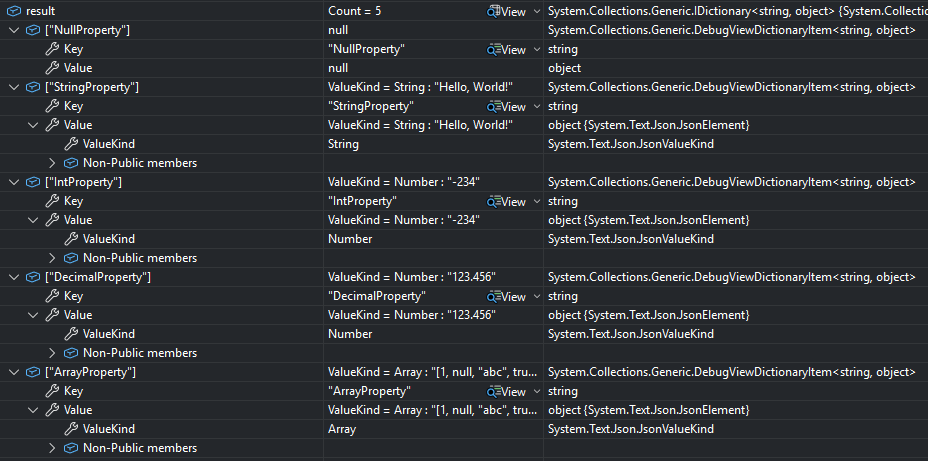
When using System.Text.Json to deserialize this JSON to an object, the result value will look like this:

When using System.Text.Json to deserialize this JSON to an IDictionary<string, object>, the result value will look like this:
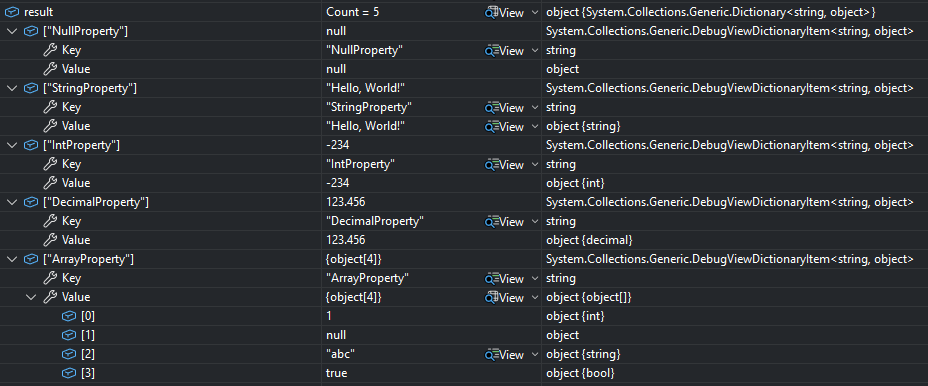
When using System.Text.Json to deserialize this JSON to an object with the ObjectAsPrimitiveConverter, the result value will look like this:
Quick Start
Adding the NuGet package
Add the Maple.Json.ObjectAsPrimitiveConverter package to your project using the NuGet Package Manager in your IDE or the dotnet tool in the console:
dotnet add package Maple.Json.ObjectAsPrimitiveConverter
Using the ObjectAsPrimitiveConverter
In a method to deserialize JSON to an object:
var result = JsonSerializer.Deserialize<object>(json, new JsonSerializerOptions
{
    Converters = { new ObjectAsPrimitiveConverter() }
});
Global settings
ASP.NET Core controller-based application
builder.Services.AddControllers()
    .AddJsonOptions(options =>
    {
        options.JsonSerializerOptions.Converters.Add(new ObjectAsPrimitiveConverter());
    });
ASP.NET Core minimal API application
builder.Services.ConfigureHttpJsonOptions(options =>
{
    options.SerializerOptions.Converters.Add(new ObjectAsPrimitiveConverter());
});
Azure Functions (isolated worker model) application
builder.Services.Configure<WorkerOptions>(options =>
{
    options.SerializerOptions.Converters.Add(new ObjectAsPrimitiveConverter());
});
Azure Functions (isolated worker model) application with ASP.NET Core integration
builder.Services.Configure<Microsoft.AspNetCore.Http.Json.JsonOptions>(options =>
{
    options.SerializerOptions.Converters.Add(new ObjectAsPrimitiveConverter());
});
Configuration
new ObjectAsPrimitiveConverter(floatFormat, unknownNumberFormat, detectDateTime, objectFormat);
Detect date-time
| Name | Value | Description |
|---|---|---|
| None | 0 | Do not detect date-time values. |
| DateTimeOffset | 1 | Detect date-time values with timezone and deserialize them as System.DateTimeOffset (DateTimeOffset) values. |
| DateTime | 2 | Detect date-time values without timezone and deserialize them as System.DateTime (DateTime) values. |
| DateOnly | 4 | Detect date values without time and deserialize them as System.DateOnly (DateOnly) values. |
| TimeOnly | 8 | Detect time values without date and deserialize them as System.TimeOnly (TimeOnly) values. |
Float format
| Name | Value | Description |
|---|---|---|
| Decimal | 0 | Serialize a floating-point number as a System.Decimal (decimal) value. |
| Double | 1 | Serialize a floating-point number as a System.Double (double) value. |
| Single | 2 | Serialize a floating-point number as a System.Single (float) value. |
Object format
| Name | Value | Description |
|---|---|---|
| Dictionary | 0 | Serialize an object as a System.Collections.Generic.IDictionary<string, object> value. |
| Expando | 1 | Serialize an object as a System.Dynamic.ExpandoObject value. |
Unknown number format
| Name | Value | Description |
|---|---|---|
| Error | 0 | Throw an exception when an unknown number format is detected. |
| JsonElement | 1 | Serialize an unknown number format as a System.Text.Json.JsonElement (JsonElement) value. |
Type mapping
When deserializing with the ObjectAsPrimitiveConverter, each JSON value is converted to a CLR type as follows:
| JSON value | CLR type |
|---|---|
null |
null |
true / false |
System.Boolean (bool) |
| String | System.String (string), or a date/time type when detection is enabled and the value matches |
| Integer number | The smallest of System.Int32 (int), System.Int64 (long), or System.Numerics.BigInteger (BigInteger) that can represent the value |
| Floating-point number | decimal, double, or float, depending on the Float format |
| Number that cannot be represented | Throws, or produces a JsonElement, depending on the Unknown number format |
| Array | System.Object[] (object[]) whose elements are converted using these same rules |
| Object | An IDictionary<string, object> or an ExpandoObject, depending on the Object format, whose values are converted using the same rules |
Integer numbers are widened only as needed: values that fit in int become int, larger values that fit in long become long, and values beyond long become BigInteger.
A number is treated as floating-point when it contains a decimal point or an exponent, so values written in exponent notation without a decimal point (for example 1e5 or 5e-1) are converted using the Float format.
Comments
The converter honours the ReadCommentHandling setting of the JsonSerializerOptions:
JsonCommentHandling.Disallow(the default) — a comment causes aJsonException.JsonCommentHandling.Skip— comments are ignored, including comments between array elements, between object members, and immediately before a closing]or}.
Comments never appear in the deserialized result.
var result = JsonSerializer.Deserialize<object>(json, new JsonSerializerOptions
{
    ReadCommentHandling = JsonCommentHandling.Skip,
    Converters = { new ObjectAsPrimitiveConverter() }
});
Learn More
Documentation
See also
| Product | Versions Compatible and additional computed target framework versions. |
|---|---|
| .NET | net10.0 is compatible. net10.0-android was computed. net10.0-browser was computed. net10.0-ios was computed. net10.0-maccatalyst was computed. net10.0-macos was computed. net10.0-tvos was computed. net10.0-windows was computed. |
-
net10.0
- No dependencies.
NuGet packages
This package is not used by any NuGet packages.
GitHub repositories
This package is not used by any popular GitHub repositories.