MiniPty 1.3.0
dotnet add package MiniPty --version 1.3.0
NuGet\Install-Package MiniPty -Version 1.3.0
<PackageReference Include="MiniPty" Version="1.3.0" />
<PackageVersion Include="MiniPty" Version="1.3.0" />
<PackageReference Include="MiniPty" />
paket add MiniPty --version 1.3.0
#r "nuget: MiniPty, 1.3.0"
#:package MiniPty@1.3.0
#addin nuget:?package=MiniPty&version=1.3.0
#tool nuget:?package=MiniPty&version=1.3.0



MiniPty
NativeAOT-friendly minimal cross-platform pseudo-terminal library for .NET.
Motivation
I needed a PTY library for NativeAOT projects, but existing .NET PTY libraries don't reliably work with NativeAOT. MiniPty is a minimal PTY library with a simple API, no third-party dependencies, and in-process backends built for AOT publish.
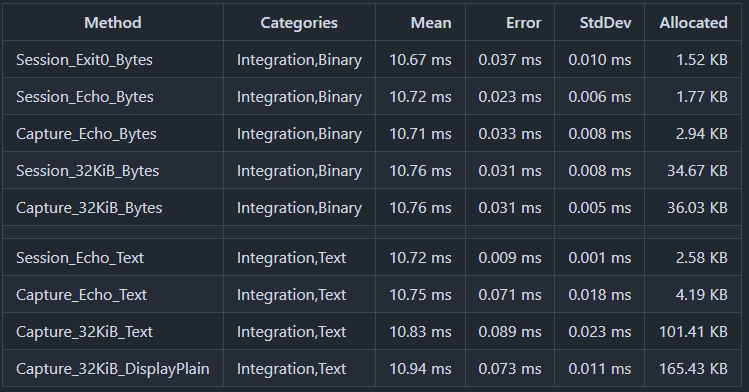
Benchmarks
You can check various benchmark patterns at GitHub Actions/Benchmark.
Ubuntu 24.04, .NET 10
Features
- NativeAOT ready, in-process backends only, no winpty or bundled helpers
- Multi-platform ready, Windows, Linux, macOS, and FreeBSD
- Spawn a child in a pseudo-terminal (
Pty.Start) - Overlay child environment variables and set Unix
TERM Input/Outputbyte streams; stdout and stderr merged onOutput- Persistent bytes-only output streaming (
ReadOutputAsync) - One-shot run with optional stdin and drained output (
CompleteAsync) - Resize the terminal after spawn (
PtySession.Resize) - Exit status with Unix termination signal (
WaitForExitStatusAsync,ExitStatus) and signal kill (Kill(PtySignal)) - Per-read timestamps for observation or recording (MiniPty.Capture,
PtyCapture.RunAsync) - Host terminal input attach for interactive programs (MiniPty.Console,
PtyConsoleInput.Attach) - Backend PTY for xterm.js / editor terminals: push facade, pause/resume flow control, WebSocket bridge (MiniPty.Terminal,
PtyTerminal,PtyWebSocketBridge) - Plain or colored host output from PTY bytes (
PtyOutput.ToDisplayText)
Not supported
- Remote shells (
ssh) or tunneling a PTY over the network - Full terminal emulation, TUI replay, or faithfully preserving
\roverwrite lines - Falling back to pipe redirect when PTY creation fails—if you need a PTY, MiniPty either gives you one or throws
Platform backends
MiniPty creates a real PTY on each supported OS; it does not fall back to redirected pipes when PTY creation fails.
| OS | Backend | Notes |
|---|---|---|
| Windows | ConPTY (CreatePseudoConsole) |
Uses Win32 ConPTY directly through P/Invoke, attaches the child with PROC_THREAD_ATTRIBUTE_PSEUDOCONSOLE, and resizes with ResizePseudoConsole. Requires Windows 10 1809+ / Windows 11. No winpty or helper process is used. |
| Ubuntu / Linux | forkpty |
Uses the small libminipty_unix native shim to call the platform PTY API, then execve the child inside the PTY. Resize uses TIOCSWINSZ. |
| macOS | posix_spawn + helper |
Uses the Unix backend through libminipty_unix.dylib with a posix_spawn helper process (not forkpty). Resize uses TIOCSWINSZ. |
| FreeBSD | forkpty |
Uses the Unix backend through libutil, matching the Linux/macOS PTY lifecycle. |
Quick start
Install NuGet packages by running the following commands.
# PTY session management and lifecycle
dotnet add package MiniPty

# Timestamped PTY output observation (per-read chunks)
dotnet add package MiniPty.Capture

# Host terminal input attach for interactive sessions (vim, etc.)
dotnet add package MiniPty.Console

# Backend PTY for xterm.js / editor terminals (push events, flow control, WebSocket bridge)
dotnet add package MiniPty.Terminal
MiniPty start a session with Pty.Start, then choose one pattern:
- Persistent stream:
ReadOutputAsync+WriteInputAsync+WaitForExitAsync - One-shot run:
CompleteAsync
Disposing a session kills the child if it is still running. If nobody reads output while the child writes, the PTY buffer can fill and the child will block; ReadOutputAsync, CompleteAsync, and continuous Output stream reads avoid that. Try dotnet samples/README_MiniPty.cs to run this sample.
using System.Diagnostics;
using System.Runtime.InteropServices;
using MiniPty;

Console.Error.WriteLine("=== 1) Stream mode: chunks arrive over time ===");
await RunStreamModeAsync();

Console.Error.WriteLine();
Console.Error.WriteLine("=== 2) One-shot mode: one completion result ===");
await RunCompleteModeAsync();

static async Task RunStreamModeAsync()
{
    await using var session = Pty.Start(CreateTimedOutputStartInfo());
    var sw = Stopwatch.StartNew();
    var chunks = 0;
    await foreach (var chunk in session.ReadOutputAsync())
        Console.WriteLine($"+{sw.Elapsed.TotalSeconds,4:F1}s chunk#{++chunks} ({chunk.Data.Length} bytes)");

    Console.WriteLine($"stream exit={await session.WaitForExitAsync()}, chunks={chunks}");
}

static async Task RunCompleteModeAsync()
{
    await using var session = Pty.Start(CreateTimedOutputStartInfo());
    var result = await session.CompleteAsync();
    Console.WriteLine($"complete exit={result.ExitCode}, bytes={result.Output.Length}");
    Console.WriteLine(PtyOutput.ToDisplayText(result.GetText(), PtyOutputDisplayMode.PlainText).TrimEnd());
}

static PtyStartInfo CreateTimedOutputStartInfo()
{
    if (RuntimeInformation.IsOSPlatform(OSPlatform.Windows))
    {
        return new PtyStartInfo
        {
            FileName = Environment.GetEnvironmentVariable("ComSpec") ?? @"C:\Windows\System32\cmd.exe",
            Arguments = ["/c", "echo alpha & timeout /t 1 /nobreak >nul & echo beta & timeout /t 1 /nobreak >nul & echo gamma"],
            Size = new PtySize(120, 30),
        };
    }

    return new PtyStartInfo
    {
        FileName = "/bin/sh",
        Arguments = ["-c", "printf 'alpha\\n'; sleep 1; printf 'beta\\n'; sleep 1; printf 'gamma\\n'"],
        Size = new PtySize(120, 30),
        TerminalName = "xterm-256color",
        Environment = new Dictionary<string, string?>
        {
            ["NO_COLOR"] = null,
            ["MINIPTY_SAMPLE"] = "true",
        },
    };
}
PtyStartInfo.Environment overlays the parent environment. A null value removes a variable; an empty string sets an empty variable on platforms that preserve empty environment values. On Unix, TerminalName sets TERM; if no TERM remains, MiniPty defaults it to xterm-256color. On Windows, TerminalName is currently ignored and TERM is only passed when explicitly set in Environment.
MiniPty is not a sandbox. Processes run with the parent process permissions unless the host application isolates them with OS users, containers, or another security boundary.
MiniPty.Capture one call that runs the child, pumps output, and returns merged text, exit code, and per-read chunks. Each chunk's timestamp is elapsed time since Pty.Start. Try dotnet samples/README_MiniPty.Capture.cs to run this sample.
using System.Runtime.InteropServices;
using MiniPty;
using MiniPty.Capture;

var result = await PtyCapture.RunAsync(CreateCaptureStartInfo());

// Chunk timestamps are measured from session start (immediately after `Pty.Start`).
foreach (var chunk in result.Chunks)
    Console.WriteLine($"{chunk.Time.TotalSeconds:F3}: {chunk.Data.Length} bytes");

foreach (var textChunk in result.GetTextChunks())
    Console.WriteLine($"{textChunk.Time.TotalSeconds:F3}: {textChunk.Text.Span}");

// Or plain text for logging:
Console.WriteLine(result.ToDisplayText(PtyOutputDisplayMode.PlainText));

static PtyStartInfo CreateCaptureStartInfo()
{
    if (RuntimeInformation.IsOSPlatform(OSPlatform.Windows))
    {
        return new PtyStartInfo
        {
            FileName = Environment.GetEnvironmentVariable("ComSpec") ?? @"C:\Windows\System32\cmd.exe",
            Arguments = ["/c", "echo capture-sample"],
            Size = new PtySize(120, 30),
        };
    }

    return new PtyStartInfo
    {
        FileName = "/bin/sh",
        Arguments = ["-c", "printf '\\e[31mcapture-sample\\e[0m\\n'"],
        Size = new PtySize(120, 30),
    };
}
MiniPty.Console attaches the host terminal to a running session for interactive programs (vim, etc.). It forwards raw keyboard bytes to the PTY and syncs host resize events. It does not read PTY output — the embedder remains the sole output consumer via ReadOutputAsync and writes bytes to host stdout. Try dotnet samples/README_MiniPty.Console.cs to run this sample.
using System.Runtime.InteropServices;
using MiniPty;
using MiniPty.Console;

if (Console.IsInputRedirected || Console.IsOutputRedirected)
{
    Console.Error.WriteLine("Run this sample from an interactive terminal (TTY).");
    return;
}

await using var session = Pty.Start(CreateShellStartInfo());
Console.Error.WriteLine($"[MiniPty] child pid={session.ProcessId}, size={session.Size.Columns}x{session.Size.Rows}");
Console.Error.WriteLine("[MiniPty] Try: type `echo hello`, resize the window, then `exit`.");

using var attachCts = new CancellationTokenSource();
var outputStats = new OutputStats();
var pumpTask = PumpOutputAsync(session, outputStats);
using var consoleInput = PtyConsoleInput.Attach(session);

var exitTask = session.WaitForExitAsync(attachCts.Token);
_ = exitTask.ContinueWith(
    static (_, state) => ((CancellationTokenSource)state!).Cancel(),
    attachCts,
    CancellationToken.None,
    TaskContinuationOptions.ExecuteSynchronously,
    TaskScheduler.Default);

consoleInput.PumpInputUntil(attachCts.Token);
var exitCode = await exitTask;
await pumpTask;
ResetHostCursorColumnIfNeeded();
Console.Error.WriteLine($"[MiniPty] shell exit={exitCode}, chunks={outputStats.Chunks}, bytes={outputStats.Bytes}");

static async Task PumpOutputAsync(PtySession session, OutputStats stats)
{
    var stdout = Console.OpenStandardOutput();
    await foreach (var chunk in session.ReadOutputAsync())
    {
        stats.Chunks++;
        stats.Bytes += chunk.Data.Length;
        await stdout.WriteAsync(chunk.Data);
        await stdout.FlushAsync(CancellationToken.None);
    }
}

static void ResetHostCursorColumnIfNeeded()
{
    if (OperatingSystem.IsWindows())
        return;

    var stdout = Console.OpenStandardOutput();
    stdout.Write("\r\n"u8);
    stdout.Flush();
}

static PtyStartInfo CreateShellStartInfo()
{
    if (RuntimeInformation.IsOSPlatform(OSPlatform.Windows))
    {
        var cmd = Environment.GetEnvironmentVariable("ComSpec") ?? @"C:\Windows\System32\cmd.exe";
        if (!File.Exists(cmd))
            throw new InvalidOperationException("cmd.exe is required.");

        return new PtyStartInfo
        {
            FileName = cmd,
            Size = new PtySize(80, 24),
        };
    }

    return new PtyStartInfo
    {
        FileName = File.Exists("/bin/bash") ? "/bin/bash" : "/bin/sh",
        Arguments = ["-i"],
        Size = new PtySize(80, 24),
    };
}

sealed class OutputStats
{
    public int Chunks;
    public int Bytes;
}
On Unix, write status messages to stderr before Attach and emit \r\n on stdout after dispose if the parent shell prompt drifts (see ConsoleAttach.cs).
MiniPty.Terminal turns MiniPty into a backend PTY for frontend terminals (xterm.js, editor integrations) — the role node-pty plays behind VS Code. PtyWebSocketBridge serves one-shot browser sessions, while PtyWebSocketSessionManager adds authenticated reconnect, bounded replay, one-active-client enforcement, explicit termination, and detached-session expiry. PtyStdioBridge uses length-prefixed raw frames for helper processes. PtyTerminal also exposes node-pty-style graceful kill, foreground process names, attach, pixel resize, and a safe Clear compatibility no-op. Try dotnet samples/WebTerminal.cs for a browser shell; VsCodeTerminalHelper.cs is the stdio helper entry point, and VsCodeExtension runs it in a real VS Code integrated terminal.
using MiniPty;
using MiniPty.Terminal;

// webSocket: any System.Net.WebSockets.WebSocket (Kestrel accept, HttpListener, ...)
var status = await PtyWebSocketBridge.RunAsync(
    new PtyStartInfo { FileName = "/bin/bash", Arguments = ["-i"], Size = new PtySize(120, 30) },
    webSocket,
    cancellationToken: ct);
Console.WriteLine($"shell exited: {status.ExitCode} (signal {status.Signal?.ToString() ?? "none"})");
For custom transports (stdio framing to a VS Code extension, SignalR, …), use the PtyTerminal facade directly: a node-pty-shaped push model with an output handler, awaitable Completion (exit after all output), and Pause() / Resume() flow control. See terminal.md for the protocol and the VS Code Pseudoterminal bridging pattern.
Samples
| Sample | Shows |
|---|---|
| Capture.cs | Minimal MiniPty.Capture smoke |
| Session.cs | Pty.Start, background Output reads, WriteInputAsync / SendEof, CompleteAsync, Resize |
| Interactive.cs | ReadOutputAsync persistent loop, marker-driven writes, mid-session Resize, natural child exit |
| ConsoleAttach.cs | MiniPty.Console host attach: keyboard → PTY, ReadOutputAsync → host display (requires interactive TTY) |
| Observe.cs | PtyCapture.RunAsync, per-read chunk timelines, stdin via PtyCaptureOptions.Completion |
| WebTerminal.cs | MiniPty.Terminal xterm.js in the browser: WebSocket bridge, ACK flow control, resize, exit banner |
| VsCodeTerminalHelper.cs | MiniPty.Terminal stdio-framed helper for a VS Code Pseudoterminal |
| VsCodeExtension | Dependency-free VS Code extension sample connecting Pseudoterminal to the NativeAOT helper |
| VsCodePersistentBridge.cs | Authenticated loopback service for real VS Code detach/reconnect testing |
See the VS Code extension sample instructions for complete Windows and macOS reproduction steps, including NativeAOT helper publishing and authenticated reconnect.
Run a sample locally (JIT):
dotnet samples/Session.cs
dotnet samples/Interactive.cs
dotnet samples/ConsoleAttach.cs
dotnet samples/Observe.cs
dotnet samples/Capture.cs
dotnet samples/WebTerminal.cs   # then open http://localhost:5170/
NativeAOT publish (same flags as CI):
dotnet samples/Session.cs -c Release --self-contained true -p:PublishAot=true -p:StripSymbols=true -p:DebugType=None
Development
Use dotnet for local development, debugging, or publishing.
Documentation
- Specification — API contracts, scope, document map, lessons learned
- Lifecycle — responsibility split, session flow diagram, cancellation, EOF, drain, disposal
- Implementation reference — ConPTY,
forkpty, EOF staging
Build
dotnet build
dotnet test
dotnet pack
| Product | Versions Compatible and additional computed target framework versions. |
|---|---|
| .NET | net10.0 is compatible. net10.0-android was computed. net10.0-browser was computed. net10.0-ios was computed. net10.0-maccatalyst was computed. net10.0-macos was computed. net10.0-tvos was computed. net10.0-windows was computed. |
-
net10.0
- No dependencies.
NuGet packages (3)
Showing the top 3 NuGet packages that depend on MiniPty:
| Package | Downloads |
|---|---|
|
MiniPty.Capture
Timestamped PTY output observation for MiniPty. |
|
|
MiniPty.Console
Host terminal input attach for interactive MiniPty sessions. |
|
|
MiniPty.Terminal
Frontend terminal backend (xterm.js and editor integrations) for MiniPty. |
GitHub repositories
This package is not used by any popular GitHub repositories.