MiracleGames.Sdk.Uwp
2.8.2
dotnet add package MiracleGames.Sdk.Uwp --version 2.8.2
NuGet\Install-Package MiracleGames.Sdk.Uwp -Version 2.8.2
<PackageReference Include="MiracleGames.Sdk.Uwp" Version="2.8.2" />
<PackageVersion Include="MiracleGames.Sdk.Uwp" Version="2.8.2" />
<PackageReference Include="MiracleGames.Sdk.Uwp" />
paket add MiracleGames.Sdk.Uwp --version 2.8.2
#r "nuget: MiracleGames.Sdk.Uwp, 2.8.2"
#:package MiracleGames.Sdk.Uwp@2.8.2
#addin nuget:?package=MiracleGames.Sdk.Uwp&version=2.8.2
#tool nuget:?package=MiracleGames.Sdk.Uwp&version=2.8.2
MiracleGamesUWPSDK
Provide one stop solution for UWP developers!
Overview
- Miracle Games SDK (abbreviation: MG SDK) starts its lifespan after the release of Microsoft 10 system. With the mission of serving developers, the SDK fully uses various types of supports and services provided by Microsoft, and combines the self-developed login system, community system, advertising, sharing and other functions to provide a solid foundation for developers to log in to the Microsoft ecosystem.
- MG SDK is developed based on UWP, reserved C++, C#, JS and other languages of the functional interface, so that developers can use the MG SDK in a variety of development environments. For applications developed on different engines and different terminals, we provide developers with corresponding solution to have Android, iOS, H5, Web, Win 32 and other applications quickly ported Win 10 UWP version, and provide them with free technical support services.
- With years of Windows 10 UWP application development technology precipitation and experience accumulation, various functions in MG SDK have become efficient and stable. In the docking process, the whole process of exclusively docking MG SDK has been summarized, which makes it more convenient for cooperative developers to use the MG SDK in applications or games, and easily publish it to the Microsoft Store.
- MG has brought together a large number of technical experts to create a UWP developer community, providing free technical support services and technical training for UWP developers, so that more developers can join the Microsoft ecosystem and contribute to the construction of the Microsoft ecosystem.
- Visit Miracle Games developer Platform for more content.
Announcement
This program is an MG SDK functional demonstration which is only used for learning exchanges and is prohibited for commercial use.
MG SDK existing features:
- MG account login function
- Open-screen ads, banner ads, interstitial ads, full-screen interstitial ads, and back-screen ads
- Microsoft Payment function
- Sharing function
- Community feature
- Microsoft comment function<br>
How to run the program?
Environmental Requirements:
- Win10 development system is required
- Win10 SDK 14393 and later version
- Visual Studio 2015 and later version
Docking with MG SDK:
The SDK file in the MGSDKFile folder is introduced into the sample project by docking with Nuget package. After the SDK docking process is complete, the sample project can be operated, which demonstrates how to integrate different functions of the MG SDK in UWP project. https://doc.mguwp.net/en/images/uwpvs2.png
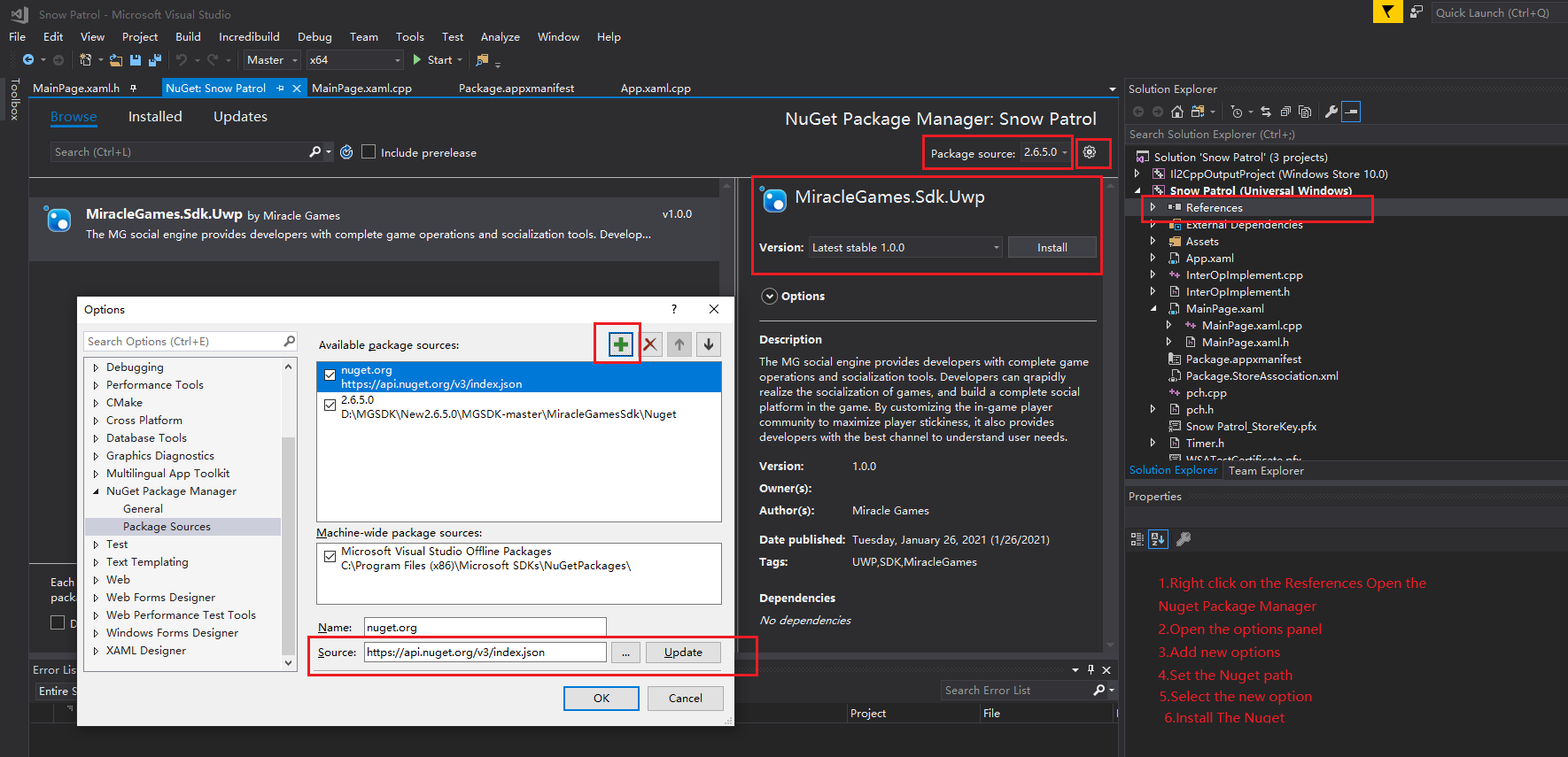
MGSDK Function Call Code Example(C#)
Initialization
Before accessing other functions of MG SDK, initialize the SDK is needed at first. After the initialization is completed, all functions in the SDK can be accessed in the background system. In general, the SDK initialization interface is called after entering the program. The parameter used in the initialization interface is “APPKEY”, which needs to be created in the MG Developer Management Center system and is only associated identity of the application in MG.
Public Mainpage()
{
    This.InitializeComponent();
    Load + =(sender,args)=>
    {
          var result = await MiracleGames.ApplicationManager.SetupAsync("YOUR_APP_KEY");
          if (!result.ReturnValue)
             return;
   };
}
Login
When calling the login function, make sure that the SDK initialization has been successful. The login panel will automatically adapt the language according to the user’s current regional location. The user can log in and register with MG account, or use Microsoft accounts, Google accounts and other third-party accounts to log in. After the account is successfully logged in, information such as Token value and user ID is returned, which developers can use to verify the online status of the account on MG server.
public MainPage()
{
    this.InitializeComponent();
    Loaded += (sender, args) =>
    {
         var auth = await MiracleGames.AuthenticationManager.AuthenticateAsync();
         if (auth.ReturnValue)
         {
             //Log in success.
             var uid =  MiracleGames.AuthenticationManager.UserInfo.Id;
             var token =  MiracleGames.AuthenticationManager.UserInfo.Token;
          }
    };
}
Community
After logging into your account, you can invoke the community code to activate the service and generate a left-side entry icon. Clicking this icon unfolds an integrated community interface that consolidates real-time support, reward pack redemption, official forum access, achievement showcase, customer support contact, and other functional modules into a unified community experience.
public MainPage()
{
    this.InitializeComponent();
    Loaded += (sender, args) =>
    {
         var auth = await MiracleGames.AuthenticationManager.AuthenticateAsync();
         if (auth.ReturnValue)//Log in success.
         {
             MiracleGames.BubbleManager.ShowBubble();//Enable the community function
         }
    };
}
Microsoft Payment
When initiating payment function, an order number is formed in developer’s system. The order number is passed to the payment interface though comment parameter. After the payment process is completed, MG’s server will initiate a callback to the developer, which contains this comment information. The developer can mark the order number as successfully paid through this information. All order status can be checked in the MG Developer Management Center. When the payment window is closed, the order number is used to check whether the payment is successful in the developer’s system. If so, the prop can be sent to the user.
public async void ShowPayChannel()
{
    if (!MiracleGames.ApplicationManager.SetupCompletedSuccessfully)
        return;
    var result = await MiracleGames.PaymentManager.OpenPayChannelAsync(goodsKey,comment, callbackId, true);
    if (result.ReturnValue)
    {

    }
    else
    {
        var msg = new MessageDialog("Cancel payment.");
        await msg.ShowAsync();
    }
}
Advertisement
Advertising forms: full-screen ads, banner ads, interstitial ads, couplet ads, full-screen interstitial ads<br> Creatives: images, videos, web pages<br> Among them, banner ads, interstitial ads, couplet ads, and full-screen interstitial ads have special settings, and the corresponding parameters are set to meet different presentation needs.<br>
//1.ShowFullScreenAd
public async void ShowFullScreen()
{
       AdvertisingManager.ShowAd(FullScreenAdID, AdType.FullScreen);
}

//2.ShowInterstitialAd
public async void ShowInterstitialAdWithClose()
{
      await AdvertisingManager.ShowAd(InterstitialAdUnitId,AdType.Interstitial, new InterstitialAdSettingOptions {DisplayCloseButton = true});
}
//3.ShowFullScreenInterstitialAd
public async void ShowFullScreenInterstitial()
{
      await AdvertisingManager.ShowAd(FullScreenInterstitialAdUnitId,AdType.FullScreenInterstitial);
}
//4.ShowBannerAd
public async void ShowBannerAdWithClose()
{
      var bannerAd = await AdvertisingManager.ShowAd(BannerAdUnitId, AdType.Banner,
      new BannerAdSettingOptions
      {
                DisplayCloseButton = true,
                HorizontalAlignment = HorizontalAlignment.Center,
                VerticalAlignment = VerticalAlignment.Top
      });
}
//5.ShowCoupletAd
public async void ShowCoupletAdWithClose()
 {
      var coupletAd = await AdvertisingManager.ShowAd(CoupletAdUnitId,AdType.Couplet,
      new CoupletAdSettingOptions
      {
                DisplayCloseButton = true,
                VerticalAlignment = VerticalAlignment.Top,
                CoupletDisplayMode = CoupletDisplayMode.Both
      });
}
Sharing
The sharing interface in MG SDK can be implemented and called directly in the project. In the callback interface of this function, you can get the user’s notification of the sharing result.
public async void ShowShareChannel()
{
	if (!MiracleGames.ApplicationManager.SetupCompletedSuccessfully)
	{
		return;
	}
	var sharingCommand = new MiracleGames.Models.SharingCommand
	{
		Title = "MyTitle",
		Content = "MyContent",
		LinkUrl = "http://www.mguwp.com"
	};
	var result = await    MiracleGames.SharingManager.OpenSharingChannelAsync(sharingCommand);
	if (result.ReturnValue)
	{
	  //Share finished
	}
}
Rating
After accessing MG SDK, you can implement the Microsoft Rating function by calling the interface provided in the MG SDK and obtain the return information of the rating operation in the callback interface of the method.
public async void isRatingReview()
{
	if (!MiracleGames.ApplicationManager.SetupCompletedSuccessfully)
	{
		return;
	}
	var result = await MiracleGames.ApplicationManager.IsRatingReviewedAsync();
	if (result.ReturnValue)
	{
		result.ReturnValue==true: //got favourable comment from the user
		result.ReturnValue==false:
	}
}
| Product | Versions Compatible and additional computed target framework versions. |
|---|---|
| native | native is compatible. |
| Universal Windows Platform | uap was computed. uap10.0 is compatible. |
-
UAP 10.0
- No dependencies.
NuGet packages
This package is not used by any NuGet packages.
GitHub repositories
This package is not used by any popular GitHub repositories.