ModernDialogs.WinForms
2.0.0
dotnet add package ModernDialogs.WinForms --version 2.0.0
NuGet\Install-Package ModernDialogs.WinForms -Version 2.0.0
<PackageReference Include="ModernDialogs.WinForms" Version="2.0.0" />
<PackageVersion Include="ModernDialogs.WinForms" Version="2.0.0" />
<PackageReference Include="ModernDialogs.WinForms" />
paket add ModernDialogs.WinForms --version 2.0.0
#r "nuget: ModernDialogs.WinForms, 2.0.0"
#:package ModernDialogs.WinForms@2.0.0
#addin nuget:?package=ModernDialogs.WinForms&version=2.0.0
#tool nuget:?package=ModernDialogs.WinForms&version=2.0.0
ModernDialogs.WinForms





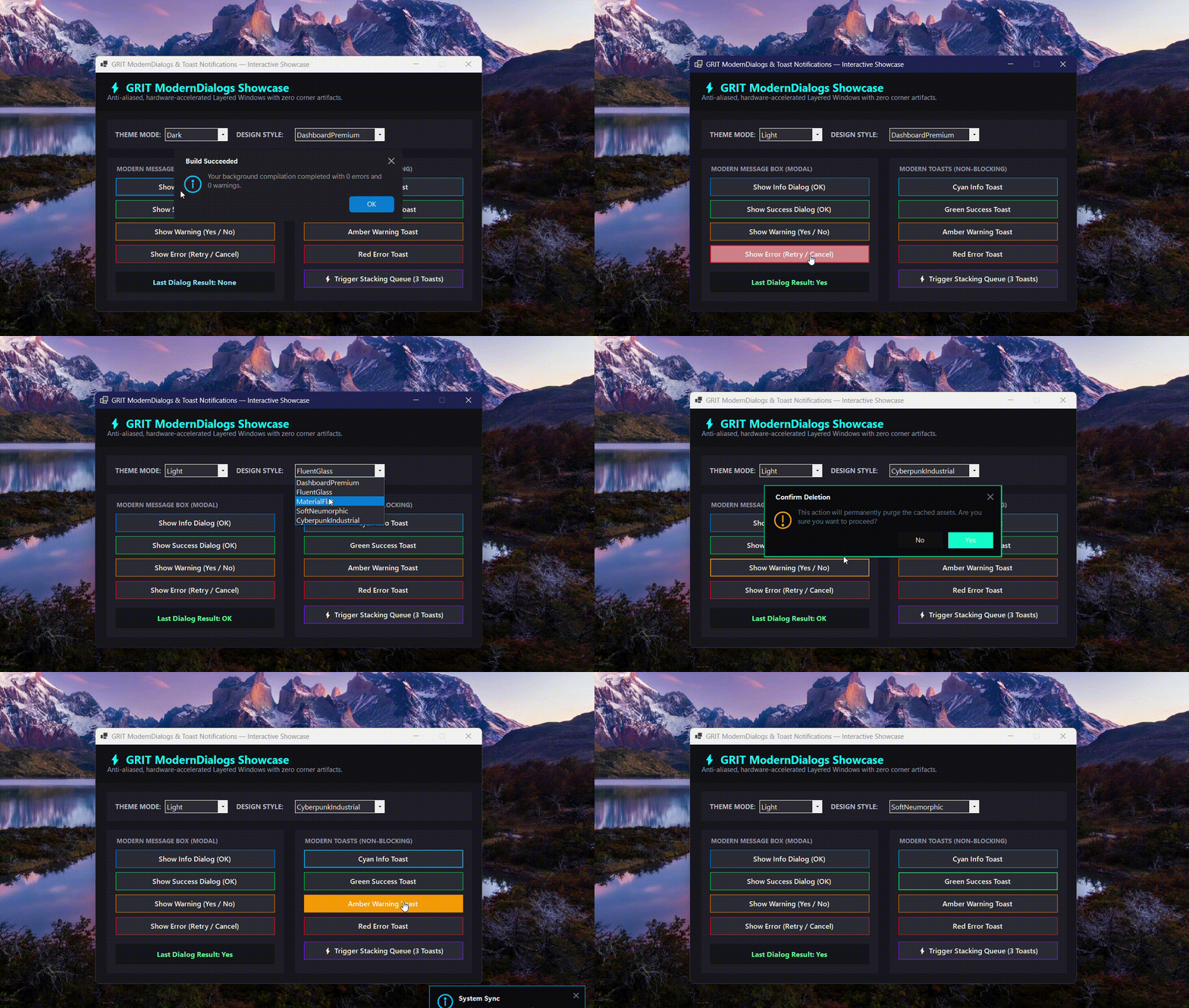
A highly polished, hardware-accelerated MessageBox and Toast Notification library for Windows Forms applications.
ModernDialogs.WinForms completely replaces legacy, rigid system dialogs with ultra-smooth 32-bit alpha-blended layered forms, dynamic dark/light theme switching, 5 built-in design aesthetics, countdown progress timers, and automatic vertical stacking queues.
Design Styles • Installation • Quick Start • API Reference
🚀 Key Features
- ✨ True 32-Bit Premultiplied Alpha: Pixel-perfect rounded corners and smooth anti-aliased drop shadows using native Windows DWM layered compositing.
- 🍞 Non-Blocking Toast Notifications: Smooth slide/fade entrance, interactive close button, and real-time visual progress countdown timers.
- 📚 Smart Stacking Queue: Multiple toasts automatically stack vertically without overlapping or stealing keyboard/mouse focus from parent forms.
- 🎨 5 Designer Styles: Switch seamlessly between DashboardPremium, FluentGlass, MaterialFlat, SoftNeumorphic, and CyberpunkIndustrial presets.
- 🌓 Global Dark / Light Modes: Instant theme-mode switching across all active and future dialogs with a single configuration flag.
- 📦 Zero External Dependencies: 100% native C# and standard Windows Forms APIs without heavy 3rd-party UI frameworks.
- 🔄 Broad Target Compatibility: Native multi-targeting for classic
.NET Framework 4.7.2 / 4.8up through modern.NET 6.0 / 8.0 Windows.
🎨 Design Styles
| Design Style | Aesthetic Concept | Key Visual Profile |
|---|---|---|
DashboardPremium |
Executive Dark Suite | Sleek rounded slate surfaces with subtle blue/gray accents (Default). |
FluentGlass |
Modern Windows 11 Fluent | High-radius frosted glass container with electric cyan highlights. |
MaterialFlat |
Flat Material Elevation | Sharp, minimalist surfaces with deep purple primary action tokens. |
SoftNeumorphic |
Soft Extruded Geometry | Organic embossed boundaries with warm coral/orange accents. |
CyberpunkIndustrial |
High-Tech Cyber Interface | Square-edged stealth obsidian hull with glowing neon emerald and cyan borders. |
📦 Installation
.NET CLI
dotnet add package ModernDialogs.WinForms
Package Manager Console
Install-Package ModernDialogs.WinForms
Visual Studio GUI
- Right-click your project and select Manage NuGet Packages.
- Search for
ModernDialogs.WinFormsunder the Browse tab. - Select the latest stable version and click Install.
⚡ Quick Start
1. Global Theme & Style Configuration
Set your application-wide aesthetic once (e.g., in Program.cs or Form_Load):
using Podargus.UI.Controls.WinForms.ModernDialogs.Enums;
using Podargus.UI.Controls.WinForms.ModernDialogs.Helpers;

// Configure global appearance
ModernNotificationConfig.Theme = NotificationThemeMode.Dark;
ModernNotificationConfig.Style = NotificationDesignStyle.DashboardPremium;
2. Modern Message Box Usage
Display modal message dialogs with custom icons and button configurations:
using Podargus.UI.Controls.WinForms.ModernDialogs;
using Podargus.UI.Controls.WinForms.ModernDialogs.Enums;

// Simple Info Alert
ModernMessageBox.Show(
    "Your background compilation completed with 0 errors.",
    "Build Succeeded",
    MessageBoxButtons.OK,
    ModernMessageIcon.Info);

// Confirmation Dialog with Return Handling
ModernDialogResult result = ModernMessageBox.Show(
    "This action will permanently purge cached assets. Continue?",
    "Confirm Deletion",
    MessageBoxButtons.YesNo,
    ModernMessageIcon.Warning);

if (result == ModernDialogResult.Yes)
{
    // Execute deletion logic
}
3. Floating Toast Notification Usage
Display non-blocking in-app notifications that auto-dismiss and stack cleanly:
using Podargus.UI.Controls.WinForms.ModernDialogs;
using Podargus.UI.Controls.WinForms.ModernDialogs.Enums;

// Success Notification (3 second auto-dismiss)
ModernToast.Show("Database Saved", "Record #41829 committed to SQL cluster.", ToasterType.Success, 3000);

// Error Notification (4 second auto-dismiss)
ModernToast.Show("Socket Exception", "Failed to bind Port 5000.", ToasterType.Error, 4000);

// Multi-Toast Stacking (They automatically stack vertically)
ModernToast.Show("Download 1/2", "Fetching manifest...", ToasterType.Info, 2500);
ModernToast.Show("Download 2/2", "Package extraction completed!", ToasterType.Success, 3500);
⚙️ Specifications
| Technical Metric | Underlying Architecture Profile |
|---|---|
| Package Identity | ModernDialogs.WinForms |
| Component Type | Windows Forms Alert & Notification Framework |
| Language Target | C# (Optimized for .NET Framework 4.7.2+ & .NET 6.0+) |
| Rendering Engine | 32-Bit Premultiplied Alpha Layered Window Compositing (UpdateLayeredWindow) |
| Target Platforms | Microsoft Windows Desktop Environment (WinForms) |
| Dependencies | None (System.Windows.Forms Base Assembly Only) |
📄 License
Distributed under the MIT License. See the repository LICENSE file for details.
📝 Release Notes
v2.0.0
- Rebrand: Transitioned under Podargus (formerly GRIT).
- Namespace: Root namespace updated to
Podargus.UI.WinForms. - Performance: Performance and rendering pipeline stability enhancements.
Developed under the Podargus
Building zero-dependency, ultra-performance developer workflows and premium component layouts.
📢 Brand Notice: This package has officially transitioned from GRIT to Podargus. All future updates, performance enhancements, and developer tooling are maintained under the official Podargus.
| Product | Versions Compatible and additional computed target framework versions. |
|---|---|
| .NET | net6.0-windows7.0 is compatible. net7.0-windows was computed. net8.0-windows was computed. net8.0-windows7.0 is compatible. net9.0-windows was computed. net10.0-windows was computed. |
| .NET Framework | net472 is compatible. net48 is compatible. net481 was computed. |
-
.NETFramework 4.7.2
- No dependencies.
-
.NETFramework 4.8
- No dependencies.
-
net6.0-windows7.0
- No dependencies.
-
net8.0-windows7.0
- No dependencies.
NuGet packages
This package is not used by any NuGet packages.
GitHub repositories
This package is not used by any popular GitHub repositories.
v2.0.0 Release:
- Rebrand:Transitioned under Podargus (formerly GRIT).
- Namespace: Root namespace updated to `Podargus.UI.WinForms`.
- Performance and rendering pipeline stability enhancements.