ModernLibs.FileHelpers
4.9.1
See the version list below for details.
dotnet add package ModernLibs.FileHelpers --version 4.9.1
NuGet\Install-Package ModernLibs.FileHelpers -Version 4.9.1
<PackageReference Include="ModernLibs.FileHelpers" Version="4.9.1" />
<PackageVersion Include="ModernLibs.FileHelpers" Version="4.9.1" />
<PackageReference Include="ModernLibs.FileHelpers" />
paket add ModernLibs.FileHelpers --version 4.9.1
#r "nuget: ModernLibs.FileHelpers, 4.9.1"
#:package ModernLibs.FileHelpers@4.9.1
#addin nuget:?package=ModernLibs.FileHelpers&version=4.9.1
#tool nuget:?package=ModernLibs.FileHelpers&version=4.9.1
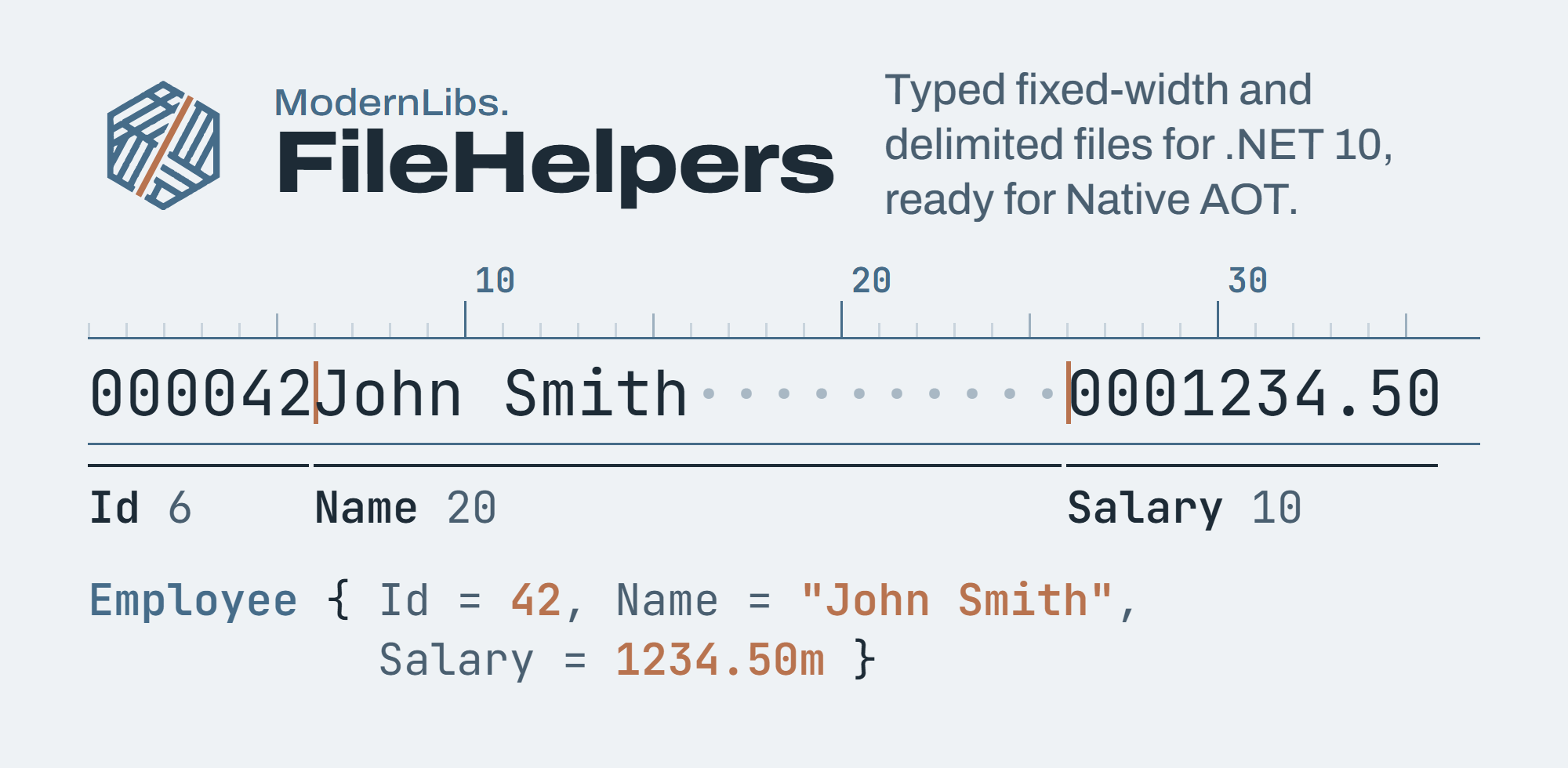


Typed reading and writing of fixed-length and delimited (CSV, TSV, pipe, ...) text files for .NET 10, with the FileHelpers 3.x API. You describe a record layout with attributes; a source generator in the package writes the parsing and formatting code at compile time. No runtime reflection, so it works with Native AOT and trimming.
- The fastest fixed-width reader in our benchmarks: more than twice as fast as FileHelpers 3.5.2 and ahead of CsvHelper 34.
- On par with the best CSV readers: reading a 25-column file, ahead of Sep and CsvHelper 34 at every size we measured, level with Sylvan at 1M rows and behind it at 10K and 100K.
- Drop-in for FileHelpers 3.x code: the same attributes, engines, events and exceptions; most code migrates by changing the namespace.
Benchmarks
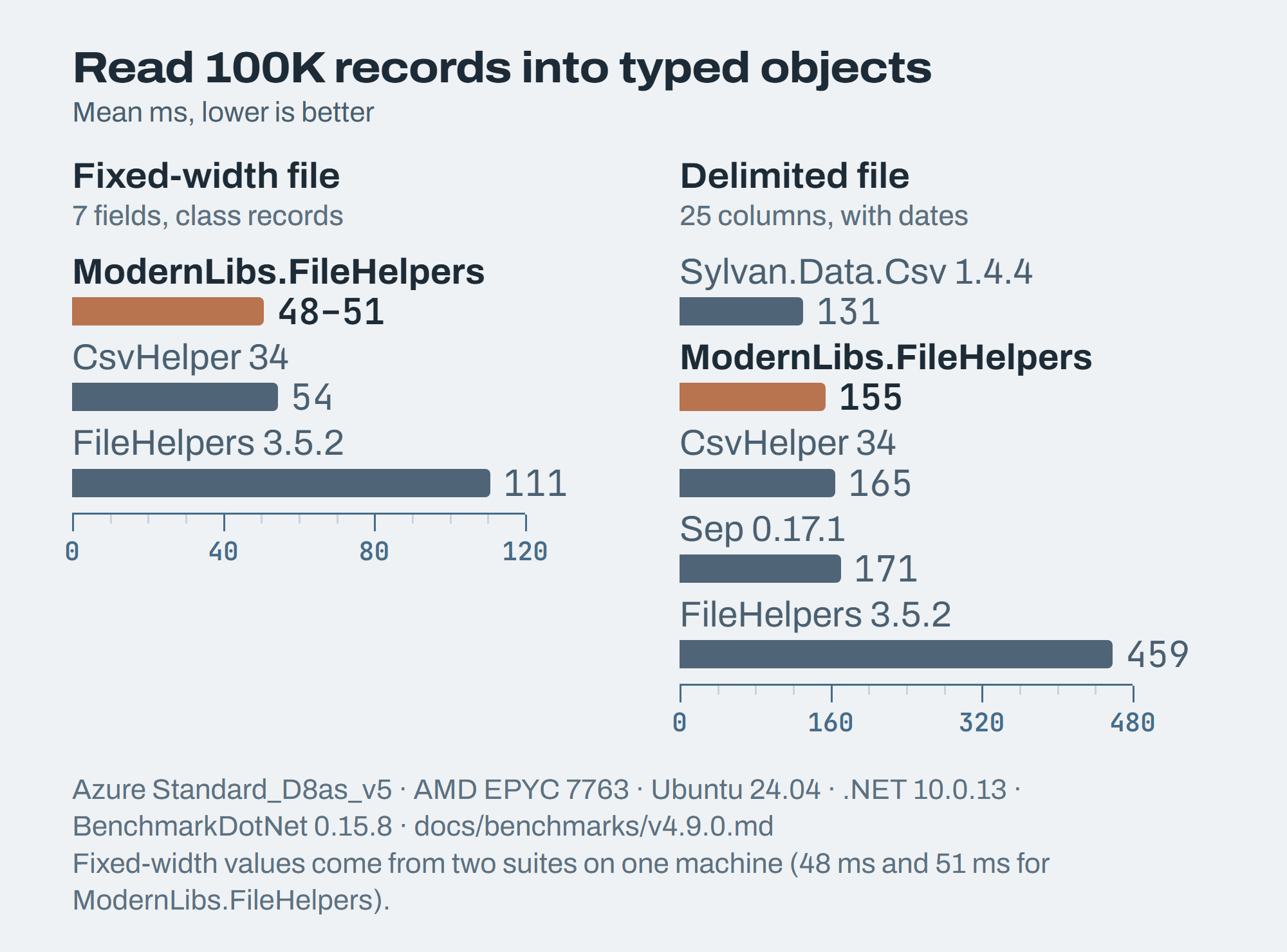
Time and allocation for 100K records (fixed-width: 7 fields, class records; 25-column file with dates), from the 4.9.0 results:
| Scenario | ModernLibs.FileHelpers 4.9.0 | FileHelpers 3.5.2 | Sep 0.17.1 | Sylvan.Data.Csv 1.4.4 | CsvHelper 34.0.0 |
|---|---|---|---|---|---|
| Fixed-width read, 7 fields | 48 to 51 ms, 39.7 MB | 111 ms, 59.5 MB | - | - | 54 ms, 40.9 MB |
| 25-column read | 155 ms, 75.7 MB | 459 ms, 230.7 MB | 171 ms, 75.6 MB | 131 ms, 75.7 MB | 165 ms, 76.9 MB |
| Quoted-field read | 46 ms, 22.8 MB | - | 29 ms, 20.5 MB | 38 ms, 22.8 MB | 28 ms, 21.7 MB |
| 25-column write | 69 to 70 ms, 55.4 MB | - | 102 ms, 110.6 MB | - | 58 ms, 110.8 MB |
Measured on an Azure Standard_D8as_v5 virtual machine (AMD EPYC 7763, Ubuntu 24.04, .NET 10.0.13)
with BenchmarkDotNet 0.15.8, default job. Where we are behind, the table says so: Sylvan reads the
25-column file faster at 10K and 100K rows (level at 1M), Sep, Sylvan and CsvHelper read quoted
fields faster, and CsvHelper writes faster. Sep and Sylvan do not read fixed-width files; we have not
benchmarked other fixed-width libraries such as RecordParser or FlatFiles.
A dash means the suite does not measure that library. ModernLibs.FileHelpers and FileHelpers 3.5.2 produce typed records through their attributes and converters; the other libraries are measured with the row-to-object code written in each benchmark. Where a cell has a range, two suites measured the same operation. BENCHMARKS.md explains how to run the suite on your own hardware.
ModernLibs.FileHelpers is an independent reimplementation modelled on the API of FileHelpers 3.x by Marcos Meli and contributors. FileHelpers 3.x is the reference for its behaviour. It is not the original project: please report problems with this library here, not upstream.
Install
dotnet add package ModernLibs.FileHelpers
Requirements: .NET 10 (net10.0). Requires C# 11 or later (MLFH026): the .NET 10 SDK defaults to
C# 14, so this only matters if your project pins an older <LangVersion>. The package has no runtime
dependencies. The source generator is included as an analyzer;
there is nothing else to install.
Quick start
Delimited records
using ModernLibs.FileHelpers;

[DelimitedRecord(",")]
[IgnoreFirst(1)]
public sealed class Customer
{
    public int Id;

    [FieldQuoted]
    public string Name = "";

    public decimal Balance;

    [FieldConverter(ConverterKind.Date, "yyyy-MM-dd")]
    public DateTime Joined;
}
var engine = new FileHelperEngine<Customer>();

Customer[] customers = engine.ReadFile("customers.csv");   // the header line is kept in engine.HeaderText
foreach (Customer c in customers)
    Console.WriteLine($"{c.Id}: {c.Name} owes {c.Balance}");

engine.WriteFile("customers-copy.csv", customers);           // HeaderText is written back first
Fields are read in declaration order. Use [FieldOrder(n)] when you want the order to be explicit.
Fixed-length records
[FixedLengthRecord]
public sealed class Employee
{
    [FieldFixedLength(6)]
    [FieldAlign(AlignMode.Right, '0')]
    public int Id;

    [FieldFixedLength(20)]
    [FieldTrim(TrimMode.Right)]
    public string Name = "";

    [FieldFixedLength(10)]
    [FieldAlign(AlignMode.Right, '0')]
    public decimal Salary;
}
var engine = new FileHelperEngine<Employee>();

Employee[] staff = engine.ReadString(
    "000042John Smith          0001234.50\r\n" +
    "000043Mary Jones          0000980.00\r\n");

string text = engine.WriteString(staff);   // writes the same layout back
[FixedLengthRecord(FixedMode.AllowLessChars)] and the other FixedMode values control how lines
that are shorter or longer than the layout are handled.
Record structs without per-record allocations
Records can be struct or record struct types. A struct whose fields are all value types (numbers,
dates, bool, Guid, enums, ...) can be read through a callback or a streaming method without any
heap allocation per record:
[DelimitedRecord(",")]
public record struct Trade
{
    public long Id;
    public decimal Price;
    public int Quantity;
}
var engine = new FileHelperEngine<Trade>();

decimal notional = 0;
int count = engine.ReadFile("trades.csv", trade => notional += trade.Price * trade.Quantity);
The callback overloads of ReadFile, ReadString and ReadSpan, and the streaming ReadSync, do
not allocate a result array or a per-line string. A string field still allocates its string, and
the array-returning overloads still allocate the array. ReadString and ReadSpan also accept a
SpanRecordCallback<T> that receives each record by reference.
Features
- Delimited and fixed-length records described with FileHelpers-style attributes:
[DelimitedRecord],[FixedLengthRecord],[FieldOrder],[FieldFixedLength],[FieldQuoted],[FieldTrim],[FieldAlign],[FieldConverter],[FieldNullValue],[FieldOptional],[FieldInNewLine],[FieldHidden],[FieldNotEmpty],[IgnoreFirst],[IgnoreLast],[IgnoreEmptyLines],[IgnoreCommentedLines],[ConditionalRecord]and more. - Record shapes: classes, structs,
recordandrecord structtypes, including positional records, types without a parameterless constructor (values are bound by constructor parameter name) andrequiredmembers.public,internalandprotected internalfields and properties are mapped; use[FieldHidden]to leave one out.privateandprotectedmembers cannot be mapped, and the ones FileHelpers 3.x would read as columns are reported (MLFH023,MLFH028). - Field types:
string,char,bool, all integer types,decimal,double,float,DateTime,DateOnly,TimeOnly,DateTimeOffset,TimeSpan,Guid, enums and their nullable forms. Other types use a custom converter. - Converters: built-in converters with FileHelpers 3.x parsing rules and culture-independent
defaults, per-field culture (
[FieldConverter(..., CultureName = "de-DE")]), 3.x-styleConverterBasecustom converters, and span-basedISpanConverter<T>converters. - Engines:
FileHelperEngine<T>(read/write string, span, file,TextReader/TextWriter, append),FileHelperAsyncEngine<T>(record-by-recordBeginRead*/ReadNextandBeginWrite*/WriteNext),MultiRecordEngine(several record types in one file) andMasterDetailEngine<TMaster, TDetail>(grouped master/detail lines). - Streaming:
ReadSync(IEnumerable<T>),ReadAsync(IAsyncEnumerable<T>with cancellation), callback reads, and async variants of the multi-record and master/detail engines. - Parallel reads:
ParallelReadFile/ParallelReadStringextension methods split large inputs into chunks and keep sequential semantics (same records, errors and line numbers). - Events:
BeforeReadRecord,AfterReadRecord,BeforeWriteRecord,AfterWriteRecord,Progress, andINotifyRead<T>/INotifyWrite<T>on the record type. - Errors: FileHelpers 3.x exception types and
ErrorModehandling (see below). - Quoting as in FileHelpers 3.x: per-field quote character,
QuoteModeon read and write, and multiline quoted values allowed by default. - Compile-time diagnostics: layout mistakes are reported as build errors and warnings
(
MLFH001-MLFH029), see the diagnostics reference. Diagnostics come from an analyzer shipped in the generator assembly.MLFHwarnings can be suppressed as usual; errors that block the descriptor cannot (#pragma,.editorconfig,NoWarnare ignored). If they are hidden with[SuppressMessage]orRunAnalyzers=false, using the record throws aBadUsageExceptionthat names the errors (see suppressing diagnostics).
Error handling
By default (ErrorMode.ThrowException) the first bad record stops the read with an exception that
carries the line number:
| Exception | Raised when |
|---|---|
ConvertException |
A field value cannot be converted (also [FieldNotEmpty] violations). Has FieldName, FieldType, FieldStringValue, LineNumber, ColumnNumber. |
NullValueNotFoundException |
A non-nullable value-type field is empty and has no [FieldNullValue]. |
BadUsageException |
The line does not match the layout (extra fields, wrong fixed width, unclosed quote, ...). |
FileHelpersException |
Base class of all of the above; also raised for lines with too few fields. |
try
{
    engine.ReadFile("customers.csv");
}
catch (ConvertException ex)
{
    Console.WriteLine($"Line {ex.LineNumber}, field {ex.FieldName}: '{ex.FieldStringValue}' is not a {ex.FieldType.Name}");
}
With ErrorMode.SaveAndContinue bad records are skipped and collected; ErrorMode.IgnoreAndContinue
skips them silently:
var engine = new FileHelperEngine<Customer> { ErrorMode = ErrorMode.SaveAndContinue };
Customer[] good = engine.ReadFile("customers.csv");

foreach (ErrorInfo error in engine.ErrorManager.Errors)
    Console.WriteLine($"Line {error.LineNumber}, field {error.FieldName}: {error.ExceptionInfo?.Message}");
Streaming large files
await foreach (Customer c in engine.ReadAsync("big.csv", cancellationToken))
{
    // one record at a time
}

using var reader = new FileHelperAsyncEngine<Customer>();
reader.BeginReadFile("big.csv");
while (reader.ReadNext() is { } customer)
{
    // FileHelpers 3.x-style pull loop
}
See Opt-in features for callbacks, record recycling and parallel reads.
Native AOT and trimming
All parsing and formatting code is generated at compile time. The library uses no reflection,
Expression compilation or DynamicMethod, and is built with IsAotCompatible and IsTrimmable
enabled, so the trim and AOT analyzers check it on every build. Applications that use it can publish
with PublishAot=true.
Why it is fast
The read path works on ReadOnlySpan<char>: lines and fields are sliced, not copied, and numeric,
date and other value-type fields are parsed straight from the span. ReadFile parses records as it
reads the file instead of loading it into one string, buffers are pooled, and the quote scan uses
vector search. Struct records with value-type fields are read without per-record allocations (see
above), and this is checked by the test suite. Results depend on hardware and record shape; run the
benchmark suite on a machine
like your production one.
Migrating from FileHelpers 3.x
The API follows FileHelpers 3.x: the same attribute names, engine classes, events and exception types. Most code migrates by changing the namespace:
- using FileHelpers;
+ using ModernLibs.FileHelpers;
Some things are different. Runtime-reflection features (ClassBuilder, non-generic engines,
DelimitedFileEngine options) are not available, a few signatures changed, and some defaults differ
(UTF-8 encoding, \r\n line endings on every platform). The
migration guide lists every
difference we know of.
Versioning
4.x is a ground-up modern reimplementation that follows FileHelpers 3.x, so its major version continues after 3.x. Versions 4.0.0 to 4.7.0 were development milestones, published only as source releases on GitHub. 4.8.0 is the first release on NuGet. From 4.8.0 on, the package follows Semantic Versioning. See the changelog.
Documentation
- Migration guide - every difference from FileHelpers 3.x
- Diagnostics reference -
MLFH001-MLFH029 - Opt-in features - callbacks, streaming, recycling, parallel reads
- Gap analysis - FileHelpers 3.x features that are not included, and why
- Benchmarks
- Changelog
- Samples
Contributing
Issues and pull requests are welcome. See CONTRIBUTING.md for how to build, test and submit changes.
License and credits
MIT, see LICENSE.
The API and behaviour are modelled on FileHelpers by Marcos Meli and contributors (also MIT licensed). Thank you to everyone who built and maintained it.
| Product | Versions Compatible and additional computed target framework versions. |
|---|---|
| .NET | net10.0 is compatible. net10.0-android was computed. net10.0-browser was computed. net10.0-ios was computed. net10.0-maccatalyst was computed. net10.0-macos was computed. net10.0-tvos was computed. net10.0-windows was computed. |
-
net10.0
- No dependencies.
NuGet packages
This package is not used by any NuGet packages.
GitHub repositories
This package is not used by any popular GitHub repositories.
Performance release: file reads that stream instead of loading the file, faster dates and WriteString, same API as 4.8.1. Changes: https://github.com/ModernLibs/FileHelpers/blob/main/CHANGELOG.md - Migrating from FileHelpers 3.x: https://github.com/ModernLibs/FileHelpers/blob/main/docs/MIGRATION.md