MudKeyboard 1.3.0
dotnet add package MudKeyboard --version 1.3.0
NuGet\Install-Package MudKeyboard -Version 1.3.0
<PackageReference Include="MudKeyboard" Version="1.3.0" />
<PackageVersion Include="MudKeyboard" Version="1.3.0" />
<PackageReference Include="MudKeyboard" />
paket add MudKeyboard --version 1.3.0
#r "nuget: MudKeyboard, 1.3.0"
#:package MudKeyboard@1.3.0
#addin nuget:?package=MudKeyboard&version=1.3.0
#tool nuget:?package=MudKeyboard&version=1.3.0
<p align="center"> <img src="https://raw.githubusercontent.com/sardar97/mudkeyboard/master/src/MudKeyboard/wwwroot/mudkeyboard_logo.svg" alt="MudKeyboard — a pure-Blazor on-screen virtual keyboard" width="540"> </p>
MudKeyboard


A free, open-source on-screen virtual keyboard for Blazor and MudBlazor applications. Built for touchscreens, kiosks, point-of-sale terminals and any interface where a hardware keyboard is unavailable or impractical.
Documentation and live demo: mudkeyboard.pages.dev
Using an AI coding assistant? MudKeyboard ships machine-readable docs and an agent skill so tools like Claude Code, Cursor or Copilot can integrate it correctly in any render mode. See For AI agents & LLMs.
Highlights
- JavaScript-free core. Rendering, the text engine, shift/caps and the symbol toggle are 100% C# and Blazor. A single tiny, optional ES module powers exactly one feature: the global docked keyboard that pops up on input focus.
- Themed by MudBlazor. Every colour comes from MudBlazor CSS variables, so dark/light mode and your theme cascade to the keyboard automatically, with no extra code.
- AOT and trim friendly. No reflection, no dynamic code. The library is marked
IsAotCompatible, so trim and AOT analyzers run on every build. - Accessible by default. Every keyboard is a labelled
role="group", each key is a real<button>with a spokenaria-label, shift/caps/symbol toggles exposearia-pressed, and the docked keyboard isinertwhile hidden — with reduced-motion, safe-area and comfortable touch targets on every device (see Accessibility). - Multi-targeted. Supports .NET 8, 9 and 10. The inline keyboards run under Interactive Server or WebAssembly; the global docked keyboard additionally works on static SSR pages (see Static SSR support).
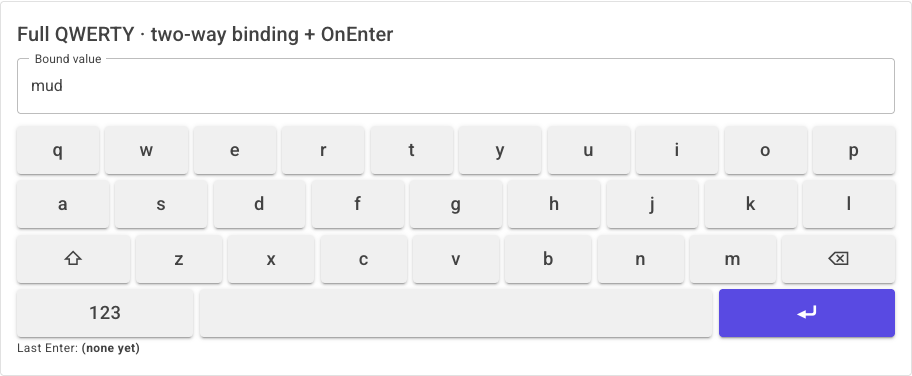
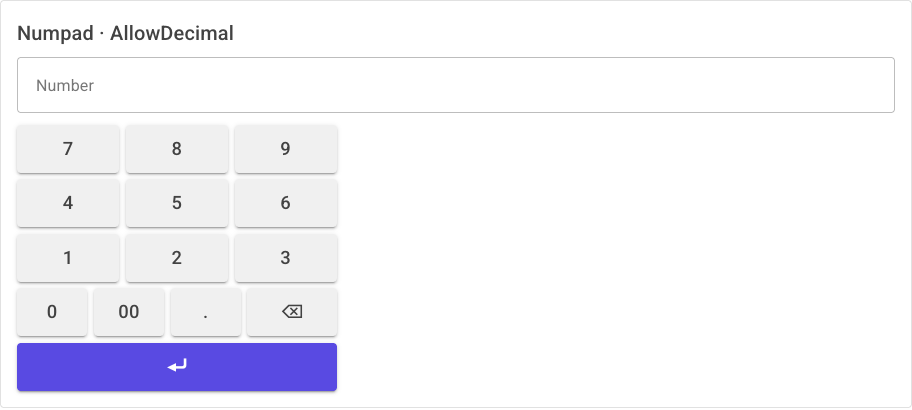
- Versatile. Ships a full QWERTY keyboard, a numpad, a pence-first pricepad and a custom-layout engine, plus an optional global docked keyboard.
- Docked editing extras (opt-in). The docked keyboard can show the focused field's live value
with edit/cancel (
ShowValuePreview), dim the page behind a backdrop (ShowBackdrop) that taps to cancel — or stays open with a Cancel button (DisableBackdropClick), and play a key-click sound (Sound) — the sound is a pure-Blazor<audio>element, so it works on every keyboard with no JavaScript.
Render modes: the library is render-mode agnostic — your app picks
InteractiveServerorInteractiveWebAssemblyfor the inline keyboards. The global docked keyboard also works on static SSR pages (it drives the focused field through JavaScript, not Blazor binding) — see Static SSR support.
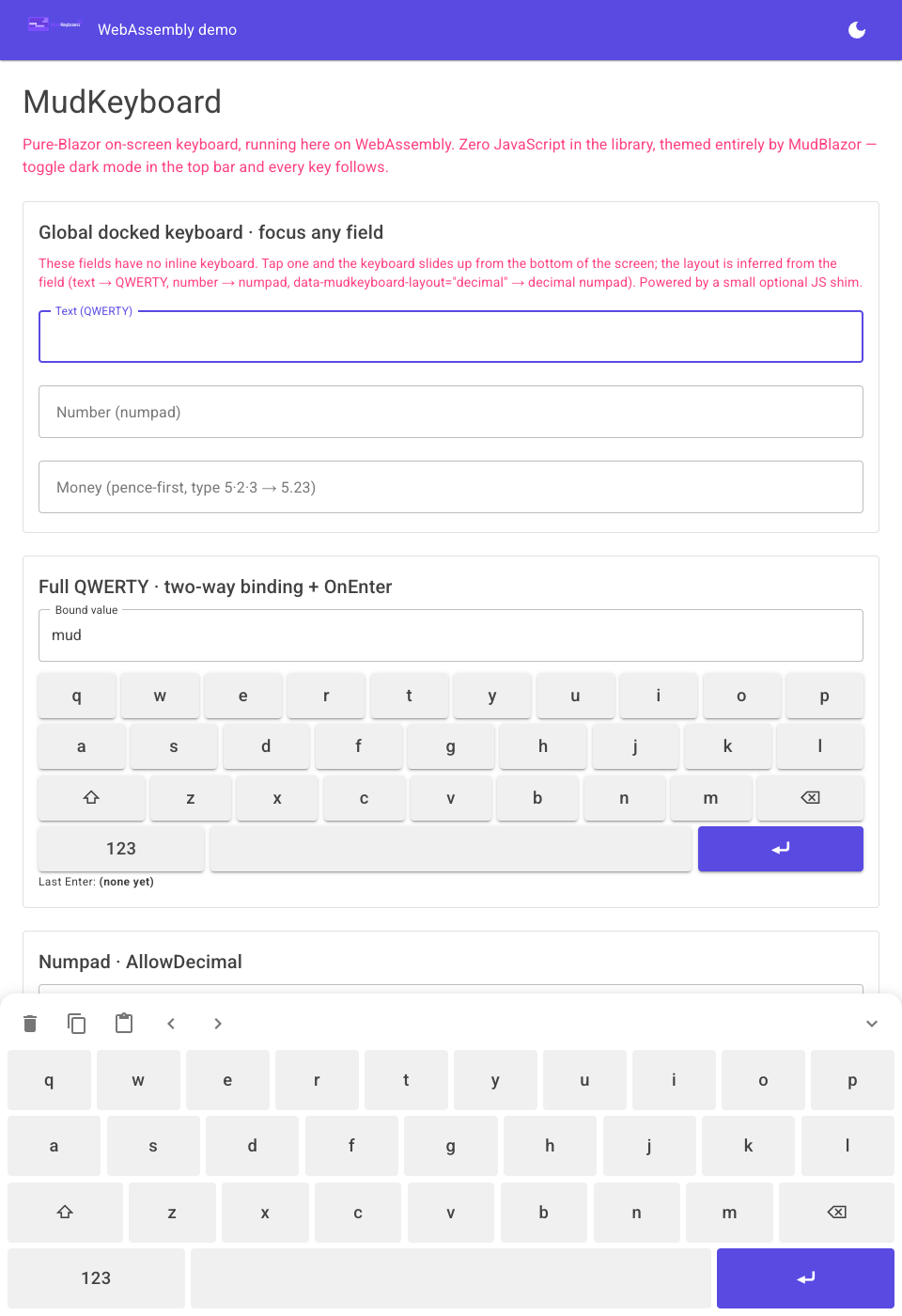
| Inline keyboard | Numpad / Pricepad | Global docked keyboard |
|---|---|---|
 |
 |
 |
Install
dotnet add package MudKeyboard
MudBlazor is a peer dependency — MudKeyboard reuses your existing MudBlazor setup and does not bundle a second theme. If you do not have MudBlazor yet, follow its getting-started guide first.
<PackageReference Include="MudBlazor" Version="9.*" />
<PackageReference Include="MudKeyboard" Version="1.0.2" />
Add the namespaces to _Imports.razor:
@using MudKeyboard.Components
@using MudKeyboard.Models
Quickstart
Inline full keyboard — two-way binding
<MudTextField @bind-Value="_text" Label="Name" Variant="Variant.Outlined" />
<MudKeyboard @bind-Value="_text" OnEnter="Submit" MaxLength="40" />

@code {
    private string _text = string.Empty;
    private void Submit() { /* Enter was pressed */ }
}
Numpad
<MudNumpad @bind-Value="_number" AllowDecimal="true" />

@code { private string _number = string.Empty; }
Pricepad (pence-first currency entry)
Typing 5, 2, 3 yields £5.23 — the last DecimalPlaces digits are always the fraction.
<MudPricepad @bind-Value="_price" CurrencySymbol="£" DecimalPlaces="2" />

@code { private string _price = string.Empty; }
Custom layout
A layout is just data — rows of key tokens. Literal tokens are typed verbatim; brace tokens such as
{bksp} are commands (see Key tokens).
<MudKeyboard @bind-Value="_value" Variant="KeyboardVariant.Custom" Layout="MyLayout" />

@code {
    private string _value = string.Empty;

    private static readonly KeyboardLayout MyLayout = new()
    {
        Rows = new string[][]
        {
            ["m", "u", "d"],
            ["k", "e", "y"],
            [KeyTokens.Space, KeyTokens.Backspace, KeyTokens.Enter],
        },
    };
}
For the complete API reference and runnable examples, see the documentation site.
Global docked keyboard
A single host component shows a keyboard that slides up from the bottom when any input is focused and types at the caret of that field. This is the one feature that uses JavaScript (a small focus-capture shim shipped as a static web asset).
1. Register the services in Program.cs:
using MudKeyboard.Extensions;

builder.Services.AddMudServices();   // MudBlazor
builder.Services.AddMudKeyboard();   // MudKeyboard docked-keyboard services
2. Place the host once in your main layout (next to the MudBlazor providers):
<MudThemeProvider @bind-IsDarkMode="_isDarkMode" />
<MudPopoverProvider />
<MudDialogProvider />
<MudSnackbarProvider />

<MudKeyboardHost />   @* once, anywhere in the layout *@
That is all — every editable text or number field now raises the keyboard on focus. The layout is
inferred per field: text maps to QWERTY, integer fields to a plain numpad, and floating-point fields to
a numpad with a decimal point. Currency is the one case the rendered HTML can't reveal — a decimal and
a double look identical to JavaScript — so bind money fields with
MudKeyboardNumericField<T>, which picks the keypad from the bound CLR type
and routes decimal to the pence-first money keypad. See Type-aware numeric fields.
Controlling which fields attach
By default (KeyboardAttachMode.AllInputs) every editable field attaches. Opt out, opt in, or force a
layout with data attributes:
| Attribute | Effect |
|---|---|
data-mudkeyboard-ignore |
Never raise the keyboard for this field (AllInputs mode). |
data-mudkeyboard |
Opt this field in when using KeyboardAttachMode.OptIn. |
data-mudkeyboard-layout="..." |
Force a layout: qwerty, numpad, decimal, or money/price. |
// Only attach to fields explicitly marked with data-mudkeyboard
builder.Services.AddMudKeyboard(o => o.AttachMode = KeyboardAttachMode.OptIn);
<MudTextField @bind-Value="_amount" data-mudkeyboard-layout="money" Immediate="true" />
<MudTextField @bind-Value="_note"  data-mudkeyboard-ignore="true" Immediate="true" />
Use
Immediate="true"on MudBlazor inputs so the bound value updates as keys are tapped.
The docked panel also includes clear, copy, paste and cursor controls, and automatically docks one layer above the top-most element on the page, so it floats over dialogs and overlays.
Type-aware numeric fields
A decimal, a double and a float all render the same inputmode="decimal", so the focus-capture
shim can't tell a currency field from a plain decimal on its own. MudKeyboardNumericField<T> wraps
MudNumericField<T> and resolves the keypad from the bound CLR type — no data attribute to remember:
| Bound type | Docked keypad |
|---|---|
decimal |
Money — pence-first (type 5·2·3 → 5.23), like MudPricepad. |
double / float |
Numeric keypad with a . key. |
int, long, short, … |
Numeric keypad without a . key. |
@* The keypad follows T — nothing else to configure (DockedKeyboard="true" is only needed in OptIn mode). *@
<MudKeyboardNumericField @bind-Value="Model.Price" T="decimal" Format="N2"
                         Adornment="Adornment.Start" AdornmentIcon="@Icons.Material.Filled.CurrencyPound" />

<MudKeyboardNumericField @bind-Value="_measure" T="double" />   @* numeric keypad with "." *@
<MudKeyboardNumericField @bind-Value="_quantity" T="int" />     @* numeric keypad, no "." *@
Set DockedKeyboardLayout to override the auto choice for a field (for example a non-money decimal:
DockedKeyboardLayout="decimal"). A raw MudNumericField still auto-detects integer vs. floating-point
on its own; only decimal → money needs the bound type. You can also force money on any field with
data-mudkeyboard-layout="money".
Static SSR support
MudKeyboard supports Blazor static Server-Side Rendering (the static SSR introduced in .NET 8).
A static-SSR page has no Blazor circuit or WebAssembly runtime of its own, so the inline keyboards
(MudKeyboard, MudNumpad, MudPricepad) — which rely on Blazor event handlers — still need an
interactive render mode. The global docked keyboard, however, works on static-SSR pages: it edits
the focused <input> through JavaScript on document.activeElement and dispatches native input and
change events, so the typed text lands in the field's value and is carried by an ordinary form POST —
no per-page Blazor interactivity required.
1. Put the host in App.razor, outside <Routes>, with its own interactive render mode. This
gives the keyboard its own circuit, which stays live regardless of the render mode of whichever page is
on screen — including statically rendered ones:
<body>
    @* No global @rendermode on <Routes> → each page chooses its own; pages with no @rendermode
       directive render with static SSR. *@
    <Routes />

    @* The docked keyboard host lives here, outside <Routes>, with its own circuit. *@
    <MudKeyboardHost @rendermode="InteractiveServer" />

    <script src="@Assets["_framework/blazor.web.js"]"></script>
</body>
Placing the host inside a layout that a static-SSR page uses would make the host static too (it would never run its JavaScript). Keep it outside
<Routes>so it has its own interactive island.
2. Opt fields into the docked keyboard with MudKeyboardTextField and DockedKeyboard="true".
The page itself needs no @rendermode directive:
@page "/login"
@* No @rendermode → this page is static SSR. *@

<EditForm Model="Input" method="post" OnValidSubmit="SignIn" FormName="login">
    <MudKeyboardTextField @bind-Value="Input.Username" Label="Username"
                          DockedKeyboard="true" name="Input.Username" />

    <MudKeyboardTextField @bind-Value="Input.Password" Label="Password"
                          InputType="InputType.Password"
                          DockedKeyboard="true" DockedKeyboardLayout="qwerty"
                          name="Input.Password" />

    <MudButton ButtonType="ButtonType.Submit">Sign in</MudButton>
</EditForm>
MudKeyboardTextField is a thin generic wrapper over MudTextField<T> that adds data-mudkeyboard
(and, when set, data-mudkeyboard-layout) for you. It is most useful with
KeyboardAttachMode.OptIn, where only opted-in fields raise the keyboard.
Alternative — a plain MudTextField. You don't have to use the wrapper: any input marked with the
data-mudkeyboard attribute works the same way, which is handy in AllInputs mode or when you already
have a MudTextField:
<MudTextField @bind-Value="Input.Email" Label="Email" data-mudkeyboard="true" name="Input.Email" />
A runnable example lives in the Server demo at /components/ssr-login-demo
(demo/MudKeyboard.Demo.Server).
Components and parameters
<MudKeyboard>
| Parameter | Type | Default | Description |
|---|---|---|---|
Value / ValueChanged |
string |
"" |
Two-way bindable value (@bind-Value). |
Layout |
KeyboardLayout? |
null |
Explicit layout; overrides Variant. |
Variant |
KeyboardVariant |
Full |
Full, Numpad, Pricepad, Custom. |
SymbolLayout |
KeyboardLayout? |
null |
Numbers/symbols face for the {sym} toggle. |
MaxLength |
int? |
null |
Optional cap on value length. |
Disabled |
bool |
false |
Disables every key. |
DropShadow |
bool |
true |
Flat keys when false. |
Sound |
bool |
false |
Plays a click sound on key press (pure-Blazor <audio>, no JavaScript). |
SoundSrc |
string? |
null |
Custom click-sound source (URL or data: URI); defaults to the built-in click. |
Palette |
KeyboardPalette? |
null |
Per-keyboard colour overrides. |
AriaLabel |
string? |
"On-screen keyboard" |
Accessible name for the root role="group". |
Class / Style |
string? |
null |
Passthrough CSS. |
OnEnter |
EventCallback |
— | Fires on the Enter key. |
OnEscape |
EventCallback |
— | Fires on an {esc} key. |
OnInput |
EventCallback<KeyboardInput> |
— | Emit mode: route each press elsewhere instead of editing Value. |
<MudNumpad>
Value/ValueChanged, AllowDecimal, AllowNegative (adds a ± sign-toggle key; default false),
MaxLength, Disabled, Sound + SoundSrc (key-click sound, no JavaScript), OnEnter, Palette,
AriaLabel (default "Numeric keypad"), Class, Style.
<MudPricepad>
Value/ValueChanged, CurrencySymbol (default £), DecimalPlaces (default 2), AllowNegative
(adds a ± key → -£1.23; default false), MaxLength, Disabled, Sound + SoundSrc (key-click
sound, no JavaScript), OnEnter, Palette, AriaLabel (default "Price entry keypad"), Class, Style.
<MudKeyboardHost>
Palette, Elevation (default 8), MinZIndex (default 1400), Style, VisibleActions
(KeyboardAction, default All), DisabledActions (KeyboardAction, default None), AllowNegative
(global default for the ± sign-toggle key on numeric keypads; default false).
It also supports an opt-in live value preview with edit/cancel, an optional backdrop, and a key-click sound — all off by default:
| Parameter | Type | Default | Description |
|---|---|---|---|
ShowValuePreview |
bool |
true |
Shows a bar at the top with the focused field's live value (it follows spin buttons, hardware typing and app changes too). Edits apply live; Cancel reverts to the value at focus-in. |
ShowBackdrop |
bool |
false |
Dims the page behind the keyboard; a backdrop click cancels (reverts) and closes — unless DisableBackdropClick is set. |
DisableBackdropClick |
bool |
false |
Backdrop clicks no longer dismiss; a Cancel button is shown in the preview bar instead (requires ShowValuePreview). |
CancelLabel |
string |
"Cancel" |
Text for the Cancel button. |
Sound |
bool |
false |
Plays a click sound on key press (pure-Blazor <audio>, no JavaScript). |
SoundSrc |
string? |
null |
Custom click-sound source; defaults to the built-in click. |
VisibleActions and DisabledActions control the dock's toolbar buttons (Clear, Copy, Paste, the
cursor arrows, Hide). KeyboardAction is a [Flags] enum, so you can hide or disable any button —
globally or one at a time:
@* Hide Copy and Paste everywhere *@
<MudKeyboardHost VisibleActions="@(KeyboardAction.All & ~(KeyboardAction.Copy | KeyboardAction.Paste))" />

@* Drop the whole toolbar *@
<MudKeyboardHost VisibleActions="KeyboardAction.None" />

@* Keep Clear visible but greyed-out *@
<MudKeyboardHost DisabledActions="KeyboardAction.Clear" />
<MudKeyboardTextField>
A generic (@typeparam T) wrapper over MudTextField<T> that opts a field into the global docked
keyboard. Forwards the common text-field parameters (Value/ValueChanged/ValueExpression, Label,
Placeholder, HelperText, InputType, Immediate, Disabled, ReadOnly, Variant, Adornment,
AdornmentIcon, Lines, Class, Style) plus any extra attributes (such as name).
| Parameter | Type | Default | Description |
|---|---|---|---|
DockedKeyboard |
bool |
false |
Adds data-mudkeyboard="true" so the docked keyboard attaches to this field. |
DockedKeyboardLayout |
string |
"" |
Forces the layout via data-mudkeyboard-layout (qwerty, numpad, decimal, money). Empty = infer. |
<MudKeyboardNumericField>
A generic (@typeparam T) wrapper over MudNumericField<T> that makes the global docked keyboard show
the right keypad for the field's numeric type (decimal → money, double/float → decimal keypad,
integers → plain numpad). Forwards the common numeric parameters (Value/ValueChanged, For, Label,
Placeholder, HelperText, Variant, Margin, Adornment, AdornmentIcon, Immediate, Disabled,
ReadOnly, ShrinkLabel, Format, Min, Max, Step, Class, Style) plus any extra attributes
(such as name).
| Parameter | Type | Default | Description |
|---|---|---|---|
DockedKeyboard |
bool |
false |
Adds data-mudkeyboard="true" (required in OptIn mode). |
DockedKeyboardLayout |
string |
"" |
Overrides the auto layout (money, decimal, numpad, qwerty). Empty = resolve from T. |
AllowNegative |
bool |
false |
Shows a ± sign-toggle key on the docked keypad so negative values can be entered (overrides the host's global default for this field). |
Theming
The keyboard reads the ambient MudBlazor theme — toggle MudThemeProvider's dark mode and every
key follows, with no extra code. To recolour a single keyboard without touching the app theme, pass a
KeyboardPalette. Any slot you leave unset still follows the theme, so dark/light keeps working:
<MudKeyboard @bind-Value="_value" Palette="Brand" />

@code {
    private static readonly KeyboardPalette Brand = new()
    {
        AccentColor = "#00897b",      // Enter / active-shift keys
        AccentTextColor = "#ffffff",
        // Surface, KeyColor, KeyTextColor left unset → follow the theme
    };
}
| Slot | Recolours |
|---|---|
Surface |
Keyboard background |
KeyColor |
Literal-key background |
KeyTextColor |
Literal-key label |
AccentColor |
Accent-key (Enter / active shift) background |
AccentTextColor |
Accent-key label |
Values are any CSS colour — a hex string, rgb()/hsl(), or a var(--…) reference.
Accessibility
MudKeyboard is built to be usable with the keyboard, switch controls and screen readers, on phones, tablets and desktops alike — nothing extra to wire up.
- Real, labelled controls. Each keyboard surface is a
role="group"; every key is a genuine<button>with a spokenaria-label, so glyph keys aren't read as raw symbols (⌫→ "Backspace", the blank space bar → "Space",123/ABC→ "Numbers and symbols"/"Letters",00→ "Double zero"). - Toggle state. Shift / caps lock and the symbol toggle expose
aria-pressed, so assistive tech announces whether shift is armed or the symbol face is showing. - Name your keyboards. Set the
AriaLabelparameter onMudKeyboard,MudNumpadandMudPricepadto give each control a distinct accessible name (defaults:"On-screen keyboard","Numeric keypad","Price entry keypad").KeyboardKey.AccessibleLabelexposes a key's spoken name directly. - Docked keyboard. While hidden,
MudKeyboardHostisinertandaria-hidden— out of the tab order and the accessibility tree until a field is focused. Its action bar is a labelledrole="toolbar", every tool has anaria-label, and focus is never stolen from the field you're editing. A clear, theme-coloured focus ring marks the focused key. - Every device. The docked panel never overflows the viewport (clamps to
100vw), pads past device safe-area insets (addviewport-fit=coverto your viewport meta tag), scrolls its keys on short or landscape screens, keeps comfortable touch targets (≈ 52–64px), and honoursprefers-reduced-motionand high/forced-contrast modes. - Contrast. All colours come from your MudBlazor theme, so the keyboard inherits a palette you've already tuned for contrast and follows dark/light automatically.
@* Give a screen reader a distinct name for this keyboard. *@
<MudKeyboard @bind-Value="_pin" Variant="KeyboardVariant.Numpad" AriaLabel="PIN entry" />
See the Accessibility guide for the full rundown.
Built-in layouts
LayoutLibrary exposes the shipped layouts: Qwerty, Symbols, Numeric, Numpad,
NumpadWithDecimal, and Price.
Key tokens
Inside a KeyboardLayout, any token wrapped in braces is a command; everything else is a literal
character. The well-known tokens are constants on KeyTokens:
| Token | Constant | Action |
|---|---|---|
{bksp} |
KeyTokens.Backspace |
Delete the character before the caret |
{enter} |
KeyTokens.Enter |
Commit / submit |
{space} |
KeyTokens.Space |
Insert a space |
{shift} |
KeyTokens.Shift |
One-shot shift (double-tap = caps lock) |
{caps} |
KeyTokens.Caps |
Caps lock |
{sym} |
KeyTokens.SymbolToggle |
Flip between letters and numbers/symbols |
{esc} |
KeyTokens.Escape |
Dismiss (raises OnEscape) |
AOT and trimming
The library targets net8.0;net9.0;net10.0 and sets <IsAotCompatible>true</IsAotCompatible>, which
enables the trim, AOT and single-file analyzers on every build — there is no reflection or dynamic code
to trip them. Only primitive strings cross the JS interop boundary, so the focus-capture shim is
AOT/trim-safe too.
Demos
Two runnable demos live under demo/:
dotnet run --project demo/MudKeyboard.Demo.Server   # Interactive Server
dotnet run --project demo/MudKeyboard.Demo.Wasm     # Interactive WebAssembly
The Server demo showcases every variant, two-way binding, the OnEnter callback, a custom layout, a
KeyboardPalette override and the global docked keyboard — plus a static-SSR login page at
/components/ssr-login-demo that proves the docked keyboard works with no per-page render mode. A
hosted version is available on the documentation site.
For AI agents & LLMs
MudKeyboard publishes machine-readable documentation so AI coding assistants can add and configure it correctly — across every render mode (Interactive Server, WebAssembly, static SSR, with or without prerendering) and whether or not your own fields are MudBlazor inputs.
Why this exists: the documentation site is a Blazor WebAssembly single-page app, so a plain HTTP fetch of a page URL returns an empty JavaScript shell — an LLM can't read it that way. The resources below are plain text/Markdown served at the site origin (and mirrored in the repo), so agents can read the latest docs directly.
| Resource | URL | What it is |
|---|---|---|
| Agent skill | /skill.md |
A task-focused "how to integrate MudKeyboard in any situation" guide with YAML frontmatter, ready to drop in as a Claude Code / agent skill. |
| Full docs (one file) | /llms-full.txt |
The complete documentation as a single Markdown file. |
| AI index | /llms.txt |
An llms.txt-format index linking the resources above. |
The same files are in this repository under
src/MudKeyboard.Docs/wwwroot/
(skill.md, llms-full.txt, llms.txt).
Use it as a Claude Code skill
Download the skill into your Claude Code skills folder (the file already has the required frontmatter):
mkdir -p ~/.claude/skills/mudkeyboard
curl -fsSL https://mudkeyboard.pages.dev/skill.md -o ~/.claude/skills/mudkeyboard/SKILL.md
Or, to scope it to one project, save it under .claude/skills/mudkeyboard/SKILL.md in the repo. Cursor,
Windsurf, Copilot and similar tools can ingest the same file (e.g. as a rule/context file) or fetch
/llms-full.txt directly.
Point an agent at the docs
If you just want an assistant to read the current docs, give it one of these plain-text URLs (not a page URL, which is the un-readable SPA shell):
https://mudkeyboard.pages.dev/llms-full.txt   # full documentation
https://mudkeyboard.pages.dev/skill.md        # integration skill
Contributing and building
Contributions are welcome. To build and test locally:
dotnet build                                   # build everything
dotnet test tests/MudKeyboard.Tests            # run the unit and bUnit tests
Please open an issue or pull request on GitHub.
Support the project
MudKeyboard is free and open source, maintained in spare time. If it saves you work and you would like to support its continued development, donations are gratefully received:
Starring the repository and reporting issues are equally appreciated and cost nothing.
License
MIT © Sardar Qaslany
| Product | Versions Compatible and additional computed target framework versions. |
|---|---|
| .NET | net8.0 is compatible. net8.0-android was computed. net8.0-browser was computed. net8.0-ios was computed. net8.0-maccatalyst was computed. net8.0-macos was computed. net8.0-tvos was computed. net8.0-windows was computed. net9.0 is compatible. net9.0-android was computed. net9.0-browser was computed. net9.0-ios was computed. net9.0-maccatalyst was computed. net9.0-macos was computed. net9.0-tvos was computed. net9.0-windows was computed. net10.0 is compatible. net10.0-android was computed. net10.0-browser was computed. net10.0-ios was computed. net10.0-maccatalyst was computed. net10.0-macos was computed. net10.0-tvos was computed. net10.0-windows was computed. |
-
net10.0
- Microsoft.AspNetCore.Components.Web (>= 10.0.12)
- MudBlazor (>= 9.9.0)
-
net8.0
- Microsoft.AspNetCore.Components.Web (>= 8.0.31)
- MudBlazor (>= 9.9.0)
-
net9.0
- Microsoft.AspNetCore.Components.Web (>= 9.0.20)
- MudBlazor (>= 9.9.0)
NuGet packages
This package is not used by any NuGet packages.
GitHub repositories
This package is not used by any popular GitHub repositories.