NLightTemplate 2.3.0
dotnet add package NLightTemplate --version 2.3.0
NuGet\Install-Package NLightTemplate -Version 2.3.0
<PackageReference Include="NLightTemplate" Version="2.3.0" />
<PackageVersion Include="NLightTemplate" Version="2.3.0" />
<PackageReference Include="NLightTemplate" />
paket add NLightTemplate --version 2.3.0
#r "nuget: NLightTemplate, 2.3.0"
#:package NLightTemplate@2.3.0
#addin nuget:?package=NLightTemplate&version=2.3.0
#tool nuget:?package=NLightTemplate&version=2.3.0
NLightTemplate



NLightTemplate is a lightweight .NET string template renderer.
This was born out of a recurring need (and subsequent fractured code bases) for server-side rendered, user-defined templates. Our research and testing of the available template engines failed to find one that was lightweight and provided the functionality we required. We rolled our own and this is the result of internal iterations on the concept.
Features
- Lightweight, no external dependencies
- Reflection-based POCO key:value replacement
- Nested enumeration (works with any
IEnumerable, including custom implementations) with loop metadata ({index},{first},{last},{count}) - Dot notation property accessors for reference types
- Conditionals: boolean
{if}/{else}/{else if}, negation (!), comparison operators (==,!=,>,<,>=,<=), property-to-property (@) and enum-aware comparisons - Inline null-coalesce fallback (
{Prop ?? "N/A"}) - Output options: configurable culture (
IFormatProvider), HTML encoding, block-tag whitespace trimming, and per-type formatters - Usable as a static class or via an injectable
ITemplateRenderer - Familiar syntax (using default configuration)
Get It
Direct Download
Package Manager
PM> Install-Package NLightTemplate
.NET CLI
> dotnet add package NLightTemplate
Dependencies
.NET Standard 2.0
Microsoft.CSharp (>= 4.7.0) provides dynamic/ExpandoObject support
Targets netstandard2.0, so it runs on .NET Framework 4.6.1+, .NET Core 2.0+, and all modern .NET (5/6/7/8+).
Should I update?
NLightTemplate has been in production use for over 8 years with more than 19,000 downloads on NuGet. The 1.x line is stable and battle-tested.
Update to 2.x if you want the newer features: dependency injection via ITemplateRenderer, {else} and comparison operators (==, !=, >, <, >=, <=) in {if}, enum and property-to-property comparisons, and validated custom IEnumerable support. 2.x targets netstandard2.0 (.NET Framework 4.6.1+, .NET Core 2.0+, and all modern .NET).
If you don't need those, there is no pressure to move. The 1.x line targets netstandard1.0 and .NET Framework 4.5, and will continue to be supported for the foreseeable future, so projects on older frameworks or ones that simply want to stay put can keep using it.
Syntax
The renderer uses token replacement with curly braces { and } surrounding the key by default.
A global custom configuration may be set at any time using the fluent interface. This should only be done once during the application initialization process.
StringTemplate.Configure.OpenToken("<%").CloseToken("%>").ForeachToken("fe");
A custom configuration may be set on an individual call by passing a configuration object into the Render method.
var cfg = new FluentStringTemplateConfiguration()
	.OpenToken("<%")
    .CloseToken("%>")
    .ForeachToken("fe")
    .ExposeConfiguration();
//or
var cfg = new StringTemplateConfiguration
            {
              OpenToken = "<%",
              CloseToken = "%>",
              ForeachToken = "fe"
            };
var body = StringTemplate.Render(template, customer, cfg);
Version 1.0.2 added support for string.Format syntax for padding and format.
var d = DateTime.Now;
var s = string.Format("{0,15:d MMM yyyy}", d);
var t = StringTemplate.Render("{MyDate,15:d MMM yyyy}", new { MyDate = d });
Console.WriteLine(s == t); // outputs True
Basic usage
  public class Customer
  {
    public int Id { get; set; }
    public string FirstName { get; set; }
    public string LastName { get; set; }
    public string FullName => $"{FirstName} {LastName}";
  }
  var customer = new Customer
  {
    FirstName = "John",
    LastName = "Doe"
  };

  Console.WriteLine(StringTemplate.Render("Hello {FullName}!", customer)); //Produces "Hello John Doe!"
  Console.WriteLine(StringTemplate.Render("Hello {FirstName} {LastName}!", customer)); //Produces "Hello John Doe!"
Enumeration
IEnumerable properties can be enumerated by specifying the open {foreach PropertyName} and close {/foreach PropertyName} tags. Everything in between will be repeated, applying the token replacement for each. Property names are locally scoped within the foreach tags.
	public class Order
    {
        public int Id { get; set; }
        public int CustomerId { get; set; }
        public DateTime Placed { get; set; }
        public DateTime? Shipped { get; set; }
        public List<OrderDetail> Details { get; set; }
        public double SubTotal => Details?.Sum(d => d.SubTotal) ?? 0;
    }

    public class OrderDetail
    {
        public int Id { get; set; }
        public int OrderId { get; set; }
        public Product Product { get; set; }
        public int Quantity { get; set; }
        public double UnitPrice { get; set; }
        public double SubTotal => UnitPrice * Quantity;
    }

    public class Product
    {
        public int Id { get; set; }
        public string Name { get; set; }
        public bool IsInStock { get; set; }
        public override string ToString() =>  $"{Name} {(IsInStock ? "In Stock" : "Unavailable")}";
    }
Single Enumeration
	Console.WriteLine(StringTemplate.Render(
    	"{foreach Orders}Order Id: {Id} ${SubTotal}\r\n{/foreach Orders}",
        customer));
    /*
    Outputs:
    Order Id: 123 $24.25
    Order Id: 124 $107.79
    */
Nested Enumeration
	string template = @"{foreach Orders}
         Order {Id} placed at {Placed} and Shipped {Shipped}
         QTY	Product		Price           SubTotal
         {foreach Details}
         {Quantity}	{Product.Name}	{UnitPrice}     	{SubTotal}
         {/foreach Details}
			                Total: 	{SubTotal}
         {/foreach Orders}";
    Console.WriteLine(StringTemplate.Render(template, customer));
	/*
    Outputs:
     Order 123 placed at 9/20/2017 2:46:15 AM and Shipped
     QTY     Product         Price           SubTotal
     1       Blue Shirt      12.35           12.35
     2       White Socks     5.95            11.9
                                     Total:  24.25

     Order 124 placed at 9/22/2017 2:46:15 AM and Shipped
     QTY     Product         Price           SubTotal
     1       Red Shoes       59.99           59.99
     4       White Shirt     11.95           47.8
                                     Total:  107.79
    */
Loop metadata
Inside a foreach block these values are available for the current item: {index} (0-based position), {first} and {last} (booleans), and {count} (total items). Because {first} and {last} are booleans, they combine with {if} for things like separators:
StringTemplate.Render("{foreach Orders}{Id}{if last}{else}, {/if last}{/foreach Orders}", customer);
// "123, 124"
If the item already has a property named index, first, last, or count, that property's value is used instead (your data wins).
Dot Notation
Any reference properties will have their properties available using dot notation.
The above example shows {Product.Name} writing out the Name property on the Product property of the OrderDetail instance.
Conditionals
Wrap content in {if PropertyName} and {/if PropertyName} tags to include it conditionally. An optional {else} block renders when the condition is false. As with foreach, the closing tag repeats the property name.
For a bool property the block renders when the value is true:
StringTemplate.Render("{if IsInStock}In stock{else}Sold out{/if IsInStock}", product);
You can also compare a property to a value using ==, !=, >, <, >=, or <=. Numeric values are compared numerically, true/false as booleans, and everything else as an ordinal string:
StringTemplate.Render("{if Age >= 18}Adult{else}Minor{/if Age}", customer);       // compares the Age property
StringTemplate.Render("{if Status == Active}Enabled{else}Disabled{/if Status}", account); // string comparison (unquoted literal)
The right-hand side is a literal by default. To compare against another property, prefix it with @ (an unknown property resolves to no value, so the comparison simply won't match):
StringTemplate.Render("{if Total >= @MinimumOrder}Free shipping{/if Total}", cart); // property vs property
Enums compare by member name (case-insensitively) or by numeric value. Both forms work whether the right-hand side is a literal or an @ property:
// given: enum Statuses { None = 0, Active = 1, Disabled = 2 }  and  account.Status = Statuses.Active
StringTemplate.Render("{if Status == Active}on{/if Status}", account); // by name  -> "on"
StringTemplate.Render("{if Status == 1}on{/if Status}", account);      // by number -> "on"
Prefix a condition with ! to negate it, and chain alternatives with {else if ...}:
StringTemplate.Render("{if !IsActive}inactive{/if IsActive}", account);
StringTemplate.Render("{if Level == Gold}Gold{else if Level == Silver}Silver{else}Basic{/if Level}", account);
An {else if ...} may test any property, not just the one in the opening tag (the closing tag still names the opening property).
if blocks may be nested and combine freely with foreach.
Null coalesce
Provide an inline fallback for a null or missing value with ??. The fallback is used when the property is null or absent; wrap it in quotes to include spaces:
StringTemplate.Render("Hello {Name ?? \"there\"}!", customer); // "Hello there!" when Name is null/missing
Output options
These configuration options control output formatting, all off by default:
- Culture:
FormatProviderapplies anIFormatProvider(for example aCultureInfo) to format specifiers. - HTML encoding:
HtmlEncodeHTML-encodes substituted values (not the template literals) for safe HTML or email output. - Whitespace trimming:
TrimBlockWhitespacetrims horizontal whitespace before, and a trailing newline after, block tags, so control tags on their own line do not leave blank lines. - Custom type formatters:
Format<T>(...)registers a callback that controls how values of typeTrender (an explicit format specifier on a token still overrides it).
var cfg = new FluentStringTemplateConfiguration()
    .FormatProvider(new CultureInfo("de-DE"))
    .HtmlEncode()
    .TrimBlockWhitespace()
    .Format<Money>(m => $"{m.Currency} {m.Amount:0.00}")
    .ExposeConfiguration();
StringTemplate.Render(template, model, cfg);
Dependency Injection
In addition to the static StringTemplate class, an instance-based ITemplateRenderer / TemplateRenderer is provided for DI-first applications. It carries its own configuration and delegates to the same engine. NLightTemplate takes no dependency on any DI container, so you register it yourself:
// Program.cs / Startup.cs (default configuration)
services.AddSingleton<ITemplateRenderer, TemplateRenderer>();
For custom tokens, register an IStringTemplateConfiguration and the container injects it into TemplateRenderer; when none is registered the renderer uses the defaults. The StringTemplateConfiguration.Create factory builds one via the fluent interface:
services.AddSingleton<IStringTemplateConfiguration>(_ =>
    StringTemplateConfiguration.Create(c => c.OpenToken("<%").CloseToken("%>").ForeachToken("fe")));
services.AddSingleton<ITemplateRenderer, TemplateRenderer>();

// (equivalent one-off without a container:)
var cfg = new FluentStringTemplateConfiguration().OpenToken("<%").CloseToken("%>").ExposeConfiguration();
ITemplateRenderer renderer = new TemplateRenderer(cfg);
public class GreetingService
{
    private readonly ITemplateRenderer _renderer;
    public GreetingService(ITemplateRenderer renderer) => _renderer = renderer;

    public string Greet(Customer c) => _renderer.Render("Hello {FullName}!", c);
}
A complete, runnable example lives in the Sample.DependencyInjection project (dotnet run --project Sample.DependencyInjection).
Advanced Template
This one combines dot notation, inherited properties, enum and property-to-property comparisons, {if}/{else if}/{else} with negation (!), null-coalesce (??), nested {foreach}, loop metadata, and format specifiers:
string template =
@"Hi {FullName}, thanks for your order!

Account #{Id}, member since {CreatedUtc:yyyy-MM-dd}. Shipping to {ShippingAddress.City}, {ShippingAddress.Country}.
{if Level == Gold}Gold member: express shipping is free.{else if Level == Standard}Standard member: free shipping on orders over $50.{else}Create an account to start earning rewards.{/if Level}
{if LoyaltyPoints >= @RewardThreshold}You have {LoyaltyPoints} points, enough to redeem a reward!{else}{LoyaltyPoints} of {RewardThreshold} points to your next reward.{/if LoyaltyPoints}

You have {OrderCount} recent order(s):
{foreach Orders}  [{index}] Order #{Id} placed {Placed:yyyy-MM-dd}{if first} (latest){/if first} - {if !Shipped}processing{else}shipped{/if Shipped}
      Tracking: {TrackingNumber ?? ""pending""}
{foreach Lines}      {Quantity} x {Product} @ {UnitPrice:C} = {Subtotal:C}
{/foreach Lines}      Order total: {Total:C} {if Total >= 50}(free shipping){else}(+ $5.00 shipping){/if Total}
{if last}      that's all {count} order(s).
{/if last}{/foreach Orders}
Questions? Email {supportEmail}.";

var extras = new Dictionary<string, object> { { "supportEmail", "help@example.com" } };
Console.WriteLine(StringTemplate.Render(template, customer, extras));
The full runnable version (model, data, and a custom-token example) is in the Sample project: dotnet run --project Sample.
Performance
Render time across published versions (lower is better). Absolute numbers reflect the machine that produced them, so read the version-over-version comparison as the signal. See the full report.
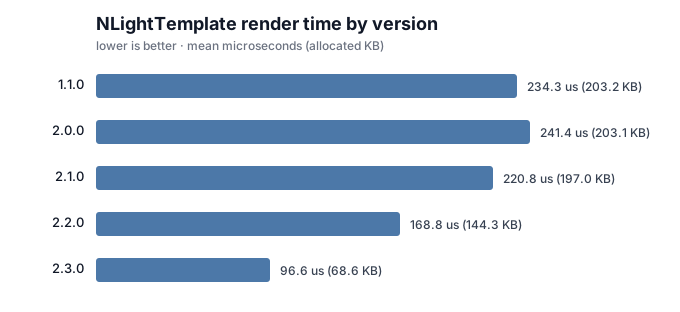
Benchmark the library against your own template and data with the benchmark project.
Roadmap
Released
- Validate and write tests for custom implementations of IEnumerable (added in v2.0.0)
- Conditional
{if}/{else}with comparison operators (added in v2.0.0) - Instance-based
ITemplateRendererfor dependency injection (added in v2.0.0) - Add support for
string.Formatstyle format patterns and padding (added in v1.0.2)
Planned
Correctness and robustness
- Inherited properties: flatten properties inherited from base classes, not just those declared on the exact type (released in 2.1)
- Regex escaping: escape configured tokens in the format/padding matcher so custom tokens containing regex metacharacters work (released in 2.1)
Performance
- Regex reuse: reuse compiled
Regexinstances across renders rather than rebuilding them each call (released in 2.1) - Compiled/cached property accessors: cache compiled per-type accessors so repeated renders skip the reflection cost (released in 2.2)
- Benchmarking report: publish a comparison of rendering performance from v1.1.0 through v2.x.x+ (released in 2.1)
Template authoring
- Loop metadata inside
foreach: expose values such as{index},{first},{last}, and{count}within a loop (released in 2.1) -
{else if}chains: allow chained else-if conditions inside anifblock (released in 2.2) - Negation: support negating a condition, for example
{if !IsActive}(released in 2.2) - Fallback null coalesce: provide an inline fallback for null or missing values, for example
{Prop ?? "N/A"}(released in 2.2)
Output and formatting
- HTML encoding option: optionally HTML-encode substituted values for safe server-side HTML/email rendering (released in 2.3)
- Whitespace/newline trimming: optionally trim whitespace and newlines around block tags for cleaner output (released in 2.3)
- Configurable culture: let rendering use a configurable culture /
IFormatProviderinstead of the default (released in 2.3) - Custom type formatters: register per-type formatting callbacks to control how specific types render (released 2.3)
| Product | Versions Compatible and additional computed target framework versions. |
|---|---|
| .NET | net5.0 was computed. net5.0-windows was computed. net6.0 was computed. net6.0-android was computed. net6.0-ios was computed. net6.0-maccatalyst was computed. net6.0-macos was computed. net6.0-tvos was computed. net6.0-windows was computed. net7.0 was computed. net7.0-android was computed. net7.0-ios was computed. net7.0-maccatalyst was computed. net7.0-macos was computed. net7.0-tvos was computed. net7.0-windows was computed. net8.0 was computed. net8.0-android was computed. net8.0-browser was computed. net8.0-ios was computed. net8.0-maccatalyst was computed. net8.0-macos was computed. net8.0-tvos was computed. net8.0-windows was computed. net9.0 was computed. net9.0-android was computed. net9.0-browser was computed. net9.0-ios was computed. net9.0-maccatalyst was computed. net9.0-macos was computed. net9.0-tvos was computed. net9.0-windows was computed. net10.0 was computed. net10.0-android was computed. net10.0-browser was computed. net10.0-ios was computed. net10.0-maccatalyst was computed. net10.0-macos was computed. net10.0-tvos was computed. net10.0-windows was computed. |
| .NET Core | netcoreapp2.0 was computed. netcoreapp2.1 was computed. netcoreapp2.2 was computed. netcoreapp3.0 was computed. netcoreapp3.1 was computed. |
| .NET Standard | netstandard2.0 is compatible. netstandard2.1 was computed. |
| .NET Framework | net461 was computed. net462 was computed. net463 was computed. net47 was computed. net471 was computed. net472 was computed. net48 was computed. net481 was computed. |
| MonoAndroid | monoandroid was computed. |
| MonoMac | monomac was computed. |
| MonoTouch | monotouch was computed. |
| Tizen | tizen40 was computed. tizen60 was computed. |
| Xamarin.iOS | xamarinios was computed. |
| Xamarin.Mac | xamarinmac was computed. |
| Xamarin.TVOS | xamarintvos was computed. |
| Xamarin.WatchOS | xamarinwatchos was computed. |
-
.NETStandard 2.0
- Microsoft.CSharp (>= 4.7.0)
NuGet packages
This package is not used by any NuGet packages.
GitHub repositories
This package is not used by any popular GitHub repositories.