Nuisho.Elifir
2.1.0
dotnet add package Nuisho.Elifir --version 2.1.0
NuGet\Install-Package Nuisho.Elifir -Version 2.1.0
<PackageReference Include="Nuisho.Elifir" Version="2.1.0" />
<PackageVersion Include="Nuisho.Elifir" Version="2.1.0" />
<PackageReference Include="Nuisho.Elifir" />
paket add Nuisho.Elifir --version 2.1.0
#r "nuget: Nuisho.Elifir, 2.1.0"
#:package Nuisho.Elifir@2.1.0
#addin nuget:?package=Nuisho.Elifir&version=2.1.0
#tool nuget:?package=Nuisho.Elifir&version=2.1.0
Elifir
Elifir is a small library for constructing T → Tʹ functions using If-Then-Else expressions provided by its methods.
It was implemented to have hands-on experience using edge cases abilities of the C# type system.
API of Elifir based on method-by-method calling (left image) with no need to pass sub-expressions as arguments (right).
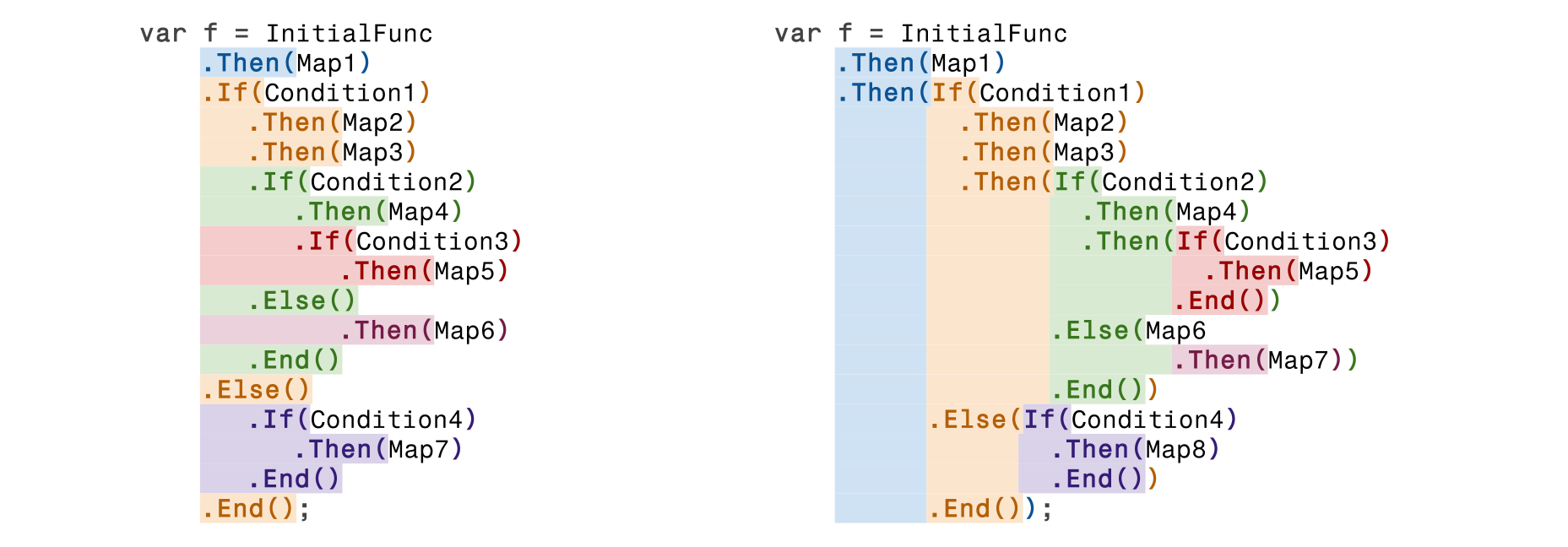
This aspect was the main feature and challenge of Elifir's realization because it required implementing a "family of types" that controls the type state at each point of expression.
For example, if you call 5 Ifs, you should close 5 Ends, no less, no more, in relevant places. And all this is under compiler control without any surprises in runtime.
Also, the library provides some custom "covariance" that helps to avoid a list of type conflicts.
Usings
The inclusion of the following directives is required to use the library.
using Nuisho.Elifir;
using static Nuisho.Elifir.Syntax;
Also, it is published as a NuGet Package on nuget.org and can be found by "Nuisho.Elifir"
Then
The simplest functional item of Elifir is the Then method, which essentially is functional composition.
Func<char, double> fromCharToDouble = ...
Func<double, string> fromDoubleToString = ...
Func<string, int> fromStringToInt = ...

Func<char, int> fromCharToInt =
     fromCharToDouble
        .Then(fromDoubleToString)
        .Then(fromStringToInt);
If Then End
The simplest form of a conditional expression is If-Then-End.
It begins with If, which takes a predicate as its argument.
It completes with End, which can be invoked only on an expression state where the types are appropriately matched.
Any number > 0 of Then calls can be included between these If and End.
Func<int, bool> IsEven = x => x % 2 == 0;

Func<int, int> f = ...
Func<int, int> g = ...
Func<int, int> h = ...

Func<int, int> p = If(IsEvent).Then(f).Then(g).Then(h).End();
The function p from the code snippet above returns the original value for odd arguments and the result of Then's functions applying to even arguments (h(g(f(x)))).
There are two ways to close an expression by End with the auto inference of return type and one with the manual explicit type specification.
The following image shows them.
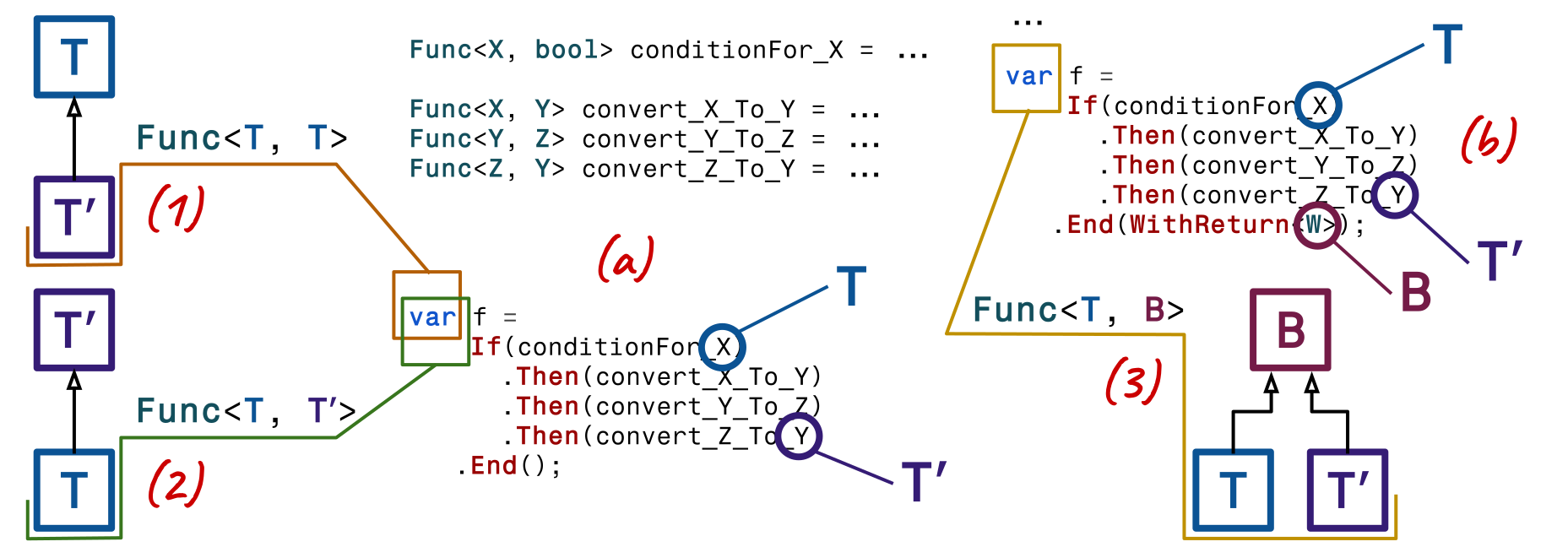
We can close the expression using one of the overloads of the End method without any additional parametersˣ, as shown in (a), under the following conditions:
- (1)
Tʹis a subtype ofT, orTʹandTare the same type. In this case, the resulting function has the typeT → T. - (2)
Tis a subtype ofTʹ. In this scenario, the resulting function has the typeT → Tʹ.
This concept is straightforward. Expression should return an original value of the original type T when the If condition is false.
Otherwise, it should return the transformed value with the resulting type Tʹ, which is the return type of the last function in the Then chain.
To unify these two types into a single, one of them must be a subtype of the other (or, naturally, they can be the same).
Additionally, there is another case where two types can be unified:
- (3) When there exists a type
Bthat serves as the base type for bothTandTʹ. In this case, the resulting function type isT → B.
However, it is not possible to automatically infer type B because it is not guaranteed to be unique (T and Tʹ can have more than one base type).
Accordingly, C# can't provide mechanisms to handle this scenario.
Therefore, the type B must be explicitly specified using the WithReturn<B> argument, as illustrated in example (b).
</br>
ˣ "End method without any additional parameters" means there is no need to pass explicit parameters for execution.
Technically, these methods can have at least one 'this parameter' since they can be implemented as extensions.
'Default parameters' are also possible. The following code snippet demonstrates the signatures of two methods with the same name,
where the second method includes an additional 'default parameter' to work around C#'s method overloading limitations (and it functions correctly).
public static Func<I, I> End<I, T>(
    this ˣ.If<I>.Then<T> o)
        where T : I
            { ... }

public static Func<I, T> End<I, T>(
    this ˣ.If<I>.Then<T> o,
    AdHocPolyMarker? _ = null)
        where I : T
            { ... }
If Then Else Then End
A similar situation arises with the additional Else branch.
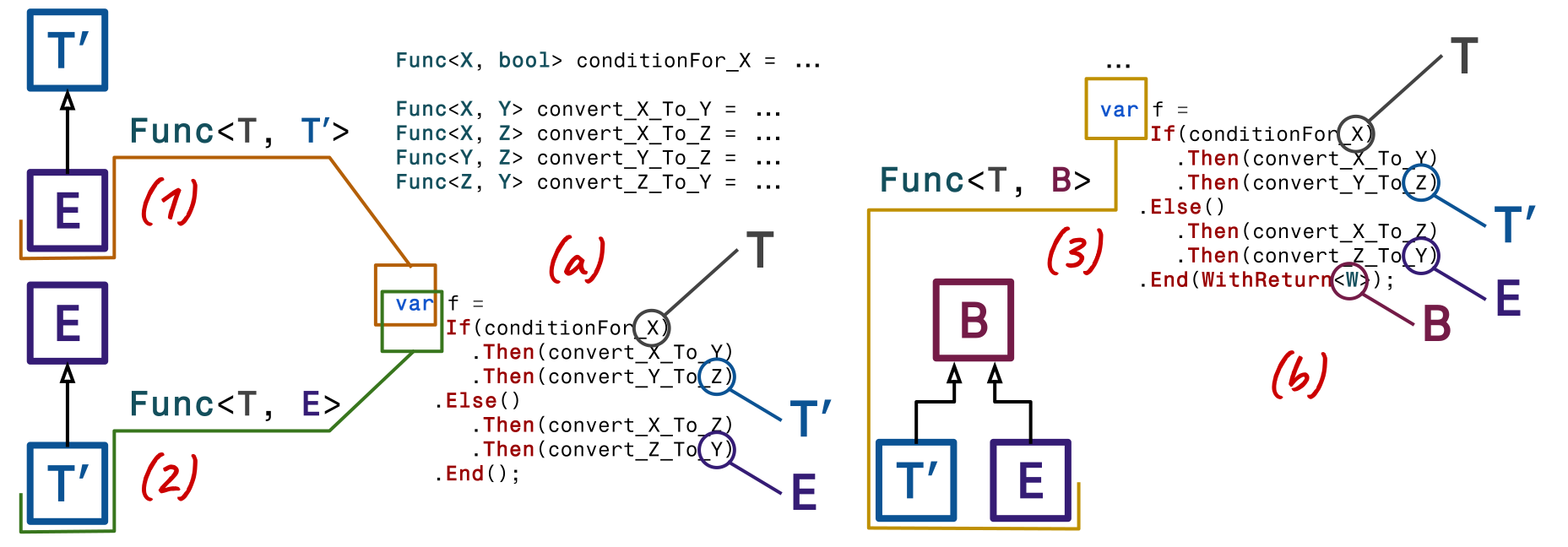
However, in this case, there are three key types involved: T (the input parameter type), Tʹ (the result type of the If branch), and E (the result type of the Else branch).
Thus, unification is required between Tʹ and E instead of T and Tʹ.
Induction
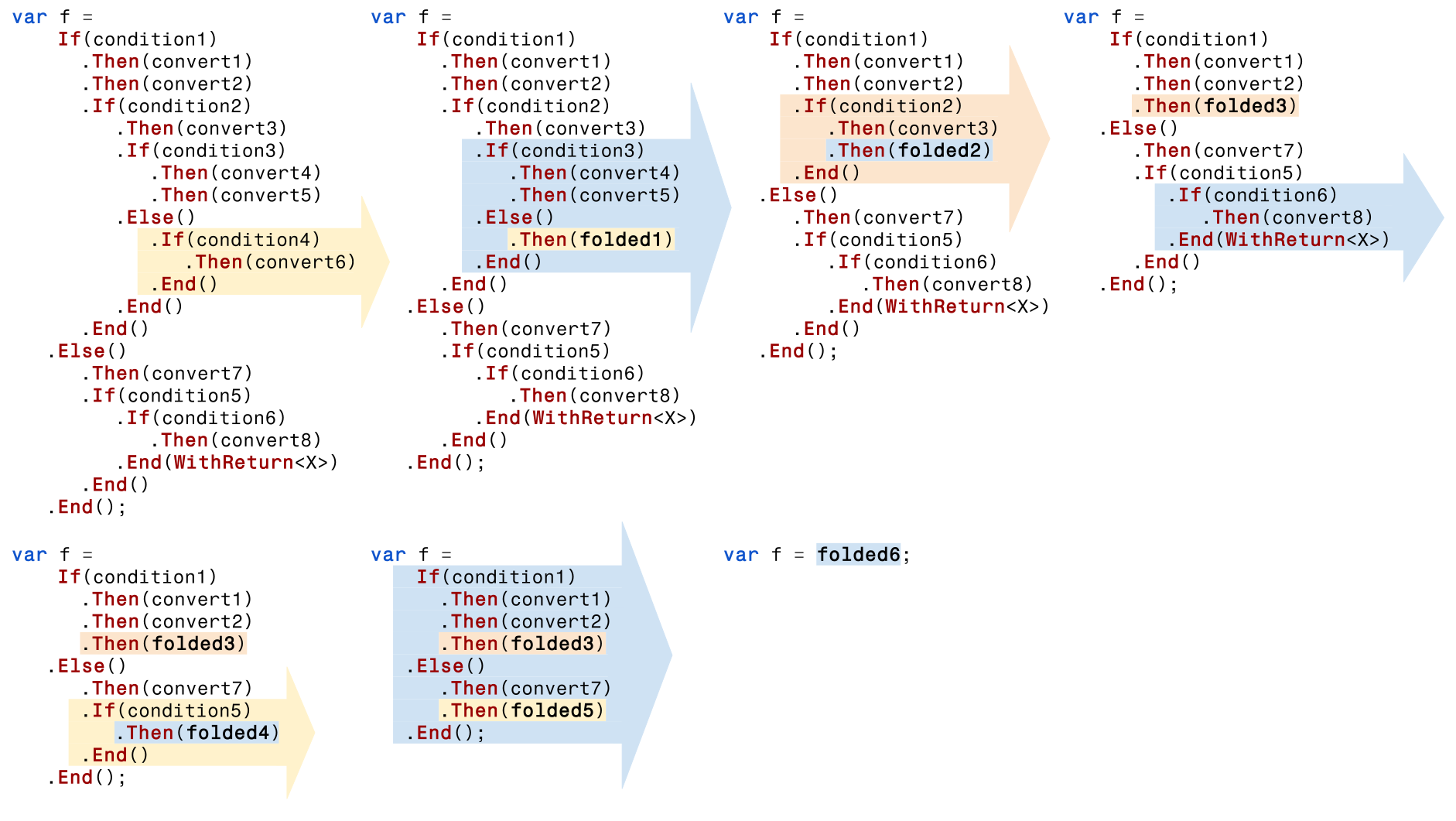
An If can be added to any part of the expression to extend it with a sub-expression.
Each sub-expression must be closed with End, adhering to the same rules outlined earlier for the top-level expression.
Every If must have a corresponding End, and all types within the expression must be harmonized to build the resulting function.
The following image illustrates the process of expression folding.
Type Condition
In addition to conventional conditions, Elifir provides sub-typing conditions.
That means we can check the type of object in the If and delegate it to the sub-expression cast to this type (while keeping the original type for the Else branch).
For example:
class A { ... }
class B : A { ... }
class C { ... }

Func<A, C> convert_A_To_C = ...
Func<B, C> convert_B_To_C = ...

var f =
    If(Object<A>.Is<B>)
      .Then(convert_B_To_C)
   .Else()
      .Then(convert_A_To_C)
   .End();
When the If is not the first in the expression and the previous type A is already known from the context, we should use Is<B> instead of Object<A>.Is<B> as shown below.
var f =
    convert_X_To_A
   .If(Is<B>)
      .Then(convert_B_To_A)
   .End();
AndIf
Also, it is possible to combine conditions with the AndIf method.
It works for both conventional and type conditions.
var f =
    If(Object<A>.Is<B>).AndIf(B_Is_Something)
      .Then(convert_B_To_C)
      .If(C_Is_Something).AndIf(Is<D>)
                         .AndIf(D_Is_Somthing)
                         .AndIf(Is<E>)
         .Then(convert_E_To_C)
      .End()
   .Else()
      .Then(convert_A_To_C)
   .End();
Types & Static Polymorphism
Elifir is implemented using static polymorphism rather than dynamic. As a result, almost every modification of a non-finalized expression generates a new type incompatible with the previous one. This is the main and a pretty cool library feature. But it has a dark side. You can use Elifir to construct functions. However, the direct use of any type from the library is not recommended. For this reason, the names of Elifir types include the symbol "İ", which is absent on the keyboard and private constructors.
The library is oriented to "var" using and doesn't support backward compatibility with types, but with expressions.
We can see Elifir types in action in the following code snippet.
                                       Func<A, B> _0 =
convert_A_To_B;                       (Func<A, B>, İf<B>) _1 = _0
.If(B_Is_Something);                  (Func<A, B>, İf<B>.Then<C>) _2 = _1
    .Then(convert_B_To_C);            (Func<A, B>, İf<B>.Then<D>) _3 = _2
    .Then(convert_C_To_D);           ((Func<A, B>, İf<B>.Then<D>), İf<D>.Is<E>) _4 = _3
    .If(Is<E>);                      ((Func<A, B>, İf<B>.Then<D>), İf<D>.Then<B>) _5 = _4
        .Then(convert_E_To_B);       ((Func<A, B>, İf<B>.Then<D>), İf<D>.Then<B>.Else) _6 = _5
    .Else();                         ((Func<A, B>, İf<B>.Then<D>), İf<D>.Then<B>.Else.Then<B>) _7 = _6
        .Then(convert_D_To_B);      (((Func<A, B>, İf<B>.Then<D>), İf<D>.Then<B>.Else.Then<B>), İf<B>) _8 = _7
        .If(B_Is_Something);        (((Func<A, B>, İf<B>.Then<D>), İf<D>.Then<B>.Else.Then<B>), İf<B>.Then<B>) _9 = _8
            .Then(convert_B_To_B);   ((Func<A, B>, İf<B>.Then<D>), İf<D>.Then<B>.Else.Then<B>) _10 = _9
        .End();                       (Func<A, B>, İf<B>.Then<B>) _11 = _10
    .End();                            Func<A, B> _12 = _11
.End();
Generics limitation
Each Elifir If in an expression increases the generic type level of nesting.
I am aware that the maximum nesting depth for generic types in C# is limited.
Based on forum discussions, this limit is estimated to be around 1000, but no precise documentation with the exact number exists.
To investigate further, I conducted some tests.
The first issue I encountered was that IntelliSense crashed Visual Studio.
To work around this, I continued writing nested If statements in Notepad and only compiled the code in Visual Studio without opening the file.
The next barrier was the error: "CS8078: An expression is too long or complex to compile.".
I resolved this by splitting the expression into portions connected through variables, allowing me to extend the testing expression to ten times its original length.
I expected some error that the type was out of the maximum nesting depth of the generic type.
Nothing like that happens, but StackOverflowException during compilation instead.
Also, I found out that when the expression has a compilation error (for example, extra End), it is enough to have a much smaller expression to have StackOverflowException.
It looks like it was caused during an error message building.
To sum up, the limitation of nesting in the generic type is about 1000, and still, there is no exact number.
However, comfortable work at 100 is impossible because of the long compilation time and VS's slowing down as an IDE.
| Product | Versions Compatible and additional computed target framework versions. |
|---|---|
| .NET | net9.0 is compatible. net9.0-android was computed. net9.0-browser was computed. net9.0-ios was computed. net9.0-maccatalyst was computed. net9.0-macos was computed. net9.0-tvos was computed. net9.0-windows was computed. net10.0 was computed. net10.0-android was computed. net10.0-browser was computed. net10.0-ios was computed. net10.0-maccatalyst was computed. net10.0-macos was computed. net10.0-tvos was computed. net10.0-windows was computed. |
-
net9.0
- No dependencies.
NuGet packages
This package is not used by any NuGet packages.
GitHub repositories
This package is not used by any popular GitHub repositories.