Nullean.VsTest.Pretty.TestLogger
0.11.0
dotnet add package Nullean.VsTest.Pretty.TestLogger --version 0.11.0
NuGet\Install-Package Nullean.VsTest.Pretty.TestLogger -Version 0.11.0
<PackageReference Include="Nullean.VsTest.Pretty.TestLogger" Version="0.11.0" />
<PackageVersion Include="Nullean.VsTest.Pretty.TestLogger" Version="0.11.0" />
<PackageReference Include="Nullean.VsTest.Pretty.TestLogger" />
paket add Nullean.VsTest.Pretty.TestLogger --version 0.11.0
#r "nuget: Nullean.VsTest.Pretty.TestLogger, 0.11.0"
#:package Nullean.VsTest.Pretty.TestLogger@0.11.0
#addin nuget:?package=Nullean.VsTest.Pretty.TestLogger&version=0.11.0
#tool nuget:?package=Nullean.VsTest.Pretty.TestLogger&version=0.11.0
Nullean.VsTest.Pretty.TestLogger

A VSTest logger for dotnet test that replaces the default console output: a coloured line for every failed, skipped or slow test, readable stack traces, every failure repeated at the end, and a summary.

Install
dotnet add package Nullean.VsTest.Pretty.TestLogger
Quick start
Reference it from the test project, as a build-time dependency only, and point the project at a .runsettings
file:
<ItemGroup>
  <PackageReference Include="Nullean.VsTest.Pretty.TestLogger" Version="*" PrivateAssets="All" />
</ItemGroup>
<PropertyGroup>
  <RunSettingsFilePath>$(MSBuildProjectDirectory)\.runsettings</RunSettingsFilePath>
</PropertyGroup>
In the .runsettings next to it, turn the console logger off and this one on:
<RunSettings>
  <LoggerRunSettings>
    <Loggers>
      <Logger friendlyName="Console" enabled="False" />
      <Logger friendlyName="pretty" enabled="True" />
    </Loggers>
  </LoggerRunSettings>
</RunSettings>
Or pick it for a single run: dotnet test --logger pretty. Works for F# test projects too.
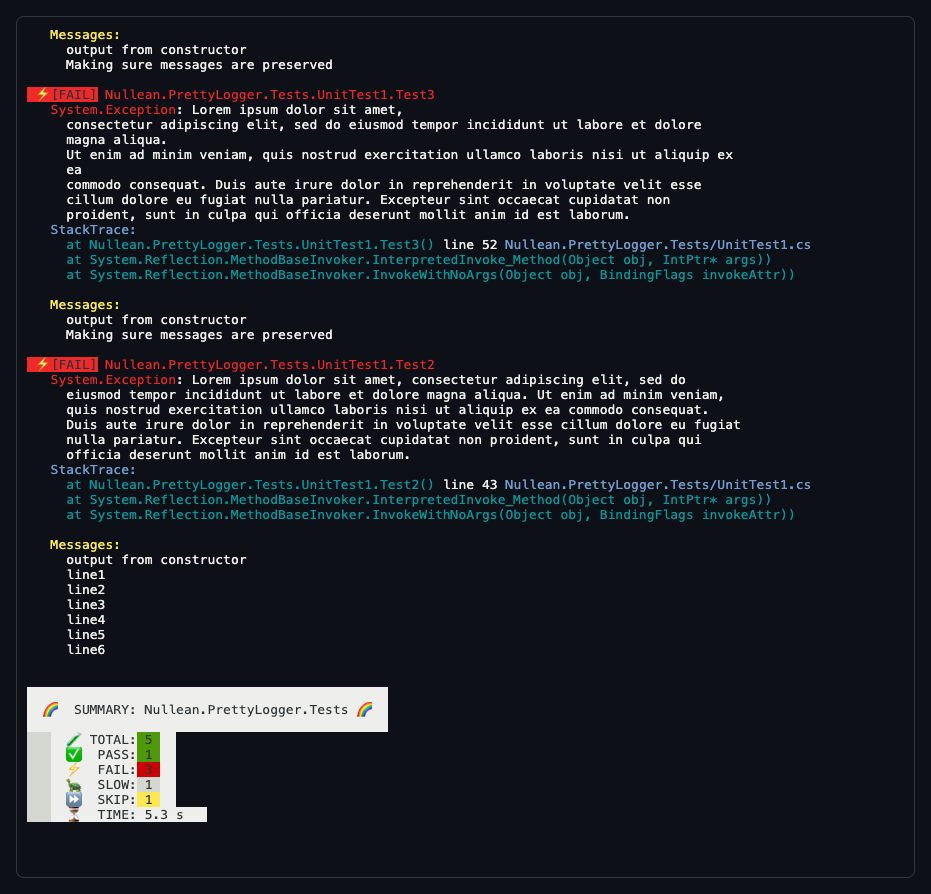
- Clear feedback during tests. Fast passing tests print no line; failed, skipped and slow tests (over two seconds, a fixed threshold) do.
- Readable stack traces, not a sea of red, with each test's output under its failure.
- Every failure repeated at the end, marked
[FAIL]so they are easy to grep, then a summary of passed, failed, slow and skipped tests. - VSTest only. It works with
dotnet teston VSTest (xUnit v2, NUnit, MSTest withMicrosoft.NET.Test.Sdk), not on Microsoft.Testing.Platform, which has no VSTest loggers. Other loggers can run next to it, such as--logger GitHubActions.
To hide the skipped tests of some namespaces, list their prefixes in a run parameter; they still count in the summary:
<TestRunParameters>
  <Parameter name="DisableFullSkipMessages" value="MyTests.Examples.;MyTests.Slow." />
</TestRunParameters>
Learn more
- Recordings: https://asciinema.org/a/363126 (this logger) and https://asciinema.org/a/363123 (
dotnet testout of the box) - Source and issues: https://github.com/nullean/vstest-pretty-logger
| Product | Versions Compatible and additional computed target framework versions. |
|---|---|
| .NET | net5.0 was computed. net5.0-windows was computed. net6.0 was computed. net6.0-android was computed. net6.0-ios was computed. net6.0-maccatalyst was computed. net6.0-macos was computed. net6.0-tvos was computed. net6.0-windows was computed. net7.0 was computed. net7.0-android was computed. net7.0-ios was computed. net7.0-maccatalyst was computed. net7.0-macos was computed. net7.0-tvos was computed. net7.0-windows was computed. net8.0 was computed. net8.0-android was computed. net8.0-browser was computed. net8.0-ios was computed. net8.0-maccatalyst was computed. net8.0-macos was computed. net8.0-tvos was computed. net8.0-windows was computed. net9.0 was computed. net9.0-android was computed. net9.0-browser was computed. net9.0-ios was computed. net9.0-maccatalyst was computed. net9.0-macos was computed. net9.0-tvos was computed. net9.0-windows was computed. net10.0 was computed. net10.0-android was computed. net10.0-browser was computed. net10.0-ios was computed. net10.0-maccatalyst was computed. net10.0-macos was computed. net10.0-tvos was computed. net10.0-windows was computed. |
| .NET Core | netcoreapp2.0 was computed. netcoreapp2.1 was computed. netcoreapp2.2 was computed. netcoreapp3.0 was computed. netcoreapp3.1 was computed. |
| .NET Standard | netstandard2.0 is compatible. netstandard2.1 was computed. |
| .NET Framework | net461 was computed. net462 was computed. net463 was computed. net47 was computed. net471 was computed. net472 was computed. net48 was computed. net481 was computed. |
| MonoAndroid | monoandroid was computed. |
| MonoMac | monomac was computed. |
| MonoTouch | monotouch was computed. |
| Tizen | tizen40 was computed. tizen60 was computed. |
| Xamarin.iOS | xamarinios was computed. |
| Xamarin.Mac | xamarinmac was computed. |
| Xamarin.TVOS | xamarintvos was computed. |
| Xamarin.WatchOS | xamarinwatchos was computed. |
-
.NETStandard 2.0
- Microsoft.TestPlatform.ObjectModel (>= 18.12.0)
NuGet packages
This package is not used by any NuGet packages.
GitHub repositories (3)
Showing the top 3 popular GitHub repositories that depend on Nullean.VsTest.Pretty.TestLogger:
| Repository | Stars |
|---|---|
|
elastic/elasticsearch-net
This strongly-typed, client library enables working with Elasticsearch. It is the official client maintained and supported by Elastic.
|
|
|
elastic/apm-agent-dotnet
|
|
|
opensearch-project/opensearch-net
OpenSearch .NET Client
|