OpenApiFeatureFlags 0.4.1
dotnet add package OpenApiFeatureFlags --version 0.4.1
NuGet\Install-Package OpenApiFeatureFlags -Version 0.4.1
<PackageReference Include="OpenApiFeatureFlags" Version="0.4.1" />
<PackageVersion Include="OpenApiFeatureFlags" Version="0.4.1" />
<PackageReference Include="OpenApiFeatureFlags" />
paket add OpenApiFeatureFlags --version 0.4.1
#r "nuget: OpenApiFeatureFlags, 0.4.1"
#:package OpenApiFeatureFlags@0.4.1
#addin nuget:?package=OpenApiFeatureFlags&version=0.4.1
#tool nuget:?package=OpenApiFeatureFlags&version=0.4.1

OpenApiFeatureFlags
Feature flags for Swagger and OpenAPI documents.


Mark the endpoint, action, property or parameter with [OpenApiFeatureFlag] and it only appears in
the generated document once the flag is enabled by the same flags the runtime already reads.
[OpenApiFeatureFlag("NewCheckout")]
[HttpPost("checkout")]
public IActionResult Checkout() => Ok();
With NewCheckout off, /api/orders/checkout is not in the generated document. With it on, it
is. No restart, no rebuild, no conditional compilation.
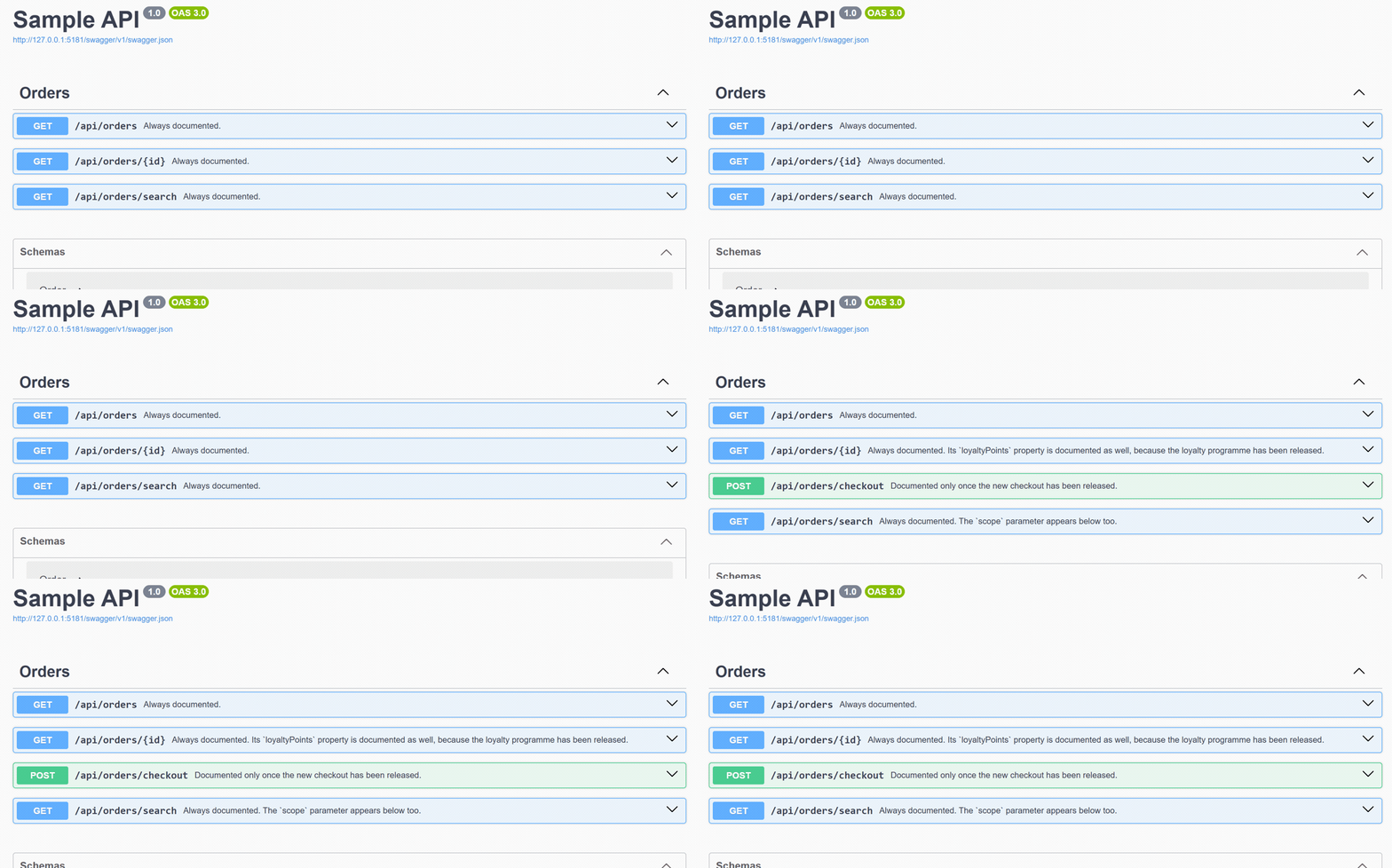
The running sample with the flags off and on: the checkout operation appears without a restart.
Multi-targets net8.0, net9.0 and net10.0. All three document engines are supported: Swashbuckle,
the built-in Microsoft.AspNetCore.OpenApi (through a net10.0-only package) and NSwag. FastEndpoints
endpoints are covered by the built-in-engine adapter. Flags can come from Microsoft.FeatureManagement,
the CNCF OpenFeature standard, or your own IFeatureFlagSource.
At a glance
- Engines: Swashbuckle, the built-in
Microsoft.AspNetCore.OpenApi(net10.0only) and NSwag; FastEndpoints v8.2 or later through the built-in engine. - Flag sources: Microsoft.FeatureManagement, the CNCF OpenFeature standard, or any
IFeatureFlagSource. - Modes:
Remove(default),Annotate,Include. - Guarantees: fail closed, and fail loudly: rather than publish a document that silently lost every gated endpoint, the library throws.
- Build-time safety: a companion analyzer package reports the silent authoring traps (
docs/analyzers.md). - Eight packages, one version, MIT.
The problem this solves
A document is generated from the code, so it describes every endpoint the code declares. A feature toggle only gates runtime behaviour. The result is customers reading documented API surface they cannot use, and, once the document is published, a support conversation about an endpoint that "exists" but does not work.
Installation
dotnet add package OpenApiFeatureFlags.Swashbuckle
dotnet add package OpenApiFeatureFlags.FeatureManagement
That is the whole install for a Swashbuckle API reading flags through Microsoft's feature management:
OpenApiFeatureFlags and OpenApiFeatureFlags.Abstractions arrive as dependencies. Swap the first
line for OpenApiFeatureFlags.AspNetCore or OpenApiFeatureFlags.NSwag if that is the document
engine you use, swap the second line for OpenApiFeatureFlags.OpenFeature to read flags through the
CNCF OpenFeature standard, or leave it out if you are implementing IFeatureFlagSource yourself.
| Package | What it is for |
|---|---|
OpenApiFeatureFlags |
Core: the planner and the service registration. |
OpenApiFeatureFlags.Swashbuckle |
Swashbuckle filter set. Add this if you use AddSwaggerGen. |
OpenApiFeatureFlags.AspNetCore |
Transformer set for the built-in Microsoft.AspNetCore.OpenApi. Add this if you use AddOpenApi. net10.0 only. |
OpenApiFeatureFlags.NSwag |
Processor set for NSwag's generator. Add this if you use AddOpenApiDocument. |
OpenApiFeatureFlags.Analyzers |
Roslyn analyzers that report the family's silent traps at build time. Optional; install it next to the adapter you use. |
OpenApiFeatureFlags.FeatureManagement |
Reads flags from Microsoft's IFeatureManager. |
OpenApiFeatureFlags.OpenFeature |
Reads flags through the CNCF OpenFeature standard. |
OpenApiFeatureFlags.Abstractions |
Attribute and contracts only. Reference this from assemblies that must not take a dependency on Swashbuckle or a flag library. |
All eight packages ship in lockstep: one version for all of them, set once in Directory.Build.props and checked by CI on every change.
Build-time safety is optional and separate: OpenApiFeatureFlags.Analyzers reports the mistakes
that would otherwise fail silently, from an unescaped <gate> under NSwag to an attribute on a
FastEndpoints endpoint. See docs/analyzers.md.
Quickstart
1. Register the services
builder.Services.AddOpenApiFeatureFlagsWithFeatureManagement();

builder.Services.AddSwaggerGen(options =>
{
    options.SwaggerDoc("v1", new OpenApiInfo { Title = "My API", Version = "1.0" });

    // Register this LAST. See "Filter ordering" below.
    options.AddOpenApiFeatureFlagFilters();
});
That is the Swashbuckle flavour. Only the engine line changes with the document engine:
| Engine | The line that changes |
|---|---|
| Swashbuckle | options.AddOpenApiFeatureFlagFilters() inside AddSwaggerGen |
Built-in Microsoft.AspNetCore.OpenApi |
options.AddOpenApiFeatureFlagTransformers() inside AddOpenApi |
| NSwag | settings.AddOpenApiFeatureFlagProcessors(services) inside the two-argument AddOpenApiDocument |
Each engine has a runnable sample and a guide: see the samples,
docs/aspnetcore.md
and docs/nswag.md.
AddOpenApiFeatureFlagsWithFeatureManagement() is one call that registers your existing
Microsoft.FeatureManagement setup and points OpenApiFeatureFlags at it. Already using feature
management? Chain instead:
builder.Services
    .AddOpenApiFeatureFlags(options => options.Mode = DocumentMode.Annotate)
    .AddFeatureManagementFlagSource();
Bringing your own flag store? Implement one interface and register it:
public sealed class MyFlagSource(IMyToggleStore store) : IFeatureFlagSource
{
    public bool IsEnabled(string flagName) => store.IsOn(flagName);
}

builder.Services.AddOpenApiFeatureFlags(new MyFlagSource(store));
Azure App Configuration needs no adapter of its own. It is a configuration source that feeds
Microsoft.FeatureManagement, and OpenApiFeatureFlags.FeatureManagement reads through
IFeatureManager, so the wiring above is the whole integration, plus the three lines that add the
store. See docs/azure-app-configuration.md.
2. Mark what is gated
[ApiController]
[Route("api/orders")]
public sealed class OrdersController : ControllerBase
{
    [HttpGet("{id}")]
    public Order Get(string id) => _orders.Find(id);

    [OpenApiFeatureFlag("NewCheckout")]                  // gates this operation
    [HttpPost("checkout")]
    public IActionResult Checkout() => Ok();

    [HttpGet("search")]
    public IActionResult Search(
        [OpenApiFeatureFlag("InternalSearch")] string? scope) => Ok();   // gates one parameter
}

public sealed class Order
{
    public string? Id { get; set; }

    [OpenApiFeatureFlag("LoyaltyProgram")]               // gates one response property
    public int LoyaltyPoints { get; set; }
}
The attribute works on a controller, an action, a model property or a parameter. Two attributes on one target are ANDed: the element is documented only when every flag is enabled.
Doc comments become descriptions, and you cannot put an attribute on half a sentence. Wrap gated
prose in <gate> instead:
/// <summary>
/// The order total.
/// <gate flag="LoyaltyProgram">Points are shown in <c>loyaltyPoints</c>.</gate>
/// </summary>
public decimal Total { get; set; }
3. Done
Nothing else. The document is regenerated on every request, so flipping a flag changes the published document without a restart.
Modes
| Mode | Behaviour |
|---|---|
Remove (default) |
Gated elements are hidden (removed from the document). |
Annotate |
Gated elements stay, tagged with x-feature-flag, so a portal can filter them. |
Include |
The library does nothing; the full document is published. |
Annotatepublishes your flag names, on each gated operation and as a document-level list. On a document that anyone can read, that discloses which features exist, including ones you have not released. Use it for internal or authenticated audiences; useRemovefor public documents. Seedocs/security.md.
See docs/modes.md for output samples.
What this library does not do
It never changes runtime behaviour. Hiding an operation from the document leaves the endpoint routeable; hiding a property leaves it serialised. A documentation decision must not silently become a behaviour change, and this is the one rule the design refuses to bend. Runtime gating stays in your application code.
So do not use it to protect an endpoint. Gating makes unreleased surface less discoverable; it is
not an access control, and it cannot unpublish a document that has already been served. Authentication
and authorization belong where they always did. docs/security.md sets out what
this library does and does not do to your security posture, including its availability trade-offs.
Guarantees
- Fail closed. If a flag cannot be resolved, the element is hidden rather than leaked.
- Fail loudly instead of quietly deleting. Failing closed is only safe while your flag store
answers. If a document contains gated elements and no flag could be read, the library throws
FeatureFlagSourceUnavailableExceptionrather than publishing a document that is silently missing released endpoints. Turn it off withCanaryEnabled = falseif you accept that risk. - Invisible when unused. With no attributes applied, the produced document is byte-identical to one generated without the library. There is a regression test that asserts exactly this.
Filter ordering
Swashbuckle applies filters in registration order, and this matters:
- Call
AddOpenApiFeatureFlagFilters()after your own filters and document processors. A processor that clears and rebuildsPathswould otherwise put removed operations back, and one that rebuildsTagswould put removed tags back.
The registration order inside AddOpenApiFeatureFlagFilters is deliberate and documented in the
method's XML docs.
FAQ
How do I hide an endpoint from Swagger when a feature flag is off?
Put [OpenApiFeatureFlag("FlagName")] on the controller or the action, register the library next to
your document engine, and the operation leaves the generated document while the flag is off and
returns when it is on. The Quickstart above is the whole setup.
How do I exclude just one property or parameter?
The same attribute goes on the model property or the action parameter. One boundary: under the
built-in engine a minimal API's parameter cannot be gated (the engine offers no removal path for it);
under NSwag it can, because the delegate is present as a MethodInfo.
Does this change runtime behaviour? No, and that is a design rule. Hiding an operation from the document leaves the endpoint routeable; hiding a property leaves it serialised. Runtime gating stays in your application code.
How do I gate part of a description sentence?
Doc comments become descriptions, and an attribute cannot sit on half a sentence, so wrap the prose
in <gate flag="X">...</gate>. Under NSwag write it escaped (<gate flag="X">...) because the
reader flattens element markup; the analyzers catch a missed escape at build time.
What happens if the flag store cannot be read?
The library fails closed (a flag that cannot be evaluated hides the element), and it fails loudly: if
a document contains gated elements and no flag could be read, it throws
FeatureFlagSourceUnavailableException instead of silently dropping released endpoints. Turn the
exception off with CanaryEnabled = false if you accept that risk.
Can it protect an endpoint from being called? No. Document gating is not access control; see What this library does not do.
Which .NET versions work?
The library targets net8.0, net9.0 and net10.0. The built-in-engine adapter (and with it
FastEndpoints support) is net10.0 only.
How is this different from writing my own IOperationFilter?
For one static rule, write the filter. This library is for the whole problem: one attribute with the
same semantics across three engines, three modes, gating for operations, parameters, schema
properties and prose, fail-closed evaluation, a planning layer with logging, and analyzers that
catch the silent authoring mistakes.
Documentation
docs/trying-locally.md: build the packages from source into a local feed, for trying a change before it is released.docs/modes.md: what each mode produces.docs/aspnetcore.md: theMicrosoft.AspNetCore.OpenApiadapter: wiring, what a minimal API can and cannot gate, and why the package isnet10.0only.docs/nswag.md: the NSwag adapter: wiring, what a minimal API can gate here that it cannot there, and the measured processor model behind it.docs/fastendpoints.md: using the built-in-engine adapter with FastEndpoints v8.2 or later, and the two boundaries that were measured.docs/analyzers.md: the build-time analyzer package: the ID scheme, every rule, and how to set severities.docs/descriptions.md: gating part of a description with<gate>, and the one thing it cannot do.docs/azure-app-configuration.md: reading flags from Azure App Configuration, and the four ways that can go quietly wrong.docs/troubleshooting.md: nothing is hidden, or too much is.docs/security.md: what gating does and does not protect, whatAnnotatediscloses, and the availability trade-offs.samples/OpenApiFeatureFlags.Sample: a runnable API, its document served by Swashbuckle.samples/OpenApiFeatureFlags.AspNetCore.Sample: the same API through the built-inMicrosoft.AspNetCore.OpenApiengine.samples/OpenApiFeatureFlags.NSwag.Sample: the same API through NSwag, including a gated minimal-API parameter.docs/design.md: why it is built this way, the decisions behind it, and the measurements those decisions rest on.
Project
CONTRIBUTING.md: build and test commands, and the two rules a pull request is most likely to trip over.SECURITY.md: how to report a vulnerability privately. Please do not open a public issue for one.CODE_OF_CONDUCT.md: how people are expected to treat each other here.CHANGELOG.md: what changed, and when.llms.txt: a compact machine-readable summary for AI assistants and answer engines.
Author
Dogukan Demir (@dogukandemir)
Licence
MIT.
| Product | Versions Compatible and additional computed target framework versions. |
|---|---|
| .NET | net8.0 is compatible. net8.0-android was computed. net8.0-browser was computed. net8.0-ios was computed. net8.0-maccatalyst was computed. net8.0-macos was computed. net8.0-tvos was computed. net8.0-windows was computed. net9.0 is compatible. net9.0-android was computed. net9.0-browser was computed. net9.0-ios was computed. net9.0-maccatalyst was computed. net9.0-macos was computed. net9.0-tvos was computed. net9.0-windows was computed. net10.0 is compatible. net10.0-android was computed. net10.0-browser was computed. net10.0-ios was computed. net10.0-maccatalyst was computed. net10.0-macos was computed. net10.0-tvos was computed. net10.0-windows was computed. |
-
net10.0
- OpenApiFeatureFlags.Abstractions (>= 0.4.1)
-
net8.0
- OpenApiFeatureFlags.Abstractions (>= 0.4.1)
-
net9.0
- OpenApiFeatureFlags.Abstractions (>= 0.4.1)
NuGet packages (5)
Showing the top 5 NuGet packages that depend on OpenApiFeatureFlags:
| Package | Downloads |
|---|---|
|
OpenApiFeatureFlags.OpenFeature
OpenFeature flag source for OpenApiFeatureFlags: reads flags through the CNCF vendor-neutral standard instead of a vendor SDK. |
|
|
OpenApiFeatureFlags.Swashbuckle
Swashbuckle adapter for OpenApiFeatureFlags: hides gated operations, parameters and schema properties from the generated Swagger/OpenAPI document while their feature flag is off. |
|
|
OpenApiFeatureFlags.FeatureManagement
Microsoft.FeatureManagement flag source for OpenApiFeatureFlags: point the library at your existing IFeatureManager and one call wires the whole thing up. |
|
|
OpenApiFeatureFlags.AspNetCore
Adapter for OpenApiFeatureFlags for the built-in Microsoft.AspNetCore.OpenApi document engine: hides gated operations, parameters and schema properties from the generated document while their feature flag is off. |
|
|
OpenApiFeatureFlags.NSwag
NSwag adapter for OpenApiFeatureFlags: hides gated operations, parameters and schema properties from the generated Swagger/OpenAPI document while their feature flag is off. |
GitHub repositories
This package is not used by any popular GitHub repositories.