OpsToolkit.Hangfire.JobControl
0.9.1
dotnet add package OpsToolkit.Hangfire.JobControl --version 0.9.1
NuGet\Install-Package OpsToolkit.Hangfire.JobControl -Version 0.9.1
<PackageReference Include="OpsToolkit.Hangfire.JobControl" Version="0.9.1" />
<PackageVersion Include="OpsToolkit.Hangfire.JobControl" Version="0.9.1" />
<PackageReference Include="OpsToolkit.Hangfire.JobControl" />
paket add OpsToolkit.Hangfire.JobControl --version 0.9.1
#r "nuget: OpsToolkit.Hangfire.JobControl, 0.9.1"
#:package OpsToolkit.Hangfire.JobControl@0.9.1
#addin nuget:?package=OpsToolkit.Hangfire.JobControl&version=0.9.1
#tool nuget:?package=OpsToolkit.Hangfire.JobControl&version=0.9.1
OpsToolkit.Hangfire
Hangfire provides the scheduling and execution engine, together with basic operational controls. OpsToolkit.Hangfire adds the durable governance, runtime control, and long-running-job supervision needed for business-critical production workflows.
When jobs carry operational, financial, or customer impact, teams need more than queue visibility and manual action buttons. They need changes that survive deployments, a record of who intervened and why, and evidence that a long-running job is still making progress.
Install
dotnet add package OpsToolkit.Hangfire.JobControl
View OpsToolkit.Hangfire.JobControl on NuGet.org.
Quick start
var jobControl = new JobControlOptions();

builder.Services.AddHangfire(configuration => configuration
    .UsePostgreSqlStorage(/* ... */)
    .UseJobControl(jobControl));

builder.Services.AddJobControlStallDetector(jobControl); // optional: [Heartbeat] stall detection

app.MapJobControl(
    viewPolicy: "CanViewJobs",
    managePolicy: "CanManageJobs",
    apiBase: "/hangfire/api",
    options: jobControl,
    actorProvider: context =>
        context.User.FindFirst("email")?.Value ?? "unknown");
UseJobControl() installs the server-side enforcement filters. MapJobControl() maps the recurring
and run APIs plus both operator UIs. AddJobControlStallDetector() monitors [Heartbeat] jobs for
stalled progress. Pass the same options to each registration.
Schedule and parameter overrides require recurring jobs to be declared through a
RecurringJobRegistrar:
var registrar = new RecurringJobRegistrar();
var jobControl = new JobControlOptions { Registrar = registrar };

registrar.Register<ReportingJobs>("nightly-report", x => x.Run(), Cron.Daily());
registrar.Apply(JobStorage.Current, jobControl);
Without a registrar, all other capabilities remain available; the override and invoke endpoints return 501 and their UI controls are hidden. See Recurring Jobs control for rollout and reconciliation guidance.
apiBase is the shared API root: recurring-job endpoints are under {apiBase}/recurring and run
endpoints under {apiBase}/runs. The default pages are:
/hangfire/job-control/recurring— recurring-job controls and history/hangfire/job-control/runs— run monitoring, details, and actions/hangfire/job-control— redirect to the recurring-jobs page
The view authorization policy protects reads and both UIs. The manage policy protects every mutation.
The enterprise operations gap
| Enterprise need | Native Hangfire behavior | What OpsToolkit adds |
|---|---|---|
| Accountable intervention | Dashboard actions do not produce an operator audit trail that records who acted, why, and what happened | Records every OpsToolkit intervention with its actor, reason, and outcome |
| Durable job suspension | A recurring job deleted in the Dashboard is recreated when application code calls RecurringJob.AddOrUpdate again |
Stores disable state that survives registration, restarts, and deployments |
| Long-running job supervision | A server heartbeat proves that a worker is alive, not that an individual job is making progress; job-level heartbeat and stall detection are not built in | Adds job heartbeat, progress reporting, stall detection, mid-flight cancellation, and cancellation acknowledgment |
| Runtime configuration | The Dashboard cannot durably override cron schedules or parameter values; code registration remains authoritative | Stores validated cron and parameter overrides, with reset and reconciliation |
The first module, OpsToolkit.Hangfire.JobControl, provides these controls through two embedded operator UIs. Both UIs ship with the package and require no frontend build.
What it provides
1. Audit trail for operator intervention
Every OpsToolkit intervention records its UTC timestamp, actor, action, job, reason, outcome, and relevant details. Entries are retained in Hangfire storage up to a configurable count, with no toolkit schema or cleanup job. Expected-state checks and per-job locks reject stale or concurrent actions.
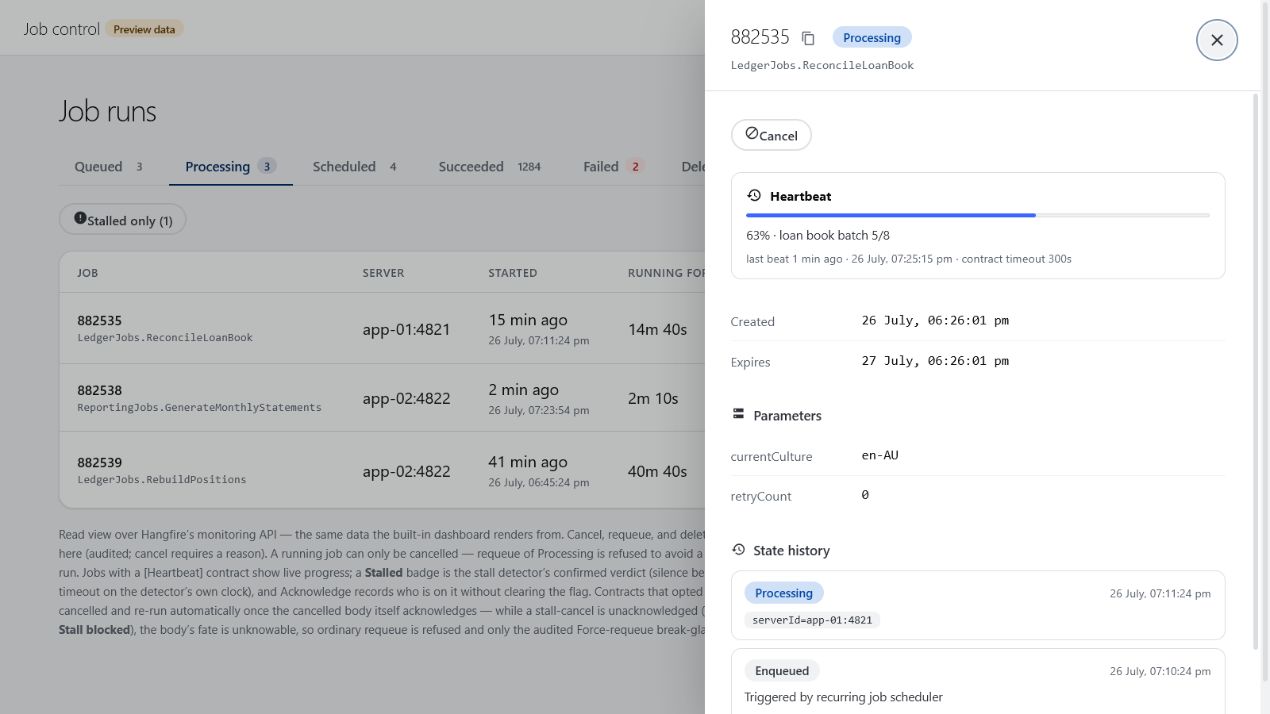
2. Long-running job support
Add [Heartbeat] to a long-running job and call context.Beat() after real work completes. The Job
Runs UI displays heartbeat and progress data, while the stall detector flags stopped progress.
Operators can cancel jobs in any active state; processing jobs must observe a CancellationToken or
IJobCancellationToken. Retry-on-stall is opt-in and governed by a per-job budget.
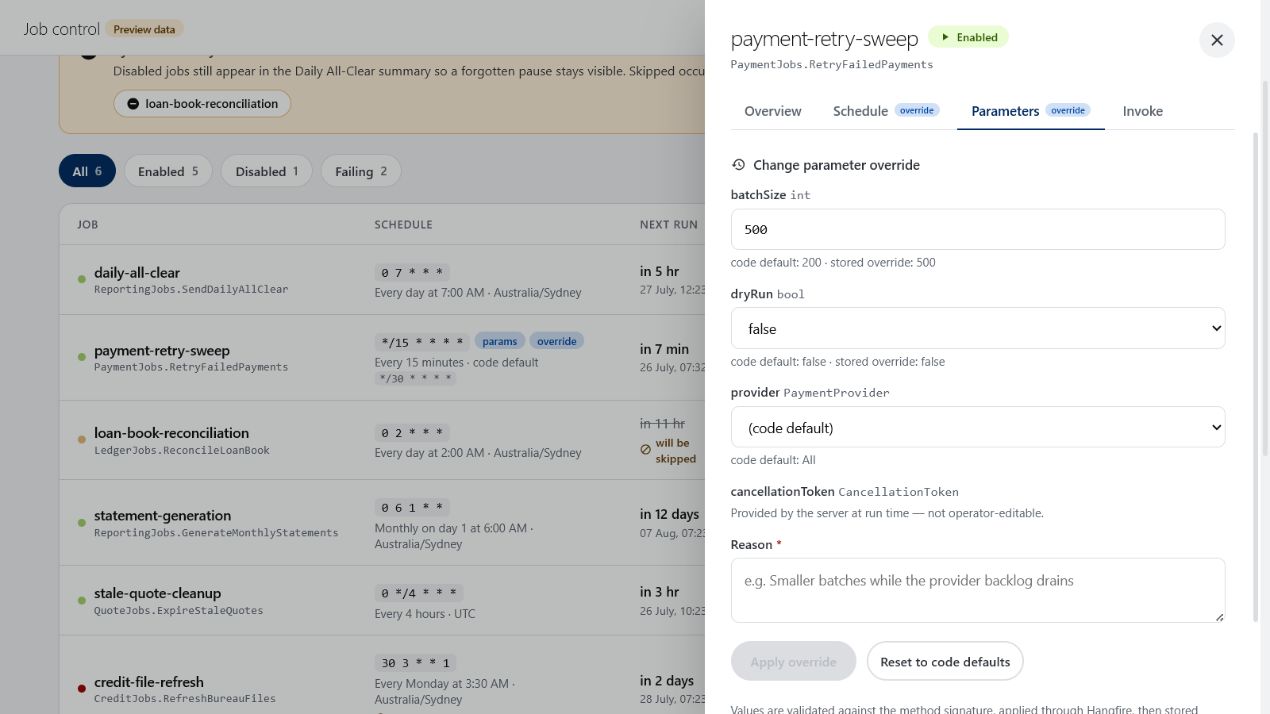
3. Persisted runtime parameter and cron overrides
Operators can change recurring-job parameters or cron schedules without deploying code. Overrides
are validated against the deployed job definition, stored in Hangfire, and applied as
operator override ?? code default. Operators can reset either override independently, reconcile
defaults on demand, or invoke a one-off run with edited values.
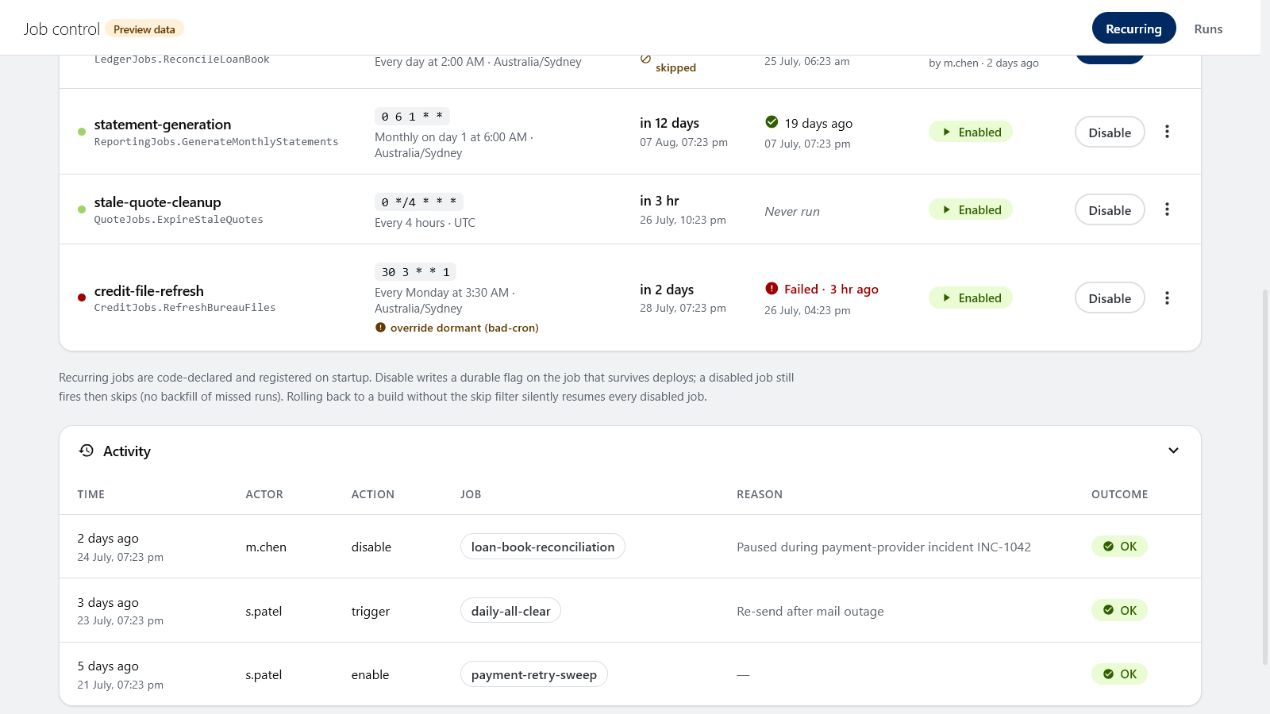
4. Persisted disable
Disabling a recurring job requires a reason and persists across restarts and
RecurringJob.AddOrUpdate. It does not stop a run already in progress or backfill skipped
occurrences when re-enabled. Use Job Runs to cancel active work; manual invoke remains available as
the explicit force-run path.
Configuration
var options = new JobControlOptions
{
    AuditMaxEntries = 10_000,
    AuditDefaultReadLimit = 200,
    RunsDefaultPageSize = 50,
};
JobControlOptions can be shared by web and worker hosts. Configure actor extraction through the
endpoint mappers' actorProvider parameter; it defaults to
HttpContext.User.Identity?.Name ?? "unknown".
OpsToolkit state lives in Hangfire storage, so hosts need no toolkit schema or migration. Processing
job cancellation is cooperative: the job must observe a CancellationToken or
IJobCancellationToken. Otherwise, it may complete after Hangfire moves it to Deleted, which
OpsToolkit records as completed-anyway.
Use Hangfire Dashboard in read-only mode
OpsToolkit governance applies only to mutations made through its APIs. In governed deployments, map Hangfire's native Dashboard as read-only so its delete and requeue actions cannot bypass required reasons, audit records, locking, and cancellation acknowledgment:
app.MapHangfireDashboard("/hangfire", new DashboardOptions
{
    Authorization = new[] { new HostDashboardAuthorizationFilter() },
    IsReadOnlyFunc = _ => true,
});
Read-only mode is not a security boundary. Application code, other services, and storage administrators can still mutate Hangfire state directly; every writer sharing the storage must follow the same governance protocol.
Split deployments
In a web/worker split, integrate OpsToolkit in both processes against the same Hangfire storage:
| Process | Package | Required setup |
|---|---|---|
| Web host | OpsToolkit.Hangfire.JobControl |
AddHangfire(...) and MapJobControl(...) |
| Every worker | OpsToolkit.Hangfire.JobControl.Core |
UseJobControl(options) and, when enabled, AddJobControlStallDetector(options) |
Use the same JobControlOptions values in both processes. Put recurring-job declarations in a
shared assembly and run registrar.Apply(...) once, normally in the worker whose code defaults are
authoritative.
Feature documentation
- Operator audit trail
- Long-running job liveness: heartbeat, progress, stall detection, and governed retry
- Job Runs dashboard and cancellation
- Recurring Jobs control
- Liveness design: the two-layer model, the retry state machine, and rejected alternatives
Run the demo
cd tests/OpsToolkit.Hangfire.Host
docker compose -f docker-compose.postgres.yaml up -d
dotnet run
Open the built-in Hangfire dashboard or either toolkit page at the address printed by the host.
License
MIT - see LICENSE.
| Product | Versions Compatible and additional computed target framework versions. |
|---|---|
| .NET | net8.0 is compatible. net8.0-android was computed. net8.0-browser was computed. net8.0-ios was computed. net8.0-maccatalyst was computed. net8.0-macos was computed. net8.0-tvos was computed. net8.0-windows was computed. net9.0 was computed. net9.0-android was computed. net9.0-browser was computed. net9.0-ios was computed. net9.0-maccatalyst was computed. net9.0-macos was computed. net9.0-tvos was computed. net9.0-windows was computed. net10.0 was computed. net10.0-android was computed. net10.0-browser was computed. net10.0-ios was computed. net10.0-maccatalyst was computed. net10.0-macos was computed. net10.0-tvos was computed. net10.0-windows was computed. |
-
net8.0
- OpsToolkit.Hangfire.JobControl.Core (>= 0.9.1)
NuGet packages
This package is not used by any NuGet packages.
GitHub repositories
This package is not used by any popular GitHub repositories.