Pages.Reporting
0.2.1
dotnet add package Pages.Reporting --version 0.2.1
NuGet\Install-Package Pages.Reporting -Version 0.2.1
<PackageReference Include="Pages.Reporting" Version="0.2.1" />
<PackageVersion Include="Pages.Reporting" Version="0.2.1" />
<PackageReference Include="Pages.Reporting" />
paket add Pages.Reporting --version 0.2.1
#r "nuget: Pages.Reporting, 0.2.1"
#:package Pages.Reporting@0.2.1
#addin nuget:?package=Pages.Reporting&version=0.2.1
#tool nuget:?package=Pages.Reporting&version=0.2.1

Pages.Reporting


A .NET 10 component library for reporting. A report is defined once as a single self-contained JSON document and can then be rendered two ways from that same JSON:
- On screen - Blazor components rendering exactly what the PDF will show (static bordered tables, SVG charts).
- As a file - PDF or Excel returned as
byte[].
The PDF can look exactly like the screen because it is the same thing: the identical Blazor components are rendered to HTML and printed with headless Chromium, using whatever CSS you supply.
The library ships zero report styling. Components render semantic markup with stable
pr-* class names; you style them entirely with your own CSS.
Reports are built in a drag-and-drop designer - or in C# - and you store the JSON wherever you like. The library persists nothing.
Everything ships in one package, Pages.Reporting, covering four areas:
| Area | What it is |
|---|---|
| Model | Report model, JSON contract, encryption, data resolution, SVG charts |
| View | <ReportView> + element components (unstyled) |
| Designer | Drag-and-drop <ReportDesigner> component |
| Export | PdfReportExporter (Playwright/Chromium) and ExcelReportExporter (ClosedXML) |
It is a server-side library - it carries ADO.NET drivers and Playwright, so it runs on Blazor Server or the server half of a Blazor Web App, not in WebAssembly.
What it looks like
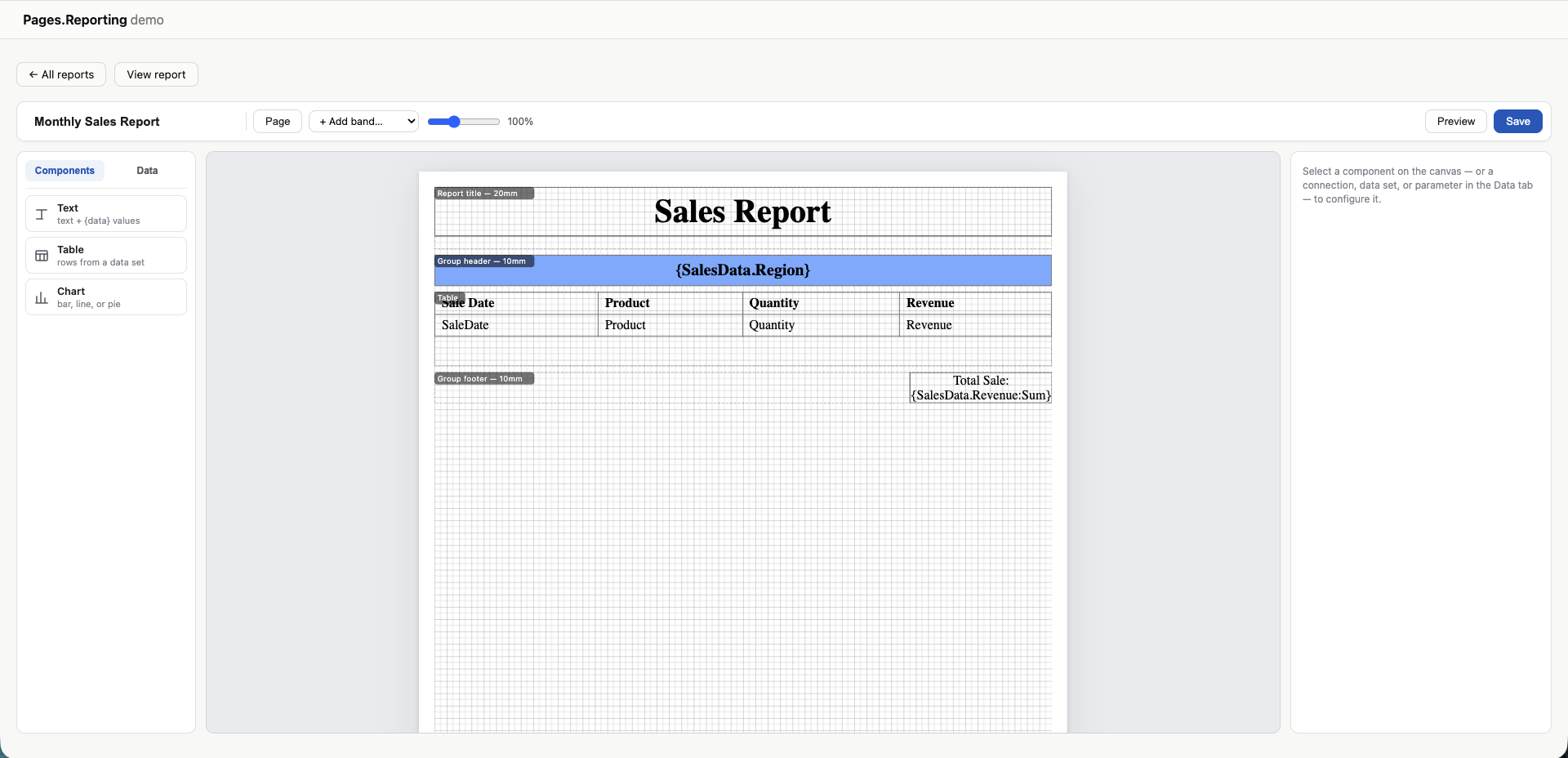
The designer. Components on the left, the band canvas in the middle, properties on the right.
Each band is labelled with its height, and {dataSet.Column} expressions sit where their values
will land - here a group header on {SalesData.Region} and a footer totalling
{SalesData.Revenue:Sum}.
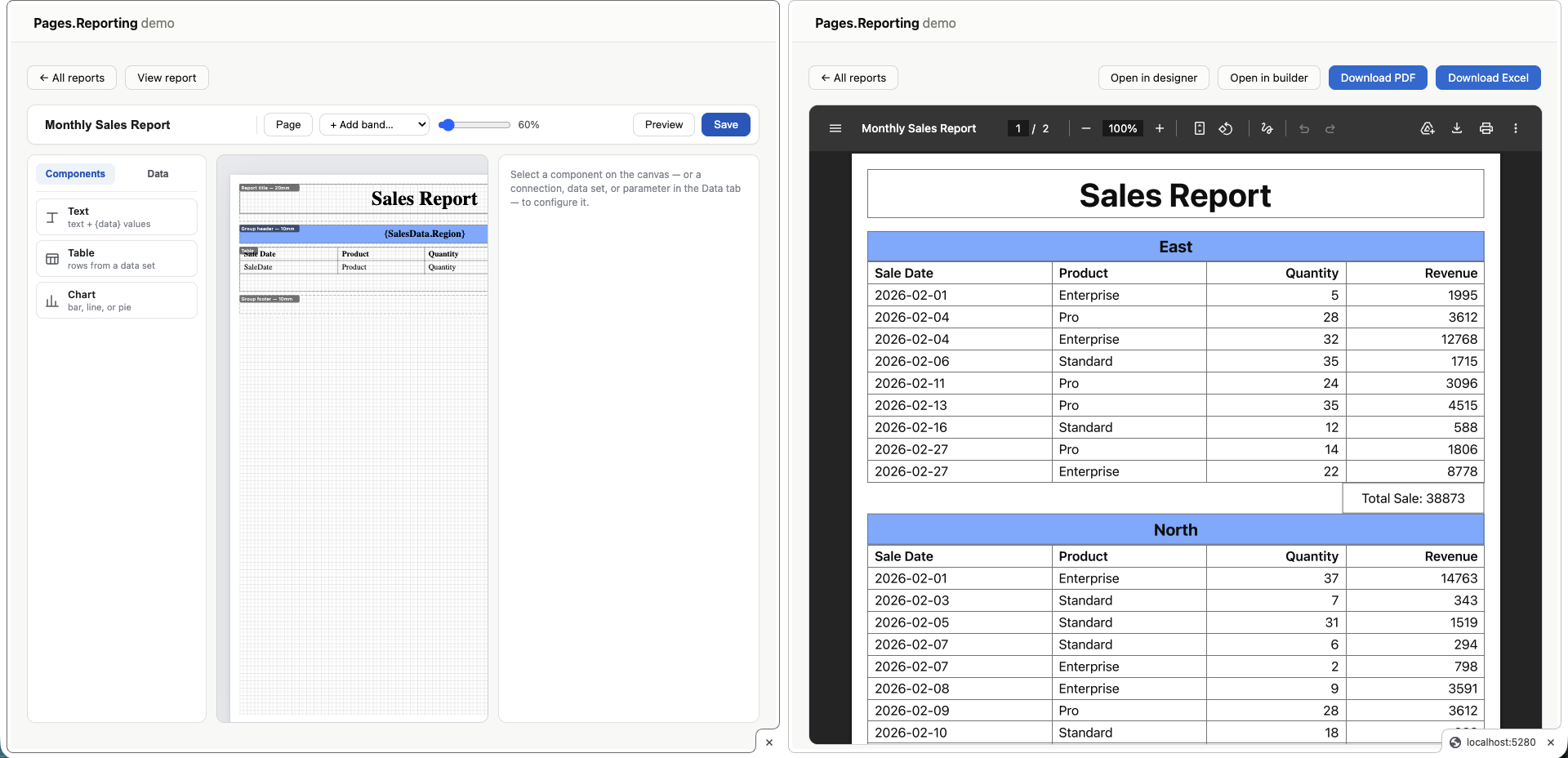
The same definition, printed. The designer on the left, the exported PDF on the right - grouped by region, with per-group totals and real pagination. No second layout step in between.
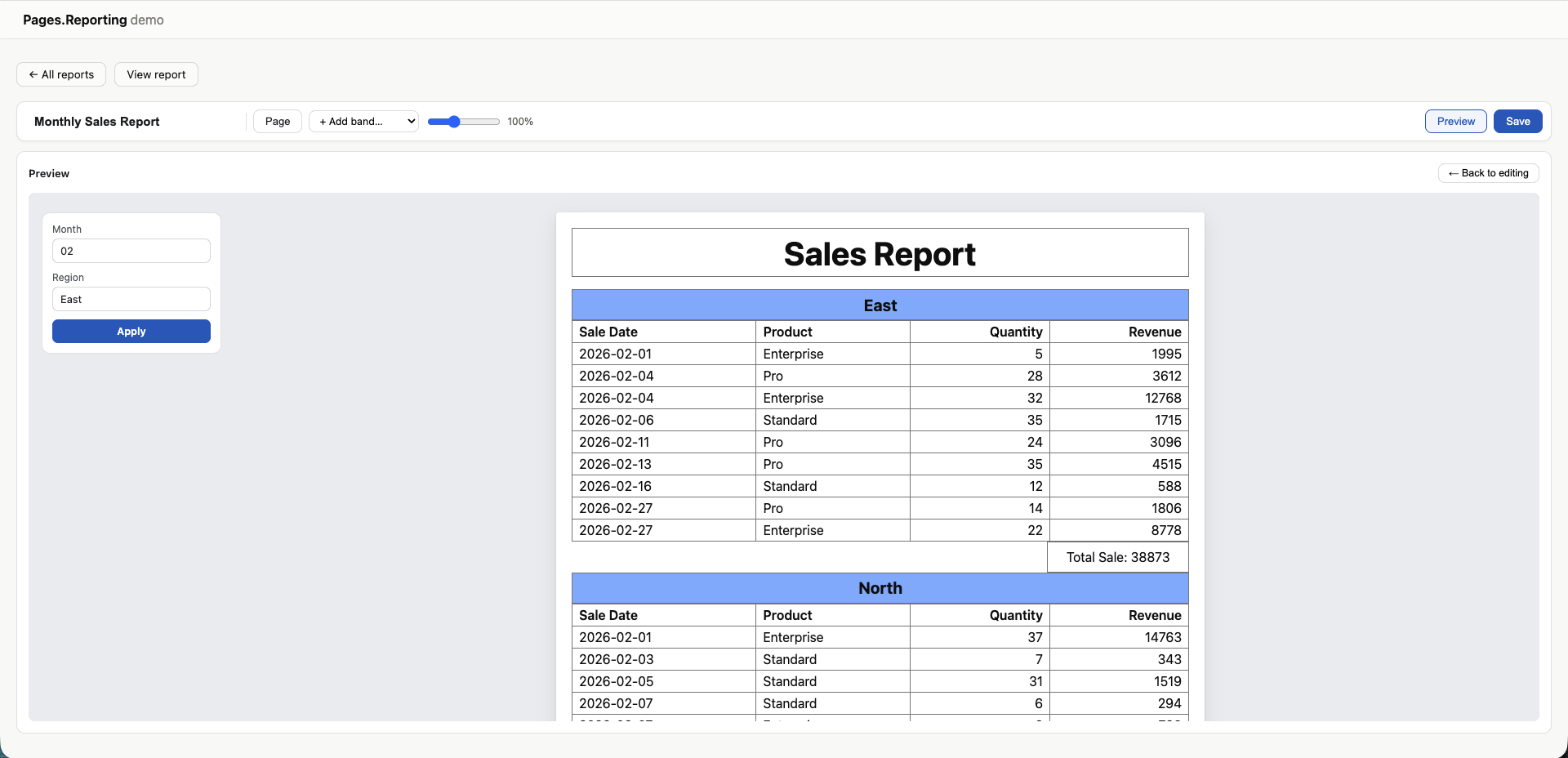
Parameters, without leaving the designer. Preview renders the report beside its parameter inputs; type values, press Apply, and it re-runs against them.
Full documentation lives in docs/:
- The report definition - data sets, text expressions, table columns, parameters, encryption
- Bands and groups - page structure, grouping, pagination
- Styling - CSS hooks, the
styleblock, what the designer canvas shows - Hosting - supported Blazor render modes, pre-installing Chromium, fonts
Project status
Early, and moving. The API may still change between releases — the badge above carries the
current version, so check it rather than trusting a number written here. Versions are 0.x
deliberately: until 1.0 a minor bump may carry a breaking change. What landed in each version
is in the changelog.
Pages.Reporting is under active development, and we want to be straightforward about where it stands.
This library was built with significant help from AI tooling. We use it ourselves and we think it holds up, but it has not yet accumulated the years of real-world use that harden a mature reporting library. Please review the code and test it thoroughly against your own requirements before depending on it in production.
Features are missing, and we know it. The roadmap is long and we are actively working through it. If something you need isn't here, telling us about it is the fastest way to get it prioritised.
Licensed under the MIT licence. Use it commercially, modify it, redistribute it — keep the copyright notice. See LICENSE.
We built this because rendering real reports in Blazor - one definition, matching on screen and in PDF - was harder than it should have been. If that's a problem you have too, we'd like your help.
Contributing and feedback
Every kind of contribution is welcome, from anywhere in the world:
- Bug reports - open an issue with the report JSON (redact your connection strings) and what you expected to happen.
- Feature requests - tell us what you're trying to build and where the current model gets in the way.
- Code and security review - especially around the connection-string encryption and the SQL execution path. Critical feedback is genuinely appreciated.
- Pull requests - bug fixes, features, tests, documentation, or sample reports.
- General feedback - API ergonomics, confusing docs, or a rough edge in the designer.
You don't need permission to open an issue or a pull request, and no contribution is too small.
Prerequisites
.NET 10 SDK - required for everything.
A server-side Blazor host - Blazor Server, or the server project of a Blazor Web App with
@rendermode InteractiveServer. Not WebAssembly. See hosting for the full
support matrix.
Databases ship with the library. SQL Server, SQLite, PostgreSQL and MySQL are all supported, and your app installs no ADO.NET packages of its own.
Chromium - only if you export PDFs. It downloads itself on the first export (~150 MB, once). Pre-installing it for servers, containers and CI takes no PowerShell - see hosting.
How to use the library
Install the package:
dotnet add package Pages.Reporting
Register the services:
builder.Services.AddPagesReporting();          // + options => options.EncryptionKey = "..."
builder.Services.AddPagesReportingExport();    // only if you need PDF/Excel
The designer needs no registration of its own - it uses the same services. Its chrome CSS ships
via Blazor scoped-CSS isolation (your app's *.styles.css bundle) and its only JS is an
isolated collocated module.
1. Design
<ReportDesigner Json="@existingJsonOrNull" OnSave="HandleSave" />
<ReportDesigner> is self-contained - palette, canvas, properties, preview, save - and fills
the box you place it in, so give the wrapper a height (e.g. calc(100dvh - <your chrome>)).
Every panel scrolls internally, so the page itself never needs to scroll. Pass Json to edit
an existing report; omit it to start from scratch. You can also build a Report object in C#
and serialize it yourself.
2. Save
OnSave fires with the updated JSON string - connection strings inside are already encrypted
(enc:v1:...). Store that JSON wherever you want: your database, a file, blob storage.
private async Task HandleSave(string json) => await myRepository.SaveAsync(reportId, json);
3. Render
Hand the stored JSON back:
<ReportView Json="@json" />
byte[] pdf  = await pdfExporter.ExportAsync(json, css);
byte[] xlsx = await excelExporter.ExportAsync(json);
Pass the same CSS to the exporter that you use on screen and the PDF will match it. Runtime parameter values are supported on both paths - see the report definition.
Sample project
samples/Pages.Reporting.Demo is a Blazor Web App playing the "consumer" role - it stores
report JSON in its own SQLite database exactly as your app would, and wires up the designer,
the viewer, and the PDF/Excel endpoints.
cd samples/Pages.Reporting.Demo
dotnet run
It seeds a SQLite database with sample sales data and no reports - "+ New report" opens the designer to build one from scratch, so you exercise the real authoring flow. Reports render deliberately unstyled (the demo ships almost no report CSS) to prove the bring-your-own-CSS contract.
| Product | Versions Compatible and additional computed target framework versions. |
|---|---|
| .NET | net10.0 is compatible. net10.0-android was computed. net10.0-browser was computed. net10.0-ios was computed. net10.0-maccatalyst was computed. net10.0-macos was computed. net10.0-tvos was computed. net10.0-windows was computed. |
-
net10.0
- ClosedXML (>= 0.105.0)
- Microsoft.AspNetCore.Components.Web (>= 10.0.8)
- Microsoft.Data.SqlClient (>= 7.0.2)
- Microsoft.Data.Sqlite (>= 10.0.9)
- Microsoft.Extensions.DependencyInjection.Abstractions (>= 10.0.9)
- Microsoft.Playwright (>= 1.61.0)
- MySqlConnector (>= 2.6.1)
- Npgsql (>= 10.0.3)
- SQLitePCLRaw.bundle_e_sqlite3 (>= 3.0.3)
NuGet packages
This package is not used by any NuGet packages.
GitHub repositories
This package is not used by any popular GitHub repositories.