Ph0rd.ColorSampler
1.0.0
See the version list below for details.
dotnet add package Ph0rd.ColorSampler --version 1.0.0
NuGet\Install-Package Ph0rd.ColorSampler -Version 1.0.0
<PackageReference Include="Ph0rd.ColorSampler" Version="1.0.0" />
<PackageVersion Include="Ph0rd.ColorSampler" Version="1.0.0" />
<PackageReference Include="Ph0rd.ColorSampler" />
paket add Ph0rd.ColorSampler --version 1.0.0
#r "nuget: Ph0rd.ColorSampler, 1.0.0"
#:package Ph0rd.ColorSampler@1.0.0
#addin nuget:?package=Ph0rd.ColorSampler&version=1.0.0
#tool nuget:?package=Ph0rd.ColorSampler&version=1.0.0
Ph0rd.ColorSampler
Ph0rd.ColorSampler is a performant Windows desktop eyedropper for .NET apps (WinUI 3, WPF, WinForms).
It shows a click-through crosshair, a zoomed pixel preview, and raises one sampler event as the sampled color changes, is confirmed, or is cancelled.
It is the color sampling component used by Instant Syntax Styler, the Visual Studio 2026 extension for changing syntax colors and styles directly in the editor window.
| Package icon | Live sampling preview |
|---|---|
 |
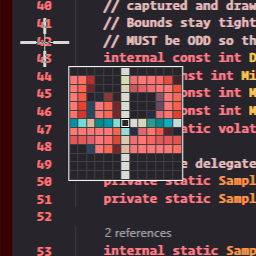 |
Install
dotnet add package Ph0rd.ColorSampler
No third-party software is required.
Quick Start
using Ph0rd.ColorSampler;
using System;
using System.Windows.Media;

Sampler? sampler = new Sampler(onError: ex => Console.Error.WriteLine(ex));

sampler.SamplerEvent += (_, e) =>
{
    // This event is not raised on your UI thread.
    // Marshal before touching WPF, WinForms, or WinUI controls.
    switch (e.Kind)
    {
        case SamplerEventKind.ColorChanged:
            Console.WriteLine(ToHex(e.Color!.Value));
            break;

        case SamplerEventKind.Confirmed:
            Console.WriteLine($"Confirmed {ToHex(e.Color!.Value)}");
            sampler.Dispose();
            break;

        case SamplerEventKind.Cancelled:
            Console.WriteLine("Cancelled");
            sampler.Dispose();
            break;
    }
};

sampler.Start();

static string ToHex(Color c) => $"#{c.R:X2}{c.G:X2}{c.B:X2}";
User Controls
- Move the mouse to move the virtual crosshair.
- Scroll the mouse wheel to zoom in or out.
- Left-click to confirm the color.
- Right-click or press Escape to cancel.
Threading Contract
SamplerEvent fires on the sampler's dedicated render thread.
UI apps must marshal back to their own UI thread:
- WPF:
Dispatcher.BeginInvoke(...) - WinForms:
BeginInvoke(...) - WinUI 3:
DispatcherQueue.TryEnqueue(...)
Only one sampler session can run at a time.
Calling Start() while another Sampler is active throws InvalidOperationException.
Platform Requirements
This package is Windows-only. It uses a low-level mouse hook, GDI screen capture, DWM synchronization, layered windows, and the Windows Magnification API.
During an active sampling session, the package temporarily hides the cursor, then restores it when sampling stops, the sampler is disposed, or the host process exits.
Supported target frameworks:
.NET Framework 4.8.NET 8Windows desktop apps throughnet8.0-windows
Expected limitations:
- It is not for web, service, console-only, macOS, or Linux apps.
- Security tools, RDP sessions, UAC prompts, lock screens, or secure desktops may block or interrupt sampling.
- The sampler captures normal desktop pixels. It is not designed to bypass protected content.
Samples
The repository includes three small samples:
dotnet run --project samples/ColorSampler.WpfSample/ColorSampler.WpfSample.csproj
dotnet run --project samples/ColorSampler.WinFormsSample/ColorSampler.WinFormsSample.csproj
dotnet run --project samples/ColorSampler.WinUISample/ColorSampler.WinUISample.csproj
Each sample shows the same pattern: create a Sampler, subscribe to SamplerEvent, switch on SamplerEventKind,
marshal back to the UI thread, and dispose the sampler when finished.
Build
dotnet restore ColorSampler.slnx
dotnet build ColorSampler.slnx -c Release --no-restore
Links
- Project: github.com/ph0rd/ColorSampler
- Instant Syntax Styler: VS Marketplace
- Instant Syntax Styler: ph0rd.com/instant-syntax-styler
- Instant Syntax Styler public repo: github.com/ph0rd/Instant-Syntax-Styler
License
MIT for the source code.
The Ph0rd name, Ph0rd.ColorSampler name, package icon, logos, and other branding assets are reserved and are not licensed for use as your own product branding.
| Product | Versions Compatible and additional computed target framework versions. |
|---|---|
| .NET | net8.0-windows7.0 is compatible. net9.0-windows was computed. net10.0-windows was computed. |
| .NET Framework | net48 is compatible. net481 was computed. |
-
.NETFramework 4.8
- No dependencies.
-
net8.0-windows7.0
- No dependencies.
NuGet packages
This package is not used by any NuGet packages.
GitHub repositories
This package is not used by any popular GitHub repositories.
Initial public package preparation. Includes the Windows desktop sampler API used by Instant Syntax Styler and WPF, WinForms, and WinUI samples.