PooledMailKit 0.2.1
dotnet add package PooledMailKit --version 0.2.1
NuGet\Install-Package PooledMailKit -Version 0.2.1
<PackageReference Include="PooledMailKit" Version="0.2.1" />
<PackageVersion Include="PooledMailKit" Version="0.2.1" />
<PackageReference Include="PooledMailKit" />
paket add PooledMailKit --version 0.2.1
#r "nuget: PooledMailKit, 0.2.1"
#:package PooledMailKit@0.2.1
#addin nuget:?package=PooledMailKit&version=0.2.1
#tool nuget:?package=PooledMailKit&version=0.2.1
PooledMailKit
PooledMailKit is a .NET OSS library for guarded SMTP connection reuse on top of MailKit.
Project site: https://synthaicode.org/MailKit.Pooling/
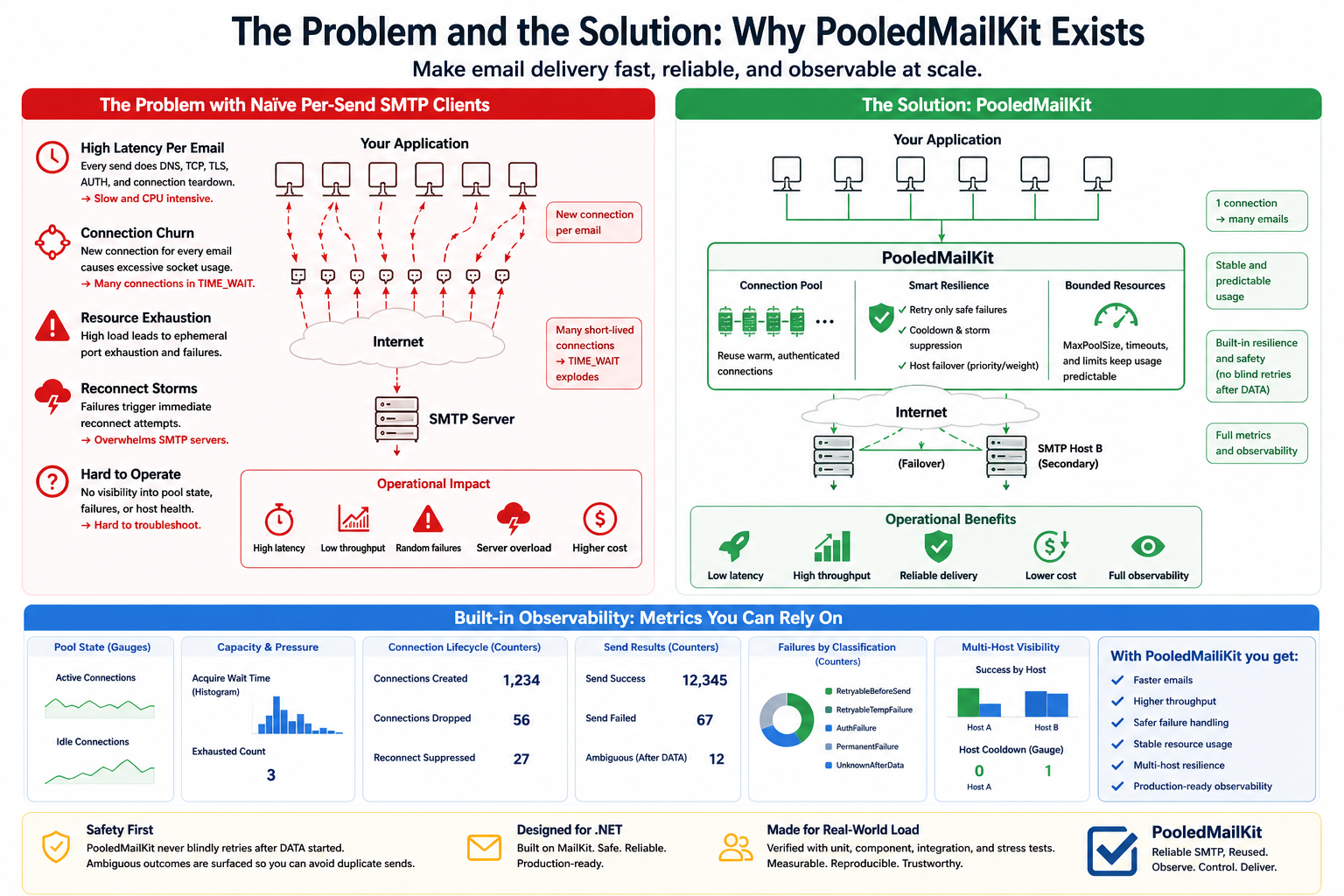
It exists to stop application teams from implementing unsafe SMTP client lifecycle code such as:
- creating and disposing a new SMTP client per request
- leaking TIME_WAIT and ephemeral ports under sustained traffic
- reusing broken SMTP sessions after send failures
- reconnecting immediately and repeatedly during server-side outages
- waiting forever when the pool is exhausted
- retrying blindly when the server may already have accepted the message body
This repository intentionally focuses on SMTP connection control. It does not provide template rendering, notification orchestration, durable queuing, or bulk-marketing features.
Current repository status
This repository currently contains:
- design documents for the MVP
- a working SMTP pool implementation on top of MailKit
- a sender-oriented API with retry, timeout, and classification behavior
- dependency-injection integration
- unit, component, integration, and manual stress/resource validation paths
It does not yet contain every planned operational feature or public observability surface.
Intended Public Surface
The NuGet-facing API is intentionally narrow.
Primary consumer-facing types:
ISmtpSenderSmtpPoolOptionsSmtpHostOptionsSmtpSendResultSmtpSendFailedExceptionSmtpFailureClassificationSmtpFailureKindSmtpSendStageServiceCollectionExtensions
Most pool, factory, adapter, clock, metrics, and classifier implementation types are internal and not intended as package extension points.
MVP scope
The current MVP provides guarded SMTP pooling with:
- MailKit-based connect, authenticate, send, and keepalive execution
- single-host and multi-host endpoint configuration with priority and weight
MinPoolSize,MaxPoolSize, andAcquireTimeout- delayed refill of
MinPoolSizeafter discarded connections - one-send-per-connection exclusivity
- failed-connection disposal
- reconnect cooldown, including host-level cooldown for multi-host selection
- keepalive health checks
- explicit error classification
- dependency-injection and logging integration
- unit-testable state transitions via abstractions
Non-goals
The initial package does not aim to provide:
- HTML or template generation
- durable queues or delivery guarantees
- SMTP server hosting
- SES / Graph API / non-SMTP transports
- marketing campaign features
Planned package shape
PooledMailKit
The DI registration API remains available under the namespace PooledMailKit.DependencyInjection, but it is shipped inside the single PooledMailKit NuGet package rather than as a second package.
See the design documents under docs/ for the current boundary, API direction, and open decisions.
For intended usage scenarios, see docs/design/use-cases.md.
For guidance on selecting option values, see docs/design/option-tuning.md.
For a synchronous send example with a strict request-path SLA, see docs/design/synchronous-send-sla-sample.md.
For intended telemetry design, see docs/operation/metrics-and-logging.md.
For Datadog-specific metric collection setup, see docs/operation/datadog-metrics.md.
For NuGet release preparation, see docs/release/nuget-publish-checklist.md.
For release-facing notes, see docs/release/0.1.0.md and CHANGELOG.md.
The current telemetry contract includes:
- pool state gauges such as
pooledmailkit.pool.connections.active,pooledmailkit.pool.connections.idle,pooledmailkit.pool.host.cooldown.active, andpooledmailkit.pool.host.available - pressure and lifecycle metrics such as
pooledmailkit.pool.acquire.wait_time,pooledmailkit.pool.lease.duration,pooledmailkit.pool.connections.created,pooledmailkit.pool.connections.dropped, andpooledmailkit.pool.keepalive.failure.count - send-path metrics such as
pooledmailkit.send.duration,pooledmailkit.send.failed.count,pooledmailkit.send.definitely_not_accepted.count,pooledmailkit.send.ambiguous.count, andpooledmailkit.send.classification.count
Quick Start
Register the pool once in DI, then send through ISmtpSender.
using PooledMailKit.Abstractions;
using PooledMailKit.DependencyInjection;
using PooledMailKit.Options;
using Microsoft.Extensions.DependencyInjection;
using MimeKit;

var services = new ServiceCollection();

services.AddMailKitPooling(options =>
{
    options.Hosts.Add(new SmtpHostOptions
    {
        Host = "smtp-primary.example.com",
        Port = 587,
        SecureSocketOptions = "StartTls",
        UserName = "smtp-user",
        Password = "smtp-password",
        Priority = 0,
        Weight = 3,
    });

    options.Hosts.Add(new SmtpHostOptions
    {
        Host = "smtp-secondary.example.com",
        Port = 587,
        SecureSocketOptions = "StartTls",
        UserName = "smtp-user",
        Password = "smtp-password",
        Priority = 10,
        Weight = 1,
    });

    options.MinPoolSize = 0;
    options.MinPoolRefillDelay = TimeSpan.Zero;
    options.MaxPoolSize = 8;
    options.AcquireTimeout = TimeSpan.FromSeconds(15);
    options.IdleTimeout = TimeSpan.FromMinutes(2);
    options.KeepAliveInterval = TimeSpan.FromMinutes(1);
    options.ConnectTimeout = TimeSpan.FromSeconds(15);
    options.AuthenticateTimeout = TimeSpan.FromSeconds(15);
    options.SmtpSendTimeout = TimeSpan.FromSeconds(30);
    options.ReconnectCooldown = TimeSpan.FromSeconds(30);
    options.MaxReconnectCooldown = TimeSpan.FromMinutes(5);
    options.MaxRetryAttempts = 1;
    options.RetryBaseDelay = TimeSpan.FromSeconds(2);
});

await using var provider = services.BuildServiceProvider();
var sender = provider.GetRequiredService<ISmtpSender>();

var message = new MimeMessage();
message.From.Add(MailboxAddress.Parse("from@example.com"));
message.To.Add(MailboxAddress.Parse("to@example.com"));
message.Subject = "Hello";
message.Body = new TextPart("plain") { Text = "Hello from PooledMailKit" };

var result = await sender.SendAsync(message);
Console.WriteLine($"Sent via {result.EndpointKey} in {result.Attempts} attempt(s).");
If you only have one SMTP endpoint, configuring options.Host still works as a compatibility path. New configuration should prefer options.Hosts. Lower Priority values are preferred first. Weight applies within hosts that share the same Priority.
Intended Use Cases
PooledMailKit is intended for SMTP-based application code that needs safer connection lifecycle control, not for full notification orchestration.
- web APIs that send transactional email during request handling
- background workers or outbox executors that send steady SMTP traffic
- environments where TCP churn, TIME_WAIT, or reconnect storms are operational concerns
- multi-host SMTP relay setups that need application-side priority and weight handling
It is not intended to replace:
- template rendering
- durable delivery workflows
- non-SMTP transport abstraction
- bulk marketing infrastructure
See docs/design/use-cases.md for the fuller boundary and decision rule.
Choosing Option Values
The example values in Quick Start are starting points only.
Choose values in this order:
- set expected concurrent send volume
- size
MaxPoolSizeandMinPoolSize - decide whether discarded connections should be refilled immediately or after
MinPoolRefillDelay - set
AcquireTimeoutfrom caller-facing wait tolerance - set
ConnectTimeout,AuthenticateTimeout, andSmtpSendTimeoutfrom real SMTP latency - set
ReconnectCooldown,MaxReconnectCooldown,MaxRetryAttempts, andRetryBaseDelayfrom outage and retry tolerance - set host
PriorityandWeightfrom failover and load-sharing intent
Practical defaults for many transactional systems are:
MinPoolSize = 0MaxPoolSize = 4to16AcquireTimeout = 2to15seconds for API pathsIdleTimeout = 1to5minutesMinPoolRefillDelay = 0unless close-driven churn needs smoothingKeepAliveInterval = 30to120seconds when idle drops are suspectedReconnectCooldown = 5to30seconds as the base reconnect cooldownMaxReconnectCooldown = 1to5minutes when exponential cooldown is enabledMaxRetryAttempts = 0or1for additional retries after the initial attempt
See docs/design/option-tuning.md for per-option decision rules, increase/decrease signals, and multi-host tuning guidance.
Send Failures
ISmtpSender.SendAsync() returns SmtpSendResult on success.
On failure, the main exception surface is:
SmtpSendFailedException- thrown when SMTP send/connect/authenticate/acquire work failed after library classification
- inspect
Classification.Kind,Classification.Stage, andAttempts InnerExceptionkeeps the original MailKit, timeout, socket, or protocol exception
OperationCanceledException- returned as-is when the caller's
CancellationTokenis canceled - caller cancellation is not wrapped into
SmtpSendFailedException
- returned as-is when the caller's
Timeout Boundary
SmtpSendTimeout- is a cooperative timeout applied to one SMTP send operation
- it does not guarantee that the full
ISmtpSender.SendAsync()call returns within that duration
AbsoluteTimeout- if enabled by a caller-side or future library-side absolute deadline pattern, the caller can receive a timeout at the configured deadline
- it still does not guarantee physical termination of the underlying SMTP operation
connection invalidation after absolute timeout
- a connection that crosses an absolute deadline should be treated as state-unknown and invalidated
- this may increase
TIME_WAITbecause the underlying TCP connection may need to be discarded
UnknownAfterData- timeout or disconnect after the SMTP
DATAambiguity boundary is treated asUnknownAfterData - the library reduces blind retries, but it cannot fully guarantee prevention of duplicate delivery in that state
- timeout or disconnect after the SMTP
Typical handling looks like:
try
{
    await sender.SendAsync(message, cancellationToken);
}
catch (SmtpSendFailedException ex) when (ex.Classification.Kind == SmtpFailureKind.PoolExhausted)
{
    // Pool wait exceeded AcquireTimeout.
}
catch (SmtpSendFailedException ex) when (ex.Classification.Kind == SmtpFailureKind.UnknownAfterData)
{
    // Delivery may already be ambiguous. Do not blindly resend.
}
Operational Notes
ReconnectCooldownis the base cooldown after a failed reconnect. WhenUseExponentialBackoff = true, repeated failures grow that cooldown up toMaxReconnectCooldown, withJitterRatioapplied to the cooldown as well.MaxRetryAttemptscounts retries after the initial send attempt.MaxRetryAttempts = 1means up to 2 total send attempts.- When you register the pool with DI, dispose the root
IServiceProvideror host so the singletonSmtpPoolcan close its SMTP connections.
Verification Notes
The repository includes:
- fast unit and component tests
- Docker-backed integration tests using
smtp4dev - manual stress/resource tests gated behind
MAILKIT_POOLING_RUN_STRESS=1 - a dated validation record under
docs/verification/
The latest checked-in record is docs/verification/2026-06-05-validation.md.
That record includes:
- Docker-backed multi-host integration on two real SMTP endpoints
- priority failover verification from
localhost:2525tolocalhost:2526 - weight distribution verification for a real
3:1split - Docker orchestration stabilization for integration and manual stress execution
- longer-running sustained outage validation
- repeated flapping outage validation
- multi-host partial outage validation with primary-only failure
- the latest manual stress/resource artifact references
Recent manual stress/resource evidence against smtp4dev produced the following sample results on Windows:
- naive per-send MailKit: 40 sends, 40 connection creations, 1145 ms, TIME_WAIT 0 → 1
- pooled sender: 40 sends, 8 connection creations, 277 ms, TIME_WAIT 1 → 1
- reconnect suppression scenario: 8 reconnect attempts, 4 suppressed reconnects, 12 outage failures, 6 recovery successes, 4 final successes
These numbers come from the generated JSON artifacts under tests/MailKit.Pooling.StressTests/bin/Debug/net8.0/StressResults/ and should be treated as environment-specific observations, not universal benchmarks.
README benchmark and performance-oriented statements should remain evidence-based and should be updated only when new measurements are collected on the intended target environment.
Additional Linux validation was also exercised in Docker using the stress test container and the same smtp4dev target. In that run, the TIME_WAIT observer source was ss, and the sample result was:
- naive per-send MailKit: 40 sends, 40 connection creations, 625 ms, TIME_WAIT 0 → 0
- pooled sender: 40 sends, 8 connection creations, 231 ms, TIME_WAIT 0 → 0
Linux reconnect-storm validation was also exercised in Docker with the stress runner container managing smtp4dev lifecycle through the Docker socket. In that run, the sample reconnect result was:
- reconnect suppression scenario: 6 reconnect attempts, 15 suppressed reconnects, 12 outage failures, 6 recovery successes, 4 final successes
Longer-running outage patterns were also exercised in Docker:
- sustained 20-second outage: 24 outage attempts, 24 outage failures, 22 reconnect attempts, 20 connection-create failures, 10 suppressed reconnects, 6 recovery successes, 4 final successes
- flapping outage (
3x5s down / 5s up): 66 attempts, 24 failures, 21 reconnect attempts, 15 connection-create failures, 41 suppressed reconnects, 4 recovery successes - multi-host partial outage (primary-only
12sstop): 70 secondary successes during primary outage, 2 primary-side failures, 0 suppressed reconnects, 4 recovery successes
The latest rerun after Docker orchestration hardening also passed end-to-end:
dotnet test MailKit.Pooling.sln --no-build: unit42 passed, component7 passed, integration8 passed, stress4 passed, 2 skipped- manual stress rerun with
MAILKIT_POOLING_RUN_STRESS=1:9 passed
That stabilization changed the test harness behavior to use a shared smtp4dev lock across integration and stress runs, and to prefer docker compose up -d plus docker compose stop instead of repeated down --force-recreate style churn.
Remaining Gaps
The following areas are still incomplete or intentionally limited:
- metrics are emitted through
System.Diagnostics.Metricswith the currentpooledmailkit.*contract; the internal implementation is intentional, while public customization and long-term compatibility policy remain intentionally narrow - TIME_WAIT observation is implemented for Windows, Linux, and macOS in the stress harness; recorded validation currently covers Windows and Linux, while macOS remains unverified
- stress/resource scenarios are manual and are not part of normal fast test execution
- reconnect validation now includes sustained outages, repeated flapping, and multi-host partial outage scenarios, but more advanced fault injection patterns such as latency shaping or packet blackholing still remain future work
| Product | Versions Compatible and additional computed target framework versions. |
|---|---|
| .NET | net8.0 is compatible. net8.0-android was computed. net8.0-browser was computed. net8.0-ios was computed. net8.0-maccatalyst was computed. net8.0-macos was computed. net8.0-tvos was computed. net8.0-windows was computed. net9.0 was computed. net9.0-android was computed. net9.0-browser was computed. net9.0-ios was computed. net9.0-maccatalyst was computed. net9.0-macos was computed. net9.0-tvos was computed. net9.0-windows was computed. net10.0 is compatible. net10.0-android was computed. net10.0-browser was computed. net10.0-ios was computed. net10.0-maccatalyst was computed. net10.0-macos was computed. net10.0-tvos was computed. net10.0-windows was computed. |
-
net10.0
- MailKit (>= 4.16.0)
- Microsoft.Extensions.DependencyInjection (>= 10.0.9)
- Microsoft.Extensions.DependencyInjection.Abstractions (>= 10.0.9)
-
net8.0
- MailKit (>= 4.16.0)
- Microsoft.Extensions.DependencyInjection (>= 10.0.9)
- Microsoft.Extensions.DependencyInjection.Abstractions (>= 10.0.9)
NuGet packages
This package is not used by any NuGet packages.
GitHub repositories
This package is not used by any popular GitHub repositories.