Ramstack.LocaleAlignment
2.1.1
See the version list below for details.
dotnet add package Ramstack.LocaleAlignment --version 2.1.1
NuGet\Install-Package Ramstack.LocaleAlignment -Version 2.1.1
<PackageReference Include="Ramstack.LocaleAlignment" Version="2.1.1" />
<PackageVersion Include="Ramstack.LocaleAlignment" Version="2.1.1" />
<PackageReference Include="Ramstack.LocaleAlignment" />
paket add Ramstack.LocaleAlignment --version 2.1.1
#r "nuget: Ramstack.LocaleAlignment, 2.1.1"
#:package Ramstack.LocaleAlignment@2.1.1
#addin nuget:?package=Ramstack.LocaleAlignment&version=2.1.1
#tool nuget:?package=Ramstack.LocaleAlignment&version=2.1.1
Ramstack.LocaleAlignment


Aligns .NET culture settings with the POSIX locale categories (LANG, LC_NUMERIC, LC_MONETARY, LC_TIME)
on Linux and other Unix-like systems.
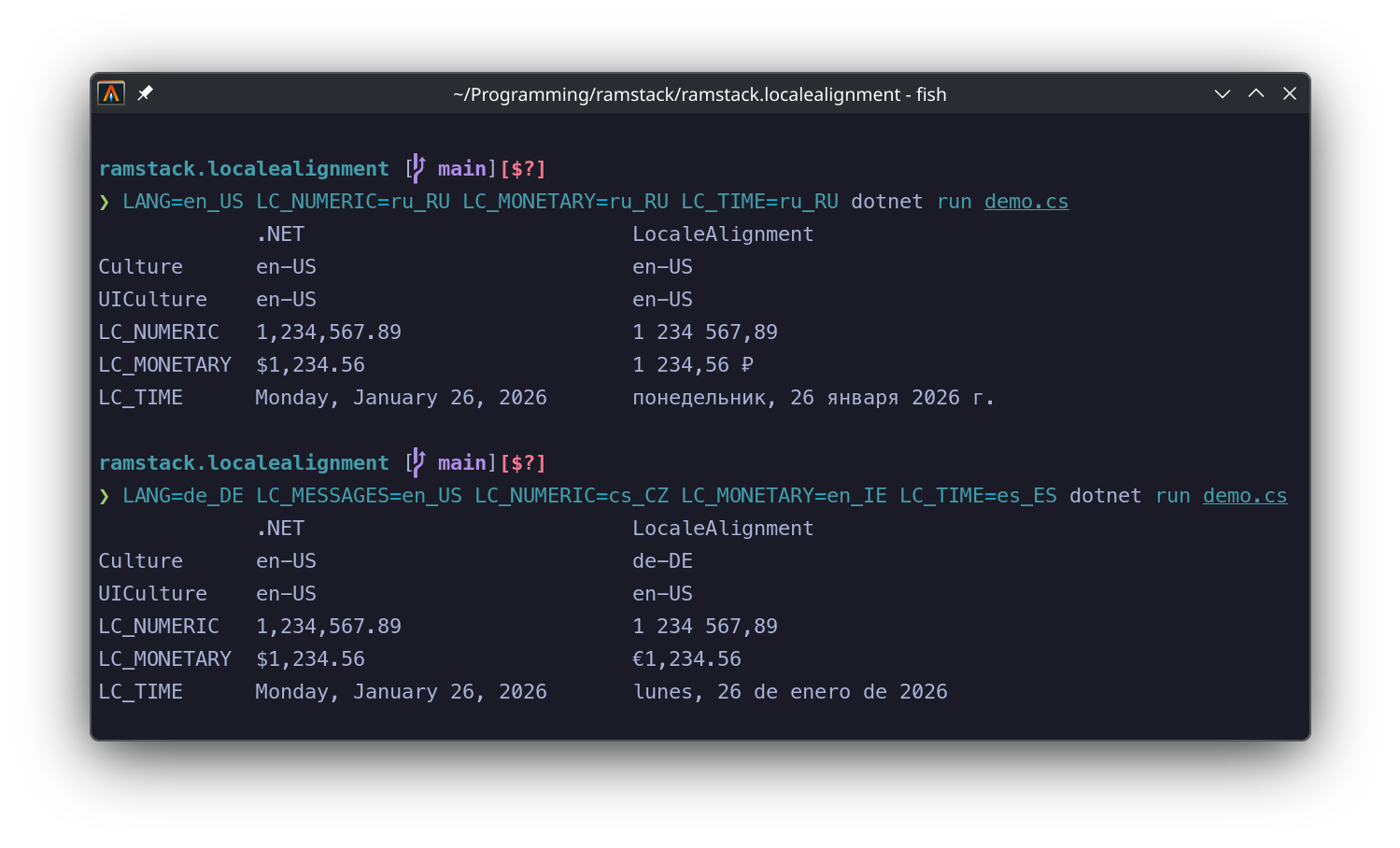
The .NET column shows the culture settings .NET picks by itself, and the LocaleAlignment column shows them after alignment.
Problem
On Unix-like systems, .NET resolves a single locale the way POSIX resolves LC_MESSAGES (LC_ALL, then LC_MESSAGES, then LANG)
and uses it for both CurrentCulture and CurrentUICulture. As a result:
LC_NUMERIC,LC_MONETARY, andLC_TIMEare ignoredLANGis ignored whenLC_MESSAGESis set
For example, with LC_MESSAGES=en_US.UTF-8 and LANG=de_DE.UTF-8,
.NET applications use US number, currency, and date formats, while other applications use German formats.
This is a known limitation, discussed in dotnet/runtime#110095.
What this package does
When called at application startup, LocaleAlignment.Apply() resolves the locale as defined by POSIX, separately for each category:
LANGdefines the base culture. If it is not set, the base culture is the one .NET resolved itself, e.g., fromLC_MESSAGES. Unlike POSIX, which uses the C locale in this case, this keeps the formats .NET would use without alignmentLC_NUMERIC,LC_MONETARY, andLC_TIMEoverride the number, currency, and date and time formatsLC_ALLtakes precedence over all of them. When it is set, alignment is skipped, leaving the culture as .NET resolved it- In
LANG,LC_NUMERIC,LC_MONETARY, andLC_TIME, a value without a language, such as.UTF-8, or one that .NET rejects as a culture name, such as@latin, is ignored as if the variable were not set. As in .NET, a well-formed name, such asxx_YY, is not checked against the ICU data
Locale names are converted to .NET culture names, e.g., sr_RS.UTF-8@latin to sr-Latn-RS.
The resulting culture becomes CurrentCulture and DefaultThreadCurrentCulture.
As with customized regional formats on Windows, it keeps the name of the base culture,
so en-US with German formats is still en-US.
Likewise, dates use a calendar the base culture supports,
so en-US with Thai formats uses the Gregorian calendar rather than the Thai Buddhist one.
CurrentUICulture is left unchanged.
Nothing changes on Windows or in globalization-invariant mode.
Usage
Add the package to your project:
dotnet add package Ramstack.LocaleAlignment
Call the alignment method as early as possible during application startup, before any culture-sensitive code runs:
LocaleAlignment.Apply();
Only the first call has an effect. The method can be called from any .NET language (C#, F#, Visual Basic, etc.).
The method aligns the culture of the process it is called in. Integration tests that run the application's Main
in the test process, as WebApplicationFactory does for the minimal hosting model, therefore align the culture
of the test process as well.
For C# applications, Ramstack.LocaleAlignment.Generator does the same automatically, without an explicit call and without a runtime dependency.
Supported versions
.NET 6 and later.
Contributions
Bug reports and contributions are welcome.
License
This package is released as open source under the MIT License.<br /> See the LICENSE file for more details.
| Product | Versions Compatible and additional computed target framework versions. |
|---|---|
| .NET | net6.0 is compatible. net6.0-android was computed. net6.0-ios was computed. net6.0-maccatalyst was computed. net6.0-macos was computed. net6.0-tvos was computed. net6.0-windows was computed. net7.0 was computed. net7.0-android was computed. net7.0-ios was computed. net7.0-maccatalyst was computed. net7.0-macos was computed. net7.0-tvos was computed. net7.0-windows was computed. net8.0 was computed. net8.0-android was computed. net8.0-browser was computed. net8.0-ios was computed. net8.0-maccatalyst was computed. net8.0-macos was computed. net8.0-tvos was computed. net8.0-windows was computed. net9.0 was computed. net9.0-android was computed. net9.0-browser was computed. net9.0-ios was computed. net9.0-maccatalyst was computed. net9.0-macos was computed. net9.0-tvos was computed. net9.0-windows was computed. net10.0 was computed. net10.0-android was computed. net10.0-browser was computed. net10.0-ios was computed. net10.0-maccatalyst was computed. net10.0-macos was computed. net10.0-tvos was computed. net10.0-windows was computed. |
-
net6.0
- No dependencies.
NuGet packages
This package is not used by any NuGet packages.
GitHub repositories
This package is not used by any popular GitHub repositories.