RecursiveAI.OneImage
1.8.1
See the version list below for details.
dotnet add package RecursiveAI.OneImage --version 1.8.1
NuGet\Install-Package RecursiveAI.OneImage -Version 1.8.1
<PackageReference Include="RecursiveAI.OneImage" Version="1.8.1" />
<PackageVersion Include="RecursiveAI.OneImage" Version="1.8.1" />
<PackageReference Include="RecursiveAI.OneImage" />
paket add RecursiveAI.OneImage --version 1.8.1
#r "nuget: RecursiveAI.OneImage, 1.8.1"
#:package RecursiveAI.OneImage@1.8.1
#addin nuget:?package=RecursiveAI.OneImage&version=1.8.1
#tool nuget:?package=RecursiveAI.OneImage&version=1.8.1
OneImage
A pure-managed .NET image library: one-line thumbnails, crops and
conversions, and lazy, tiled, streaming load, edit and render on the
same engine. PNG, JPEG, WebP, GIF, TIFF, BMP and ICO, with ICC color
management. Pure C# with no dependency beyond .NET itself; untrusted
files are read through bounds-checked managed code. It also includes
vector drawing and a layered document model (OneImage.Layers: pixel,
group, fill and adjustment layers, masks, clipping and blend modes,
rendered on demand).
How many times faster OneImage is than ImageSharp 3.1.12 on each benchmark task (log scale, higher is better; slower tasks and ties are marked):
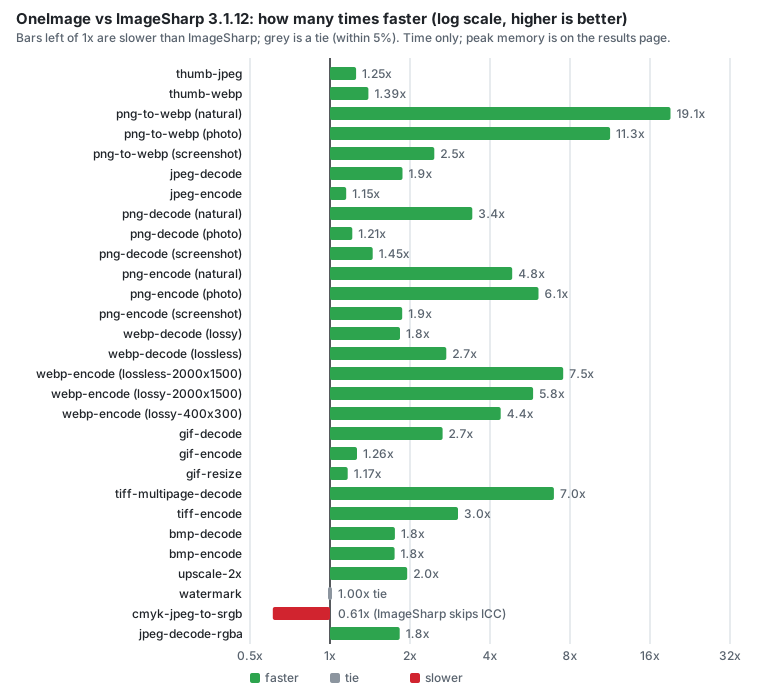
Full results, with memory, the losses and the method
Install
dotnet add package RecursiveAI.OneImage
The package is RecursiveAI.OneImage; the namespace is OneImage
(using OneImage;).
Target framework net10.0.
Quick start
using OneImage;

// A 400 px wide thumbnail, upright, in sRGB, without EXIF/GPS, written as WebP.
Image.Thumbnail("in.jpg", 400).Save("thumb.webp");

// Load, edit, save. Nothing is decoded until Save.
Image.Load("in.jpg")
    .Resize(width: 1200)
    .Rotate(90)
    .Save("out.png");

// Format and quality.
Image.Load("in.png").Save("out.jpg", new SaveOptions { EncoderOptions = new JpegEncoderOptions { Quality = 85 } });
The format of Save follows the file extension. For streams and buffer
writers, name it: image.Save(stream, PngFormat.Instance).
What is new in 1.8.1
- Color to gray is about 5x faster, with identical output. Reading an 8-bit RGB or RGBA image as
Gray8,Gray16or gray with alpha uses an integer vector path that gives exactly the bytes of the previous float path (checked over every RGB value and every alpha). An A4 JPEG read asGray8takes 11.5 ms instead of 58 ms (10 ms asRgb24).
What was new in 1.8.0
- Repeated region reads no longer decode again. From the second
CopyPixelsToof a sub-rectangle of a large JPEG or PNG, the rows read so far are kept in a bounded per-image plane in the requested format, so further band and region reads are copies. Load plus 20 random region reads of an A4 page: JPEG 47 to 26 ms, PNG 94 to 42 ms, with peak memory 31 to 10 MB above baseline.ImageEngine.RegionCacheBytes(64 MiB per frame, 0 turns it off) bounds it andImage.ReleaseDecodedPixels()gives it back. - The first
Loadcosts less memory. The first PNG load in a process adds 2.3 MB instead of 11 MB, and the first JPEG load 2.5 MB instead of 6.1 MB. - Output is byte for byte the same as 1.7.0.
Learn more
- Guide: the lazy model, errors, operations,
Canvas, metadata, color, animation, limits, AOT and trimming. - Layers: layered documents that render on demand, with
incremental re-rendering and an optional disk-spill store. Photoshop files
load into them through the separate
RecursiveAI.OneImage.Psdpackage (PSD page). - Migrating from ImageSharp and System.Drawing
- How OneImage compares, including where the others are the better fit
- Benchmarks and the method
- Changelog and security policy
License
Licensed under either of MIT or Apache-2.0 at your option.
Copyright (c) Recursive AI, LLC.
| Product | Versions Compatible and additional computed target framework versions. |
|---|---|
| .NET | net10.0 is compatible. net10.0-android was computed. net10.0-browser was computed. net10.0-ios was computed. net10.0-maccatalyst was computed. net10.0-macos was computed. net10.0-tvos was computed. net10.0-windows was computed. |
-
net10.0
- No dependencies.
NuGet packages (5)
Showing the top 5 NuGet packages that depend on RecursiveAI.OneImage:
| Package | Downloads |
|---|---|
|
RecursiveAI.OneImage.Web
ASP.NET Core middleware for on-the-fly image processing and caching: resize, crop, convert and recompress images through URL commands, with a disk cache, conditional requests, signed URLs and request limits. Built on the OneImage library. |
|
|
RecursiveAI.OneImage.Text
Fonts and text for OneImage: loads TrueType, OpenType (CFF), TrueType Collection, WOFF and WOFF2 fonts, measures and lays out text, and draws it onto images and canvases through the vector drawing layer. |
|
|
RecursiveAI.OneImage.Svg
SVG support for OneImage: reads static SVG (shapes, paths, gradients, patterns, clipping, masks, markers, filters and text) as an image format, rendered directly at the requested output size. |
|
|
RecursiveAI.OneImage.Psd
Photoshop PSD and PSB support for OneImage: reads the merged composite as an image format, loads and saves the layer tree as a OneImage layered document. |
|
|
RecursiveAI.OneImage.Pdf
PDF support for OneImage: renders PDF pages as an image format, drawn on demand per tile from OnePDF display lists. |

GitHub repositories
This package is not used by any popular GitHub repositories.
See CHANGELOG.md in the repository.