Retro.TUI.Rendering
0.4.1-alpha.4
Prefix Reserved
dotnet add package Retro.TUI.Rendering --version 0.4.1-alpha.4
NuGet\Install-Package Retro.TUI.Rendering -Version 0.4.1-alpha.4
<PackageReference Include="Retro.TUI.Rendering" Version="0.4.1-alpha.4" />
<PackageVersion Include="Retro.TUI.Rendering" Version="0.4.1-alpha.4" />
<PackageReference Include="Retro.TUI.Rendering" />
paket add Retro.TUI.Rendering --version 0.4.1-alpha.4
#r "nuget: Retro.TUI.Rendering, 0.4.1-alpha.4"
#:package Retro.TUI.Rendering@0.4.1-alpha.4
#addin nuget:?package=Retro.TUI.Rendering&version=0.4.1-alpha.4&prerelease
#tool nuget:?package=Retro.TUI.Rendering&version=0.4.1-alpha.4&prerelease
Retro.TUI.Framework
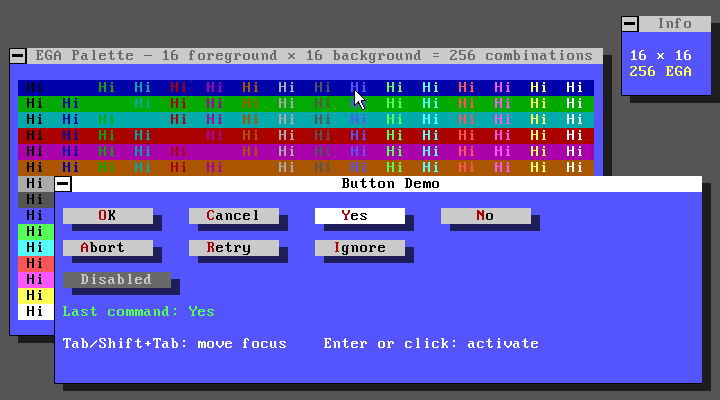
A modern C-Sharp .NET multiplatform TUI framework powered by SkiaSharp,
inspired by Turbo Vision with a PC Tools 9.x retro aesthetic.







Index
- Overview
- What it is and what it is not
- Inspiration and references
- Design decisions
- Solution structure
- Architecture layers
- Roadmap
- Detailed technical documentation
1. Overview
Retro.TUI.Framework is a .NET framework for building text user interface (TUI) applications with the following core characteristics:
- Truly multiplatform: Windows, Linux and macOS from the same code base.
- Vector rendering: SkiaSharp as the drawing engine, with embedded bitmap fonts and an authentic EGA/CGA color palette.
- Component model: hierarchical view tree, typed event system, focus management and modal stack, inspired by the Turbo Vision architecture.
- Fixed EGA palette: 16-color EGA palette with semantic color roles (
TuiColorRole). Colors are fixed and faithful to the PC Tools 9.x aesthetic by Central Point Software. - Idiomatic C#: naming, patterns and conventions native to modern C# (.NET 10+). It is not a 1:1 translation of Turbo Vision.
2. What it is and what it is not
It is
- A framework for building desktop TUI applications with a retro look.
- A reusable library distributable as independent NuGet packages per layer.
- An extensible foundation for building custom controls and behaviours.
It is not
- A terminal emulator or a framework for console applications (
stdout/stdin). - A direct reimplementation of Turbo Vision. It adopts its philosophy and patterns, but adapts them to the modern .NET ecosystem.
- A specific application. The project includes a sample app (
samples/) that reproduces the PC Tools 9 look, but the framework is independent of it.
3. Inspiration and references
Turbo Vision (Borland, 1990)
Turbo Vision was a TUI framework for C++ and Pascal that introduced advanced concepts for its time: view tree, event system, modal stack, semantic palettes and a component composition model. This framework adopts its architectural philosophy and translates it to the modern C# paradigm.
| Turbo Vision concept | Retro.TUI equivalent |
|---|---|
TView |
TuiView |
TGroup |
TuiGroup |
TApplication |
TuiApplication |
TEvent (struct with union) |
record hierarchy with TuiEvent |
Numeric palette (tpXxx) |
TuiColorRole (semantic enum) |
TDeskTop |
TuiDesktop |
TWindow / TDialog |
TuiWindow / TuiDialog |
TMenuBar / TStatusLine |
TuiMenuBar / TuiStatusBar |
PC Tools 9.x (Central Point Software, ~1991)
The visual aesthetic reference. Characteristics reproduced:
- Standard 16-color EGA palette mapped to semantic roles, with two additional non-EGA grays for inactive title bars and scroll bar tracks.
- IBM VGA monospaced font (PxPlus IBM VGA 9x16), embedded as a resource in
Retro.TUI.Theming. - Application title bar in Norton/PCTools style.
- Window borders with geometric lines (not Unicode box-drawing characters).
- Semi-transparent shadows on windows and dialogs.
- Menu bar and status bar with the characteristic color scheme.
4. Design decisions
4.1 Window host: SDL2 + SkiaSharp
Decision: SDL2 (via .NET binding through Silk.NET) as window and input host. SkiaSharp as the 2D rendering engine.
Rationale:
- SDL2 does exactly one thing: manage windows, keyboard/mouse input and the rendering context. It imposes no UI model of its own.
- SkiaSharp provides high-quality 2D vector rendering with font support, controllable antialiasing and direct access to graphics primitives.
- Truly multiplatform: the same API on Windows, Linux and macOS.
4.2 Class prefix: Tui
Decision: all public framework classes use the Tui prefix.
Rationale: avoids collisions with System.* (View, Window, Application,
Label, Control...), SkiaSharp (SK prefix) and SDL2 (SDL prefix).
Examples: TuiView, TuiDialog, TuiMenuBar, TuiPalette, TuiTheme.
4.3 Event system: .NET records + Channel<T>
Decision: hierarchy of abstract record TuiEvent with subtypes for each event type.
Queue implemented with System.Threading.Channels.Channel<TuiEvent>.
4.4 Color system: fixed EGA palette + semantic roles
Decision: the color scheme is fixed and defined in three static classes —
TuiEgaPalette (16 canonical EGA color constants), TuiColorMap (internal
mapping from TuiColorRole to SKColor) and TuiPalette (public static
Resolve(TuiColorRole) method). TuiTheme is a static class holding only
typography and shadow parameters.
No control has hardcoded colors. All rendering code resolves colors through
TuiPalette.Resolve(TuiColorRole).
4.5 Separate projects per layer
Decision: each layer is an independent .csproj project.
Rationale: enforces layer dependencies at compile time, enables independent NuGet distribution per layer, and facilitates unit testing per layer.
4.6 Naming and conventions
The framework follows official C# conventions throughout:
PascalCase, _camelCase for private fields, I prefix for interfaces,
XML doc comments on all public API, nullable reference types enabled,
record for immutable value types, init-only setters for configuration.
5. Solution structure
Retro.TUI.Framework.sln
│
├── docs/
│   └── architecture.md            Detailed technical design
│
├── samples/
│   └── Retro.TUI.Sample.Basic/    Basic demo application
│
├── src/
│   ├── Retro.TUI.Core/            Application, message loop
│   ├── Retro.TUI.Events/          Event hierarchy and commands
│   ├── Retro.TUI.Hosting/         Window and input host (SDL2)
│   ├── Retro.TUI.Rendering/       Rendering engine (SkiaSharp)
│   ├── Retro.TUI.Theming/         Palettes, themes and color roles
│   ├── Retro.TUI.Views/           TuiView, TuiGroup, TuiDesktop
│   ├── Retro.TUI.Widgets/         Standard controls
│   └── Retro.TUI.Windows/         TuiWindow, TuiDialog
│
└── tests/
    ├── Retro.TUI.Core.Tests/
    ├── Retro.TUI.Events.Tests/
    ├── Retro.TUI.Hosting.Tests/
    ├── Retro.TUI.Rendering.Tests/
    ├── Retro.TUI.Theming.Tests/
    ├── Retro.TUI.Views.Tests/
    ├── Retro.TUI.Widgets.Tests/
    └── Retro.TUI.Windows.Tests/
Project dependencies
Dependencies strictly follow the layer direction. No lower layer knows about any upper layer.
Retro.TUI.Widgets
    └── Retro.TUI.Windows
            └── Retro.TUI.Views
                    └── Retro.TUI.Core
                            ├── Retro.TUI.Rendering
                            │       ├── Retro.TUI.Theming
                            │       └── Retro.TUI.Events
                            └── Retro.TUI.Hosting
                                    └── Retro.TUI.Events
6. Architecture layers
┌──────────────────────────────────────────────────────┐
│                   WIDGETS LAYER                      │
│   TuiMenuBar · TuiStatusBar · TuiButton · TuiLabel   │
│   TuiInputLine · TuiCheckBox · TuiRadioButton · ...  │
├──────────────────────────────────────────────────────┤
│                   WINDOWS LAYER                      │
│           TuiWindow · TuiDialog                      │
├──────────────────────────────────────────────────────┤
│                    VIEWS LAYER                       │
│         TuiView · TuiGroup · TuiDesktop              │
├──────────────────────────────────────────────────────┤
│                    CORE LAYER                        │
│         TuiApplication · TuiMessageLoop              │
├───────────────────────┬──────────────────────────────┤
│    RENDERING LAYER    │       HOSTING LAYER          │
│  TuiRenderContext     │   ITuiHost · SdlHost         │
│  TuiGrid · TuiFont    │   ITuiInputProvider          │
├───────────────────────┴──────────────────────────────┤
│              THEMING LAYER                           │
│    TuiTheme · TuiPalette · TuiColorRole              │
├──────────────────────────────────────────────────────┤
│               EVENTS LAYER                           │
│   TuiEvent (record hierarchy) · TuiCommand           │
│   TuiEventQueue · TuiKey · TuiModifiers              │
└──────────────────────────────────────────────────────┘
For the complete technical detail of each layer, see:
7. Roadmap
| Milestone | Version | Content |
|---|---|---|
| 1 — Foundations | v0.1.0 |
Hosting, Rendering, Theming, Events |
| 2 — View tree | v0.2.0 |
Views, Core, Application loop |
| 3 — Windows | v0.3.0 |
TuiWindow, TuiDialog, modal stack |
| 4 — Base controls (Widgets) | v0.4.0 |
MenuBar, StatusBar, Button, Input |
| 5 — Advanced controls | v0.5.0 |
CheckBox, RadioButton, ListBox, ScrollBar |
| 6 — Sample application | v1.0.0 |
PC Tools 9 desktop sample |
Milestone 1 — Foundations (Hosting + Rendering + Theming + Events)
v0.1.0
- ✅
Retro.TUI.Events: record hierarchy,TuiCommand,TuiKey - ✅
Retro.TUI.Theming:TuiColorRole,TuiEgaPalette,TuiColorMap,TuiPalette(static),TuiTheme(static) — IBM VGA font embedded as resource - ✅
Retro.TUI.Hosting:ITuiHost,SdlHost - ✅
Retro.TUI.Rendering:TuiRenderContext,TuiGrid,TuiFont
Milestone 2 — View tree (Views + Core)
v0.2.0
- ✅
Retro.TUI.Views:TuiView,TuiGroup,TuiDesktop - ✅
Retro.TUI.Core:TuiApplication,TuiMessageLoop,TuiFocusManager - ✅ Keyboard and mouse event dispatch to the tree
- ✅ Custom mouse cursor
Milestone 3 — Windows
v0.3.0 ✅
- ✅
TuiWindowwith title, border and shadow - ✅
TuiDialogwith modal stack (IModalDialog,TuiDesktop.PushModal/PopModal) - ✅ Window drag with mouse (mouse capture via
_capturedView) - ✅ Z-order (bring to front on click)
- ✅
TuiApplication.RunModal— nested event loop, automatic lifecycle - ✅ Modal event routing — keyboard, mouse and commands restricted to active modal
Milestone 4 — Base controls (Widgets)
v0.4.0
-
TuiMenuBarwith hover and menu opening -
TuiStatusBarwith function keys - ✅
TuiButton— focus, keyboard/mouse/accelerator activation, disabled state, factory presets (Ok,Cancel,Yes,No,Abort,Retry,Ignore) - ✅
TuiLabel -
TuiInputLinewith blinking cursor and basic editing
Milestone 5 — Advanced controls
v0.5.0
-
TuiCheckBox -
TuiRadioButtonwith groups -
TuiListBox -
TuiScrollBar - Drop-down menus (
TuiMenu,TuiMenuItem)
Milestone 6 — Sample application
v1.0.0
-
Retro.TUI.Sample.PcTools: reproduction of the PC Tools 9 desktop - Framework usage documentation
8. Detailed technical documentation
| Document | Content |
|---|---|
| docs/architecture.md | Contracts, event hierarchy, theming, lifecycle, view tree |
Requirements
- .NET 10 SDK (
10.0.300or later) - Visual Studio 2026 or VS Code with C# Dev Kit
- SDL2 native libraries (Windows: bundled via NuGet; Linux/macOS: system package)
- Compatible with Windows 10+, Ubuntu 20.04+, macOS 12+
Contributing
See CONTRIBUTING.md for branch strategy, commit conventions and coding guidelines.
Third-party notices
See THIRD-PARTY-NOTICES.md for the licenses of all third-party components used by this project.
License
This project is licensed under the MIT License.
© 2026 Oscar Fernandez Gonzalez a.k.a. Osc@rNET and Contributors
Trademarks and Acknowledgements
This project is not affiliated with, endorsed by, or sponsored by any of the following companies or products:
- Turbo Vision is a trademark of Embarcadero Technologies, Inc.
- PC Tools was a trademark of Central Point Software, Inc., later acquired by Symantec Corporation.
- Norton is a trademark of Gen Digital Inc.
- IBM is a registered trademark of International Business Machines Corporation.
The retro aesthetic and architectural concepts used in this project are inspired by these products for educational and nostalgic purposes only. All trademarks are the property of their respective owners.
| Product | Versions Compatible and additional computed target framework versions. |
|---|---|
| .NET | net10.0 is compatible. net10.0-android was computed. net10.0-browser was computed. net10.0-ios was computed. net10.0-maccatalyst was computed. net10.0-macos was computed. net10.0-tvos was computed. net10.0-windows was computed. |
-
net10.0
- Retro.TUI.Theming (>= 0.4.1-alpha.4)
- SkiaSharp (>= 3.119.2)
- SkiaSharp.NativeAssets.Linux (>= 3.119.2)
- SkiaSharp.NativeAssets.macOS (>= 3.119.2)
- SkiaSharp.NativeAssets.Win32 (>= 3.119.2)
NuGet packages (2)
Showing the top 2 NuGet packages that depend on Retro.TUI.Rendering:
| Package | Downloads |
|---|---|
|
Retro.TUI.Views
View-tree layer for Retro.TUI.Framework. Provides TuiView, TuiGroup and TuiDesktop — the composable visual hierarchy that all controls and windows build on. Depends on Events, Theming and Rendering; does not reference SkiaSharp directly. |
|
|
Retro.TUI.Core
Application core for Retro.TUI.Framework. Provides TuiApplication (entry point), TuiMessageLoop (poll-update-render cycle) and TuiFocusManager (keyboard focus). This is the only layer that wires together Hosting, Rendering and the view tree. |
GitHub repositories
This package is not used by any popular GitHub repositories.
| Version | Downloads | Last Updated |
|---|---|---|
| 0.4.1-alpha.4 | 98 | 7/7/2026 |
| 0.3.0-alpha.3 | 83 | 6/27/2026 |