Rhino.Scripting.QrCode
0.2.0
dotnet add package Rhino.Scripting.QrCode --version 0.2.0
NuGet\Install-Package Rhino.Scripting.QrCode -Version 0.2.0
<PackageReference Include="Rhino.Scripting.QrCode" Version="0.2.0" />
<PackageVersion Include="Rhino.Scripting.QrCode" Version="0.2.0" />
<PackageReference Include="Rhino.Scripting.QrCode" />
paket add Rhino.Scripting.QrCode --version 0.2.0
#r "nuget: Rhino.Scripting.QrCode, 0.2.0"
#:package Rhino.Scripting.QrCode@0.2.0
#addin nuget:?package=Rhino.Scripting.QrCode&version=0.2.0
#tool nuget:?package=Rhino.Scripting.QrCode&version=0.2.0

Rhino.Scripting.QrCode



Rhino.Scripting.QrCode is a small library for creating QR codes as Rhino3D Meshes or Hatches.
It uses ZXing.Net to encode the text.
The QR code is vector geometry, not an image, so it stays sharp at any size.
It works in Rhino 8 and later, from F#, C# and Python.
The QR code is created at the World Origin with a size of 1.0 x 1.0 units, using the high error correction level (30%).
Text with non-ASCII characters is encoded as UTF-8.
Use in F#
For example in the Fesh.Rhino scripting editor:
#r "nuget: Rhino.Scripting.QrCode"
open Rhino
open Rhino.Geometry
open Rhino.Scripting

let doc = RhinoDoc.ActiveDoc

// as a Mesh, scaled to 50 units
let mesh = QrCode.asMesh "https://www.rhino3d.com"
mesh.Transform(Transform.Scale(Point3d.Origin, 50.0)) |> ignore
doc.Objects.AddMesh(mesh) |> ignore

// as Hatches, using the 'Solid' hatch pattern of the active document
for hatch in QrCode.asHatches "https://www.rhino3d.com" do
    doc.Objects.AddHatch(hatch) |> ignore

doc.Views.Redraw()
Use in C#
For example in the Rhino 8 script editor:
#r "nuget: Rhino.Scripting.QrCode"
using Rhino;
using Rhino.Scripting;

var mesh = QrCode.asMesh("https://www.rhino3d.com");
RhinoDoc.ActiveDoc.Objects.AddMesh(mesh);
RhinoDoc.ActiveDoc.Views.Redraw();
Use in Python
Get the files
Rhino.Scripting.QrCode.dll,zxing.dllandFSharp.Core.dllinto one folder.
Rundotnet buildon this repository, then they are all inbin/Release/net48.
If you download dll files instead, you might need to unblock them first: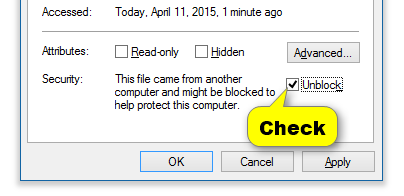
Reference the dll in IronPython:
import clr
clr.AddReferenceToFileAndPath(r"C:\path\to\bin\Release\net48\Rhino.Scripting.QrCode.dll")
import Rhino
from Rhino.Scripting import QrCode

mesh = QrCode.asMesh("https://www.rhino3d.com")
Rhino.RhinoDoc.ActiveDoc.Objects.AddMesh(mesh)
Rhino.RhinoDoc.ActiveDoc.Views.Redraw()
Full API Documentation
goswinr.github.io/Rhino.Scripting.QrCode
Alternatives
There are other QR code tools for Rhino that create images instead of geometry,
see discourse.mcneel.com.
Contributing
Contributions are welcome even for small things like typos. If you have problems with this library please submit an issue.
License
Changelog
see CHANGELOG.md
| Product | Versions Compatible and additional computed target framework versions. |
|---|---|
| .NET | net8.0 is compatible. net8.0-android was computed. net8.0-browser was computed. net8.0-ios was computed. net8.0-maccatalyst was computed. net8.0-macos was computed. net8.0-tvos was computed. net8.0-windows was computed. net9.0 was computed. net9.0-android was computed. net9.0-browser was computed. net9.0-ios was computed. net9.0-maccatalyst was computed. net9.0-macos was computed. net9.0-tvos was computed. net9.0-windows was computed. net10.0 is compatible. net10.0-android was computed. net10.0-browser was computed. net10.0-ios was computed. net10.0-maccatalyst was computed. net10.0-macos was computed. net10.0-tvos was computed. net10.0-windows was computed. |
| .NET Framework | net48 is compatible. net481 was computed. |
-
.NETFramework 4.8
- FSharp.Core (>= 6.0.7)
- ZXing.Net (>= 0.16.11)
-
net10.0
- FSharp.Core (>= 6.0.7)
- ZXing.Net (>= 0.16.11)
-
net8.0
- FSharp.Core (>= 6.0.7)
- ZXing.Net (>= 0.16.11)
NuGet packages
This package is not used by any NuGet packages.
GitHub repositories
This package is not used by any popular GitHub repositories.
| Version | Downloads | Last Updated |
|---|---|---|
| 0.2.0 | 92 | 10/10/2026 |
### Added
- First release on nuget.org
### Changed
- Target net48, net8.0 and net10.0, for Rhino 8 and later. Rhino 6 and 7 are not supported anymore
- Reference RhinoCommon 8 instead of 6
- Update ZXing.Net from 0.16.6 to 0.16.11
- NuGet package id is `Rhino.Scripting.QrCode` instead of `Rhino6.Scripting.QrCode`
### Fixed
- The QR code had an extra empty row and column, so it was smaller than 1.0 unit and shifted up by one module
- Characters outside of ISO-8859-1, like '€' or '中', were encoded as '?'. Text with non-ASCII characters is encoded as UTF-8 now
- `asHatches` used a fixed tolerance of 0.01, bigger than a module of QR codes with more than 100 modules. It is relative to the module size now
- `asHatches` adds the 'Solid' hatch pattern to the document if it is missing, instead of failing
- `asMesh` returns a Mesh with normals
- README examples