RouteCheck 0.1.0
See the version list below for details.
dotnet tool install --global RouteCheck --version 0.1.0
dotnet new tool-manifest
dotnet tool install --local RouteCheck --version 0.1.0
#tool dotnet:?package=RouteCheck&version=0.1.0
nuke :add-package RouteCheck --version 0.1.0
RouteCheck


Check your API routes in your Terminal.
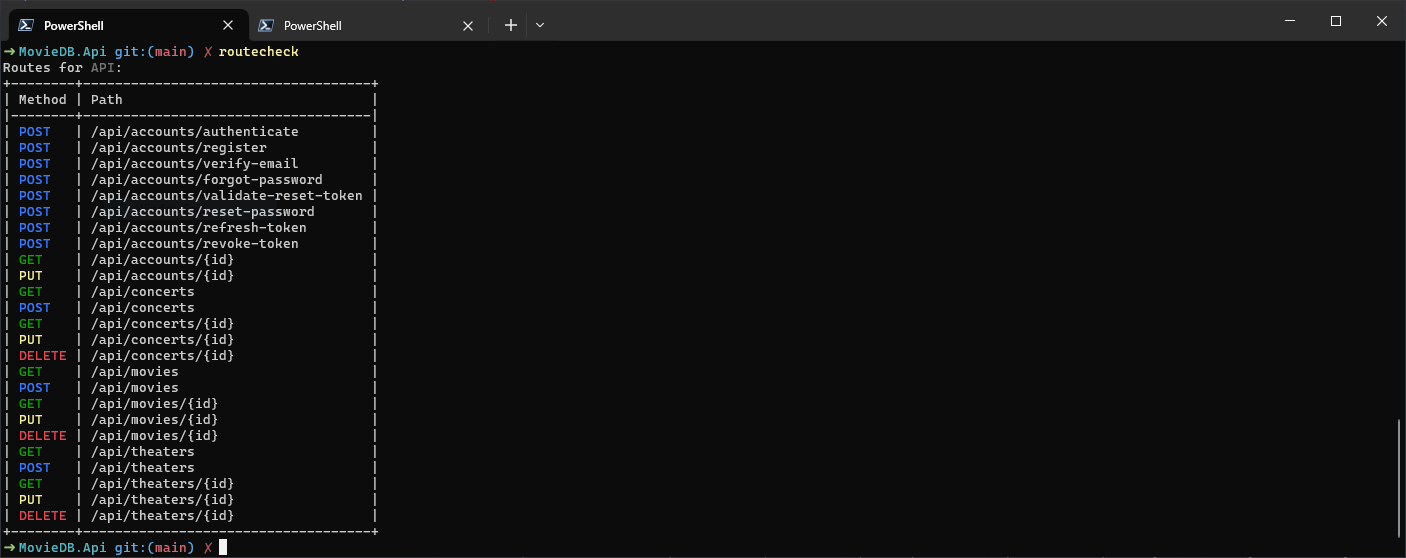
RouteCheck is a dotnet tool for checking/viewing your API routes in your terminal. The check command (default) shows you all routes in a nice table with some basic information. RouteCheck builds and starts your application in the Development environment, calls the /openapi/v1.json endpoint and displays the returned document.
Currently this only works if you are using the
Microsoft.AspNetCore.OpenApipackage and expose the generated JSON via an endpoint (builder.Services.AddOpenApi()andapp.MapOpenApi()).
Installation
You can install RouteCheck as a dotnet tool via NuGet:
# Install
dotnet tool install --global RouteCheck

# Update
dotnet tool update --global RouteCheck
Usage
In your terminal cd into a ASP.NET project and run:
routecheck
This should give you something like this:
You can also provide a path to the web app's directory or project file via the path option:
routecheck --path /absolute/path/to/webapp

# or

routecheck -p relative/path/to/webapp/WebApp.csproj
If you use a custom OpenApi endpoint, you can set the openapi-endpoint option:
routecheck --openapi-endpoint /some/other/endpoint
RouteCheck waits 20 seconds for your app to start (after building it). If your app needs longer, e.g. because it runs migrations on startup, set the timeout option:
routecheck --timeout 60
Filter routes
The routes are sorted by path, and routes with the same path by method. To show only routes with certain HTTP methods, use the method option. It can be used multiple times or with comma-separated values:
routecheck --method GET -m post

# or

routecheck -m get,post
To show only routes whose path contains a text, use the filter option. With a wildcard (* or %), the pattern has to match the whole path. It can be used multiple times, a route has to match one of them:
# /pets, /pets/{id}, /users/{id}/pets, ...
routecheck --filter pets

# /pets, /pets/{id}, but not /users/{id}/pets
routecheck -f "/pets*"
Matching is case-insensitive, like ASP.NET Core routing. method and filter can be combined.
Output for scripts and LLM agents
With --output json or --output markdown, RouteCheck prints only the result, as one document: no status lines and no update notice.
routecheck --output json
{
  "command": "check",
  "project": "src/Api/Api.csproj",
  "routes": [
    {
      "method": "GET",
      "path": "/pets"
    }
  ],
  "error": null
}
projectis the project file relative to the current directory.- On an error,
errorcontains the message and the exit code is1. Otherwiseerrorisnulland the exit code is0. --output markdownprints the same as a Markdown table, e.g. for pull request comments or job summaries.
Environment
The app is started with the environment Development, unless your launch profile or the ASPNETCORE_ENVIRONMENT environment variable sets another one.
For help run:
routecheck -h
LICENSE
MIT
| Product | Versions Compatible and additional computed target framework versions. |
|---|---|
| .NET | net8.0 is compatible. net8.0-android was computed. net8.0-browser was computed. net8.0-ios was computed. net8.0-maccatalyst was computed. net8.0-macos was computed. net8.0-tvos was computed. net8.0-windows was computed. net9.0 is compatible. net9.0-android was computed. net9.0-browser was computed. net9.0-ios was computed. net9.0-maccatalyst was computed. net9.0-macos was computed. net9.0-tvos was computed. net9.0-windows was computed. net10.0 is compatible. net10.0-android was computed. net10.0-browser was computed. net10.0-ios was computed. net10.0-maccatalyst was computed. net10.0-macos was computed. net10.0-tvos was computed. net10.0-windows was computed. |
This package has no dependencies.