SA.Umbraco.MediaPreview
1.0.0
dotnet add package SA.Umbraco.MediaPreview --version 1.0.0
NuGet\Install-Package SA.Umbraco.MediaPreview -Version 1.0.0
<PackageReference Include="SA.Umbraco.MediaPreview" Version="1.0.0" />
<PackageVersion Include="SA.Umbraco.MediaPreview" Version="1.0.0" />
<PackageReference Include="SA.Umbraco.MediaPreview" />
paket add SA.Umbraco.MediaPreview --version 1.0.0
#r "nuget: SA.Umbraco.MediaPreview, 1.0.0"
#:package SA.Umbraco.MediaPreview@1.0.0
#addin nuget:?package=SA.Umbraco.MediaPreview&version=1.0.0
#tool nuget:?package=SA.Umbraco.MediaPreview&version=1.0.0
SA.Umbraco.MediaPreview
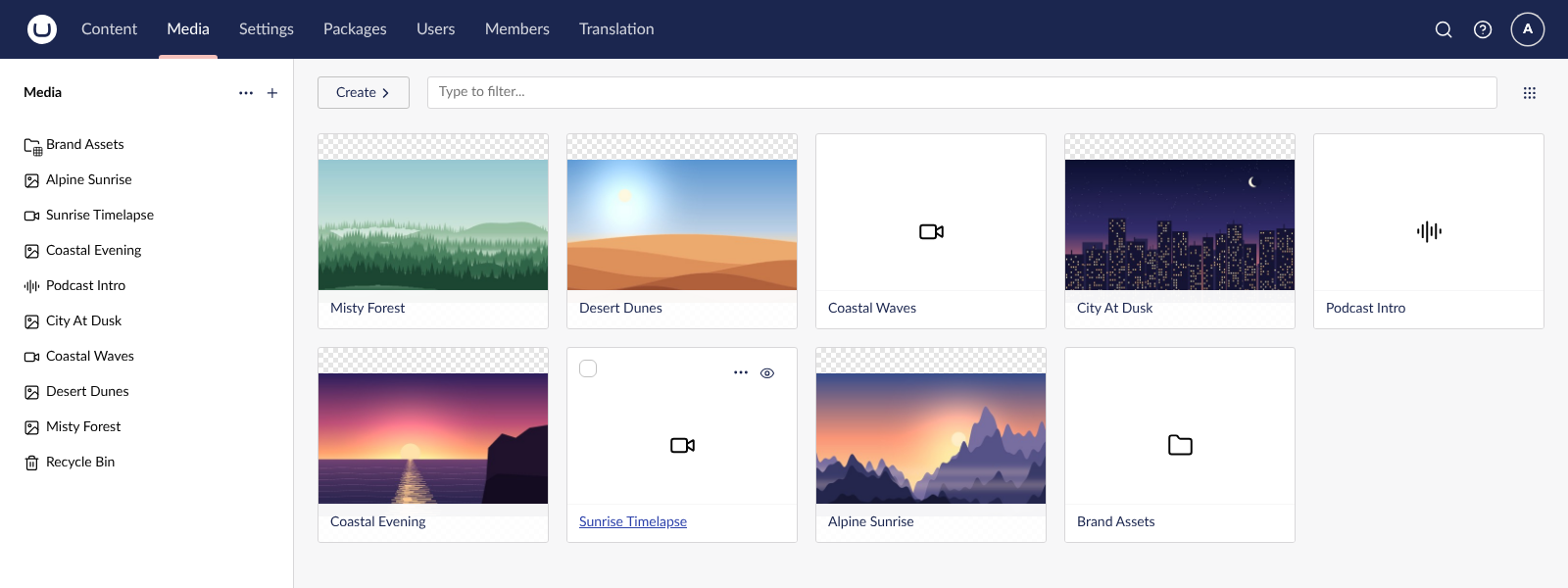
Preview images, video and audio straight from the Umbraco media library.
Hover over a file's card and click the eye next to the "..." menu. The media item opens in a fly-out from the right, where you can view the image or play the video or audio with Umbraco's built-in players. Close the fly-out and you're back where you were, in the same folder and position.
<img src="https://raw.githubusercontent.com/suedeapple/SA.Umbraco.MediaPreview/main/docs/screenshots/01-preview-button.png" alt="Close-up of a media card with the Preview eye button highlighted" width="360">
Requirements
Umbraco 17.3 or later, Umbraco 18 and Umbraco 19. Earlier 17.x versions have no buttons on media cards, so there is nowhere for the eye to appear.
Install
dotnet add package SA.Umbraco.MediaPreview
No configuration needed. Rebuild and run your site, then open the Media section.
What changes
- Files in the media library show the eye as their one-click button, in both the grid and list layouts. The Create (+) action moves into the "..." menu for files.
- Folders keep Create (+) as their one-click button.
- The media tree on the left is unchanged.
- Languages: the button uses Umbraco's own "Preview" wording, so it appears in each editor's backoffice language (for example "Vorschau" in German).
The fly-out is Umbraco's own media editor, the same one that opens when you click a picked item in a Media Picker, so you can also make and save changes there. Umbraco's cards aren't replaced or modified.
Support
Found a problem or have an idea? Open an issue.
| Product | Versions Compatible and additional computed target framework versions. |
|---|---|
| .NET | net10.0 is compatible. net10.0-android was computed. net10.0-browser was computed. net10.0-ios was computed. net10.0-maccatalyst was computed. net10.0-macos was computed. net10.0-tvos was computed. net10.0-windows was computed. |
-
net10.0
- Umbraco.Cms.Core (>= 17.3.0 && < 20.0.0)
NuGet packages
This package is not used by any NuGet packages.
GitHub repositories
This package is not used by any popular GitHub repositories.
| Version | Downloads | Last Updated |
|---|---|---|
| 1.0.0 | 109 | 10/28/2026 |