Scal.Interpreting.Commands
1.2.1
Prefix Reserved
dotnet add package Scal.Interpreting.Commands --version 1.2.1
NuGet\Install-Package Scal.Interpreting.Commands -Version 1.2.1
<PackageReference Include="Scal.Interpreting.Commands" Version="1.2.1" />
<PackageVersion Include="Scal.Interpreting.Commands" Version="1.2.1" />
<PackageReference Include="Scal.Interpreting.Commands" />
paket add Scal.Interpreting.Commands --version 1.2.1
#r "nuget: Scal.Interpreting.Commands, 1.2.1"
#:package Scal.Interpreting.Commands@1.2.1
#addin nuget:?package=Scal.Interpreting.Commands&version=1.2.1
#tool nuget:?package=Scal.Interpreting.Commands&version=1.2.1
Scal.Interpreting.Commands
A lightweight, deterministic command-line interpreter for DotNet with attribute-based validation, type conversion and response file.
Status





Last verified with DotNet 10 (2026)
Purpose
Unlike reflection-heavy or attribute-mandatory CLI frameworks, Scal.Interpreting.Commands prioritizes deterministic resolution of strongly-typed commands without dependencies.
Motivation
I needed a parameters interpreter that do not require me to remember how many dashes it requires, that allows to differentiate similar commands with different parameters, and that supports abbreviations while detecting ambiguity.
See Why Scal.Interpreting.Commands exists for more information.
Philosophy
- Simple deterministic grammar: verb (noun) (arguments)
- Case-insensitive
- Dash-tolerant but dash-agnostic
- Accept abbreviations but detect collisions
- Bulletproof and predictable behavior
Design
Principles
- A base class is derived into different commands. I use Program but you may use anything you like.
- The commands have properties that are their parameters, possibly annotated with validation attributes and type converters.
- The base class is given to the interpreter which selects the appropriate derived command and instantiate it.
- Instantiation delegate may be provided if you need dependency injection support.
- In case of error or ambiguity, no command is instantiated and the Results property of the interpretation contains the list of errors.
- Help is provided by calling the Feedback method of the interpretation with a delegate (Console.Writeline, List.Add, ...).
Features
- Verb/noun definition by attributes or Pascal-case naming convention
- Strongly-typed command instantiation
- Validation via DataAnnotations
- TypeConverter support
- Response file (with the @ prefix, see example below)
- Contextual help generation
- Dependency-free
- DI-agnostic construction
- DotNet 8.0 and 10.0 LTS compatible (console or AspNet)
- Lightweight (total 470 lines including comments, 4 classes and 2 extensions)
Usage
Syntax
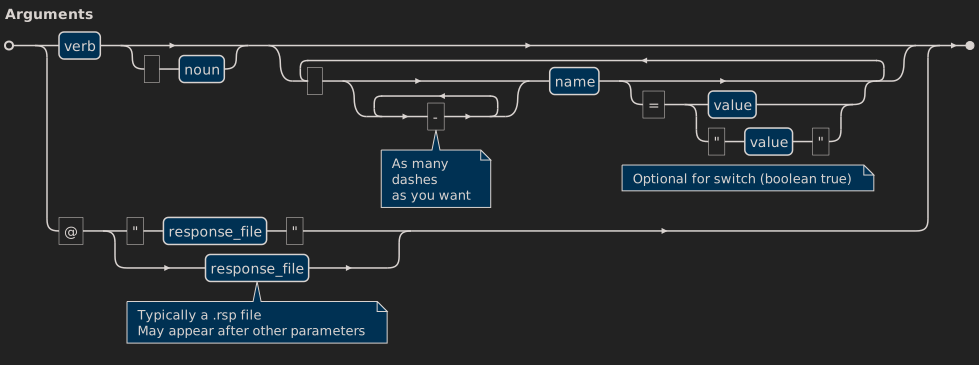
Annotated example
Example of a program accepting as List Image Name=abc command:
[DataContract(Name = "CliArgs")]
[Description("Cli arguments interpreter example")]
public abstract class Program
{
    private static async Task<int> Main(string[] args)
    {
        var interpretation = new CommandLineInterpreter().Interpret<Program>(args);
        if (interpretation.Command is null) {
            interpretation.Feedback(Console.WriteLine);
            return 1;
        }
        interpretation.Feedback(Console.WriteLine, showHelp: false);
        return await interpretation.Command.ExecuteAsync();
    }

    public abstract Task<int> ExecuteAsync();

    [Description("List the images")]
    [DataContract(Namespace = "List", Name = "Image")]
    public class ListImage : Program
    {
        [Description("The image name pattern")]
        [Required]
        [MinLength(1)]
        public string Name { get; set; } = string.Empty;

        [Description("The image type Id")]
        [Range(1, 9)]
        public int TypeId { get; set; } = 1;

        public override Task<int> ExecuteAsync()
        {
            Console.WriteLine("Simulate {0} {1}", nameof(ListImage), this.Name);
            return Task.FromResult(0);
        }
    }
}
Mention that:
- The Program itself is an abstract with just an entrypoint and the ExecuteAsync contract.
- Commands are classes deriving from Program containg the methods you desire (ExecuteAsync in the example).
- It is derived in a ListImage class that is instantiated.
- Help is generated using text from DesriptionAttribute.
- I choose to output the feedback without help in case of success which shows the program title.
Executing:
CliArgs.exe List Image Name=abc
or
CliArgs.exe L I N=abc
gives:
CliArgs Cli arguments interpreter example
Simulate ListImage abc
Help example
Executing the program without parameter will output this with the accepted abbreviations in parentheses:
CliArgs Cli arguments interpreter example
*** : Usage: verb (noun) (parameters)
  List     Image            List the images (L I)
    TypeId                  The image type Id (T)
    Name                    The image name pattern (N)
Example of validation using DataAnnotations attributes
Executing the example above with:
CliArgs.exe List Image Name= Type=10
or
CliArgs.exe L I N= T=10
gives:
CliArgs Cli arguments interpreter example
*** TypeId: The field TypeId must be between 1 and 9.
*** Name: The Name field is required.
  List     Image            List the images (L I)
    TypeId                  The image type Id (T)
    Name                    The image name pattern (N)
Example of new ListImport command without attribute
When adding a new command List Import to the same program:
    public class ListImportWithoutParameter : Program
    {
        public override Task<int> ExecuteAsync()
        {
            Console.WriteLine("Simulate {0}", nameof(ListImportWithoutParameter));
            return Task.FromResult(0);
        }
    }
Mention that:
- The class does not require any attribute and VerbNoun is extracted using the first two words of the class name Pascal-casing.
- Acronyms such as XML or HTTP will be split into individual letters unless explicitly configured using attributes, e.g. a ListXMLFile will be interpreted as List X by convention. In such a case, use a DataContract attribute to clarify your intent.
- The abbreviations now become l ima for List Image and l imp for List Import as those are the minimum required to prevent ambiguity.
Please note that abbreviations should never be used is scripts or documentation for many reasons (clarity, newbie-friendly), including the fact that they may change by adding new commands.
Example of ambiguity detection and contextual help
If you have the following two commands (taken from tests):
internal class ListImageByType : Program
{
    [Required]
    public string Name { get; set; } = string.Empty;
    [Range(1, 9)]
    public int TypeId { get; set; }
}

internal class ListImageByNamespace : Program
{
    public string Name { get; set; } = string.Empty;
    public string Namespace { get; set; } = string.Empty;
}
Trying to execute the program with:
CliArgs.exe List Image Name=abc
gives:
CliArgs Cli arguments interpreter example
List Image Name=abc
*** : Ambiguous command: List Image
    List     Image             (L Ima)
      Name                     (N)
      TypeId                   (T)
    List     Image             (L Ima)
      Name                     (Name)
      Namespace                (Names)
Mention that:
- This allows to have mutually exclusive parameters isolated in different commands simplifying implementation.
- Help is contextual and only shows the ambiguous commands.
Example of verb-only command
You may define a verb-only command by creating a one-word class like Cleanup, or by specifying a Namespace in a DataContract without Name:
    public class Cleanup : Program
    {
        public override Task<int> ExecuteAsync()
        {
            Console.WriteLine("Simulate {0}", nameof(Cleanup));
            return Task.FromResult(0);
        }
    }
Example of verb-only and verb/noun with the same verb
It is accepted as long as there is a way to differentiate both commands, either the verb alone or the presence of a parameter.
internal class Do : Program
{
    public string? What { get; set; }

    public override Task<int> ExecuteAsync()
    {
        Console.WriteLine("{0}: '{1}'", this.GetType().Name, this.What);
        return Task.FromResult(0);
    }
}

internal class DoMore : Program
{
    public string? What { get; set; }

    public override Task<int> ExecuteAsync()
    {
        Console.WriteLine("{0}: '{1}'", this.GetType().Name, this.What);
        return Task.FromResult(0);
    }
}
Mention that:
- Do What=Something and Do More What=Something will both work, instantiating the correct command.
- Do works too as no parameter is required.
Example with type converter and custom validation
Custom type converter and custom validation may be used:
    public class SomeCommand : Program
    {
        [TypeConverter(typeof(YourTypeConverter))]
        [YourCustomValidation]
        [Required]
        public YourType Reference { get; set; }

        public override Task<int> ExecuteAsync()
        {
            Console.WriteLine("Simulate {0} {1}", nameof(SomeCommand), this.Reference);
            return Task.FromResult(0);
        }
    }
Example with response file
You may use a response file, typically with extension .rsp, containing the paramaters either on one line or multiple lines.
CliArgs.exe @MyParameters.rsp
or
CliArgs.exe @"/path with spaces/MyParameters.rsp"
with MyParameters.rsp containing:
# Comment in response file
List Image Name=abc TypeId=1
You may mix actual parameters with response file:
CliArgs.exe List Image @ListImageFilter.rsp
You may give a default path for response files if the path is not rooted:
var interpreter = new CommandLineInterpreter(responseFilePath: @"/the path you want");
Mention that:
- Response files may contain other response files up to a depth of 9.
- If responseFilePath is not specified, the path to the first response file read is used for subsequent ones.
- The parameters are used in the order they appear, the first two being verb and noun.
Example of factory constructor
You may provide a factory delegate to integrate with your preferred DI framework:
var interpreter = new CommandLineInterpreter(
    factory: type => MyContainer.Resolve(type));
If no factory delegate is provided, Activator is used:
... = Activator.CreateInstance(type);
Test examples
To view examples, see the tests models: by convention, by annotation, verb-only, with type converter and with response file.
Integration
dotnet add package Scal.Interpreting.Commands
Dependencies
None.
Customization
- The DataContractAttribute may be used to specify the verb (Namespace) and the noun (Name) of the command.
- The DescriptionAttribute may be used to provide the help text concerning a command or a parameter.
- You may decorate properties with attributes deriving from ValidationAttribute, either custom or standard ones such as RequiredAttribute.
Extensibility
You may add as many commands as you want as long as there is no ambiguity on how to call them, i.e. at least one different parameter.
Notes
- Even if a parameter is not annotated as required, it is needed when it is the only difference between two commands.
- Commands are discovered by searching the assembly of the base class given to the interpreter.
Thanks
Thanks to Dan (aka ChatGPT) for they advices and making doubts disappear.
| Product | Versions Compatible and additional computed target framework versions. |
|---|---|
| .NET | net8.0 is compatible. net8.0-android was computed. net8.0-browser was computed. net8.0-ios was computed. net8.0-maccatalyst was computed. net8.0-macos was computed. net8.0-tvos was computed. net8.0-windows was computed. net9.0 was computed. net9.0-android was computed. net9.0-browser was computed. net9.0-ios was computed. net9.0-maccatalyst was computed. net9.0-macos was computed. net9.0-tvos was computed. net9.0-windows was computed. net10.0 is compatible. net10.0-android was computed. net10.0-browser was computed. net10.0-ios was computed. net10.0-maccatalyst was computed. net10.0-macos was computed. net10.0-tvos was computed. net10.0-windows was computed. |
-
net10.0
- No dependencies.
-
net8.0
- No dependencies.
NuGet packages
This package is not used by any NuGet packages.
GitHub repositories
This package is not used by any popular GitHub repositories.