SilkierQuartz 10.0.0
dotnet add package SilkierQuartz --version 10.0.0
NuGet\Install-Package SilkierQuartz -Version 10.0.0
<PackageReference Include="SilkierQuartz" Version="10.0.0" />
<PackageVersion Include="SilkierQuartz" Version="10.0.0" />
<PackageReference Include="SilkierQuartz" />
paket add SilkierQuartz --version 10.0.0
#r "nuget: SilkierQuartz, 10.0.0"
#:package SilkierQuartz@10.0.0
#addin nuget:?package=SilkierQuartz&version=10.0.0
#tool nuget:?package=SilkierQuartz&version=10.0.0


SilkierQuartz is a new after merging Quartzmin and QuartzHostedService!
Quartz.NET is a full-featured, open source job scheduling system that can be used from smallest apps to large scale enterprise systems.
Quartzmin Quartzmin is powerful, easy to use web management tool for Quartz.NET
QuartzHostedService QuartzHostedService is easy to host Quartz as service in .Net Core !
So
SilkierQuartz can be used within your existing application with minimum effort as a Quartz.NET plugin when it automatically creates embedded web server.
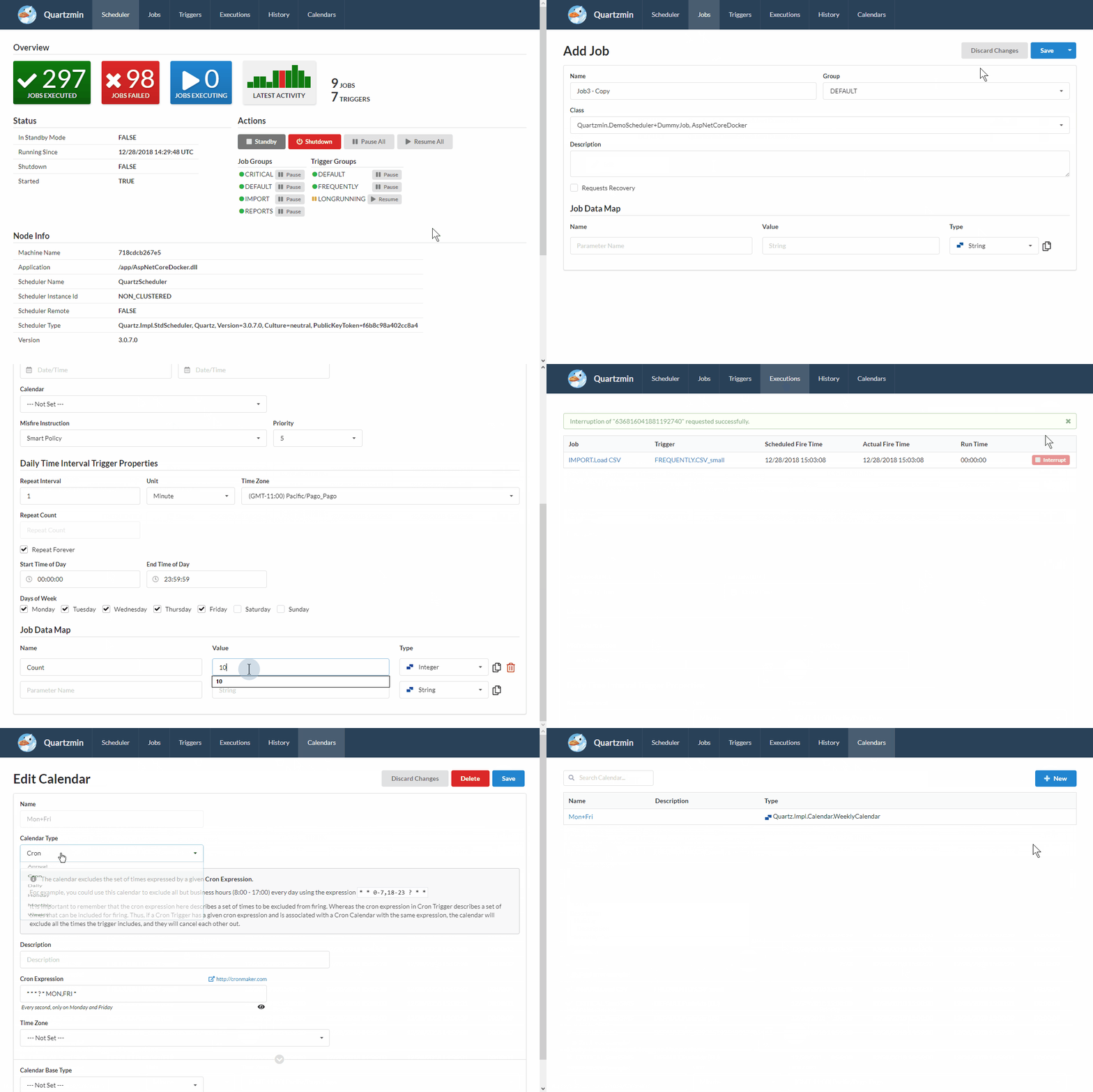
The goal of this project is to provide convenient tool to utilize most of the functionality that Quartz.NET enables. The biggest challenge was to create a simple yet effective editor of job data map which is heart of Quartz.NET. Every job data map item is strongly typed and SilkierQuartz can be easily extended with a custom editor for your specific type beside standard supported types such as String, Integer, DateTime and so on.
SilkierQuartz was created with Semantic UI and Handlebars.Net as the template engine.
Packages
| Package | Description | Version | Downloads |
|---|---|---|---|
| SilkierQuartz | Main web UI package for Quartz.NET management, including dashboard, job editing, trigger management, and execution monitoring. |  |
 |
| SilkierQuartz.Plugins.RecentHistory | Core recent-history plugin that records execution history and supports centralized relational persistence through the provider-agnostic registration API. |  |
 |
| SilkierQuartz.Plugins.RecentHistory.EFCoreSqlServer | EF Core SQL Server history store package with ready-to-use AddEfCoreExecutionHistoryStore(...) registration for Microsoft SQL Server deployments. |
 |
 |
| SilkierQuartz.Plugins.RecentHistory.EFCoreNpgsql | EF Core PostgreSQL history store package for teams using Npgsql and wanting the same execution-history behavior on PostgreSQL. |  |
 |
| SilkierQuartz.Plugins.RecentHistory.EFCoreSqlite | EF Core SQLite history store package for lightweight or embedded deployments that want persistent recent job history. |  |
 |
| SilkierQuartz.Plugins.RecentHistory.EFCoreMySql | EF Core MySQL history store package for MySQL-compatible deployments using the Pomelo provider. |  |
 |
Choose the package that matches your storage model:
SilkierQuartzfor the web dashboard.SilkierQuartz.Plugins.RecentHistoryfor the core recent-history plugin and provider-agnostic relational registration.- One EF Core provider package when you want recent history persisted with SQL Server, PostgreSQL, SQLite, or MySQL.
SilkierQuartz's Features
- automatically discover IJob subclasses with SilkierQuartzAttribute
- With QuartzHostedService and more extensions
- Authentication feature , by khanhna
Quartzmin's Features
- Add, modify jobs and triggers
- Add, modify calendars (Annual, Cron, Daily, Holiday, Monthly, Weekly)
- Change trigger type to Cron, Simple, Calendar Interval or Daily Time Interval
- Set typed job data map values (bool, DateTime, int, float, long, double, decimal, string, byte[])
- Create custom type editor for complex type in job data map
- Manage scheduler state (standby, shutdown)
- Pause and resume job and trigger groups
- Pause and resume triggers individually
- Pause and resume all triggers for specific job
- Trigger specific job immediately
- Watch currently executing jobs
- Interrupt executing job
- See next scheduled dates for Cron
- See recent job history, state and error messages
Install
SilkierQuartz is available on nuget.org
To install SilkierQuartz, run the following command in the Package Manager Console
PM> Install-Package SilkierQuartz
To persist recent execution history with EF Core, install the matching provider package:
PM> Install-Package SilkierQuartz.Plugins.RecentHistory.EFCoreSqlServer
PM> Install-Package SilkierQuartz.Plugins.RecentHistory.EFCoreNpgsql
PM> Install-Package SilkierQuartz.Plugins.RecentHistory.EFCoreSqlite
PM> Install-Package SilkierQuartz.Plugins.RecentHistory.EFCoreMySql
ASP.NET Core middleware
Add to your Program.cs file:
   public class Program
    {
        public static void Main(string[] args)
        {
            CreateHostBuilder(args).Build().Run();
        }

        public static IHostBuilder CreateHostBuilder(string[] args) =>
            Host.CreateDefaultBuilder(args)
                .ConfigureWebHostDefaults(webBuilder =>
                {
                    webBuilder.UseStartup<Startup>();
                })
             .ConfigureSilkierQuartzHost();
     }
Add to your Startup.cs file:
public void ConfigureServices(IServiceCollection services)
{
    services.AddSilkierQuartz();
    services.AddExecutionHistoryStore(setting =>
        setting.UseSqlite("Data Source=silkierquartz-history.db"));
}

public void Configure(IApplicationBuilder app)
{
    /* Optional for authentication
    app.UseAuthentication();
    app.AddSilkierQuartzAuthentication();
    app.UseAuthorization();
    */
    app.UseSilkierQuartz(new SilkierQuartzOptions()
                {
                    Scheduler = scheduler,
                    VirtualPathRoot = "/SilkierQuartz",
                    UseLocalTime = true,
                    DefaultDateFormat = "yyyy-MM-dd",
                    DefaultTimeFormat = "HH:mm:ss"
                    /* Optional for authentication
                    AccountName = "Your User Name",
                    AccountPassword = "Your User Password",
                    IsAuthenticationPersist = false
                    */
                });
}
For applications that already manage their own ADO.NET provider factory, you can also configure the centralized execution history store through the generic provider interface:
services.AddExecutionHistoryStore(setting =>
    setting.UseAdoProvider(
        providerInvariantName: "Microsoft.Data.SqlClient",
        connectionString: configuration.GetConnectionString("QuartzHistory"),
        providerFactory: SqlClientFactory.Instance));
Notes
In clustered environments, you can now register a centralized execution history store directly with AddExecutionHistoryStore(...). SilkierQuartz will automatically enable ExecutionHistoryPlugin, and if no external store is configured the plugin falls back to the existing in-process history store.
License
This project is made available under the MIT license. See LICENSE for details.
| Product | Versions Compatible and additional computed target framework versions. |
|---|---|
| .NET | net8.0 is compatible. net8.0-android was computed. net8.0-browser was computed. net8.0-ios was computed. net8.0-maccatalyst was computed. net8.0-macos was computed. net8.0-tvos was computed. net8.0-windows was computed. net9.0 was computed. net9.0-android was computed. net9.0-browser was computed. net9.0-ios was computed. net9.0-maccatalyst was computed. net9.0-macos was computed. net9.0-tvos was computed. net9.0-windows was computed. net10.0 is compatible. net10.0-android was computed. net10.0-browser was computed. net10.0-ios was computed. net10.0-maccatalyst was computed. net10.0-macos was computed. net10.0-tvos was computed. net10.0-windows was computed. |
-
net10.0
- Handlebars.Net (>= 2.1.6)
- JsonSubTypes (>= 2.0.1)
- Newtonsoft.Json (>= 13.0.4)
- Quartz (>= 3.18.0)
- SilkierQuartz.Plugins.RecentHistory (>= 10.0.0)
-
net8.0
- Handlebars.Net (>= 2.1.6)
- JsonSubTypes (>= 2.0.1)
- Newtonsoft.Json (>= 13.0.4)
- Quartz (>= 3.18.0)
- SilkierQuartz.Plugins.RecentHistory (>= 10.0.0)
NuGet packages (1)
Showing the top 1 NuGet packages that depend on SilkierQuartz:
| Package | Downloads |
|---|---|
|
SilkierQuartzEasyConfig
Easy Why To Config SilkierQuartz |
GitHub repositories
This package is not used by any popular GitHub repositories.
| Version | Downloads | Last Updated |
|---|---|---|
| 10.0.0 | 471 | 4/18/2026 |
| 9.0.400 | 9,294 | 2/11/2026 |
| 9.0.398 | 447 | 2/7/2026 |
| 9.0.396 | 13,096 | 9/18/2025 |
| 9.0.393 | 7,643 | 7/24/2025 |
| 9.0.391 | 2,289 | 5/27/2025 |
| 9.0.387 | 522 | 5/19/2025 |
| 9.0.383 | 1,181 | 5/15/2025 |
| 5.0.382 | 571 | 5/15/2025 |
| 5.0.381 | 391 | 5/15/2025 |
| 5.0.380 | 269 | 5/10/2025 |
| 5.0.378 | 322 | 5/8/2025 |
| 5.0.377 | 370 | 5/5/2025 |
| 5.0.376 | 526 | 4/16/2025 |
| 5.0.375 | 59,892 | 10/15/2024 |
| 5.0.374 | 1,630 | 10/10/2024 |
| 5.0.356 | 90,967 | 4/24/2022 |
| 5.0.309 | 15,043 | 9/2/2021 |
| 5.0.244 | 14,521 | 3/11/2021 |
| 5.0.234 | 1,877 | 2/27/2021 |