Simple.SwaggerThemeToggler
1.0.16
dotnet add package Simple.SwaggerThemeToggler --version 1.0.16
NuGet\Install-Package Simple.SwaggerThemeToggler -Version 1.0.16
<PackageReference Include="Simple.SwaggerThemeToggler" Version="1.0.16" />
<PackageVersion Include="Simple.SwaggerThemeToggler" Version="1.0.16" />
<PackageReference Include="Simple.SwaggerThemeToggler" />
paket add Simple.SwaggerThemeToggler --version 1.0.16
#r "nuget: Simple.SwaggerThemeToggler, 1.0.16"
#:package Simple.SwaggerThemeToggler@1.0.16
#addin nuget:?package=Simple.SwaggerThemeToggler&version=1.0.16
#tool nuget:?package=Simple.SwaggerThemeToggler&version=1.0.16
Simple.SwaggerThemeToggler




🚀 Overview
Simple.SwaggerThemeToggler is a plug-and-play theme switcher for Swagger UI in .NET applications.
It adds a convenient dropdown menu so users can easily switch between multiple UI themes – including your own custom styles!
Supports both built-in themes and externally defined ones via JSON.
No complicated setup – just a few lines of code and you're done.
🔑 Key Features
- ⚡ Super quick and easy to integrate
- 🛠️ Comes with built-in themes
- 🎨 Supports custom themes via JSON
- 🧩 .NET 8+ compatible
📚 Table of Contents
🚦 Getting Started
To use Simple.SwaggerThemeToggler, install the NuGet package and activate it in your Program.cs.
📦 Installing
Add a reference to the package:
dotnet add package Simple.SwaggerThemeToggler
🧪 Activating
💡 Using Built-in Themes
app.UseSwaggerThemeToggler();

app.UseSwaggerUI(options =>
{
    options.AddSwaggerThemeToggler();
});
🎨 Using Custom Themes
You need:
- A JSON file (e.g. in
wwwroot/custom-themes/themes.json) that describes your custom themes:
[
  {
    "name": "My Example Theme",
    "file": "/custom-themes/my-example.css"
  },
  {
    "name": "Another Example Theme",
    "file": "/custom-themes/another-example.css"
  }
]
- The actual CSS files in the location you referenced in the JSON above.
Make sure you enable static file serving:
app.UseStaticFiles();

app.UseSwaggerThemeToggler();

app.UseSwaggerUI(options =>
{
    options.AddSwaggerThemeToggler("/custom-themes/themes.json");
});
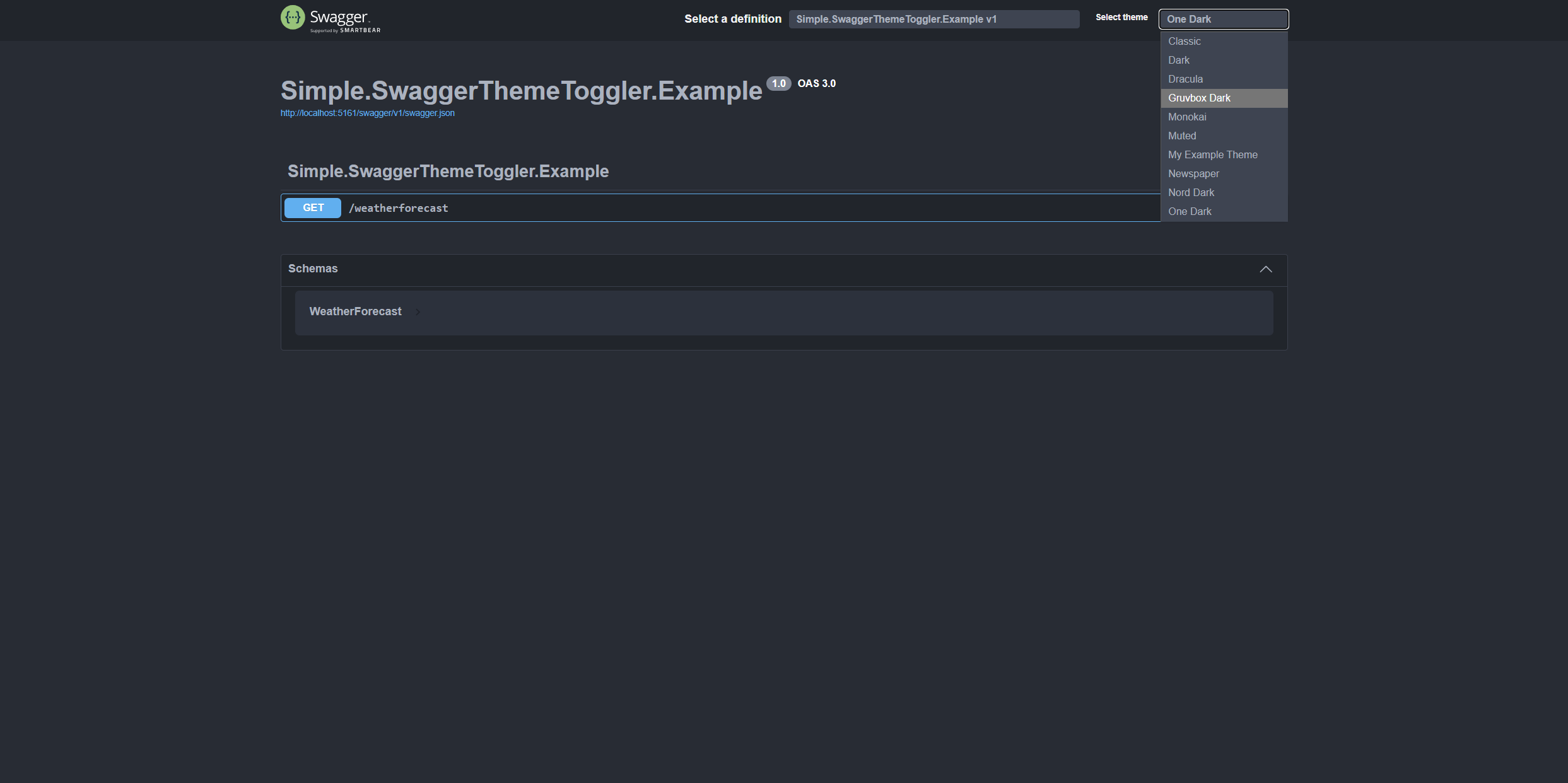
🖼️ What it looks like
Once activated, a dropdown will appear in the top-right corner of Swagger UI, allowing users to choose their preferred theme:
🔬 Technical Information
Built-in themes currently included:
- Classic (default Swagger UI)
- Classic Dark
- Dracula Dark
- Gruvbox Dark
- Monokai Dark
- Muted Light
- Newspaper Light
- Nord Dark
- One Dark
- Visual Studio Code Dark
- Xcode Light
🐞 Known Issues & Limitations
- Some built-in themes need rework for better consistency 🔥
🤝 Contributing
Found a bug or want to suggest a new feature?
Feel free to open an issue or submit a pull request!
📄 License
This project is licensed under the MIT License.
| Product | Versions Compatible and additional computed target framework versions. |
|---|---|
| .NET | net8.0 is compatible. net8.0-android was computed. net8.0-browser was computed. net8.0-ios was computed. net8.0-maccatalyst was computed. net8.0-macos was computed. net8.0-tvos was computed. net8.0-windows was computed. net9.0 is compatible. net9.0-android was computed. net9.0-browser was computed. net9.0-ios was computed. net9.0-maccatalyst was computed. net9.0-macos was computed. net9.0-tvos was computed. net9.0-windows was computed. net10.0 was computed. net10.0-android was computed. net10.0-browser was computed. net10.0-ios was computed. net10.0-maccatalyst was computed. net10.0-macos was computed. net10.0-tvos was computed. net10.0-windows was computed. |
-
net8.0
- Microsoft.Extensions.FileProviders.Embedded (>= 8.0.17)
- Swashbuckle.AspNetCore.SwaggerUI (>= 8.1.1)
-
net9.0
- Microsoft.Extensions.FileProviders.Embedded (>= 8.0.17)
- Swashbuckle.AspNetCore.SwaggerUI (>= 8.1.1)
NuGet packages
This package is not used by any NuGet packages.
GitHub repositories
This package is not used by any popular GitHub repositories.