SpawnDev.ILGPU
3.2.1
See the version list below for details.
dotnet add package SpawnDev.ILGPU --version 3.2.1
NuGet\Install-Package SpawnDev.ILGPU -Version 3.2.1
<PackageReference Include="SpawnDev.ILGPU" Version="3.2.1" />
<PackageVersion Include="SpawnDev.ILGPU" Version="3.2.1" />
<PackageReference Include="SpawnDev.ILGPU" />
paket add SpawnDev.ILGPU --version 3.2.1
#r "nuget: SpawnDev.ILGPU, 3.2.1"
#:package SpawnDev.ILGPU@3.2.1
#addin nuget:?package=SpawnDev.ILGPU&version=3.2.1
#tool nuget:?package=SpawnDev.ILGPU&version=3.2.1
SpawnDev.ILGPU

Run ILGPU C# kernels on WebGPU, WebGL, Wasm, Cuda, and OpenCL — from a single codebase.
Write parallel compute code in C# and let the library pick the best available backend automatically. In the browser, three backends (WebGPU, WebGL, Wasm) bring GPU-accelerated compute to virtually every modern browser. On desktop and server, ILGPU's native Cuda and OpenCL backends are available alongside CPU. The same async extension methods work everywhere.
Your existing ILGPU kernels run in the browser with zero changes to the kernel code — and the same code runs on desktop too.
Architecture
┌────────────────────────────────────────────────────────────────────────────────┐
│                          Your C# ILGPU Kernel                                  │
├──────────────────┬──────────────────┬──────────────┬──────────┬───────────────┤
│     WebGPU       │     WebGL        │     Wasm     │   Cuda   │   OpenCL      │
│     Backend      │     Backend      │   Backend    │ Backend  │   Backend     │
├──────────────────┼──────────────────┼──────────────┼──────────┼───────────────┤
│ WGSL             │ GLSL ES 3.0      │ Wasm binary  │   PTX    │   OpenCL C    │
│ transpile → GPU  │ transpile → GPU  │ → Workers    │  → GPU   │    → GPU      │
└──────────────────┴──────────────────┴──────────────┴──────────┴───────────────┘
  Browser backends: WebGPU, WebGL, Wasm    Desktop backends: Cuda, OpenCL, CPU
Demo Application
The Live Demo source is located in SpawnDev.ILGPU.Demo and showcases:
- Fractal Explorer - Interactive Mandelbrot / Fractal Explorer
- Run Benchmarks - Benchmark suite comparing performance across all backends
- Unit Tests - Comprehensive unit tests for all backends
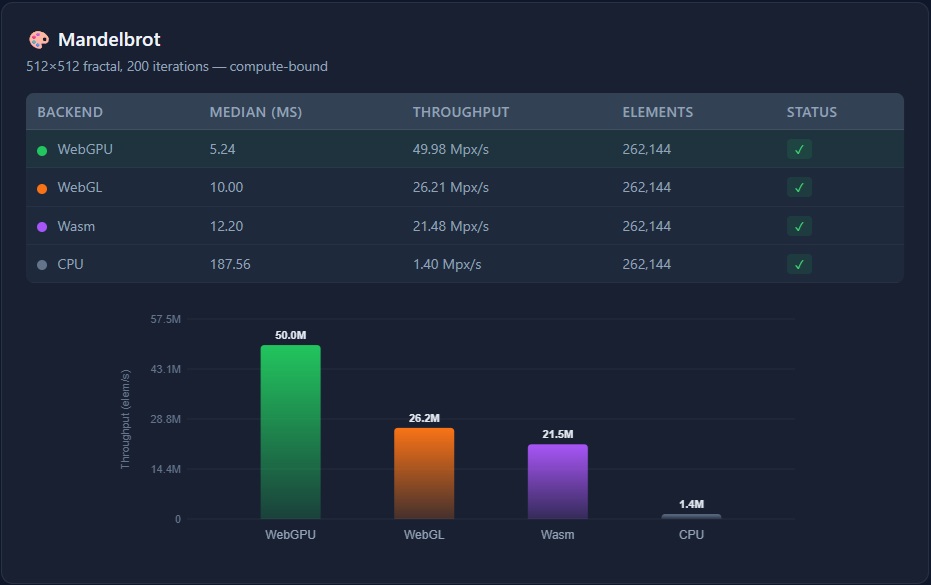
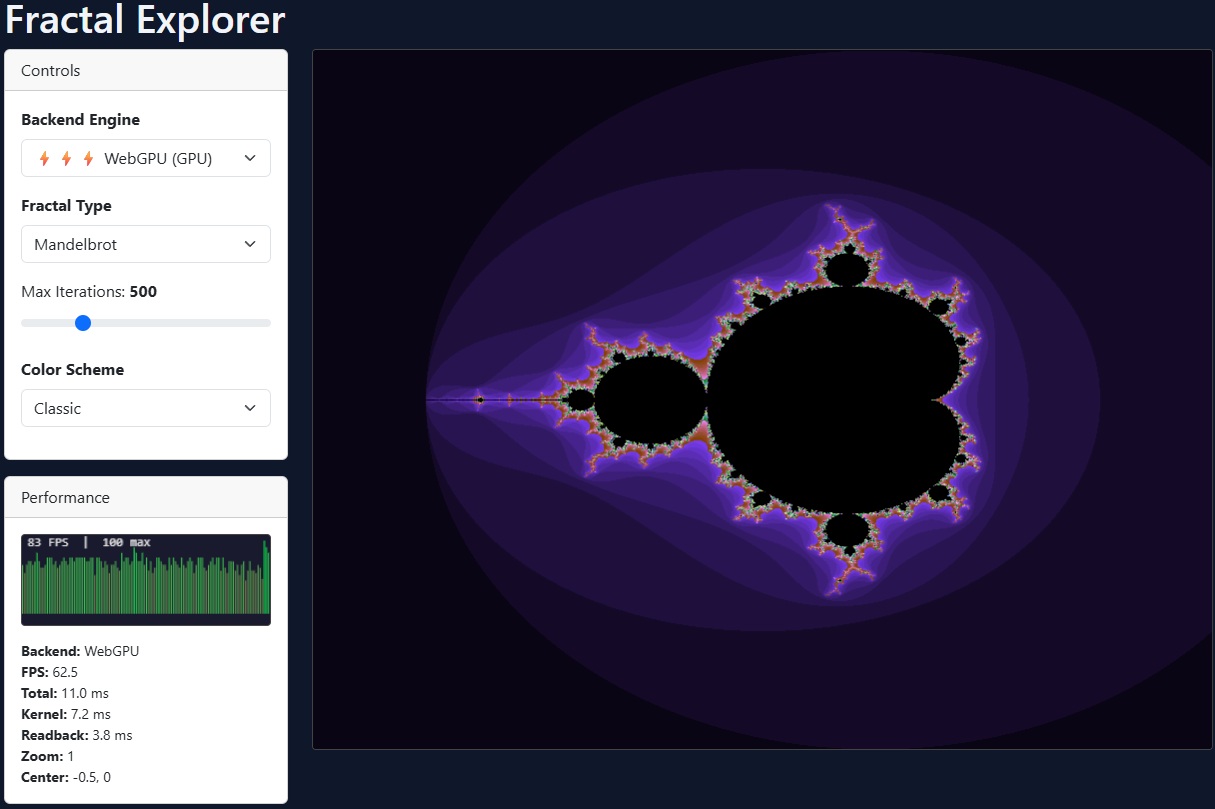
📚 Documentation
Comprehensive documentation is available in the Docs folder:
- Getting Started — Installation, setup, first kernel
- Backends — WebGPU, WebGL, Wasm, Cuda, OpenCL, CPU setup & configuration
- Writing Kernels — Kernel rules, index types, math functions, shared memory
- Memory & Buffers — Allocation, async readback, zero-allocation patterns
- Advanced Patterns — Device sharing, external buffers, GPU intrinsics, rendering
- Limitations — Blazor WASM constraints, browser compatibility
- API Reference — Public API surface by namespace
Browser Backends (Blazor WebAssembly)
| 🎮 WebGPU | 🖼️ WebGL | 🧊 Wasm | 🐢 CPU (Debug) | |
|---|---|---|---|---|
| Executes on | GPU | GPU | Web Workers | Main (UI) thread |
| Transpiles to | WGSL | GLSL ES 3.0 | WebAssembly binary | — (interpreted) |
| Technique | Compute shader | Transform Feedback | Multi-worker | Single-threaded |
| Blocking | Non-blocking | Non-blocking | Non-blocking | ⚠️ Blocks UI thread |
| SharedArrayBuffer | Not required | Not required | Required for multi-worker | Not required |
| Shared Memory | ✅ | ❌ | ✅ | ⚠️ Barriers broken in WASM |
| Atomics | ✅ | ❌ | ✅ | ⚠️ Crashes in WASM |
| 64-bit (f64/i64) | ✅ Emulated | ✅ Emulated | ✅ Native | ✅ Native |
| Browser support | Chrome/Edge 113+ | All modern browsers | All modern browsers | All modern browsers |
| Best for | GPU compute (modern) | GPU compute (universal) | General compute | Debugging / comparison |
Auto-selection priority: WebGPU → WebGL → Wasm
Desktop Backends (Console, WPF, ASP.NET, etc.)
SpawnDev.ILGPU bundles ILGPU's native backends, so the same NuGet package works on desktop and server too.
| 🚀 Cuda | 🔧 OpenCL | 🐢 CPU | |
|---|---|---|---|
| Executes on | NVIDIA GPU | AMD/Intel GPU | CPU cores |
| Transpiles to | PTX | OpenCL C | — (interpreted) |
| Shared Memory | ✅ | ✅ | ✅ |
| Atomics | ✅ | ✅ | ✅ |
| 64-bit | ✅ Native | ✅ Native | ✅ Native |
| Requirement | NVIDIA GPU + driver | OpenCL 2.0+ GPU | None |
Auto-selection: Cuda → OpenCL → CPU (via GetPreferredDevice)
Features
- Cross-platform — Same kernel code runs in browser (WebGPU, WebGL, Wasm) and desktop (Cuda, OpenCL, CPU) from one NuGet package
- Automatic backend selection —
CreatePreferredAcceleratorAsync()(browser) orGetPreferredDevice()(desktop) picks the best available - Unified async API —
SynchronizeAsync()andCopyToHostAsync()work everywhere, falling back to synchronous calls on desktop - ILGPU-compatible — Use familiar APIs (
ArrayView,Index1D/2D/3D, math intrinsics, etc.) - WGSL transpilation — C# kernels automatically compiled to WebGPU Shading Language
- GLSL transpilation — C# kernels compiled to GLSL ES 3.0 vertex shaders with Transform Feedback for GPU compute
- Wasm compilation — C# kernels compiled to native WebAssembly binary modules
- 64-bit emulation — Support for
double(f64) andlong(i64) via software emulation on browser GPU backends, with two f64 schemes: fast Dekker (vec2<f32>) and precise Ozaki (vec4<f32>) - WebGPU extension auto-detection — Probes adapter for
shader-f16,subgroups,timestamp-query, and other features; conditionally enables them on the device - Subgroup operations —
Group.BroadcastandWarp.Shuffleare supported on the WebGPU backend when the browser supports thesubgroupsextension - Multi-worker dispatch — Wasm backend distributes work across all available CPU cores via SharedArrayBuffer; falls back to a single off-thread worker when SAB is unavailable
- Blazor WebAssembly — Seamless integration via SpawnDev.BlazorJS
- Shared memory & atomics — Supports workgroup memory, barriers, and atomic operations (WebGPU, Wasm, Cuda, OpenCL)
- No native dependencies — Entirely written in C#
Installation
dotnet add package SpawnDev.ILGPU
Quick Start — Blazor WebAssembly
1. Configure Program.cs
SpawnDev.ILGPU requires SpawnDev.BlazorJS for browser interop.
using SpawnDev.BlazorJS;

var builder = WebAssemblyHostBuilder.CreateDefault(args);
builder.RootComponents.Add<App>("#app");
builder.RootComponents.Add<HeadOutlet>("head::after");

// Add BlazorJS services
builder.Services.AddBlazorJSRuntime();

await builder.Build().BlazorJSRunAsync();
2. Automatic Backend Selection
The library discovers all available browser backends and picks the best one (WebGPU → WebGL → Wasm):
using global::ILGPU;
using global::ILGPU.Runtime;
using SpawnDev.ILGPU;

// Initialize context with all available backends
using var context = await Context.CreateAsync(builder => builder.AllAcceleratorsAsync());

// Create the best available accelerator (WebGPU > WebGL > Wasm)
using var accelerator = await context.CreatePreferredAcceleratorAsync();

// Allocate buffers and run a kernel — same API regardless of backend
int length = 256;
using var bufA = accelerator.Allocate1D(Enumerable.Range(0, length).Select(i => (float)i).ToArray());
using var bufB = accelerator.Allocate1D(Enumerable.Range(0, length).Select(i => (float)i * 2f).ToArray());
using var bufC = accelerator.Allocate1D<float>(length);

var kernel = accelerator.LoadAutoGroupedStreamKernel<Index1D, ArrayView<float>, ArrayView<float>, ArrayView<float>>(VectorAddKernel);
kernel((Index1D)length, bufA.View, bufB.View, bufC.View);

await accelerator.SynchronizeAsync();
var results = await bufC.CopyToHostAsync<float>();

// The kernel — runs on GPU or Wasm transparently
static void VectorAddKernel(Index1D index, ArrayView<float> a, ArrayView<float> b, ArrayView<float> c)
{
    c[index] = a[index] + b[index];
}
3. Using a Specific Browser Backend
// WebGPU — GPU compute via WGSL
using var context = await Context.CreateAsync(builder => builder.WebGPU());
var device = context.GetWebGPUDevices()[0];
using var accelerator = await device.CreateAcceleratorAsync(context);
// WebGL — GPU compute via GLSL ES 3.0 + Transform Feedback (works on virtually all browsers)
using var context = await Context.CreateAsync(builder => builder.WebGL());
var device = context.GetWebGLDevices()[0];
using var accelerator = await device.CreateAcceleratorAsync(context);
// Wasm — native WebAssembly binary
using var context = await Context.CreateAsync(builder => builder.Wasm());
var device = context.GetDevices<WasmILGPUDevice>()[0];
using var accelerator = await device.CreateAcceleratorAsync(context);
Quick Start — Desktop / Server
SpawnDev.ILGPU also works in console, WPF, ASP.NET, and other .NET apps. The same async pattern used in Blazor WASM works on desktop too:
using global::ILGPU;
using global::ILGPU.Runtime;
using SpawnDev.ILGPU;

// SAME code as Blazor WASM — AllAcceleratorsAsync auto-detects the environment
// Browser: registers WebGPU, WebGL, Wasm, CPU
// Desktop: registers Cuda, OpenCL, CPU (browser backends are skipped)
using var context = await Context.CreateAsync(builder => builder.AllAcceleratorsAsync());
using var accelerator = await context.CreatePreferredAcceleratorAsync();

Console.WriteLine($"Using: {accelerator.Name} ({accelerator.AcceleratorType})");

// Same kernel code, same async extensions
int length = 256;
using var bufA = accelerator.Allocate1D(Enumerable.Range(0, length).Select(i => (float)i).ToArray());
using var bufB = accelerator.Allocate1D(Enumerable.Range(0, length).Select(i => (float)i * 2f).ToArray());
using var bufC = accelerator.Allocate1D<float>(length);

var kernel = accelerator.LoadAutoGroupedStreamKernel<Index1D, ArrayView<float>, ArrayView<float>, ArrayView<float>>(VectorAddKernel);
kernel((Index1D)length, bufA.View, bufB.View, bufC.View);

// SynchronizeAsync/CopyToHostAsync fall back to synchronous calls on desktop
await accelerator.SynchronizeAsync();
var results = await bufC.CopyToHostAsync<float>();

Console.WriteLine($"result[0]={results[0]}, result[255]={results[255]}");

static void VectorAddKernel(Index1D index, ArrayView<float> a, ArrayView<float> b, ArrayView<float> c)
{
    c[index] = a[index] + b[index];
}
Same kernel, any platform. The
VectorAddKernelabove is identical in both examples. Write once, run on WebGPU, WebGL, Wasm, Cuda, OpenCL, or CPU.
Why async? Browser backends require async — Blazor WASM's single-threaded environment will deadlock on synchronous calls. Desktop backends support both sync and async, with async extensions gracefully falling back to synchronous ILGPU calls. Therefore, the async pattern is always recommended for maximum portability.
Testing
Browser Tests
Start the demo app and navigate to /tests to run the unit test suite.
Automated Tests (Playwright)
# Windows
_test.bat

# Linux/macOS
./_test.sh
Test Coverage
400+ tests across four test suites covering all core features.
Test Suites
| Suite | Backend | What's Tested |
|---|---|---|
| WebGPUTests | WebGPU | Full ILGPU feature set on GPU via WGSL |
| WebGLTests | WebGL | GPU compute via GLSL ES 3.0, f64/i64 emulation |
| WasmTests | Wasm | Native WebAssembly binary dispatch to workers |
| CPUTests | CPU | ILGPU CPU accelerator as reference (barriers/atomics excluded) |
| DefaultTests | Auto | Device enumeration, preferred backend, kernel execution |
Coverage by Area
| Area | What's Tested | Status |
|---|---|---|
| Memory | Allocation, transfer, copy, views | ✅ |
| Indexing | 1D, 2D, 3D kernels, boundary conditions | ✅ |
| Arithmetic | +, -, *, /, %, negation, complex expressions | ✅ |
| Bitwise | AND, OR, XOR, NOT, shifts (<<, >>) | ✅ |
| Math Functions | sin, cos, tan, exp, log, sqrt, pow, abs, min, max | ✅ |
| Atomics | Add, Min, Max, CompareExchange, Xor | ✅ |
| Control Flow | if/else, loops, nested, short-circuit | ✅ |
| Structs | Simple, nested, with arrays | ✅ |
| Type Casting | float↔int, uint, mixed precision | ✅ |
| 64-bit Emulation | double and long via software emulation (WebGPU, WebGL) |
✅ |
| GPU Patterns | Stencil, reduction, matrix multiply, lerp, smoothstep | ✅ |
| Shared Memory | Static and dynamic workgroup memory | ✅ |
| Broadcast & Subgroups | Group.Broadcast, Warp.Shuffle (WebGPU with subgroups extension) |
✅ |
| Special Values | NaN, Infinity detection | ✅ |
| Backend Selection | Auto-discovery, priority, cross-backend kernel execution | ✅ |
Browser Requirements
| Backend | Browser Support |
|---|---|
| WebGPU | Chrome/Edge 113+, Firefox Nightly (dom.webgpu.enabled) |
| WebGL | ✅ All modern browsers (Chrome, Edge, Firefox, Safari, mobile browsers) |
| Wasm | All modern browsers (compatible with every browser that supports Blazor WASM) |
| CPU | All modern browsers |
GPU on every device: WebGL support means GPU-accelerated compute works on virtually every browser and device — including mobile phones, tablets, and older desktops without WebGPU support.
Note: For multi-worker SharedArrayBuffer support (used by the Wasm backend for parallel dispatch), the page must be cross-origin isolated (COOP/COEP headers). The demo includes a service worker (
coi-serviceworker.js) that handles this automatically. Without SharedArrayBuffer, the Wasm backend falls back to single-worker mode — still running off the main thread to keep the UI responsive.
GPU Backend Configuration
64-bit Emulation
GPU hardware typically only supports 32-bit operations. Both GPU backends (WebGPU and WebGL) provide software emulation for 64-bit types (double/f64 and long/i64), enabled by default for full precision parity with the Wasm and CPU backends.
double (f64) Emulation Schemes
The WebGPU backend offers two emulation schemes for double precision:
| Dekker (Default) | Ozaki | |
|---|---|---|
| Representation | vec2<f32> (high + low) |
vec4<f32> (quad-float) |
| Precision | ~48–53 bits of mantissa | Strict IEEE 754 double precision |
| Memory | 8 bytes per value | 16 bytes per value |
| Performance | ⚡ Faster | 🐢 Slower (~2× overhead) |
| Best for | General compute, fractals, most workloads | Scientific computing, financial calculations |
| Option | UseOzakiF64Emulation = false |
UseOzakiF64Emulation = true |
// Default: Dekker double-float emulation (good precision, better performance)
var options = new WebGPUBackendOptions();
using var accelerator = await device.CreateAcceleratorAsync(context, options);

// Ozaki quad-float emulation (strict IEEE 754 precision)
var options = new WebGPUBackendOptions { UseOzakiF64Emulation = true };
using var accelerator = await device.CreateAcceleratorAsync(context, options);

// Disable f64 emulation entirely (double promoted to float for max performance)
var options = new WebGPUBackendOptions { EnableF64Emulation = false };
using var accelerator = await device.CreateAcceleratorAsync(context, options);
Configuration Options
| Option | Default | Description |
|---|---|---|
EnableF64Emulation |
true |
64-bit float (double) emulation. When disabled, double is promoted to float. |
UseOzakiF64Emulation |
false |
Use Ozaki vec4<f32> scheme instead of Dekker vec2<f32> for strict IEEE 754 compliance. |
EnableI64Emulation |
true |
64-bit integer (long/ulong) emulation via vec2<u32> double-word technique. |
To disable emulation for better performance (at the cost of precision):
// WebGPU
using SpawnDev.ILGPU.WebGPU.Backend;
var options = new WebGPUBackendOptions { EnableF64Emulation = false, EnableI64Emulation = false };
using var accelerator = await device.CreateAcceleratorAsync(context, options);

// WebGL
using SpawnDev.ILGPU.WebGL.Backend;
var options = new WebGLBackendOptions { EnableF64Emulation = false, EnableI64Emulation = false };
using var accelerator = await device.CreateAcceleratorAsync(context, options);
Wasm Backend
The Wasm backend compiles ILGPU kernels to native WebAssembly binary modules and dispatches them to Web Workers for parallel execution. This provides near-native performance for compute-intensive workloads.
- Kernels are compiled to
.wasmbinary format (not text) - Compiled modules are cached and reused across dispatches
- Shared memory uses
SharedArrayBufferfor zero-copy data sharing
Async Synchronization
In Blazor WebAssembly, the main thread cannot block. Use SynchronizeAsync() instead of Synchronize():
// ❌ Don't use — causes deadlock in Blazor WASM
accelerator.Synchronize();

// ✅ Use async version — works with all backends
await accelerator.SynchronizeAsync();
Verbose Logging
All backends include verbose debug logging, disabled by default. Enable per-backend when needed:
using SpawnDev.ILGPU.WebGPU.Backend;
using SpawnDev.ILGPU.WebGL.Backend;
using SpawnDev.ILGPU.Wasm.Backend;

WebGPUBackend.VerboseLogging = true;   // WebGPU backend
WebGLBackend.VerboseLogging = true;    // WebGL backend
WasmBackend.VerboseLogging = true;     // Wasm backend
Blazor WebAssembly Configuration
When publishing, specific MSBuild properties are required:
<PropertyGroup>

  <PublishTrimmed>false</PublishTrimmed>

  <RunAOTCompilation>false</RunAOTCompilation>
</PropertyGroup>
License
This project is licensed under the same terms as ILGPU. See LICENSE for details.
Credits
SpawnDev.ILGPU is built upon the excellent ILGPU library. We would like to thank the original authors and contributors of ILGPU for their hard work in providing a high-performance, robust IL-to-GPU compiler for the .NET ecosystem.
- ILGPU Project: https://github.com/m4rs-mt/ILGPU
- ILGPU Authors: Marcel Koester and the ILGPU contributors
Resources
| Product | Versions Compatible and additional computed target framework versions. |
|---|---|
| .NET | net10.0 is compatible. net10.0-android was computed. net10.0-browser was computed. net10.0-ios was computed. net10.0-maccatalyst was computed. net10.0-macos was computed. net10.0-tvos was computed. net10.0-windows was computed. |
-
net10.0
- Microsoft.AspNetCore.Components.Web (>= 10.0.2)
- SpawnDev.BlazorJS (>= 3.0.3)
NuGet packages
This package is not used by any NuGet packages.
GitHub repositories
This package is not used by any popular GitHub repositories.