SpawnDev.MatrixLEDDisplay
2.0.0
Prefix Reserved
dotnet add package SpawnDev.MatrixLEDDisplay --version 2.0.0
NuGet\Install-Package SpawnDev.MatrixLEDDisplay -Version 2.0.0
<PackageReference Include="SpawnDev.MatrixLEDDisplay" Version="2.0.0" />
<PackageVersion Include="SpawnDev.MatrixLEDDisplay" Version="2.0.0" />
<PackageReference Include="SpawnDev.MatrixLEDDisplay" />
paket add SpawnDev.MatrixLEDDisplay --version 2.0.0
#r "nuget: SpawnDev.MatrixLEDDisplay, 2.0.0"
#:package SpawnDev.MatrixLEDDisplay@2.0.0
#addin nuget:?package=SpawnDev.MatrixLEDDisplay&version=2.0.0
#tool nuget:?package=SpawnDev.MatrixLEDDisplay&version=2.0.0
SpawnDev.MatrixLEDDisplay
Blazor WebAssembly code and demo app for communicating with the "Matrix LED Display" by Merkury Innovations, aka "MI Matrix Display".
Web app
- MI Matrix Display Web App
- Display
.jpg,.png, or.gifimages on your 16x16 LED display using your web browser and Bluetooth. - Animated
.gifimages are supported (limited to 8 frames.) - No graffiti mode at this time.
- Media library for easy image management
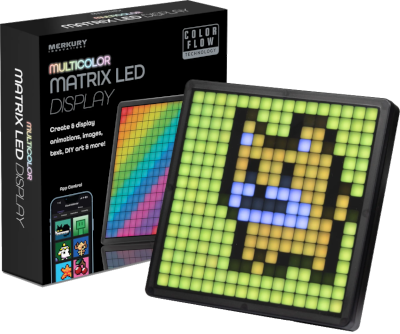
This neat 178mm (7 inch) square USB powered display features a 16x16 multi-color LED grid and can be found at places like Walmart here for about $20.
The problem
The instructions that come with this display tells the user to install an app on their phone named "MI Matrix Display"... but there is no app with that name in the iOS App Store or the Android Play Store. There are apps that claim to be the new version of the official app, MatrixPanel Plus on Android, and Matrix Panel Plus on iOS, but the publisher is a one-off publisher named "Chrisamy" not the display maker "Merkury Innovations". Merkury Innovations website doesn't list this display. This YouTube reviewer had the same issue.
I tried "MatrixPanel Plus" on 3 Android phones and the app only worked on 1 of them (the only Samsung, and newer than the others.) The problem appears to be the app itself because my old Moto E running Android 10 was able to connect to and control the MI Matrix Display using Google Chrome and this MI Matrix Display Web App.
So if you bought one of these cool displays and want an alternative to the default app, this library and demo app can help you do that.
References
- Awesome protocol work: offe/mi-led-display
Nerd stuff
From Chrome Bluetooth Devices
- chrome://bluetooth-internals/#devices
Device Name: MI Matrix Display
Services:
- 0000ffd0-0000-1000-8000-00805f9b34fb - Primary
- Characteristics:
- 0000ffd1-0000-1000-8000-00805f9b34fb - WriteWithoutResponse
- 0000ffd2-0000-1000-8000-00805f9b34fb - Notify
- Descriptors:
- 00002902-0000-1000-8000-00805f9b34fb
- Descriptors:
- 0000af30-0000-1000-8000-00805f9b34fb
Thanks
- offe - Thank you for your protocol work and the tips on how to snoop on and analyze Bluetooth communication on Android.
- Turbo - You are my sunshine. This project is dedicated to you.
- Babe - I love you to the moon and back.
| Product | Versions Compatible and additional computed target framework versions. |
|---|---|
| .NET | net10.0 is compatible. net10.0-android was computed. net10.0-browser was computed. net10.0-ios was computed. net10.0-maccatalyst was computed. net10.0-macos was computed. net10.0-tvos was computed. net10.0-windows was computed. |
-
net10.0
- Microsoft.AspNetCore.Components.WebAssembly (>= 10.0.11)
- SixLabors.ImageSharp (>= 3.1.12)
- SpawnDev.SpawnJS (>= 2.1.10)
- SpawnDev.SpawnJS.Blazor (>= 2.1.10)
NuGet packages
This package is not used by any NuGet packages.
GitHub repositories
This package is not used by any popular GitHub repositories.
| Version | Downloads | Last Updated |
|---|---|---|
| 2.0.0 | 56 | 9/8/2026 |