Stardust.Utilities
0.9.7
dotnet add package Stardust.Utilities --version 0.9.7
NuGet\Install-Package Stardust.Utilities -Version 0.9.7
<PackageReference Include="Stardust.Utilities" Version="0.9.7" />
<PackageVersion Include="Stardust.Utilities" Version="0.9.7" />
<PackageReference Include="Stardust.Utilities" />
paket add Stardust.Utilities --version 0.9.7
#r "nuget: Stardust.Utilities, 0.9.7"
#:package Stardust.Utilities@0.9.7
#addin nuget:?package=Stardust.Utilities&version=0.9.7
#tool nuget:?package=Stardust.Utilities&version=0.9.7
Stardust.Utilities


A collection of utility types for .NET applications, focused on bit manipulation, error handling, and endian-aware data types. Includes a source
generator for zero-heap-allocation [BitFields] value-type structs and zero-copy [BitFields] buffer views over Memory<byte>. Provides native hand-coded speed for bit access with no boilerplate needed.
NOTE: This is a library of utility types, not a framework or application. It is designed to be used as a building block in your own projects, not run on its own. The included demo app is a showcase of the library's capabilities, not a standalone product.
Table of Contents

Try It Live
Launch the Interactive Web Demo -- explore BitFields, PE headers, network packets, CPU registers, and RFC diagrams directly in your browser. No install required.
Watch a video walkthrough of the demo app
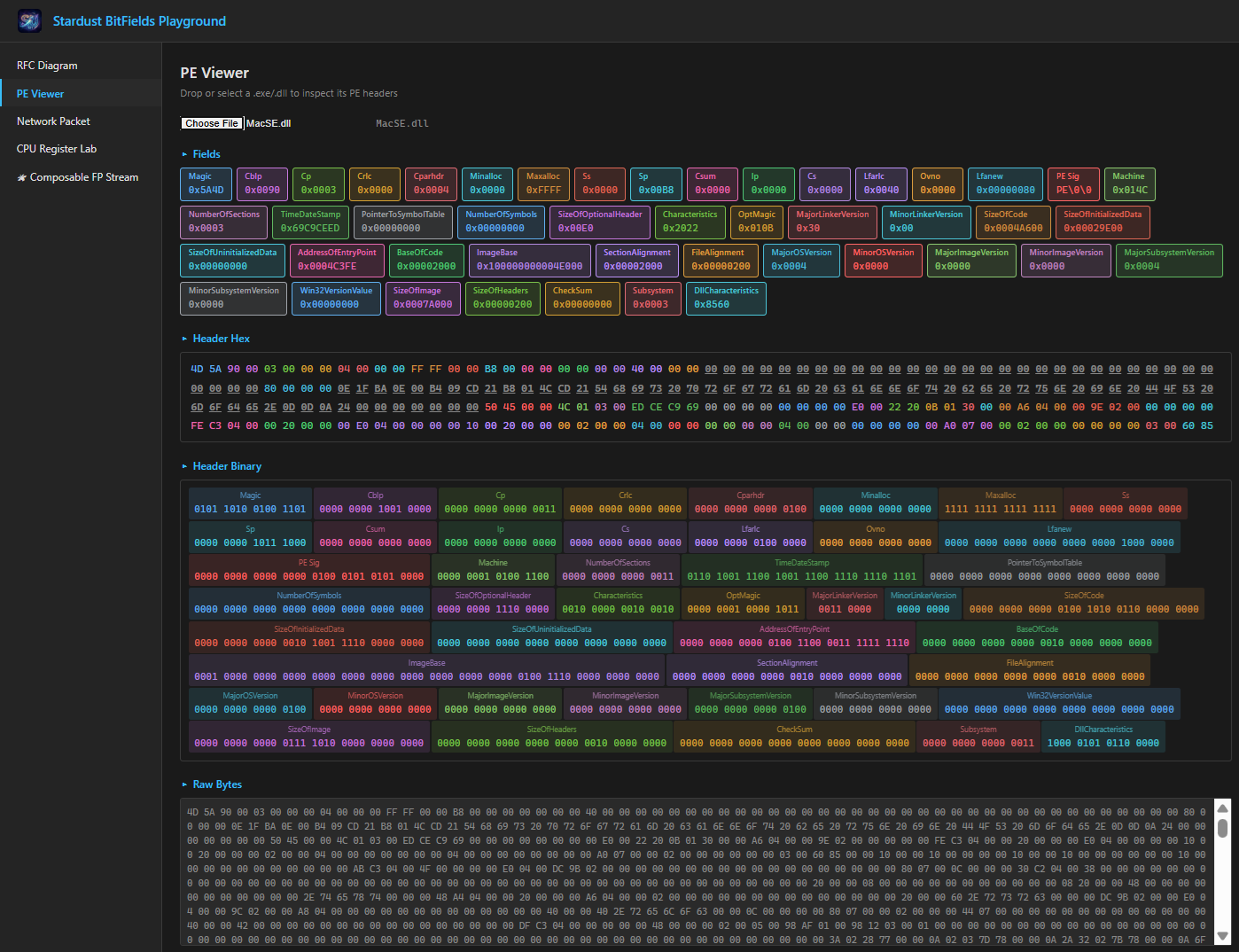
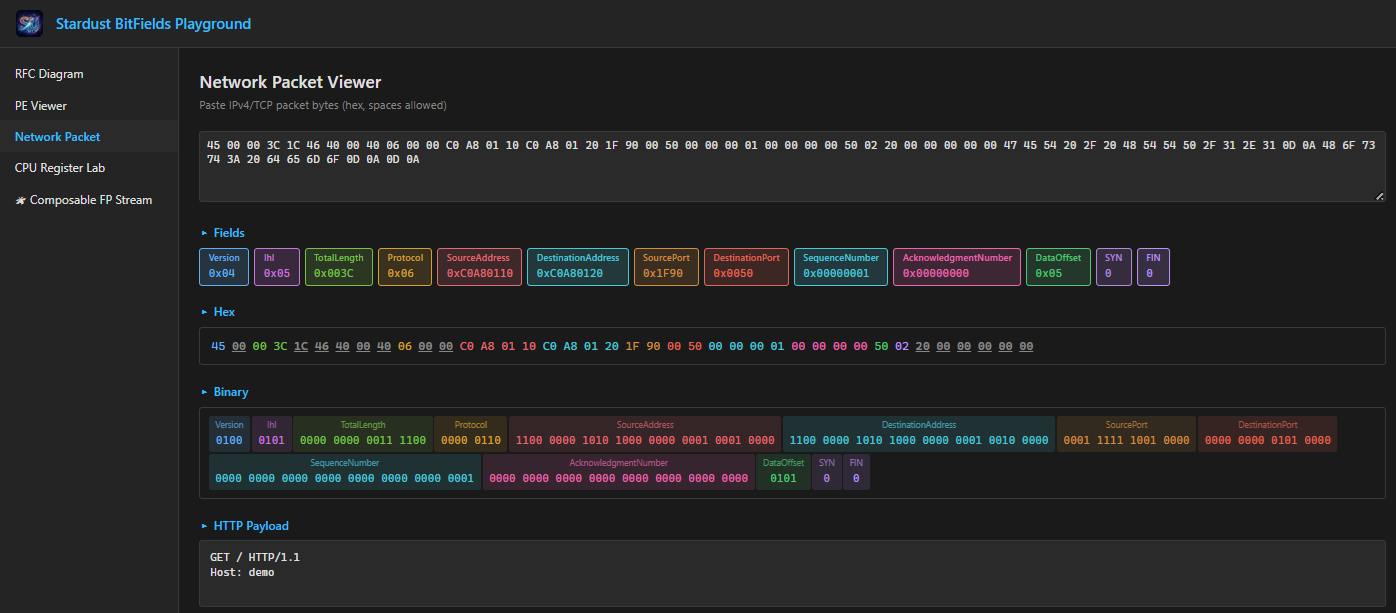
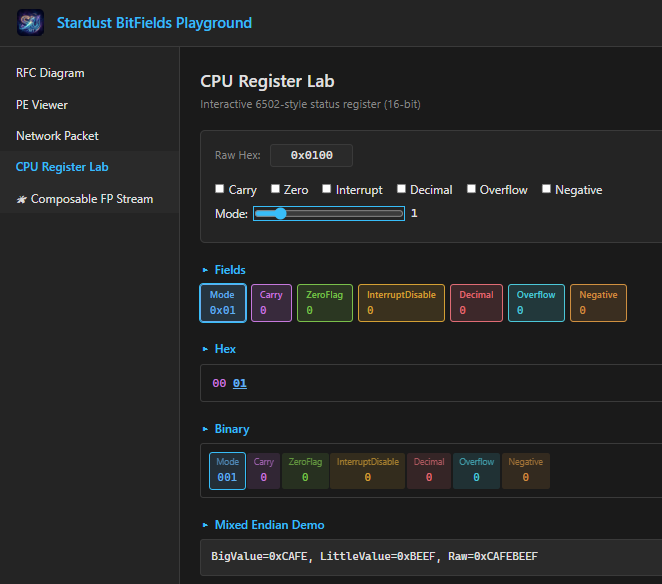
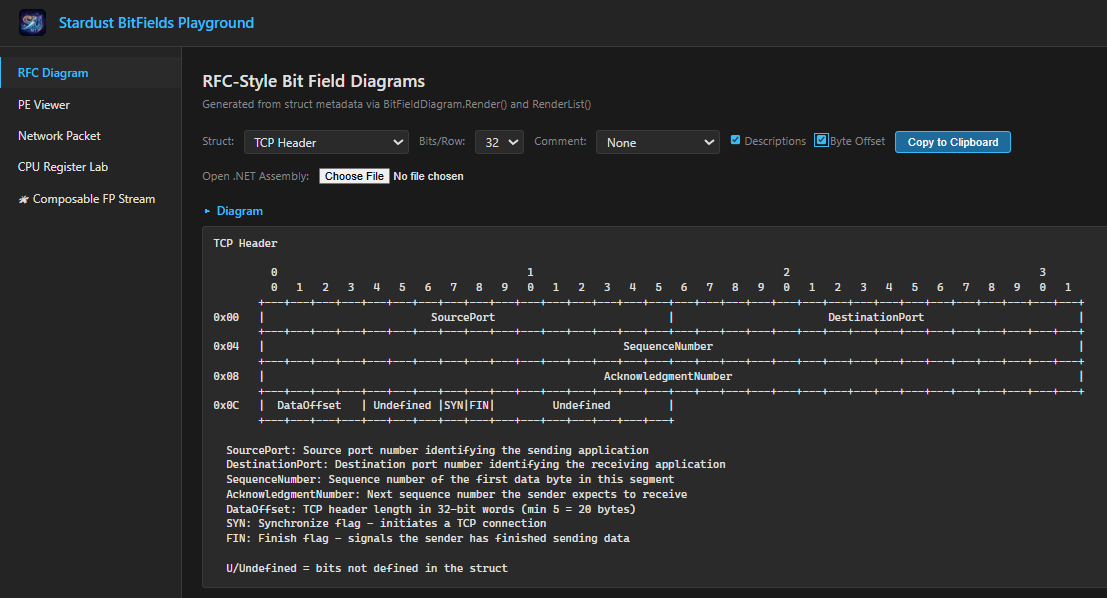
Installation
<PackageReference Include="Stardust.Utilities" Version="0.9.7" />
That's it
Features
BitFields
The easiest way to work with hardware registers, protocol headers, and bit-packed data.
One attribute, two struct kinds:
partial struct-- generates a self-contained value type backed by a storage type (byte,uint,ulong, etc.) with full operator support, parsing, and implicit conversions.partial record struct-- generates a zero-copy view overMemory<byte>, reading and writing bits directly in an external buffer with no copies.
Both use the same [BitField] and [BitFlag] property attributes, the same property types
(standard .NET value types, enums, endian types, nested structs), and produce the same JSON
serialization format. Learn one, use both.
This eliminates boilerplate code and makes working with hardware registers, S/W floating point, nested protocol headers, instruction opcodes, file headers, and other bit-packed structures highly performant, readable and maintainable.
See BITFIELDS.md for comprehensive documentation and examples.
BitFields (Value Types)
✅ Zero Performance Overhead
The source generator emits inline bit manipulation (shift and mask) with compile-time constants — the exact same code you would write by hand. There is no abstraction penalty, no runtime reflection, no boxing, and no heap allocations.
TL;DR for Architects: You can confidently use BitFields in performance-critical code. The JIT compiler completely eliminates property accessor overhead through inlining, resulting in identical performance to raw hand-coded C# bit manipulation and comparable performance to optimized C when working with bit-packed data structures and simple accessors.
Property Accessors vs Raw Bit Manipulation (500M iterations, .NET 10):
| Operation | Raw Bit Ops | Generated Properties | Difference |
|---|---|---|---|
| Boolean GET | 271 ms | 263 ms | ≈0% (noise) |
| Boolean SET | 506 ms | 494 ms | ≈0% (noise) |
| Field GET (shift+mask) | 124 ms | 123 ms | ≈0% (noise) |
All differences are within measurement noise. The generated code is statistically indistinguishable from raw inline bit manipulation.
Generated vs Hand-Coded Properties (.NET 10):
======================================================================
BITFIELD PERFORMANCE SUMMARY WITH STATISTICS
Runs: 200, Iterations per run: 100,000,000

STATISTICAL RESULTS (mean with σ = std dev)
======================================================================

Test           Generated (ms)     Hand-coded (ms)    Ratio
----------------------------------------------------------------------
BitFlag GET        82 (σ=   5)       74 (σ=   3)   1.103 (σ=0.064)
BitFlag SET        89 (σ=   9)      101 (σ=   2)   0.880 (σ=0.094)
BitField GET       32 (σ=  11)       32 (σ=  11)   0.998 (σ=0.025)
BitField SET      129 (σ=   4)      123 (σ=   3)   1.049 (σ=0.038)
Mixed R/W         136 (σ=  22)      155 (σ=   4)   0.864 (σ=0.118)
----------------------------------------------------------------------
OVERALL                                            0.991 (σ=0.199)

✓ Generated code performance statistically identical to hand-coded (95% CI includes 1.0).
        σ (std dev) = 0.1994, SE = 0.0158, n = 160
        95% CI for mean = 0.961 to 1.022
Individual run variations are due to system load and CPU scheduling, not code differences.
Key Findings:
- ✅ Zero abstraction penalty —
[MethodImpl(MethodImplOptions.AggressiveInlining)]eliminates all property call overhead - ✅ Identical to raw bit ops — Generated properties are statistically indistinguishable from
(value >> SHIFT) & MASKinline code - ✅ Compile-time constants — All masks and shifts are computed at compile time
- ✅ No heap allocations — Value types with no boxing
Quick Start
using Stardust.Utilities;

[BitFields(StorageType.Byte)]  // Specify storage type
public partial struct StatusRegister
{
    [BitFlag(0)] public partial bool Ready { get; set; }         // bit 0
    [BitFlag(1)] public partial bool Error { get; set; }         // bit 1
    [BitFlag(7)] public partial bool Busy { get; set; }          // bit 7
    [BitField(2, 4)] public partial byte Mode { get; set; }      // bits 2-4 (3 bits)
    [BitField(5, 6)] public partial byte Priority { get; set; }  // bits 5-6 (2 bits)
}
The StorageType enum is the recommended way to specify the backing type. It provides
IntelliSense discovery of all supported types and produces a clear compiler error (SD0003)
immediately if an unsupported type is chosen -- catching mistakes at the point of use rather
than at the end of a build cycle. The typeof(T) form is also supported for backward
compatibility:
// Also valid -- typeof(T) still works
[BitFields(typeof(byte))]
public partial struct StatusRegister { ... }
The source generator automatically creates the property implementations during build. The property type can be defined in your code. For example, you can make the property types enums for better readability with no runtime overhead:
using Stardust.Utilities;

public enum OpMode : byte
{
    Mode0 = 0,
    Mode1 = 1,
    Mode2 = 2,
    Mode3 = 3,
    Mode4 = 4,
    Mode5 = 5,
    Mode6 = 6,
    Mode7 = 7,
}

[BitFields(StorageType.Byte)]  // Specify storage type
public partial struct StatusRegister
{
    [BitFlag(0)] public partial bool Ready { get; set; }        // bit 0
    [BitFlag(1)] public partial bool Error { get; set; }        // bit 1
    [BitFlag(7)] public partial bool Busy { get; set; }         // bit 7
    [BitField(2, End = 4)] public partial OpMode Mode { get; set; }   // bits 2-4 (3 bits)
    [BitField(5, End = 6)] public partial byte Priority { get; set; } // bits 5-6 (2 bits)
}
Usage
// Create using constructor or implicit conversion
StatusRegister status = 0;
var status2 = new StatusRegister(0x42);

// Set individual flags
status.Ready = true;
status.Error = false;

// Set multi-bit fields
status.Mode = 5;      // Sets bits 2-4 to value 5
status.Priority = 2;  // Sets bits 5-6 to value 2

// Read values
bool isReady = status.Ready;
byte mode = status.Mode;

// Implicit conversion (generated automatically)
byte b = status;               // Converts to byte
status = 0x42;                 // Converts from byte
Attributes
The [BitField] and [BitFlag] property attributes work on both struct and record struct:
| Attribute | Parameters | Description |
|---|---|---|
[BitFields(StorageType.X)] |
StorageType enum, optional UndefinedBitsMustBe, optional BitOrder |
Value type (struct). Enum provides IntelliSense discovery of all supported types |
[BitFields(typeof(T))] |
T: storage type, optional UndefinedBitsMustBe, optional BitOrder |
Value type (struct). Equivalent to the enum form; exists for backward compatibility |
[BitFields] |
Optional ByteOrder, optional BitOrder |
Zero-copy view (record struct). Generator detects the record keyword |
[BitFlag(bit)] |
bit: 0-based position, optional MustBe, optional Description |
Single-bit boolean flag |
[BitField(start, End = N)] |
Named inclusive end, optional MustBe, optional Description |
Multi-bit field (width = End - start + 1) |
[BitField(start, Width = N)] |
Named bit count, optional MustBe, optional Description |
Multi-bit field (N bits starting at start) |
BitField Examples:
[BitField(0, Width = 3)]- 3-bit field at bits 0, 1, 2[BitField(4, End = 7)]- 4-bit field at bits 4, 5, 6, 7[BitField(3, Width = 1)]- 1-bit field at bit 3 only[BitField(Start = 0, Width = 8)]- fully named, 8-bit field
Supported Storage Types
The following storage types are supported for [BitFields] value-type structs. The
StorageType enum column shows the recommended enum value; the typeof(T) column shows
the equivalent type-based form:
StorageType Enum |
typeof(T) |
Size | Notes |
|---|---|---|---|
StorageType.Byte |
typeof(byte) |
8 bits | Signed: StorageType.SByte |
StorageType.UInt16 |
typeof(ushort) |
16 bits | Signed: StorageType.Int16 |
StorageType.UInt32 |
typeof(uint) |
32 bits | Signed: StorageType.Int32 |
StorageType.UInt64 |
typeof(ulong) |
64 bits | Signed: StorageType.Int64 |
StorageType.NUInt |
typeof(nuint) |
32 or 64 bits | Platform-dependent; signed: StorageType.NInt |
StorageType.UInt128 |
typeof(UInt128) |
128 bits | Signed: StorageType.Int128 |
StorageType.Half |
typeof(Half) |
16 bits | IEEE 754 half-precision |
StorageType.Single |
typeof(float) |
32 bits | IEEE 754 single-precision |
StorageType.Double |
typeof(double) |
64 bits | IEEE 754 double-precision |
StorageType.Decimal |
typeof(decimal) |
128 bits | .NET decimal (96-bit coefficient + scale + sign) |
[BitFields(N)] |
[BitFields(N)] |
N bits | Arbitrary width, 1 to 16,384 bits. N ⇐ 64 uses smallest backing type (byte/ushort/uint/ulong); N > 64 uses multi-word storage |
Property Types
Both value types and views support the same property types:
| Property Type | Examples | Notes |
|---|---|---|
| Standard .NET value types | byte, ushort, uint, ulong, bool |
Direct bit manipulation |
| Signed types | sbyte, short, int, long |
Automatic sign extension |
| Floating-point / decimal | Half, float, double, decimal |
Opaque bit reinterpretation; field width must match type size exactly (16/32/64/128 bits) |
| Enums | OpMode, StatusCode |
Zero-cost enum properties |
| Endian types | UInt16Be, UInt32Le, Int64Be |
Explicit byte ordering per field |
| Nested value types | StatusFlags, ProtocolHeader |
Composition; reusable sub-structures (all backing types, including multi-word) |
| Nested views | CaptureHeaderView |
Sub-views with independent byte/bit order |
When a property type has its own byte or bit order (endian types or nested structs with explicit configuration), it overrides the enclosing struct's defaults for that field.
Signed Property Types (Sign Extension)
When a property is declared with a signed type (sbyte, short, int, long), the generator automatically sign-extends the field value. This is essential for hardware registers with signed quantities like deltas or offsets:
[BitFields(StorageType.UInt16)]
public partial struct MotionRegister
{
    // 3-bit signed delta. Values: -4 to +3
    [BitField(13, 15)] public partial sbyte DeltaX { get; set; }

    // 3-bit unsigned field. Values: 0 to 7 (no sign extension)
    [BitField(10, 12)] public partial byte Speed { get; set; }
}

// Usage
MotionRegister reg = 0;
reg.DeltaX = -3;
Console.WriteLine(reg.DeltaX);  // Output: -3 (correctly sign-extended)


reg.Speed = 5;
Console.WriteLine(reg.Speed);   // Output: 5 (unsigned, stays positive)
The sign extension is optimized to a single mask-and-shift operation with zero overhead for unsigned property types.
Composition and Nesting
Value-type structs, record struct views, and endian types (UInt32Be, UInt16Le, etc.)
can all be used as property types within other [BitFields] structs. This enables
reusable sub-structures, mixed-endian fields, and layered protocol views:
// Reusable flags structure
[BitFields(StorageType.Byte)]
public partial struct StatusFlags
{
    [BitFlag(0)] public partial bool Ready { get; set; }
    [BitFlag(1)] public partial bool Error { get; set; }
    [BitField(4, 7)] public partial byte Priority { get; set; }
}

// Header that embeds StatusFlags
[BitFields(StorageType.UInt16)]
public partial struct ProtocolHeader
{
    [BitField(0, 7)] public partial StatusFlags Status { get; set; }  // Embedded!
    [BitField(8, 15)] public partial byte Length { get; set; }
}

// Usage - chained property access works
ProtocolHeader header = 0;
header.Status = new StatusFlags { Ready = true, Priority = 5 };
bool ready = header.Status.Ready;  // true
[BitFields(N)] structs (N ⇐ 64) are also composable. The generator selects the
smallest unsigned backing type (byte, ushort, uint, or ulong), so a 5-bit struct
is only 1 byte. These can be embedded in value-type structs, other [BitFields(N)]
structs, and record struct views:
// 5-bit status code -- backed by byte automatically
[BitFields(5)]
public partial struct StatusCode5
{
    [BitField(0, End = 2)] public partial byte Category { get; set; }  // 3 bits
    [BitFlag(3)]           public partial bool Urgent { get; set; }
    [BitFlag(4)]           public partial bool Ack { get; set; }
}

// Embed in a view
[BitFields]
public partial record struct SensorView
{
    [BitField(0, End = 4)]   public partial StatusCode5 Status { get; set; }
    [BitField(8, End = 19)]  public partial ushort Reading { get; set; }
}
Multi-word types (UInt128, Int128, decimal, [BitFields(N)] N > 64) are also
composable. They can be embedded in multi-word value-type parents and record struct views
using span-based ReadFrom/WriteTo. Multi-word fields can start at any bit position;
non-byte-aligned positions use byte-level bit-shifting:
[BitFields(typeof(UInt128))]
public partial struct GuidBits128
{
    [BitField(0, End = 63)]   public partial ulong Low { get; set; }
    [BitField(64, End = 127)] public partial ulong High { get; set; }
}

// Embed 128-bit type in a 512-bit telemetry frame
[BitFields(512)]
public partial struct TelemetryFrame
{
    [BitField(0, End = 127)]   public partial GuidBits128 Id { get; set; }
    [BitField(128, End = 383)] public partial WidePayload256 Payload { get; set; }
    [BitField(384, End = 511)] public partial GuidBits128 Footer { get; set; }
}

// Or embed in a view
[BitFields]
public partial record struct FrameView
{
    [BitField(0, End = 31)]    public partial uint Header { get; set; }
    [BitField(32, End = 159)]  public partial GuidBits128 Id { get; set; }
    [BitField(160, End = 191)] public partial uint Checksum { get; set; }
}
The generator validates all composition constraints at compile time: SD0021 (width mismatch), SD0022 (view in value type), SD0023 (multi-word in single-word parent).
Undefined and Reserved Bits
When a struct doesn't define fields covering all bits of its storage type, those undefined bits can be controlled with UndefinedBitsMustBe:
// Protocol header: undefined bits are always zero (clean serialization)
[BitFields(StorageType.UInt16, UndefinedBitsMustBe.Zeroes)]
public partial struct SubHeader9
{
    [BitField(0, 3)] public partial byte TypeCode { get; set; }  // bits 0-3
    [BitField(4, 8)] public partial byte Flags { get; set; }     // bits 4-8
    // Bits 9-15: UNDEFINED — always forced to zero
}

SubHeader9 sub = 0xFFFF;  // Try to set all 16 bits
ushort raw = sub;         // raw == 0x01FF (undefined bits masked off)
UndefinedBitsMustBe Value |
Behavior | Use Case |
|---|---|---|
.Any (default) |
Preserved as raw data | Hardware registers |
.Zeroes |
Always masked to zero | Protocol headers, serialization |
.Ones |
Always set to one | Reserved-high protocols |
This works with sparse undefined bits too (gaps between fields, not just high bits), and is enforced in the constructor so all operations — conversions, arithmetic, bitwise — produce consistent results.
Individual fields and flags can also override their bits with MustBe:
[BitFields(StorageType.Byte)]
public partial struct PacketFlags
{
    [BitFlag(0)] public partial bool Valid { get; set; }      // Normal flag
    [BitFlag(7, MustBe.One)] public partial bool Sync { get; set; }  // Always 1
    [BitField(1, MustBe.Zero, 3)] public partial byte Reserved { get; set; }  // Always 0
}
See BITFIELDS.md for full details on undefined bits, sparse patterns, and composition with partial-width structs.
Nested Structs
BitFields structs can be nested inside classes or other structs. Containing types must be marked partial:
public partial class HardwareController
{
    [BitFields(StorageType.UInt16)]
    public partial struct StatusRegister
    {
        [BitFlag(0)] public partial bool Ready { get; set; }
        [BitFlag(1)] public partial bool Error { get; set; }
        [BitField(8, 15)] public partial byte ErrorCode { get; set; }  // bits 8-15 (8 bits)
    }

    private StatusRegister _status;

    public bool IsReady => _status.Ready;
}
Generated Operators
BitFields types are full-featured numeric types with complete operator support:
StatusRegister a = 0x42;
StatusRegister b = 0x18;

// Arithmetic operators
var sum = a + b;           // Addition
var diff = a - b;          // Subtraction
var prod = a * 2;          // Multiplication (with storage type)
var quot = a / b;          // Division
var rem = a % b;           // Modulus
var neg = -a;              // Unary negation (two's complement)

// Bitwise operators
var or = a | b;            // OR
var and = a & b;           // AND
var xor = a ^ b;           // XOR
var not = ~a;              // Complement
var shl = a << 2;          // Left shift
var shr = a >> 2;          // Right shift
var ushr = a >>> 2;        // Unsigned right shift

// Comparison operators
bool lt = a < b;           // Less than
bool le = a <= b;          // Less than or equal
bool gt = a > b;           // Greater than
bool ge = a >= b;          // Greater than or equal

// Equality operators
bool eq = a == b;          // Equality
bool ne = a != b;          // Inequality

// Mixed-type operations (with storage type)
StatusRegister c = a + (byte)10;
StatusRegister d = (byte)5 | b;
Parsing Support
BitFields types implement IParsable<T> and ISpanParsable<T> with support for multiple formats:
// Decimal parsing
StatusRegister dec = StatusRegister.Parse("255");

// Hexadecimal parsing (0x or 0X prefix)
StatusRegister hex = StatusRegister.Parse("0xFF");
StatusRegister hex2 = StatusRegister.Parse("0XAB");

// Binary parsing (0b or 0B prefix)
StatusRegister bin = StatusRegister.Parse("0b11111111");
StatusRegister bin2 = StatusRegister.Parse("0B10101010");

// C#-style underscore digit separators (all formats)
StatusRegister d1 = StatusRegister.Parse("1_000");           // Decimal: 1000
StatusRegister h1 = StatusRegister.Parse("0xFF_00");         // Hex: 0xFF00
StatusRegister b1 = StatusRegister.Parse("0b1111_0000");     // Binary: 0xF0

// TryParse for safe parsing
if (StatusRegister.TryParse("0b1010_1010", out var result))
{
    Console.WriteLine(result);  // 0xAA
}

// With format provider
var parsed = StatusRegister.Parse("42", CultureInfo.InvariantCulture);
Formatting Support
BitFields types implement IFormattable and ISpanFormattable:
StatusRegister value = 0xAB;

// Standard format strings
string hex = value.ToString("X2", null);    // "AB"
string dec = value.ToString("D", null);     // "171"

// Default ToString returns hex
string str = value.ToString();              // "0xAB"

// Allocation-free formatting
Span<char> buffer = stackalloc char[10];
if (value.TryFormat(buffer, out int written, "X4", null))
{
    // buffer[..written] contains "00AB"
}
Fluent API
Generated With{PropertyName} methods enable immutable-style updates:
StatusRegister initial = 0;

// Fluent building
var configured = initial
    .WithReady(true)
    .WithMode(5)
    .WithPriority(2);

// Original unchanged
Console.WriteLine(initial);     // 0x0
Console.WriteLine(configured);  // 0x6D
Static Bit and Mask Properties
For each flag and field, static properties provide the corresponding bit patterns:
// For [BitFlag(0)] Ready - get a value with only that bit set
StatusRegister readyBit = StatusRegister.ReadyBit;   // 0x01

// For [BitField(2, 4)] Mode - get the mask for that field
StatusRegister modeMask = StatusRegister.ModeMask;   // 0x1C (bits 2-4)

// Useful for testing and masking
if ((status & StatusRegister.ReadyBit) != 0)
{
    // Ready bit is set
}

var modeOnly = status & StatusRegister.ModeMask;
Interface Implementations
Every BitFields type automatically implements:
| Interface | Purpose |
|---|---|
IComparable |
Non-generic comparison |
IComparable<T> |
Generic comparison |
IEquatable<T> |
Value equality |
IFormattable |
Format string support |
ISpanFormattable |
Allocation-free formatting |
IParsable<T> |
String parsing |
ISpanParsable<T> |
Span-based parsing |
JSON Serialization
Every BitFields type includes a generated System.Text.Json converter (via [JsonConverter])
that serializes the value as a hex string (e.g., "0xAB") and deserializes it using the
generated Parse method. Record struct views generate the same converter, serializing the
underlying buffer bytes as an identical hex string. Both work in DTOs, REST APIs, and
configuration files without any additional setup:
StatusRegister reg = 0xAB;

// Serializes as: "0xAB"
string json = JsonSerializer.Serialize(reg);

// Round-trips correctly
var restored = JsonSerializer.Deserialize<StatusRegister>(json);

// Record struct views serialize identically
var view = new IPv4HeaderView(packetBytes);
string viewJson = JsonSerializer.Serialize(view);  // "0x3C000045"

// Works inside container objects
var dto = new { Status = reg, Header = view, Name = "device1" };
string dtoJson = JsonSerializer.Serialize(dto);
// {"Status":"0xAB","Header":"0x3C000045","Name":"device1"}
Span Serialization
Every BitFields type generates byte-span construction and serialization methods:
// Construct from raw bytes
StatusRegister reg = StatusRegister.ReadFrom(packetBytes);

// Write to a pre-allocated buffer
Span<byte> buffer = stackalloc byte[StatusRegister.SIZE_IN_BYTES];
reg.WriteTo(buffer);

// Try-pattern for best-effort writes
if (reg.TryWriteTo(buffer, out int written))
    Send(buffer[..written]);

// Allocating convenience
byte[] bytes = reg.ToByteArray();
Zero-Copy Views (record struct)
Zero-copy bit field views over byte buffers.
When you apply [BitFields] to a partial record struct (instead of a plain struct), the
generator produces a view over Memory<byte> -- reading and writing bits directly in the
underlying buffer with no copies. The same [BitField] and [BitFlag] attributes work
identically. The record struct keyword is all that changes.
See BITFIELDS.md for comprehensive documentation and examples.
Quick Start
using Stardust.Utilities;

// Default: little-endian, LSB-first
[BitFields]
public partial record struct RegisterView
{
    [BitFlag(0)]       public partial bool Active { get; set; }
    [BitField(8, 15)]  public partial byte Status { get; set; }
}

// For network protocols: big-endian, MSB-first (RFC convention)
[BitFields(ByteOrder.BigEndian, BitOrder.BitZeroIsMsb)]
public partial record struct IPv6Header
{
    [BitField(0, 3)]   public partial byte Version { get; set; }
    [BitField(4, 11)]  public partial byte TrafficClass { get; set; }
    [BitField(12, 31)] public partial uint FlowLabel { get; set; }
}

// Zero-copy: reads/writes directly in the packet buffer
byte[] packet = ReceiveFromNetwork();
var header = new IPv6Header(packet);
byte version = header.Version;   // reads from packet[0]
Key Features
- Zero-copy -- operates directly on the underlying buffer, no data duplication
- Configurable byte order --
ByteOrder.LittleEndian(default) orByteOrder.BigEndian(network) - Configurable bit numbering --
BitOrder.BitZeroIsLsb(default) orBitOrder.BitZeroIsMsb(RFC) - Per-field endian override -- use
UInt32Be,UInt16Le, etc. to override the view's default byte order for individual fields - Nestable -- value-type
[BitFields]structs work as property types inside record struct views - Sub-view nesting -- nest record struct views inside each other for layered protocols
- Mixed-endian nesting -- each nested type independently controls its own byte/bit order
- JSON serialization -- every view type includes a generated
System.Text.Jsonconverter that serializes the underlying bytes as a"0x..."hex string, matching the value-type format - Record struct equality -- two views are equal if they reference the same buffer segment
- Same property system -- uses the same
[BitField]/[BitFlag]attributes and property types
Choosing: struct vs record struct
partial struct |
partial record struct |
|
|---|---|---|
| Backing | Private value field(s) | Memory<byte> (external buffer) |
| Copy cost | Copies all data | Copies only the view header (24 bytes) |
| Performance | Identical to hand-coded bit ops (inline shift/mask) | One level of indirection through Memory<byte>.Span; still very fast but not zero-cost |
| Max size | ~16 KB | Unlimited |
| Byte order | Per-field via endian property types | Struct-level ByteOrder + per-field override |
| Bit order | Configurable BitOrder |
Configurable BitOrder (same) |
| Property attributes | [BitField], [BitFlag] |
[BitField], [BitFlag] (same) |
| Operators | Full arithmetic, bitwise, comparison | None (it is a view, not a value) |
| JSON | Hex string via ToString()/Parse() |
Hex string of underlying bytes |
| Conversions | Implicit to/from storage type | Constructor from byte[] / Memory<byte> |
| Use case | Registers, opcodes, flags | Network packets, file formats, DMA buffers |
Use a struct when the data is a small, self-contained value -- hardware registers,
instruction opcodes, status flags, or anything that fits in a primitive type and benefits from
operator overloads and implicit conversions.
Use a record struct when the data lives in an external buffer and you want zero-copy
access -- network packets arriving on a socket, memory-mapped file headers, DMA buffers,
or any binary data where copying would be wasteful.
Composing Value Types and Views
Value-type structs and record struct views compose naturally. A value-type [BitFields] struct
can be used as a property type inside a record struct view, and nested record struct views can
each declare their own byte/bit order. Endian types like UInt32Be and UInt16Le override the
default byte order for individual fields:
// Small reusable flags struct (value type, operator support)
[BitFields(StorageType.Byte)]
public partial struct StatusFlags
{
    [BitFlag(0)] public partial bool Ready { get; set; }
    [BitFlag(1)] public partial bool Error { get; set; }
    [BitField(4, 7)] public partial byte Priority { get; set; }
}

// Network capture header (big-endian, MSB-first view)
[BitFields(ByteOrder.BigEndian, BitOrder.BitZeroIsMsb)]
public partial record struct CaptureHeaderView
{
    [BitField(0, 15)]  public partial ushort Protocol { get; set; }
    [BitField(16, 47)] public partial uint SequenceNum { get; set; }
}

// x86 file blob (little-endian view), embedding both
[BitFields(ByteOrder.LittleEndian, BitOrder.BitZeroIsLsb)]
public partial record struct FileBlobView
{
    [BitField(0, 7)]     public partial StatusFlags Flags { get; set; }  // value type inside
    [BitField(8, 39)]    public partial uint Timestamp { get; set; }     // LE native
    [BitField(40, 71)]   public partial UInt32Be SrcIp { get; set; }     // per-field BE override
    [BitField(72, 119)]  public partial CaptureHeaderView Cap { get; set; } // nested BE sub-view
}
Each nested type independently controls its own byte order, so a big-endian transport header can wrap a little-endian file payload that itself contains big-endian network captures -- all zero-copy on the same underlying buffer.
Note: The
[BitFieldsView]attribute is deprecated. Use[BitFields]on apartial record structinstead -- the generator detects therecordkeyword and produces identical code.[BitFieldsViewAttribute]will be removed in a future release.
See BITFIELDS.md for full documentation on nesting, mixed-endian scenarios, and write-through semantics.
Pre-Defined Numeric Types
The library ships four pre-defined BitFields structs that decompose .NET numeric types into
their constituent bit fields. Just using Stardust.Utilities; and start using them -- no
struct definitions required.
| Type | Storage | Use case |
|---|---|---|
IEEE754Half |
Half (16-bit) |
Half-precision analysis |
IEEE754Single |
float (32-bit) |
Single-precision analysis |
IEEE754Double |
double (64-bit) |
Double-precision analysis |
DecimalBitFields |
decimal (128-bit) |
Decimal inspection |
All four types include implicit conversions to/from their storage type, full operator support,
classification properties (IsNormal, IsNaN, IsInfinity, IsDenormalized, IsZero),
both the raw BiasedExponent field and a computed Exponent property that removes the bias,
and a WithExponent(int) fluent method that sets the exponent from its true mathematical value.
IEEE 754 Half-Precision (16-bit)
IEEE 754 Half-Precision (16-bit)
                           1                                                 0
  5    4    3    2    1    0    9    8    7    6    5    4    3    2    1    0
+----+----+----+----+----+----+----+----+----+----+----+----+----+----+----+----+
|Sign|     BiasedExponent     |                    Mantissa                     |
+----+----+----+----+----+----+----+----+----+----+----+----+----+----+----+----+

  Mantissa: 10-bit significand (fractional part); implicit leading 1 not stored
  BiasedExponent: 5-bit biased exponent (bias 15); subtract 15 for true power of 2
  Sign: Sign bit: 1 = negative, 0 = positive
IEEE754Half h = (Half)1.5;
h.Sign;            // false
h.BiasedExponent;  // 15 (raw stored value)
h.Exponent;        // 0  (true power: 1.5 is in [1, 2), so 2^0)
h.Mantissa;        // 0x200
IEEE 754 Single-Precision (32-bit)
IEEE 754 Single-Precision (32-bit)
       3                                                 2                                                 1                                                 0
  1    0    9    8    7    6    5    4    3    2    1    0    9    8    7    6    5    4    3    2    1    0    9    8    7    6    5    4    3    2    1    0
+----+----+----+----+----+----+----+----+----+----+----+----+----+----+----+----+----+----+----+----+----+----+----+----+----+----+----+----+----+----+----+----+
|Sign|            BiasedExponent             |                                                     Mantissa                                                     |
+----+----+----+----+----+----+----+----+----+----+----+----+----+----+----+----+----+----+----+----+----+----+----+----+----+----+----+----+----+----+----+----+

  Mantissa: 23-bit significand (fractional part); implicit leading 1 not stored
  BiasedExponent: 8-bit biased exponent (bias 127); subtract 127 for true power of 2
  Sign: Sign bit: 1 = negative, 0 = positive
IEEE754Single f = 1.5f;
f.Sign;            // false
f.BiasedExponent;  // 127 (raw stored value)
f.Exponent;        // 0   (true power: 1.5 is in [1, 2), so 2^0)
f.Mantissa;        // 0x400000
IEEE 754 Double-Precision (64-bit)
IEEE 754 Double-Precision (64-bit)
                 6                                                 5                                                 4                                                 3                                                 2                                                 1                                                 0
  3    2    1    0    9    8    7    6    5    4    3    2    1    0    9    8    7    6    5    4    3    2    1    0    9    8    7    6    5    4    3    2    1    0    9    8    7    6    5    4    3    2    1    0    9    8    7    6    5    4    3    2    1    0    9    8    7    6    5    4    3    2    1    0
+----+----+----+----+----+----+----+----+----+----+----+----+----+----+----+----+----+----+----+----+----+----+----+----+----+----+----+----+----+----+----+----+----+----+----+----+----+----+----+----+----+----+----+----+----+----+----+----+----+----+----+----+----+----+----+----+----+----+----+----+----+----+----+----+
|Sign|                    BiasedExponent                    |                                                                                                                             Mantissa                                                                                                                              |
+----+----+----+----+----+----+----+----+----+----+----+----+----+----+----+----+----+----+----+----+----+----+----+----+----+----+----+----+----+----+----+----+----+----+----+----+----+----+----+----+----+----+----+----+----+----+----+----+----+----+----+----+----+----+----+----+----+----+----+----+----+----+----+----+

  Mantissa: 52-bit significand (fractional part); implicit leading 1 not stored
  BiasedExponent: 11-bit biased exponent (bias 1023); subtract 1023 for true power of 2
  Sign: Sign bit: 1 = negative, 0 = positive
IEEE754Double pi = Math.PI;
pi.Sign;              // false
pi.BiasedExponent;    // 1024 (raw stored value, includes +1023 bias)
pi.Exponent;          // 1    (true mathematical power: 2^1, since 2 <= pi < 4)
pi.Mantissa;          // 0x921FB54442D18
pi.IsNormal;          // true
.NET Decimal (128-bit)
.NET Decimal (128-bit)
       3                                                 2                                                 1                                                 0
  1    0    9    8    7    6    5    4    3    2    1    0    9    8    7    6    5    4    3    2    1    0    9    8    7    6    5    4    3    2    1    0
+----+----+----+----+----+----+----+----+----+----+----+----+----+----+----+----+----+----+----+----+----+----+----+----+----+----+----+----+----+----+----+----+
|                                                                          Coefficient                                                                          |
+----+----+----+----+----+----+----+----+----+----+----+----+----+----+----+----+----+----+----+----+----+----+----+----+----+----+----+----+----+----+----+----+
|                                                                          Coefficient                                                                          |
+----+----+----+----+----+----+----+----+----+----+----+----+----+----+----+----+----+----+----+----+----+----+----+----+----+----+----+----+----+----+----+----+
|                                                                          Coefficient                                                                          |
+----+----+----+----+----+----+----+----+----+----+----+----+----+----+----+----+----+----+----+----+----+----+----+----+----+----+----+----+----+----+----+----+
|Sign|            Undefined             |                 Scale                 |                                   Undefined                                   |
+----+----+----+----+----+----+----+----+----+----+----+----+----+----+----+----+----+----+----+----+----+----+----+----+----+----+----+----+----+----+----+----+

  Coefficient: 96-bit unsigned integer coefficient (value before scaling)
  Scale: Scale factor (0-28); value = Coefficient / 10^Scale
  Sign: Sign bit: 1 = negative, 0 = positive

  U/Undefined = bits not defined in the struct
DecimalBitFields price = 19.99m;
price.Sign;          // false
price.Scale;         // 2 (divided by 10^2)
price.Coefficient;   // 1999
WithExponent (Fluent True-Exponent Setter)
The IEEE 754 types provide WithExponent(int) to set the biased exponent from a true
mathematical exponent. Out-of-range values are masked by the underlying WithBiasedExponent
method, consistent with all other generated With... methods. The Exponent property also
provides a setter that applies the bias automatically (assigning null sets BiasedExponent to 0).
// Build 2^3 = 8.0 from a true exponent
var d = IEEE754Double.Zero.WithExponent(3).WithMantissa(0);
double value = d;  // 8.0

// Round-trip: read Exponent, rebuild with WithExponent
IEEE754Double pi = Math.PI;
int exp = pi.Exponent!.Value;           // 1
var rebuilt = IEEE754Double.Zero
    .WithExponent(exp)
    .WithMantissa(pi.Mantissa);
double result = rebuilt;                 // == Math.PI

// Set Exponent directly via the setter
IEEE754Double d2 = 1.0;
d2.Exponent = 3;                         // BiasedExponent = 3 + 1023 = 1026
See Numeric Decomposition Types in BITFIELDS.md for full details, constants, and classification property reference.
RFC Diagram Generator
BitFieldDiagram generates RFC 2360-style ASCII bit field diagrams directly from struct metadata.
Cells auto-size to fit field names, byte offsets label each row, and undefined bits are clearly
marked.
// Generate a diagram from any [BitFields] struct (value type or record struct view)
var diagram = new BitFieldDiagram(typeof(IPv4HeaderView));
string output = diagram.RenderToString().Value;

// Custom width, descriptions, and byte offset control
var diagram = new BitFieldDiagram(typeof(StatusRegister),
    bitsPerRow: 16, includeDescriptions: true, showByteOffset: false);
string output = diagram.RenderToString().Value;

// Render multiple structs as a unified diagram with consistent scale
var diagram = new BitFieldDiagram(
    [typeof(M68020DataRegisters), typeof(M68020SR)],
    description: "68020 Registers");
string multi = diagram.RenderToString().Value;
See RFC Diagram Generator in BITFIELDS.md for full details.
Result Types
Railway-Oriented Programming (ROP) error handling without exceptions. Inspired by Rust's Result<T, E> type.
See RESULT.md for comprehensive documentation and examples.
Basic Usage
Use global using static to enable cleaner Ok() and Err() syntax:
// In GlobalUsings.cs
global using static Stardust.Utilities.Result<int,string>;
global using static Stardust.Utilities.Result<string>;
// Add additional global usings as needed for other Result types for clean usage syntax.

// In your source files
// Function that might fail
Result<int, string> Divide(int a, int b)
{
    if (b == 0)
        return Err("Division by zero");
    return Ok(a / b);
}

// Using the result
var result = Divide(10, 2);

if (result.IsSuccess)
{
    Console.WriteLine($"Result: {result.Value}");
}
else
{
    Console.WriteLine($"Error: {result.Error}");
}

// Pattern matching
var message = result.Match(
    onSuccess: value => $"Answer is {value}",
    onFailure: error => $"Failed: {error}"
);

// Chaining operations
var finalResult = Divide(100, 5)
    .Then(x => x * 2)                    // Transform value
    .Then(x => Divide(x, 2))             // Chain another Result
    .OnSuccess(x => Console.WriteLine(x)) // Side effect on success
    .OnFailure(e => Log(e));              // Side effect on failure
Void Results
For operations that succeed or fail without returning a value:
Result<string> SaveFile(string path, string content)
{
    try
    {
        File.WriteAllText(path, content);
        return Result<string>.Ok();
    }
    catch (Exception ex)
    {
        return Result<string>.Err(ex.Message);
    }
}

// Global using makes this even cleaner:
// In your GlobalUsings.cs or at top of file:
global using static Stardust.Utilities.Result<string>;

// Then simply:
return Ok();
return Err("Something went wrong");
Endian Types
Type-safe endian-aware integers with full operator support.
Endian types guarantee byte ordering in memory regardless of host platform. Big-endian types store the most significant byte first (network order), little-endian types store the least significant byte first (x86 native order). These are complete numeric types with arithmetic, bitwise, and comparison operators.
See ENDIAN.md for comprehensive documentation and examples.
Available Types
| Big-Endian | Little-Endian | Size | Native Equivalent |
|---|---|---|---|
UInt16Be / Int16Be |
UInt16Le / Int16Le |
2 bytes | ushort / short |
UInt32Be / Int32Be |
UInt32Le / Int32Le |
4 bytes | uint / int |
UInt64Be / Int64Be |
UInt64Le / Int64Le |
8 bytes | ulong / long |
Quick Example
using Stardust.Utilities;

// Create from native values
UInt32Be networkValue = 0x12345678;
// Stored in memory as: [0x12, 0x34, 0x56, 0x78] (big-endian)

// Arithmetic and bitwise operations work naturally
UInt32Be sum = networkValue + 100;
UInt32Be masked = networkValue & 0xFF00FF00;

// Zero-allocation I/O with Span<byte>
Span<byte> buffer = stackalloc byte[4];
networkValue.WriteTo(buffer);

// Read back
var restored = new UInt32Be(buffer);
// Or: var restored = UInt32Be.ReadFrom(buffer);

// Implicit conversion to/from native types
uint native = networkValue;
networkValue = 0xDEADBEEF;

// Modern .NET parsing (IParsable<T>, ISpanParsable<T>)
UInt64Be parsed = UInt64Be.Parse("18446744073709551615", null);
if (UInt32Be.TryParse("DEADBEEF".AsSpan(), NumberStyles.HexNumber, null, out var hex))
{
    Console.WriteLine(hex);  // 0xdeadbeef
}

// Allocation-free formatting (ISpanFormattable)
Span<char> chars = stackalloc char[16];
networkValue.TryFormat(chars, out int written, "X8", null);
Key Features
- Full operator support:
+,-,*,/,%,&,|,^,~,<<,>>,<,>,==, etc. - Modern .NET interfaces:
IParsable<T>,ISpanParsable<T>,ISpanFormattable - Zero-allocation APIs:
ReadOnlySpan<byte>constructors,WriteTo(Span<byte>),TryWriteTo() - Type converters: PropertyGrid support for UI editing
- Guaranteed layout:
[StructLayout(LayoutKind.Explicit)]ensures correct byte ordering
Extension Methods
Utility extension methods for bit manipulation.
See EXTENSIONS.md for comprehensive documentation and examples.
using Stardust.Utilities;

// Hi/Lo byte extraction
ushort word = 0x1234;
byte hi = word.Hi();  // 0x12
byte lo = word.Lo();  // 0x34

// Hi/Lo modification
word = word.SetHi(0xFF);  // 0xFF34
word = word.SetLo(0x00);  // 0xFF00

// Saturating arithmetic (clamps instead of overflows)
int a = int.MaxValue;
int result = a.SaturatingAdd(1);     // Still int.MaxValue, not overflow
uint r2 = 10u.SaturatingSub(20u);    // 0, not large number
Troubleshooting
"Partial property must have an implementation" errors
Problem: Compiler errors like CS9248: Partial property 'MyStruct.MyProperty' must have an implementation part.
Cause: Either the source generator isn't running, or your properties are missing the
partial keyword. If you see error SD0004 alongside CS9248, the fix is to add partial
to your [BitField]/[BitFlag] property declarations (see
Missing partial keyword on properties (SD0004)).
Solution:
- Ensure you have the NuGet package installed:
<PackageReference Include="Stardust.Utilities" Version="0.9.7" /> - Add the
partialkeyword to all[BitField]and[BitFlag]properties - Clean and rebuild the solution
- Restart Visual Studio if needed (sometimes required after first install)
Generated code not updating
Problem: You changed your [BitFields] struct but the generated code wasn't updated.
Solution:
- Ensure you're using
partial struct(notclassorrecord) - Check that attributes are spelled correctly:
[BitFields],[BitField],[BitFlag] - Clean and rebuild the solution
DemoWeb shows a welcome page instead of loading automatically in Edge
Edge's Enhanced Security Mode (Strict) disables WebAssembly for large modules,
which crashes the .NET WASM runtime. To prevent this crash from being the first
thing a visitor sees, Edge users are shown a welcome page with a "Load Interactive
Demo" button on their first visit. Once the demo loads successfully, subsequent
visits auto-load normally. If the demo cannot load, the welcome page also links to
a video walkthrough and screenshots. To fix the underlying issue, add the site to
Edge's exception list at edge://settings/privacy/security/secureModeSites. This
only affects Edge with Enhanced Security set to Strict. The default Balanced
mode and all other browsers are not affected.
Compiler diagnostics for nint/nuint (SD0001, SD0002)
nint and nuint are platform-dependent types: 32 bits on a 32-bit process, 64 bits on a 64-bit
process. The source generator emits diagnostics when a [BitFields] struct backed by nint or
nuint contains fields or flags that access bits above bit 31:
| Diagnostic | Severity | Condition | Meaning |
|---|---|---|---|
| SD0001 | Error | PlatformTarget is x86 |
Bits 32+ are unreachable on a 32-bit-only build. The struct is broken and will corrupt data. |
| SD0002 | Warning | PlatformTarget is AnyCPU or unset |
Bits 32+ work on 64-bit but are silently unreachable on 32-bit. The binary may run on either. |
No diagnostic is emitted when PlatformTarget is x64 or ARM64 (always 64-bit).
To resolve these diagnostics:
- Move fields to bits 0-31 if you need 32-bit compatibility.
- Change the storage type to
ulong/longfor a fixed 64-bit width on all platforms. - Set
<PlatformTarget>x64</PlatformTarget>in your.csprojif you only target 64-bit. - Suppress SD0002 with
#pragma warning disable SD0002if you have verified the binary will only run on 64-bit.
Unsupported storage type (SD0003)
If you use [BitFields(typeof(T))] with a type that is not in the supported list (for example,
typeof(Guid) or typeof(string)), the source generator emits error SD0003 identifying
the unsupported type and listing all valid alternatives. This replaces the confusing CS9248
("partial property must have an implementation part") that previously appeared when the
generator silently skipped the struct.
The StorageType enum constructor avoids this problem entirely -- IntelliSense shows only
the supported values, so an invalid choice cannot be written in the first place.
Missing partial keyword on properties (SD0004)
If a property decorated with [BitField] or [BitFlag] is not declared partial, the source
generator emits error SD0004 pointing directly at the property in your source file. The
error message includes the property name, attribute, and the corrected declaration so you can
fix it immediately.
Without this diagnostic, the compiler would instead produce confusing CS9248 ("partial property
must have an implementation part") or CS0102 ("type already contains a definition") errors
from the generated .g.cs file -- neither of which mentions the missing partial keyword or
points to your source file.
Example of the problem:
[BitFields(StorageType.Byte)]
public partial struct StatusRegister
{
    // Missing 'partial' -- produces SD0004 error
    [BitFlag(0)] public bool Ready { get; set; }
}
Fix: Add the partial keyword to every [BitField] and [BitFlag] property:
[BitFields(StorageType.Byte)]
public partial struct StatusRegister
{
    [BitFlag(0)] public partial bool Ready { get; set; }  // correct
}
This applies to both value-type structs and record struct views.
BitField syntax diagnostics (SD0015--SD0023)
The source generator validates [BitField] attribute usage and emits diagnostics when the
syntax is ambiguous, redundant, or incomplete:
| Diagnostic | Severity | Condition | Meaning |
|---|---|---|---|
| SD0015 | Info | [BitField(start, end)] two-parameter constructor used |
The positional end parameter is easily confused with a bit width. Use [BitField(start, End = N)] or [BitField(start, Width = N)] for clarity. |
| SD0016 | Warning | Both End and Width are specified and consistent |
Redundant -- remove one for conciseness. |
| SD0017 | Error | Both End and Width are specified but inconsistent |
The generator cannot determine intent. Remove one or correct the values. |
| SD0018 | Error | Start is specified but neither End nor Width |
The field range is incomplete. Add End = N or Width = N or use the positional argument end:. |
| SD0019 | Error | End or Width is specified but Start is missing |
Provide Start as a positional argument (start:) or as the named property Start. |
| SD0020 | Error | Floating-point/decimal property type width mismatch | Half requires 16, float 32, double 64, decimal 128 bits. A mismatched width could silently corrupt the value. |
| SD0021 | Error | Embedded [BitFields(N)] struct width mismatch |
The field width must exactly match the embedded type's declared N bits to avoid silent data truncation. |
| SD0022 | Error | Record struct (view) used as property in value-type struct | Views are backed by Memory<byte> and cannot be stored in an integer field. Use a value-type struct. |
| SD0023 | Error | Multi-word type in single-word parent | A multi-word type (UInt128, Int128, decimal, [BitFields(N)] N > 64) cannot fit in a single-word (<=64-bit) parent. Use a multi-word parent or a view. |
SD0015 is a learning aid: it reminds developers that the second positional parameter is
an inclusive end bit, not a width. Once you are comfortable with the convention you can
suppress it globally without touching GlobalSuppressions.cs.
Option 1 -- .editorconfig (recommended):
Add to a .editorconfig file at the project or solution root:
[*.cs]
dotnet_diagnostic.SD0015.severity = none
This is the most idiomatic .NET approach. The setting is version-controlled, scoped to the
directory tree, and can also be set to suggestion (informational) or silent instead of none.
Option 2 -- <NoWarn> in .csproj:
<PropertyGroup>
  <NoWarn>$(NoWarn);SD0015</NoWarn>
</PropertyGroup>
This suppresses SD0015 for the entire project in one line.
IntelliSense not working for generated members
Problem: Visual Studio doesn't show IntelliSense for generated properties or methods.
Solution:
- Build the project at least once (source generators run during build)
- If still not working, close and reopen the solution
- Check View ? Error List for any generator errors
- Ensure your Visual Studio is up to date (VS 2022 17.0+ required for incremental generators)
Viewing generated code
The easiest way to view generated code is to use Go to Definition:
- In your code, place the cursor on any generated type (e.g.,
StatusRegister) or property (e.g.,.Ready,.Mode) - Press F12 (or right-click → Go to Definition)
- Visual Studio opens the generated
.g.csfile with full IntelliSense support
This works because VS maintains the generated code in memory during compilation. From the opened file you can:
- View all generated operators, properties, and methods
- Use Find All References (Shift+F12) to see all usages
- Navigate to other generated members
Note: The file opens from a temporary location - this is normal and expected.
Saving generated code to disk
If you need to persist generated files to disk (for source control, code review, or CI inspection), add this to your .csproj:
<PropertyGroup>
  <EmitCompilerGeneratedFiles>true</EmitCompilerGeneratedFiles>
  <CompilerGeneratedFilesOutputPath>Generated</CompilerGeneratedFilesOutputPath>
</PropertyGroup>


<ItemGroup>
  <Compile Remove="$(CompilerGeneratedFilesOutputPath)/**/*.cs" />
</ItemGroup>
This creates a Generated/ folder with all .g.cs files.
Important limitations:
- These files are reference copies only - not for interactive development
- The files will not appear in Solution Explorer (they're excluded from the project)
- IntelliSense and "Find All References" do not work from these disk files
- For interactive development, use F12 (Go to Definition) instead
To view the files, open them directly from File Explorer or use File → Open → File in Visual Studio.
If you want to be able to open these files directly from the Visual Studio Solution Explorer,
you can add them with their Build Action set to "None" by adding this to your .csproj:
<ItemGroup>

  <None Include="$(CompilerGeneratedFilesOutputPath)/**/*.cs" />
</ItemGroup>
License
This project is provided under the MIT License.
See LICENSE for license details.
Contributing
Contributions are welcome! Please read our guidelines before submitting issues or pull requests.
- See Contributing guidelines at CONTRIBUTING.md
- See Code of Conduct guidelines at CODE_OF_CONDUCT.md
Security
To report a security vulnerability, please use GitHub's private vulnerability reporting feature. Do not report security issues through public GitHub issues.
See SECURITY.md for details.
Privacy
Stardust.Utilities does not collect, transmit, or store any personal data, telemetry, or usage information.
See PRIVACY.md for details.
| Product | Versions Compatible and additional computed target framework versions. |
|---|---|
| .NET | net7.0 is compatible. net7.0-android was computed. net7.0-ios was computed. net7.0-maccatalyst was computed. net7.0-macos was computed. net7.0-tvos was computed. net7.0-windows was computed. net8.0 is compatible. net8.0-android was computed. net8.0-browser was computed. net8.0-ios was computed. net8.0-maccatalyst was computed. net8.0-macos was computed. net8.0-tvos was computed. net8.0-windows was computed. net9.0 is compatible. net9.0-android was computed. net9.0-browser was computed. net9.0-ios was computed. net9.0-maccatalyst was computed. net9.0-macos was computed. net9.0-tvos was computed. net9.0-windows was computed. net10.0 is compatible. net10.0-android was computed. net10.0-browser was computed. net10.0-ios was computed. net10.0-maccatalyst was computed. net10.0-macos was computed. net10.0-tvos was computed. net10.0-windows was computed. |
-
net10.0
- No dependencies.
-
net7.0
- No dependencies.
-
net8.0
- No dependencies.
-
net9.0
- No dependencies.
NuGet packages
This package is not used by any NuGet packages.
GitHub repositories
This package is not used by any popular GitHub repositories.
v0.9.7: Unified [BitFields] attribute for struct and record struct. JSON serialization for all types. Floating-point/decimal property types. Deprecated [BitFieldsView]. Removed DiagramSection. Fixed 64-bit field mask overflow and view 64-bit read bug.