Syncfusion.Blazor.SfSmartPdfViewer
33.2.3
Prefix Reserved
dotnet add package Syncfusion.Blazor.SfSmartPdfViewer --version 33.2.3
NuGet\Install-Package Syncfusion.Blazor.SfSmartPdfViewer -Version 33.2.3
<PackageReference Include="Syncfusion.Blazor.SfSmartPdfViewer" Version="33.2.3" />
<PackageVersion Include="Syncfusion.Blazor.SfSmartPdfViewer" Version="33.2.3" />
<PackageReference Include="Syncfusion.Blazor.SfSmartPdfViewer" />
paket add Syncfusion.Blazor.SfSmartPdfViewer --version 33.2.3
#r "nuget: Syncfusion.Blazor.SfSmartPdfViewer, 33.2.3"
#:package Syncfusion.Blazor.SfSmartPdfViewer@33.2.3
#addin nuget:?package=Syncfusion.Blazor.SfSmartPdfViewer&version=33.2.3
#tool nuget:?package=Syncfusion.Blazor.SfSmartPdfViewer&version=33.2.3
Syncfusion® Blazor SfSmartPdfViewer Component
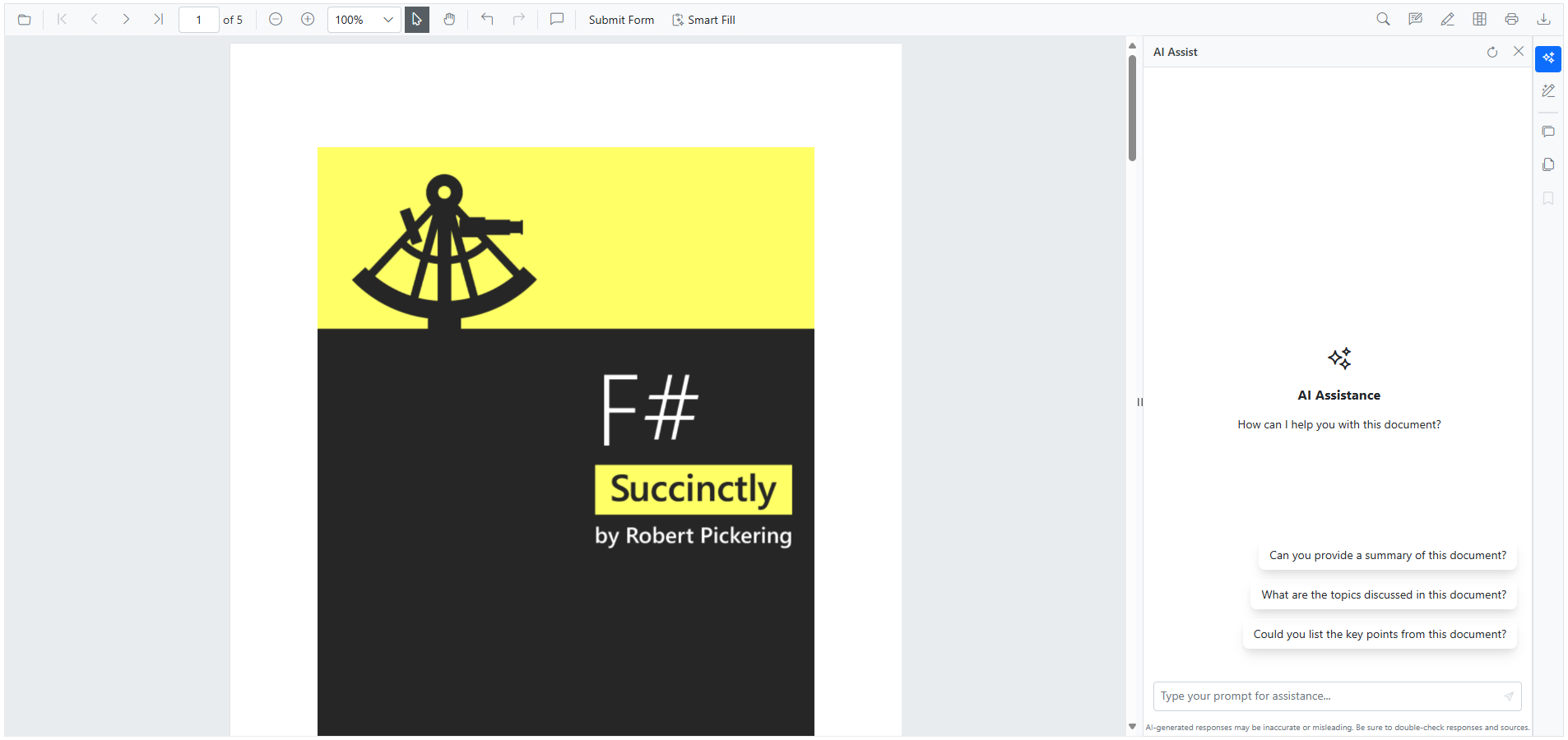
This package contains the Blazor Smart PDF Viewer for Blazor applications. The new Blazor Smart PDF Viewer is an advanced component in Syncfusion’s Blazor suite that integrates artificial intelligence to enhance document interaction. It builds upon the core capabilities of the traditional PDF Viewer by introducing intelligent features such as Document Summarization with Q&A, Smart Redact, and Smart Fill, enabling users to manage documents more efficiently and securely.
Key features
- Smart Redaction - Redacted sensitive information in PDF documents using AI-assistance.
- Smart Fill - Using AI to detect fields and populate them from clipboard or specified data, reducing manual input.
- Document Summarization - Provide the summary of the PDF document loaded into the viewer.
- Custom AI Service - Provide support to connect custom AI models in addition to the built‑in Azure OpenAI service.
Configuration
AI service setup
To use Smart Components, configure your AI services in Program.cs:
string azureOpenAIKey = "AZURE_OPENAI_KEY";
string azureOpenAIEndpoint = "AZURE_OPENAI_ENDPOINT";
string azureOpenAIModel = "AZURE_OPENAI_MODEL";
AzureOpenAIClient azureOpenAIClient = new AzureOpenAIClient(new Uri(azureOpenAiEndpoint), new ApiKeyCredential(azureOpenAiKey));
IChatClient azureOpenAiChatClient = azureOpenAIClient.GetChatClient(azureOpenAiModel).AsIChatClient();
builder.Services.AddChatClient(azureOpenAiChatClient);

builder.Services.AddSingleton<IChatInferenceService, SyncfusionAIService>();
Replace the placeholders with your actual API credentials from your AI service provider.
Add stylesheet and script references
- For Blazor Server App / Blazor Web App, add these to
Components/App.razororApp.razorfile.
<link href="_content/Syncfusion.Blazor.Themes/bootstrap5.css" rel="stylesheet" />
<script src="_content/Syncfusion.Blazor.SfSmartPdfViewer/scripts/syncfusion-blazor-sfsmartpdfviewer.min.js" type="text/javascript"></script>
Quick start
Register the Syncfusion® Blazor services in the Program.cs file.
using Syncfusion.Blazor;

builder.Services.AddSignalR(o => { o.MaximumReceiveMessageSize = 102400000; });

builder.Services.AddMemoryCache();
// Add service to the container.
builder.Services.AddSyncfusionBlazor();
Smart Paste Button
@using Syncfusion.Blazor.SmartPdfViewer

<SfSmartPdfViewer Height="100%" Width="100%" DocumentPath="https://cdn.syncfusion.com/content/pdf/http-succinctly.pdf">
</SfSmartPdfViewer>
Documentation
Help resources
Support and feedbacks
- For queries, reach our Syncfusion® support team or post the queries through the community forums.
- Request new feature through Syncfusion® feedback portal.
License
This is a commercial product and requires a paid license for possession or use. Syncfusion® licensed software, including this component, is subject to the terms and conditions of Syncfusion's EULA. You can purchase a license here or start a free 30-day trial here.
About Syncfusion®
Syncfusion® provides 1600+ UI components and frameworks for web, mobile, and desktop development across multiple platforms:
Web: Blazor | ASP.NET Core | ASP.NET MVC | JavaScript | Angular | React | Vue
Mobile: Flutter | Xamarin | UWP
Desktop: WinForms | WPF | WinUI
Learn more at www.syncfusion.com.
sales@syncfusion.com | Toll Free: 1-888-9-DOTNET
| Product | Versions Compatible and additional computed target framework versions. |
|---|---|
| .NET | net8.0 is compatible. net8.0-android was computed. net8.0-browser was computed. net8.0-ios was computed. net8.0-maccatalyst was computed. net8.0-macos was computed. net8.0-tvos was computed. net8.0-windows was computed. net9.0 is compatible. net9.0-android was computed. net9.0-browser was computed. net9.0-ios was computed. net9.0-maccatalyst was computed. net9.0-macos was computed. net9.0-tvos was computed. net9.0-windows was computed. net10.0 is compatible. net10.0-android was computed. net10.0-browser was computed. net10.0-ios was computed. net10.0-maccatalyst was computed. net10.0-macos was computed. net10.0-tvos was computed. net10.0-windows was computed. |
-
net10.0
- Syncfusion.AI.PdfViewer (>= 33.2.3)
- Syncfusion.Blazor.AI (>= 33.2.3)
- Syncfusion.Blazor.InteractiveChat (>= 33.2.3)
- Syncfusion.Blazor.SfPdfViewer (>= 33.2.3)
-
net8.0
- Syncfusion.AI.PdfViewer (>= 33.2.3)
- Syncfusion.Blazor.AI (>= 33.2.3)
- Syncfusion.Blazor.InteractiveChat (>= 33.2.3)
- Syncfusion.Blazor.SfPdfViewer (>= 33.2.3)
-
net9.0
- Syncfusion.AI.PdfViewer (>= 33.2.3)
- Syncfusion.Blazor.AI (>= 33.2.3)
- Syncfusion.Blazor.InteractiveChat (>= 33.2.3)
- Syncfusion.Blazor.SfPdfViewer (>= 33.2.3)
NuGet packages
This package is not used by any NuGet packages.
GitHub repositories
This package is not used by any popular GitHub repositories.
| Version | Downloads | Last Updated |
|---|---|---|
| 33.2.3 | 82 | 4/21/2026 |
| 33.1.49 | 102 | 4/13/2026 |
| 33.1.47 | 98 | 4/6/2026 |
| 33.1.46 | 100 | 3/30/2026 |
| 33.1.45 | 99 | 3/23/2026 |
| 33.1.44 | 126 | 3/16/2026 |
| 32.2.9 | 103 | 3/9/2026 |
| 32.2.8 | 107 | 3/2/2026 |
| 32.2.7 | 111 | 2/23/2026 |
| 32.2.5 | 127 | 2/16/2026 |
| 32.2.4 | 125 | 2/10/2026 |
| 32.2.3 | 162 | 2/5/2026 |
| 32.1.25 | 147 | 1/26/2026 |
| 32.1.24 | 117 | 1/19/2026 |
| 32.1.23 | 133 | 1/13/2026 |
| 32.1.22 | 266 | 1/5/2026 |
| 32.1.21 | 123 | 12/29/2025 |
| 32.1.20 | 219 | 12/23/2025 |
| 32.1.19 | 376 | 12/16/2025 |
| 31.2.18 | 480 | 12/8/2025 |