Syncfusion.Blazor.SmartComponents
34.2.3
Prefix Reserved
dotnet add package Syncfusion.Blazor.SmartComponents --version 34.2.3
NuGet\Install-Package Syncfusion.Blazor.SmartComponents -Version 34.2.3
<PackageReference Include="Syncfusion.Blazor.SmartComponents" Version="34.2.3" />
<PackageVersion Include="Syncfusion.Blazor.SmartComponents" Version="34.2.3" />
<PackageReference Include="Syncfusion.Blazor.SmartComponents" />
paket add Syncfusion.Blazor.SmartComponents --version 34.2.3
#r "nuget: Syncfusion.Blazor.SmartComponents, 34.2.3"
#:package Syncfusion.Blazor.SmartComponents@34.2.3
#addin nuget:?package=Syncfusion.Blazor.SmartComponents&version=34.2.3
#tool nuget:?package=Syncfusion.Blazor.SmartComponents&version=34.2.3
Syncfusion® Blazor Smart Components
AI-powered Blazor components for intelligent form data pasting and text autocompletion. Includes Smart Paste Button and Smart TextArea components for streamlined data entry.
Supported components
This package includes the following components:
Blazor Smart Paste Button component
The Blazor Smart Paste Button component is an AI-powered enhancement to the standard Syncfusion® Button component. It intelligently pastes clipboard data into form fields, automatically populating fields based on the clipboard content context.
Key features:
- Intelligent Form Population: Automatically fills form fields with clipboard data
- Context Awareness: Matches clipboard content to appropriate form fields
- Field Annotation: Support for custom field descriptions via
data-smartpaste-description - AI-Powered Parsing: Uses AI to understand and structure pasted content
- Standard Button Features: Inherits all Syncfusion Button component properties
- Form Support: Works with
<form>,<EditForm>, and<SfDataForm> - Smart Field Detection: Automatically detects form fields and labels
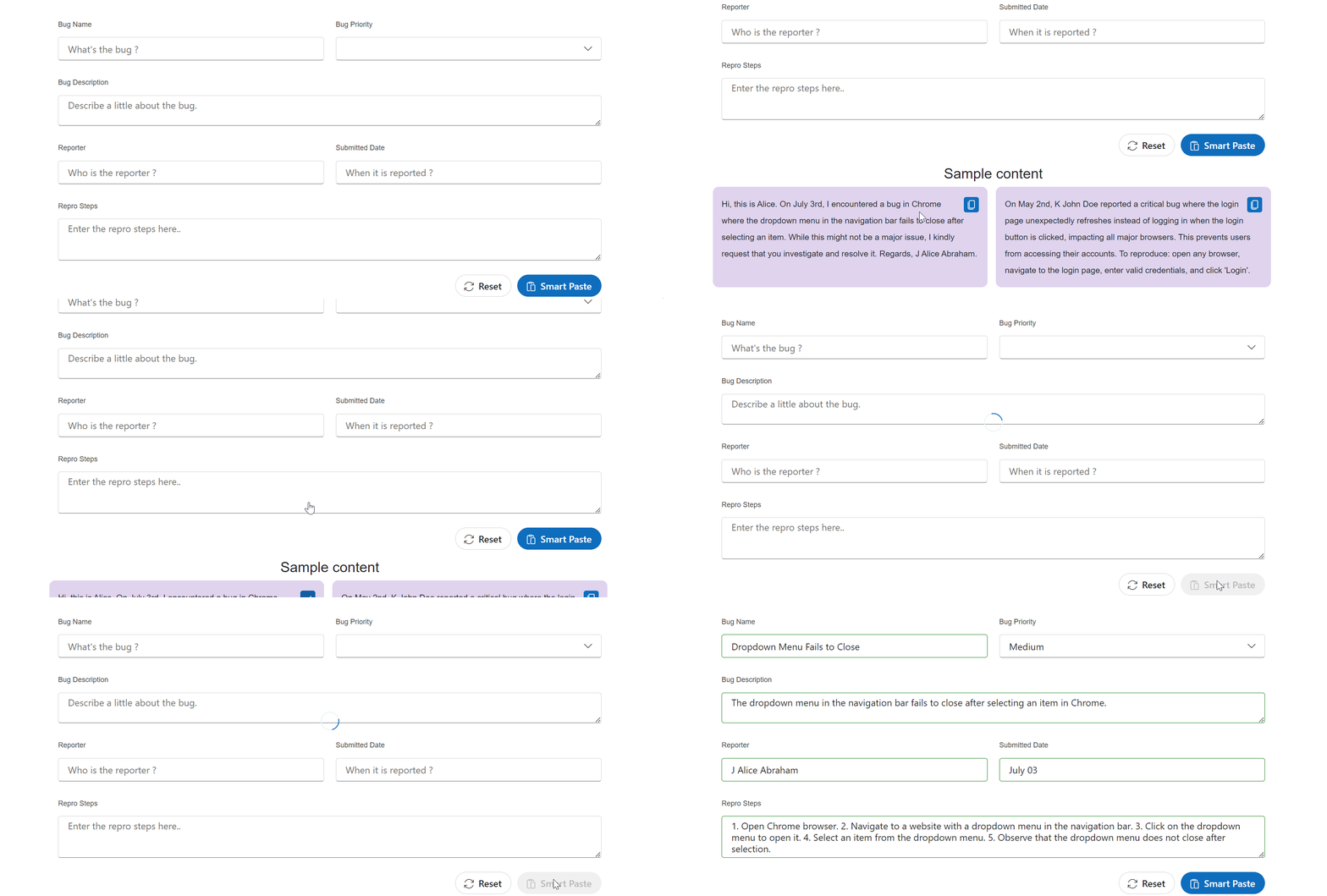
Use cases:
- Job Applications: Copy resume/LinkedIn profiles → Auto-populate experience, skills, education
- Bug Tracking: Copy issue descriptions → Auto-populate title, priority, description, steps
- Data Entry Forms: Streamline manual data entry from external sources
Annotating form fields
Override default field descriptions using the data-smartpaste-description attribute:
<input data-smartpaste-description="The user's vehicle registration number, formatted as XYZ-123" />

<textarea data-smartpaste-description="The job description should start with JOB TITLE in all caps"></textarea>

<input type="checkbox" data-smartpaste-description="Check if product is suitable for children" />
Documentation:
Blazor Smart TextArea component
The Blazor Smart TextArea is an AI-powered textarea component that provides sentence-level autocompletion suggestions based on context and user role, improving typing efficiency.
Key features:
- AI Autocompletion: Intelligent sentence-level suggestions based on context
- User Role Context: Customize suggestions based on user role
- User Phrases: Define predefined phrases for consistent responses
- Device-Aware Display: Inline suggestions on desktop, overlay on mobile
- Tab-Key Acceptance: Accept suggestions using the Tab key
- Configurable Behavior: Control suggestion display via
ShowSuggestionOnPopup - Standard TextArea Features: Inherits all Syncfusion TextArea properties
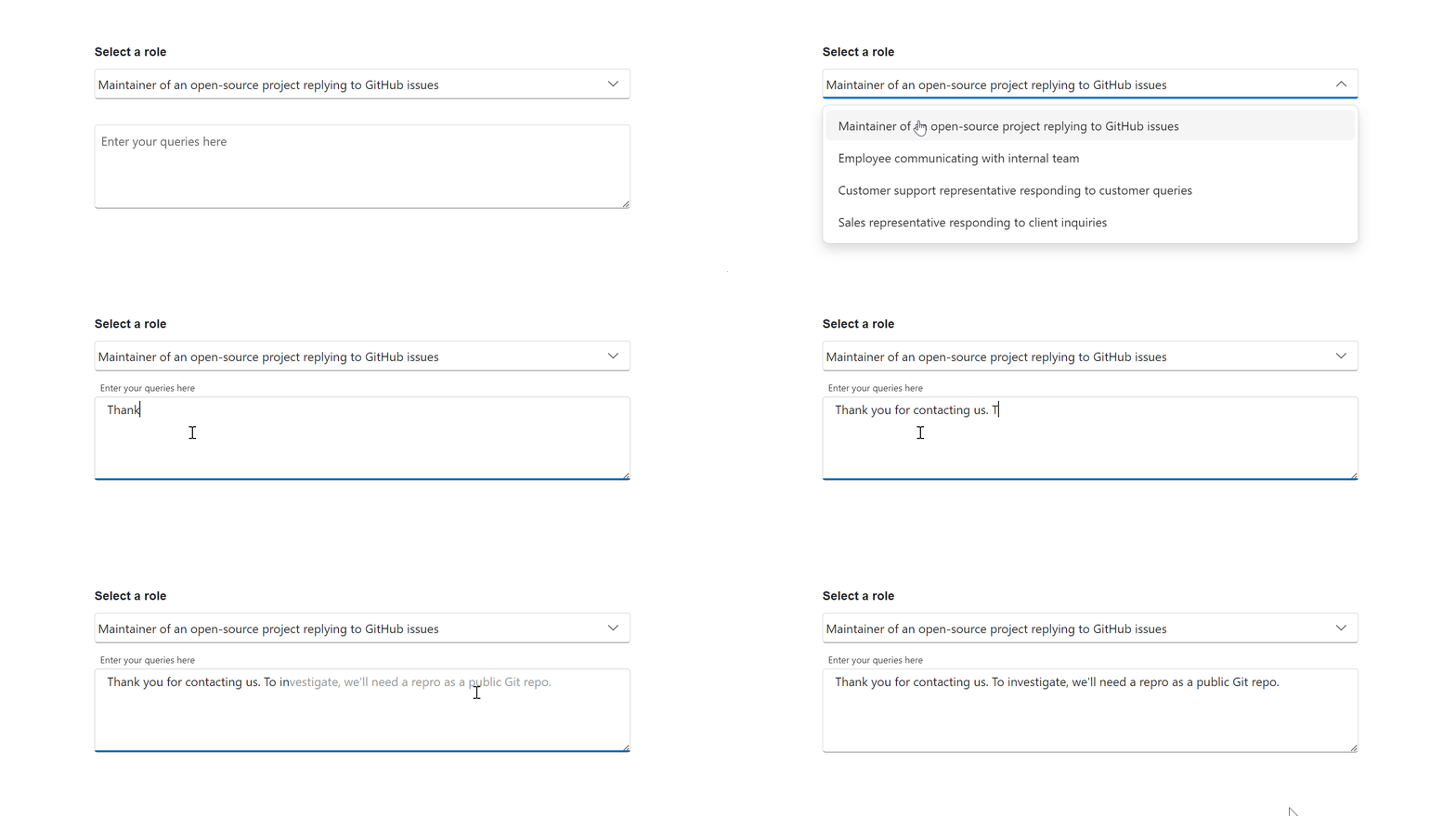
Use cases:
- GitHub Issue Responses: Quickly draft consistent, professional responses
- Live Chat Support: Generate common support messages efficiently
- Professional Communications: Autocomplete business emails and messages
Customizing suggestions
Configure autocompletion using UserRole and UserPhrases:
@using Syncfusion.Blazor.SmartComponents

<SfSmartTextArea
    @bind-Value="@text"
    UserRole="@userRole"
    UserPhrases="@userPhrases" />

@code {
    string? text;
    string userRole = "Customer service agent responding to inquiries";
    string[] userPhrases = new[]
    {
        "Thank you for contacting us.",
        "Please provide more details so we can assist you.",
        "You can find help in our documentation at [URL]."
    };
}
Suggestion display modes
Use ShowSuggestionOnPopup to control suggestion display:
<SfSmartTextArea ShowSuggestionOnPopup="true" ... />


<SfSmartTextArea ShowSuggestionOnPopup="false" ... />


<SfSmartTextArea ... />
Behavior:
| Mode | Behavior |
|---|---|
true |
Suggestions display as floating overlay (tap/click to accept) |
false |
Suggestions display inline in textarea (Tab key to accept) |
| Not set | Touch devices: overlay; Desktop: inline |
Documentation:
Best practices
Managing suggested information
Avoid using specific details in user phrases that might be reused inappropriately. Instead of:
// ❌ Risky: Version might be suggested for all file issues
"Bug report: File not found error occurred in version 2.3"
Use placeholders:
// ✅ Better: Placeholder guides specific information
"Bug report: File not found error occurred in NEED_INFO"
This allows users to fill in specific details while preventing unintended suggestions.
Configuration
AI service setup
To use Smart Components, configure your AI services in Program.cs:
string azureOpenAIKey = "AZURE_OPENAI_KEY";
string azureOpenAIEndpoint = "AZURE_OPENAI_ENDPOINT";
string azureOpenAIModel = "AZURE_OPENAI_MODEL";
AzureOpenAIClient azureOpenAIClient = new AzureOpenAIClient(
     new Uri(azureOpenAIEndpoint),
     new ApiKeyCredential(azureOpenAIKey)
);
IChatClient azureOpenAIChatClient = azureOpenAIClient.GetChatClient(azureOpenAIModel).AsIChatClient();
builder.Services.AddChatClient(azureOpenAIChatClient);
builder.Services.AddSyncfusionSmartComponents()
    .InjectOpenAIInference();
Replace the placeholders with your actual API credentials from your AI service provider.
Add stylesheet and script references
- For Blazor Server App / Blazor Web App, add these to
Components/App.razororApp.razorfile. - For Blazor WebAssembly App, add these to
wwwroot/index.htmlfile.
<link href="_content/Syncfusion.Blazor.Themes/fluent2.css" rel="stylesheet" />
<script src="_content/Syncfusion.Blazor.Core/scripts/syncfusion-blazor.min.js" type="text/javascript"></script>
Quick start
Register the Syncfusion® Blazor services in the Program.cs file.
using Syncfusion.Blazor;

builder.Services.AddSyncfusionBlazor();
Smart Paste Button
@using Syncfusion.Blazor.DataForm
@using System.ComponentModel.DataAnnotations
@using Syncfusion.Blazor.SmartComponents

<SfDataForm ID="MyForm"
            Model="@EventRegistrationModel">
    <FormValidator>
        <DataAnnotationsValidator></DataAnnotationsValidator>
    </FormValidator>
    <FormItems>
        <FormItem Field="@nameof(EventRegistration.Name)" ID="firstname"></FormItem>
        <FormItem Field="@nameof(EventRegistration.Email)" ID="email"></FormItem>
        <FormItem Field="@nameof(EventRegistration.Phone)" ID="phonenumber"></FormItem>
        <FormItem Field="@nameof(EventRegistration.Address)" ID="address"></FormItem>
    </FormItems>
    <FormButtons>
        <SfSmartPasteButton IsPrimary="true" Content="Smart Paste" IconCss="e-icons e-paste">
        </SfSmartPasteButton>
    </FormButtons>
</SfDataForm>

<br>
<h4 style="text-align:center;">Sample content</h4>
<div>
    Hi, my name is Jane Smith. You can reach me at example@domain.com or call me at +1-555-987-6543. I live at 789 Pine Avenue, Suite 12, Los Angeles, CA 90001.
</div>

@code {
    private EventRegistration EventRegistrationModel = new EventRegistration();

    public class EventRegistration
    {
        [Required(ErrorMessage = "Please enter your name.")]
        [Display(Name = "Name")]
        public string Name { get; set; }

        [Required(ErrorMessage = "Please enter your email address.")]
        [Display(Name = "Email ID")]
        public string Email { get; set; }

        [Required(ErrorMessage = "Please enter your mobile number.")]
        [Display(Name = "Phone Number")]
        public string Phone { get; set; }

        [Required(ErrorMessage = "Please enter your address.")]
        [Display(Name = "Address")]
        public string Address { get; set; }
    }
}
Smart Text Area
<SfSmartTextArea UserRole="@userRole" UserPhrases="@userPhrases" Placeholder="Enter your queries here" @bind-Value="prompt" Width="75%" RowCount="5">
</SfSmartTextArea>

@code {
    private string? prompt;
    public string userRole = "Maintainer of an open-source project replying to GitHub issues";
    public string[] userPhrases = [
        "Thank you for contacting us.",
        "To investigate, We will need a reproducible example as a public Git repository.",
        "Could you please post a screenshot of NEED_INFO?",
        "This sounds like a usage question. This issue tracker is intended for bugs and feature proposals. Unfortunately, we don't have the capacity to answer general usage questions and would recommend StackOverflow for a faster response.",
        "We do not accept ZIP files as reproducible examples.",
        "Bug report: File not found error occurred in NEED_INFO"
    ];
}
Support
License
This is a commercial product and requires a paid license for possession or use. Review the Syncfusion® EULA.
About Syncfusion®
Syncfusion® provides 1600+ UI components and frameworks for web, mobile, and desktop development across multiple platforms:
Web: Blazor | ASP.NET Core | ASP.NET MVC | JavaScript | Angular | React | Vue
Desktop: WinForms | WPF | WinUI
Learn more at www.syncfusion.com.
sales@syncfusion.com | Toll Free: 1-888-9-DOTNET
| Product | Versions Compatible and additional computed target framework versions. |
|---|---|
| .NET | net8.0 is compatible. net8.0-android was computed. net8.0-browser was computed. net8.0-ios was computed. net8.0-maccatalyst was computed. net8.0-macos was computed. net8.0-tvos was computed. net8.0-windows was computed. net9.0 is compatible. net9.0-android was computed. net9.0-browser was computed. net9.0-ios was computed. net9.0-maccatalyst was computed. net9.0-macos was computed. net9.0-tvos was computed. net9.0-windows was computed. net10.0 is compatible. net10.0-android was computed. net10.0-browser was computed. net10.0-ios was computed. net10.0-maccatalyst was computed. net10.0-macos was computed. net10.0-tvos was computed. net10.0-windows was computed. |
-
net10.0
- Syncfusion.Blazor.AI (>= 34.2.3)
- Syncfusion.Blazor.Buttons (>= 34.2.3)
- Syncfusion.Blazor.Core (>= 34.2.3)
- Syncfusion.Blazor.Inputs (>= 34.2.3)
-
net8.0
- Syncfusion.Blazor.AI (>= 34.2.3)
- Syncfusion.Blazor.Buttons (>= 34.2.3)
- Syncfusion.Blazor.Core (>= 34.2.3)
- Syncfusion.Blazor.Inputs (>= 34.2.3)
-
net9.0
- Syncfusion.Blazor.AI (>= 34.2.3)
- Syncfusion.Blazor.Buttons (>= 34.2.3)
- Syncfusion.Blazor.Core (>= 34.2.3)
- Syncfusion.Blazor.Inputs (>= 34.2.3)
NuGet packages
This package is not used by any NuGet packages.
GitHub repositories
This package is not used by any popular GitHub repositories.
| Version | Downloads | Last Updated |
|---|---|---|
| 34.2.3 | 104 | 8/11/2026 |
| 34.2.2 | 186 | 8/5/2026 |
| 34.1.33 | 164 | 7/27/2026 |
| 34.1.32 | 362 | 7/21/2026 |
| 34.1.31 | 206 | 7/14/2026 |
| 34.1.30 | 142 | 7/9/2026 |
| 34.1.29 | 372 | 7/6/2026 |
| 33.2.15 | 210 | 6/23/2026 |
| 33.2.13 | 490 | 6/16/2026 |
| 33.2.12 | 393 | 6/9/2026 |
| 33.2.10 | 182 | 6/2/2026 |
| 33.2.8 | 183 | 5/26/2026 |
| 33.2.7 | 165 | 5/19/2026 |
| 33.2.6 | 175 | 5/12/2026 |
| 33.2.5 | 166 | 5/4/2026 |
| 33.2.4 | 421 | 4/27/2026 |
| 33.2.3 | 668 | 4/21/2026 |
| 33.1.49 | 379 | 4/13/2026 |
| 33.1.47 | 942 | 4/6/2026 |
| 33.1.46 | 337 | 3/30/2026 |