Syncfusion.Blazor.Spreadsheet
33.2.3
Prefix Reserved
dotnet add package Syncfusion.Blazor.Spreadsheet --version 33.2.3
NuGet\Install-Package Syncfusion.Blazor.Spreadsheet -Version 33.2.3
<PackageReference Include="Syncfusion.Blazor.Spreadsheet" Version="33.2.3" />
<PackageVersion Include="Syncfusion.Blazor.Spreadsheet" Version="33.2.3" />
<PackageReference Include="Syncfusion.Blazor.Spreadsheet" />
paket add Syncfusion.Blazor.Spreadsheet --version 33.2.3
#r "nuget: Syncfusion.Blazor.Spreadsheet, 33.2.3"
#:package Syncfusion.Blazor.Spreadsheet@33.2.3
#addin nuget:?package=Syncfusion.Blazor.Spreadsheet&version=33.2.3
#tool nuget:?package=Syncfusion.Blazor.Spreadsheet&version=33.2.3
Syncfusion® Blazor Spreadsheet Component
A high‑performance Blazor Spreadsheet Component for creating, viewing, editing, and analyzing data within Blazor applications. It provides a comprehensive set of Excel-like features such as formulas, formatting, data manipulation, sorting, and filtering, and is optimized for seamless integration with both Blazor Server and Blazor WebAssembly environments.
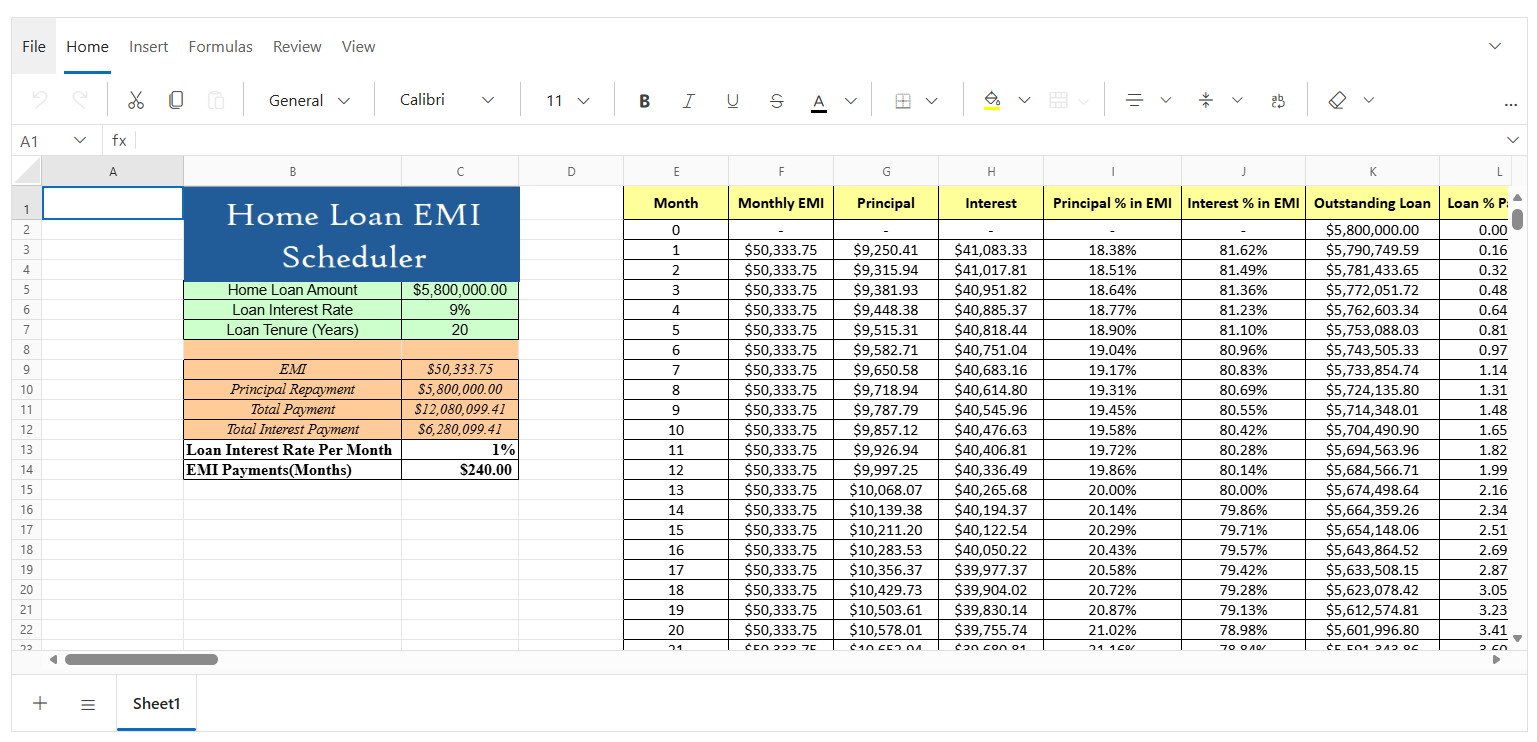
Key features
- Editing - Enables dynamic cell editing with support for direct in-cell editing and formula bar-based editing.
- Selection - Supports selection of individual cells, rows, columns, and ranges using mouse and keyboard interactions.
- Open and Save - Allows opening Excel files (.xlsx, .xls) and saving data as Excel (.xlsx) with Base64 loading and local file support.
- Clipboard - Provides cut, copy, and paste operations with compatibility for external clipboard content from Excel and Google Sheets.
- Formulas - Includes a built-in calculation engine with predefined formulas, named ranges, and automatic or manual calculation modes.
- Cell Formatting - Offers rich formatting options such as fonts, colors, borders, alignment, and text styles for enhanced data presentation.
- Sorting - Enables ascending and descending sorting for single columns to quickly organize data.
- Filtering - Allows filtering rows using text, number, and date filters with custom filter conditions.
- Hyperlink - Supports adding hyperlinks to external URLs or internal cell references across the same or different worksheets.
- Undo & Redo - Provides undo and redo operations with history tracking up to 25 actions for easy corrections.
- Protection - Enables worksheet and workbook protection with password support, range-level unlocking, and configurable permissions.
- Accessibility - Includes built-in accessibility support with keyboard navigation, ARIA attributes, and screen reader compatibility.
Add stylesheet and script references
- For Blazor Web App / Blazor Server App,add these to
Components/App.razororApp.razorfile. - For Blazor WebAssembly App,add these to
wwwroot/index.htmlfile.
<link href="_content/Syncfusion.Blazor.Themes/bootstrap5.css" rel="stylesheet" />
<script src="_content/Syncfusion.Blazor.Spreadsheet/scripts/syncfusion-blazor-spreadsheet.min.js" type="text/javascript"></script>
Quick start
- Register the Syncfusion® Blazor service in the
Program.csfile.
using Syncfusion.Blazor;

builder.Services.AddSyncfusionBlazor();
- Add Blazor Spreadsheet component to your Razor page.
@using Syncfusion.Blazor.Spreadsheet
<SfSpreadsheet DataSource="DataSourceBytes">,
    <SpreadsheetRibbon></SpreadsheetRibbon>
</SfSpreadsheet>

@code {
    public byte[] DataSourceBytes { get; set; }

    protected override void OnInitialized()
    {
        string filePath = "wwwroot/Sample.xlsx";
        DataSourceBytes = File.ReadAllBytes(filePath);
     }
}
Documentation
- Getting Started with Blazor Spreadsheet in Web App
- Getting Started with Blazor Spreadsheet in WebAssembly App
Help resources
Support and feedbacks
- For queries, reach our Syncfusion® support team or post the queries through the community forums.
- Request new feature through Syncfusion® feedback portal.
License
This is a commercial product and requires a paid license for possession or use. Syncfusion® licensed software, including this component, is subject to the terms and conditions of Syncfusion's EULA. You can purchase a license here or start a free 30-day trial here.
About Syncfusion®
Syncfusion® provides 1600+ UI components and frameworks for web, mobile, and desktop development across multiple platforms:
Web: Blazor | ASP.NET Core | ASP.NET MVC | JavaScript | Angular | React | Vue
Mobile: Flutter | Xamarin | UWP
Desktop: WinForms | WPF | WinUI
Learn more at www.syncfusion.com.
sales@syncfusion.com | Toll Free: 1-888-9-DOTNET
| Product | Versions Compatible and additional computed target framework versions. |
|---|---|
| .NET | net8.0 is compatible. net8.0-android was computed. net8.0-browser was computed. net8.0-ios was computed. net8.0-maccatalyst was computed. net8.0-macos was computed. net8.0-tvos was computed. net8.0-windows was computed. net9.0 is compatible. net9.0-android was computed. net9.0-browser was computed. net9.0-ios was computed. net9.0-maccatalyst was computed. net9.0-macos was computed. net9.0-tvos was computed. net9.0-windows was computed. net10.0 is compatible. net10.0-android was computed. net10.0-browser was computed. net10.0-ios was computed. net10.0-maccatalyst was computed. net10.0-macos was computed. net10.0-tvos was computed. net10.0-windows was computed. |
-
net10.0
- Syncfusion.Blazor.Buttons (>= 33.2.3)
- Syncfusion.Blazor.Calendars (>= 33.2.3)
- Syncfusion.Blazor.Core (>= 33.2.3)
- Syncfusion.Blazor.DropDowns (>= 33.2.3)
- Syncfusion.Blazor.Inputs (>= 33.2.3)
- Syncfusion.Blazor.Lists (>= 33.2.3)
- Syncfusion.Blazor.Navigations (>= 33.2.3)
- Syncfusion.Blazor.Popups (>= 33.2.3)
- Syncfusion.Blazor.Ribbon (>= 33.2.3)
- Syncfusion.Blazor.Spinner (>= 33.2.3)
- Syncfusion.Blazor.SplitButtons (>= 33.2.3)
- Syncfusion.XlsIO.Net.Core (>= 33.2.3)
-
net8.0
- Syncfusion.Blazor.Buttons (>= 33.2.3)
- Syncfusion.Blazor.Calendars (>= 33.2.3)
- Syncfusion.Blazor.Core (>= 33.2.3)
- Syncfusion.Blazor.DropDowns (>= 33.2.3)
- Syncfusion.Blazor.Inputs (>= 33.2.3)
- Syncfusion.Blazor.Lists (>= 33.2.3)
- Syncfusion.Blazor.Navigations (>= 33.2.3)
- Syncfusion.Blazor.Popups (>= 33.2.3)
- Syncfusion.Blazor.Ribbon (>= 33.2.3)
- Syncfusion.Blazor.Spinner (>= 33.2.3)
- Syncfusion.Blazor.SplitButtons (>= 33.2.3)
- Syncfusion.XlsIO.Net.Core (>= 33.2.3)
-
net9.0
- Syncfusion.Blazor.Buttons (>= 33.2.3)
- Syncfusion.Blazor.Calendars (>= 33.2.3)
- Syncfusion.Blazor.Core (>= 33.2.3)
- Syncfusion.Blazor.DropDowns (>= 33.2.3)
- Syncfusion.Blazor.Inputs (>= 33.2.3)
- Syncfusion.Blazor.Lists (>= 33.2.3)
- Syncfusion.Blazor.Navigations (>= 33.2.3)
- Syncfusion.Blazor.Popups (>= 33.2.3)
- Syncfusion.Blazor.Ribbon (>= 33.2.3)
- Syncfusion.Blazor.Spinner (>= 33.2.3)
- Syncfusion.Blazor.SplitButtons (>= 33.2.3)
- Syncfusion.XlsIO.Net.Core (>= 33.2.3)
NuGet packages
This package is not used by any NuGet packages.
GitHub repositories
This package is not used by any popular GitHub repositories.
| Version | Downloads | Last Updated |
|---|---|---|
| 33.2.3 | 113 | 4/21/2026 |
| 33.1.49 | 337 | 4/13/2026 |
| 33.1.47 | 186 | 4/6/2026 |
| 33.1.46 | 267 | 3/30/2026 |
| 33.1.45 | 532 | 3/23/2026 |
| 33.1.44 | 810 | 3/16/2026 |
| 32.2.9 | 1,496 | 3/9/2026 |
| 32.2.8 | 377 | 3/2/2026 |
| 32.2.7 | 294 | 2/23/2026 |
| 32.2.5 | 368 | 2/16/2026 |
| 32.2.4 | 489 | 2/10/2026 |
| 32.2.3 | 1,148 | 2/5/2026 |
| 32.1.25 | 384 | 1/26/2026 |
| 32.1.24 | 1,720 | 1/19/2026 |
| 32.1.23 | 1,277 | 1/13/2026 |
| 32.1.22 | 801 | 1/5/2026 |
| 32.1.21 | 249 | 12/29/2025 |
| 32.1.20 | 277 | 12/23/2025 |
| 32.1.19 | 2,446 | 12/16/2025 |
| 31.2.18 | 812 | 12/8/2025 |