TheBuilder.DeliveryApiInspector
0.2.1
dotnet add package TheBuilder.DeliveryApiInspector --version 0.2.1
NuGet\Install-Package TheBuilder.DeliveryApiInspector -Version 0.2.1
<PackageReference Include="TheBuilder.DeliveryApiInspector" Version="0.2.1" />
<PackageVersion Include="TheBuilder.DeliveryApiInspector" Version="0.2.1" />
<PackageReference Include="TheBuilder.DeliveryApiInspector" />
paket add TheBuilder.DeliveryApiInspector --version 0.2.1
#r "nuget: TheBuilder.DeliveryApiInspector, 0.2.1"
#:package TheBuilder.DeliveryApiInspector@0.2.1
#addin nuget:?package=TheBuilder.DeliveryApiInspector&version=0.2.1
#tool nuget:?package=TheBuilder.DeliveryApiInspector&version=0.2.1
<p align="center"> <img src="https://raw.githubusercontent.com/thebuilder/umbraco-delivery-api-inspector/refs/heads/main/apps/docs/public/logo-mark.svg" width="112" height="112" alt="Delivery API Inspector logo" /> </p>
<h1 align="center">Delivery API Inspector for Umbraco</h1>
<p align="center"> An API tab on every document and media item in the Umbraco backoffice,<br /> with the JSON the Delivery API returns for it. </p>



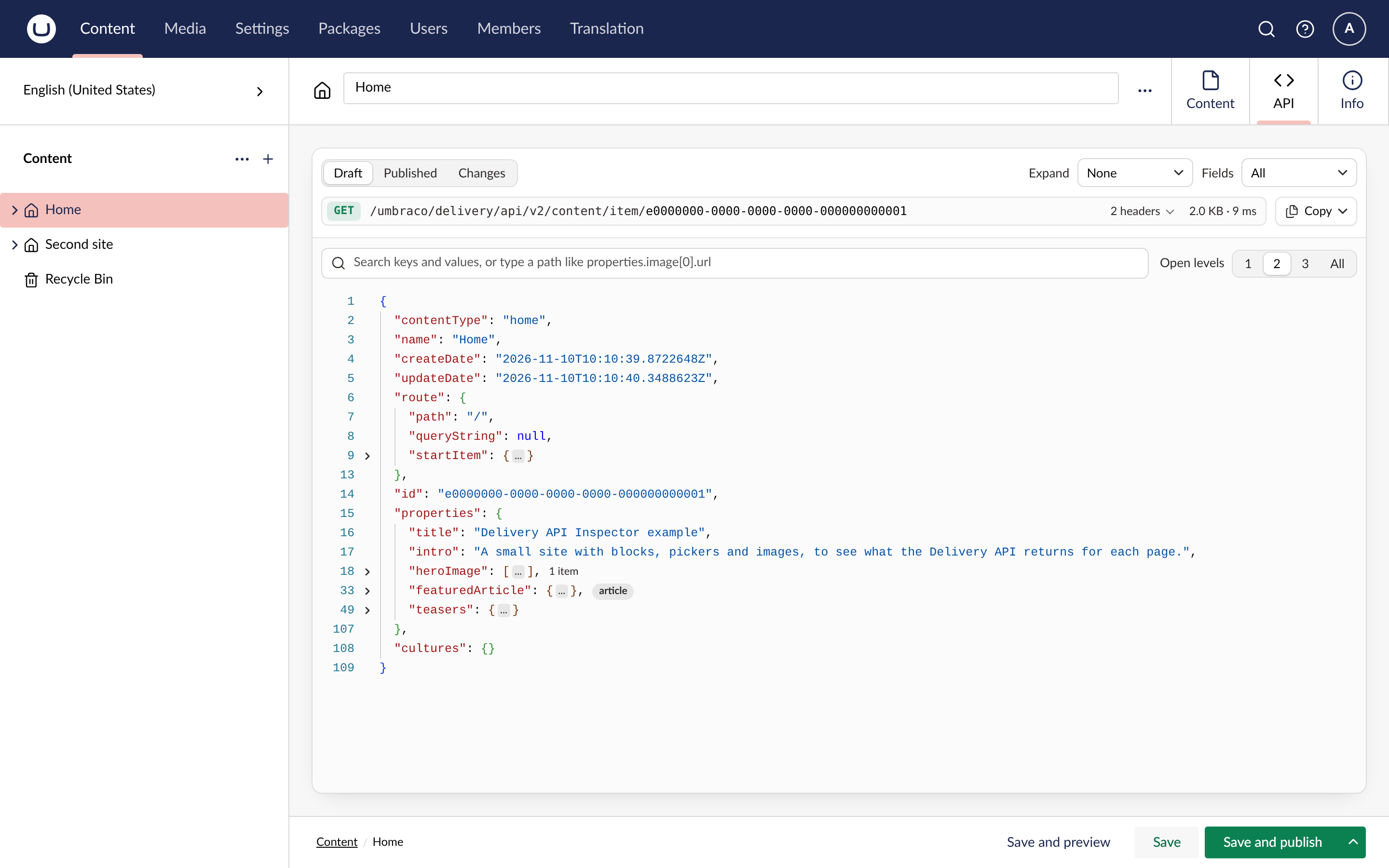
The tab builds the response with the Delivery API's own builders, so it shows the JSON a frontend receives. You don't need an API client or the site's API key.
Draft is the default view. Published shows what frontends get today, and Changes shows what publishing the draft would change.
The response is a tree you can search and filter, open to a set depth, and request with expand and
fields from a menu. Blocks and pickers show their content type, media URLs show a thumbnail on
hover, and a GUID opens its document or media item. The request copies as a URL, a curl command or a
fetch call, and the response, or any part of it, copies as JSON.
It supports Umbraco 17.4 and later, Umbraco 18 included, on .NET 10.
Getting started
Install the package in your Umbraco site:
dotnet add package TheBuilder.DeliveryApiInspectorMake sure
Program.cscallsAddDeliveryApi(). The public Delivery API does not have to be enabled.Sign in as an administrator, open a document, and click API.
Administrators see the tab. To give it to another group, turn on View Delivery API output in the group's permissions under Users, User groups. It can be set for part of the content tree too.
The documentation covers every view, the request bar, access and configuration.
Development
See AGENTS.md for the layout and commands, and samples/README.md for the sample site and the end-to-end check.
License
| Product | Versions Compatible and additional computed target framework versions. |
|---|---|
| .NET | net10.0 is compatible. net10.0-android was computed. net10.0-browser was computed. net10.0-ios was computed. net10.0-maccatalyst was computed. net10.0-macos was computed. net10.0-tvos was computed. net10.0-windows was computed. |
-
net10.0
- MessagePack (>= 3.1.12)
- Microsoft.OpenApi (>= 2.12.2)
- System.Security.Cryptography.Pkcs (>= 10.0.13)
- System.Security.Cryptography.Xml (>= 10.0.13)
- Umbraco.Cms.Api.Delivery (>= 17.4.0 && < 19.0.0)
- Umbraco.Cms.Api.Management (>= 17.4.0 && < 19.0.0)
NuGet packages
This package is not used by any NuGet packages.
GitHub repositories
This package is not used by any popular GitHub repositories.