Toolbelt.Blazor.InvokeDownloadAsync
3.1.0
dotnet add package Toolbelt.Blazor.InvokeDownloadAsync --version 3.1.0
NuGet\Install-Package Toolbelt.Blazor.InvokeDownloadAsync -Version 3.1.0
<PackageReference Include="Toolbelt.Blazor.InvokeDownloadAsync" Version="3.1.0" />
<PackageVersion Include="Toolbelt.Blazor.InvokeDownloadAsync" Version="3.1.0" />
<PackageReference Include="Toolbelt.Blazor.InvokeDownloadAsync" />
paket add Toolbelt.Blazor.InvokeDownloadAsync --version 3.1.0
#r "nuget: Toolbelt.Blazor.InvokeDownloadAsync, 3.1.0"
#:package Toolbelt.Blazor.InvokeDownloadAsync@3.1.0
#addin nuget:?package=Toolbelt.Blazor.InvokeDownloadAsync&version=3.1.0
#tool nuget:?package=Toolbelt.Blazor.InvokeDownloadAsync&version=3.1.0
Blazor InvokeDownloadAsync 
Summary
This NuGet package simply adds the InvokeDownloadAsync() extension method on your Blazor apps.
@inject IJSRuntime JSRuntime

<button @onclick="BeginDownloadAsync">
  Begin Download
</button>
...
@code
{
  ...
  private async Task BeginDownloadAsync()
  {
    ...
    await this.JSRuntime.InvokeDownloadAsync(
      "Foo.png",
      "image/png",
      pictureBytes);
  }
}
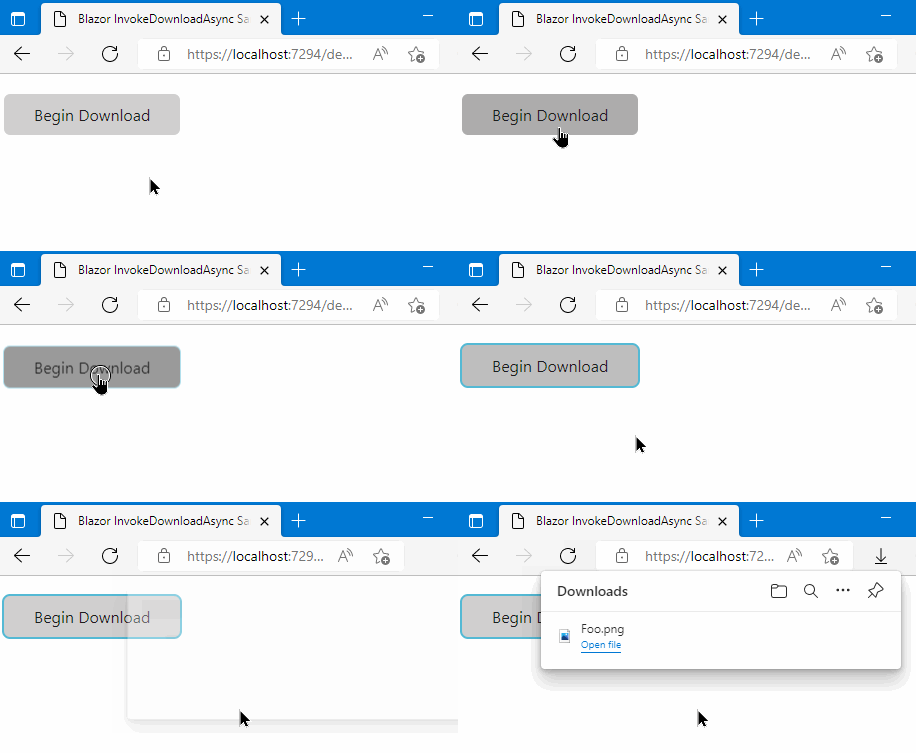
Highlights
1. Minimal setup
This package is an extension method for the IJSRuntime interface. You can use the downloading feature immediately if there is a JavaScript runtime object. You don't need to write any code in your startup.
2. Small package size
This package is simple and small content size because this package doesn't have massive code optimized for performance.
Usage
Install this NuGet package to your Blazor application project.
dotnet add package Toolbelt.Blazor.InvokeDownloadAsync
After that, you can use the InvokeDownloadAsync() extension method for the IJSRuntime interface.
Syntax
ValueTask InvokeDownloadAsync(
      this IJSRuntime jsRuntime,
      string fileName,
      string contentType,
      byte[] contentBytes);
ValueTask InvokeDownloadAsync(
      this IJSRuntime jsRuntime,
      string fileName,
      string contentType,
      Stream contentStream,
      bool leaveOpen = false);
IImplicit using the namespace
To use the InvokeDownloadAsync() extension method it requires open the namespace Toolbelt.Blazor.Extensions.Downloading. But in a general case, you don't need to open the namespace Toolbelt.Blazor.Extensions.Downloading explicitly because the NuGet package opens it implicitly by default.
To prevent this default behavior, please set the ImplicitUsingsToolbeltBlazorExtensionsDownloading MSBuild property to false.
<Project>
  ...
  <PropertyGroup>
    ...
    <ImplicitUsingsToolbeltBlazorExtensionsDownloading>false</ImplicitUsingsToolbeltBlazorExtensionsDownloading>
    ...
JavaScript file cache busting
This library includes and uses a JavaScript file to do some small work. When you update this library to a newer version, the browser may use the cached previous version of the JavaScript file, leading to unexpected behavior. To prevent this issue, the library appends a version query string to the JavaScript file URL when loading it.
.NET 8 and 9
A version query string will always be appended to this library's JavaScript file URL regardless of the Blazor hosting model you are using.
.NET 10 or later
By default, a version query string will be appended to the JavaScript file URL that this library loads. If you want to disable appending a version query string to the JavaScript file URL, you can do so by setting the TOOLBELT_BLAZOR_DOWNLOAD_JSCACHEBUSTING environment variable to 0.
// Program.cs
...
// 👇 Add this line to disable appending a version query string for this library's JavaScript file.
Environment.SetEnvironmentVariable("TOOLBELT_BLAZOR_DOWNLOAD_JSCACHEBUSTING", "0");

var builder = WebApplication.CreateBuilder(args);
...
However, when you publish a .NET 10 Blazor WebAssembly app, a version query string will always be appended to the JavaScript file URL regardless of the TOOLBELT_BLAZOR_DOWNLOAD_JSCACHEBUSTING environment variable setting. The reason is that published Blazor WebAssembly standalone apps don't include import map entries for JavaScript files from NuGet packages. If you want to avoid appending a version query string to the JavaScript file URL in published Blazor WebAssembly apps, you need to set the ToolbeltBlazorDownloadJavaScriptCacheBusting MSBuild property to false in the project file of the Blazor WebAssembly app, like this:
<PropertyGroup>
  <ToolbeltBlazorDownloadJavaScriptCacheBusting>false</ToolbeltBlazorDownloadJavaScriptCacheBusting>
</PropertyGroup>
Why do we append a version query string to the JavaScript file URL regardless of whether the import map is available or not?
We know that .NET 9 or later allows us to use import maps to import JavaScript files with a fingerprint in their file names. Therefore, in .NET 9 or later Blazor apps, you may want to avoid appending a version query string to the JavaScript file URL that i18n text library loads.
However, we recommend keeping the default behavior of appending a version query string to the JavaScript file URL. The reason is that published Blazor WebAssembly standalone apps don't include import map entries for JavaScript files from NuGet packages. This inconsistent behavior between development and production environments and hosting models may lead to unexpected issues that are hard to diagnose, particularly in AutoRender mode apps.
Release notes
Release notes is here.
License
| Product | Versions Compatible and additional computed target framework versions. |
|---|---|
| .NET | net8.0 is compatible. net8.0-android was computed. net8.0-browser was computed. net8.0-ios was computed. net8.0-maccatalyst was computed. net8.0-macos was computed. net8.0-tvos was computed. net8.0-windows was computed. net9.0 is compatible. net9.0-android was computed. net9.0-browser was computed. net9.0-ios was computed. net9.0-maccatalyst was computed. net9.0-macos was computed. net9.0-tvos was computed. net9.0-windows was computed. net10.0 is compatible. net10.0-android was computed. net10.0-browser was computed. net10.0-ios was computed. net10.0-maccatalyst was computed. net10.0-macos was computed. net10.0-tvos was computed. net10.0-windows was computed. |
-
net10.0
- Microsoft.AspNetCore.Components.Web (>= 10.0.0)
-
net8.0
- Microsoft.AspNetCore.Components.Web (>= 8.0.0)
- Toolbelt.Blazor.GetProperty.Script (>= 1.3.0)
-
net9.0
- Microsoft.AspNetCore.Components.Web (>= 9.0.0)
- Toolbelt.Blazor.GetProperty.Script (>= 1.3.0)
NuGet packages
This package is not used by any NuGet packages.
GitHub repositories
This package is not used by any popular GitHub repositories.
v.3.1.0
- Update: Added support for .NET 10, and dropped support for .NET 6.
- Improve: Removed the dependency on the Toolbelt.Blazor.GetProperty.Script NuGet package for .NET 10 or later projects.
- Improve: Better support for controlling JavaScript caching strategies on .NET 10 or later projects.
To see all the change logs, please visit the following URL.
- https://github.com/jsakamoto/Toolbelt.Blazor.InvokeDownloadAsync/blob/main/RELEASE-NOTES.txt