UIAGen 1.0.5
dotnet tool install --global UIAGen --version 1.0.5
dotnet new tool-manifest
dotnet tool install --local UIAGen --version 1.0.5
#tool dotnet:?package=UIAGen&version=1.0.5
nuke :add-package UIAGen --version 1.0.5









Universal Interop Assembly (UIA) Code Generator
Build-time code generator (UIAGen.exe) turns any Windows COM Type Library into a clean, statically typed, Native AOT-compatible C# adapter for .NET 8/9/10/11 and .NET Standard 2.0 (including .NET Framework 4.8).
Say goodbye to Primary Interop Assemblies (PIA), GAC deployment nightmares, and the slow C# dynamic binder.
What is it for?
Windows runs on COM — from Microsoft Office, Adobe Creative Cloud, and Autodesk AutoCAD to industrial CAD, ERP systems, and core OS automation. Yet modern .NET left developers behind without a modern tlbimp.exe, forcing teams to either stay stuck on .NET Framework 4.8 or write painful, error-prone interop wrappers by hand.
UIA bridges that gap. Point UIAGen at any .tlb, .dll, .exe, or registered ProgID (like Word.Application, InDesign.Application, or AutoCAD.Application), and get ready-to-compile, statically typed C# classes with full Visual Studio IntelliSense, full debugger support, and compile-time type safety.
How UIAGen Compares
| Feature | Legacy tlbimp.exe / PIA |
C# dynamic |
Manual ComWrappers |
UIAGen |
|---|---|---|---|---|
| .NET 8/9/10/11 Support | ⚠️ Limited (No tlbimp) |
✅ Yes | ✅ Yes | ✅ Native |
.NET Framework 4.8 (net48) Support |
✅ Yes (with PIA/GAC) | ✅ Yes | ❌ No | ✅ Yes (netstandard2.0, zero PIA) |
| Native AOT & Trimming | ❌ Broken | ❌ Broken | ✅ Yes | ✅ 100% Compatible |
| Zero Manual Boilerplate | ✅ Auto-generated | ✅ No wrappers | ❌ Painful to write | ✅ 1-Command CLI |
| Full IntelliSense & Type Safety | ✅ Yes | ❌ Runtime only | ✅ Yes | ✅ Strongly Typed |
| No GAC / PIA Versioning Hell | ❌ Brittle | ✅ Yes | ✅ Yes | ✅ Self-Contained |
| Deterministic COM Cleanup | ⚠️ GC-dependent | ⚠️ GC-dependent | ⚠️ Manual | ✅ Built-in Tracker |
Why is UIA unique?
- True Native AOT & Trimming Support: Unlike legacy RCW/CCW interop, UIA generates static C# wrappers that call native COM vtables directly—compiling cleanly into standalone Native AOT executables.
- Works on
.NET Framework 4.8Too: Generated adapter projects multi-targetnet8.0;netstandard2.0, and the test suite passes undernet48as well—making UIA a drop-in, PIA-free upgrade path even if you cannot migrate off .NET Framework 4.8 yet. - Zero PIA & Zero
dynamic: Ship your application without hunting for version-specific Primary Interop Assemblies or sacrificing performance and type safety todynamic. - Proven Compilation Across 500+ COM Servers: Tested at scale against more than 500 registered Windows system COM libraries, as well as massive, real-world object models like Microsoft Office, Adobe InDesign, and Autodesk AutoCAD.
- Smart Static Typing: Infers strongly typed collection elements (
Stories→Story), provides runtime polymorphic casting (As<T>()), and cleanly separates missing COM objects from failedHRESULTs. - Deterministic Memory Control: Built-in reference lifecycle tracking (
Tracker/Dispose) ensures COM servers actually close when your code finishes—no lingering zombie processes in Task Manager.
Why VBA Still Survives—and How UIA Ends "PIA Reference Hell"
People often ask why 30-year-old VBA remains so entrenched in Office, Access, and AutoCAD automation—even among experienced C# teams. Technologically, VBA and modern .NET sit on opposite ends of the spectrum:
| Dimension | VBA (1990s Scripting) | Legacy PIA (.NET Interop) | UIA (.NET 10 + Native AOT) |
|---|---|---|---|
| Runtime & Compilation | Interpreted / p-code scripting inside host documents | JIT-only managed code (breaks Native AOT & trimming) | Statically compiled C#, full Native AOT support |
| Type System | Dynamic / Variant-heavy, weak compile-time guarantees |
Static types (on brittle, version-locked PIAs) | Static C# types, zero PIA, zero dynamic |
| Tooling & Engineering | Legacy VBE editor only—no Visual Studio, no refactoring, no Roslyn, no CI/CD or NuGet | Visual Studio IDE & modern tooling | Full Visual Studio IDE, IntelliSense, debugger views, Roslyn, Git, CI/CD, NuGet |
| COM Lifetime & Cleanup | ✅ Deterministic scope-based ref-counting | ❌ GC-bound RCWs ("two-dots rule" leaks & zombies) | ✅ Deterministic LIFO Tracker + loop checkpoints |
Developers do not stay on VBA because they enjoy writing dynamic, untyped scripts trapped inside an embedded 1990s macro editor without Visual Studio, refactoring, automated testing, or native compilation. They stay on VBA for one reason: COM object models were designed around VBA's deterministic reference counting. In VBA, expressions like app.DBEngine.Workspaces(0) and rs.Fields("Label").Value release every temporary COM pointer the instant the expression or loop scope ends.
When .NET introduced Primary Interop Assemblies (PIAs), it gave developers Visual Studio and static types—but broke COM lifetime management by replacing deterministic teardown with a Garbage Collector that only sees a ~32-byte Runtime Callable Wrapper (RCW) on the managed heap, completely blind to the entire MSACCESS.EXE or EXCEL.EXE process locked on the other side. Under PIA's infamous two-dots rule, natural C# chaining silently leaks hidden RCWs that keep out-of-process COM servers alive as unclosable zombie windows holding .accdb / .laccdb file locks.
Compare all three worlds on a real 1,000-row Access DAO transaction:
' 🟡 VBA: Deterministic COM cleanup, but trapped in a dynamic 1990s scripting runtime
'    without Visual Studio, static type guarantees, modern libraries, or Native AOT.
Set ws = app.DBEngine.Workspaces(0)
ws.BeginTrans
Set rs = db.OpenRecordset("BenchItems")
For i = 0 To 999
    rs.AddNew
    rs.Fields("Label").Value = "Row " & i
    rs.Update
Next i
ws.CommitTrans
// ❌ PIA (.NET): Gives you Visual Studio, but breaks Native AOT and turns COM cleanup into a nightmare.
//    Even with 5 explicit Marshal.FinalReleaseComObject calls, MSACCESS.EXE STILL hangs!
var accessType = Type.GetTypeFromProgID("Access.Application", throwOnError: true);
var app = (Access.Application)Activator.CreateInstance(accessType);
app.OpenCurrentDatabase(_dbPath);
var db = app.CurrentDb();
var ws = app.DBEngine.Workspaces[0]; // ⚠️ Leaks 2 hidden RCWs: DBEngine + Workspaces!

ws.BeginTrans();
var rs = db.OpenRecordset("BenchItems");
for (int i = 0; i < 1000; i++)
{
    rs.AddNew();
    var field = rs.Fields["Label"];  // ⚠️ Leaks 1,000 hidden RCWs for rs.Fields!
    field.Value = $"Row {i}";
    Marshal.FinalReleaseComObject(field);
    rs.Update();
}
rs.Close();
Marshal.FinalReleaseComObject(rs);
ws.CommitTrans();
Marshal.FinalReleaseComObject(ws);

app.CloseCurrentDatabase();
Marshal.FinalReleaseComObject(db);
app.Quit(Access.AcQuitOption.acQuitSaveNone);
Marshal.FinalReleaseComObject(app);
// Result: 1,002 leaked intermediate RCWs keep MSACCESS.EXE alive, unclosable by hand,
// and locking the database until your process exits or runs GC.Collect() + WaitForPendingFinalizers().
To survive this in PIA, you must abandon readable C# and hoist every single property dot (dbEngine, workspaces, fields) into separate variables inside nested try/finally blocks. UIA bridges the technological divide completely—giving you a modern, statically typed, Native AOT-compilable C# codebase in Visual Studio with VBA-grade deterministic COM cleanup:
// ✅ UIA (.NET 10 / Native AOT): Full Visual Studio IntelliSense, static types, Native AOT,
//    VBA-grade chaining, and deterministic LIFO cleanup — zero zombies.
using var app = Adapter.Office.Access.Application.Create("Access.Application");
app.Visible = false;
app.OpenCurrentDatabase(_dbPath);
var db = app.CurrentDb();
var ws = app.DBEngine.Workspaces[0];

ws.BeginTrans();
var rs = db.OpenRecordset("BenchItems");

var tracker = app.ComBehavior!.Tracker;
for (int i = 0; i < 1000; i++)
{
    int cp = tracker.GetCheckPoint();
    rs.AddNew();
    rs.Fields["Label"].Value = $"Row {i}";
    rs.Update();
    tracker.MoveCheckPoint(cp); // Optional in small loops: frees temporary Fields/Field handles per iteration (O(1) even at 100,000+ rows).
}
ws.CommitTrans();

rs.Close();
app.CloseCurrentDatabase();
app.Quit(); // Releases remaining tracked COM wrappers (ws, Workspaces, DBEngine, rs, db) in LIFO order before COM Quit.
Even without checkpoints, app.Quit() clears the LIFO Tracker so MSACCESS.EXE shuts down cleanly with zero locked files. Adding GetCheckPoint() / MoveCheckPoint(cp) mirrors a VBA loop scope directly—keeping active COM handles constant (O(1)) whether you insert 1,000 or 100,000 rows, inside a true compiled, statically typed .NET 10 / Native AOT application. See LIFO Reference Tracking in ARCHITECTURE.md for details.
.NET Framework 4.8 (net48) Support
If your application cannot yet migrate away from .NET Framework 4.8 (net48), you can still use generated UIA adapters without PIAs or GAC dependencies:
- Multi-targeted output (
net8.0;netstandard2.0): Every generated adapter project targets bothnet8.0andnetstandard2.0, and the test suite passes onnet48. Yournet48application can reference thenetstandard2.0adapter build directly (or compile the generated sources with<AllowUnsafeBlocks>true</AllowUnsafeBlocks>). - Single-assembly merging & trimming with
ILMerge: Onnet48, you can merge and trim/internalize the generated adapter assembly into your application binary using ILMerge, keeping deployment self-contained and ready for a smooth future migration to .NET 8 and Native AOT.
Quick Start
# 1. Install the generator
dotnet tool install -g UIAGen

# 2. Generate a C# adapter (and optionally compile to .dll with -compile)
uiagen Word.Application ./WordUIA WordAdapter
uiagen InDesign.Application,InCopy.Application ./AdobeUIA AdobeAdapter
uiagen AutoCAD.Application ./AutoCADUIA AutoCADAdapter
uiagen -acad ./AcadUIA AcadAdapter -compile
uiagen -adobe ./AdobeUIA AdobeAdapter -compile
uiagen -mso ./MSOfficeUIA MSOfficeAdapter -compile
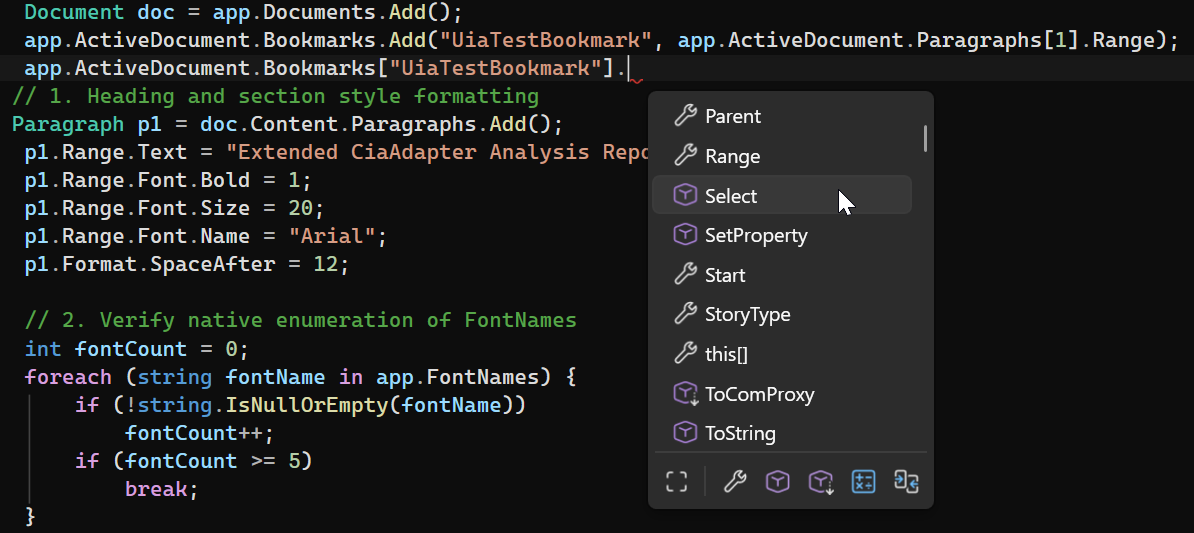
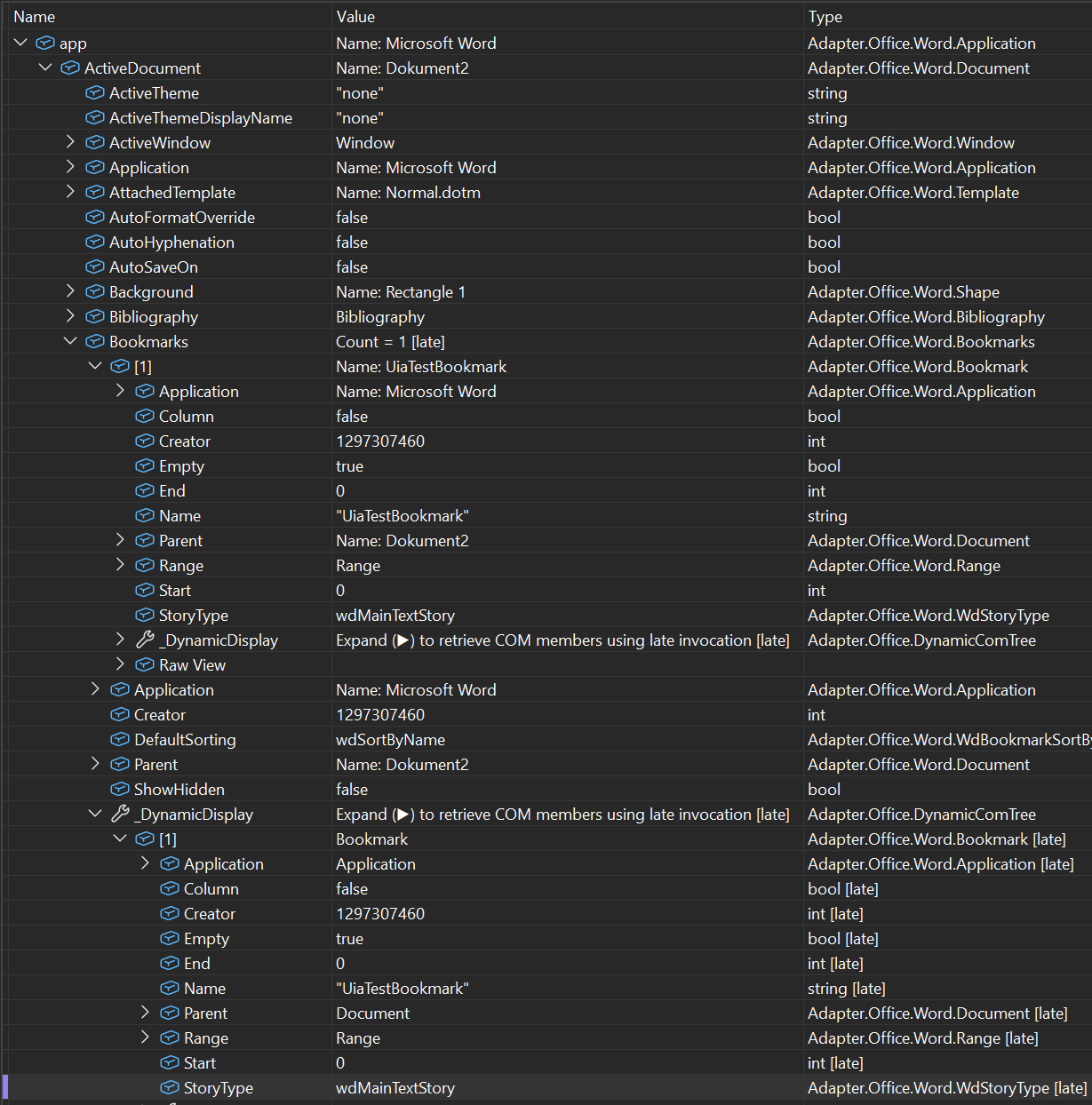
// 3. Automate with full IntelliSense, debugger application tree full view, and Native AOT support
using MSOfficeAdapter.Word;

using var app = Application.Create("Word.Application");
using var doc = app.Documents.Add();
doc.Content.Paragraphs.Add().Range.Text = "Hello from Native AOT!";
Bookmarks bookmarks = doc.Bookmarks;
Bookmark bookmark = bookmarks.Add("UiaTestBookmark", doc.Paragraphs[1].Range);
string bookmarkName = bookmarks["UiaTestBookmark"].Name;
doc.Close(WdSaveOptions.wdDoNotSaveChanges);
app.Quit(WdSaveOptions.wdDoNotSaveChanges);
IntelliSense in UIA
QuickWatch Window in UIA
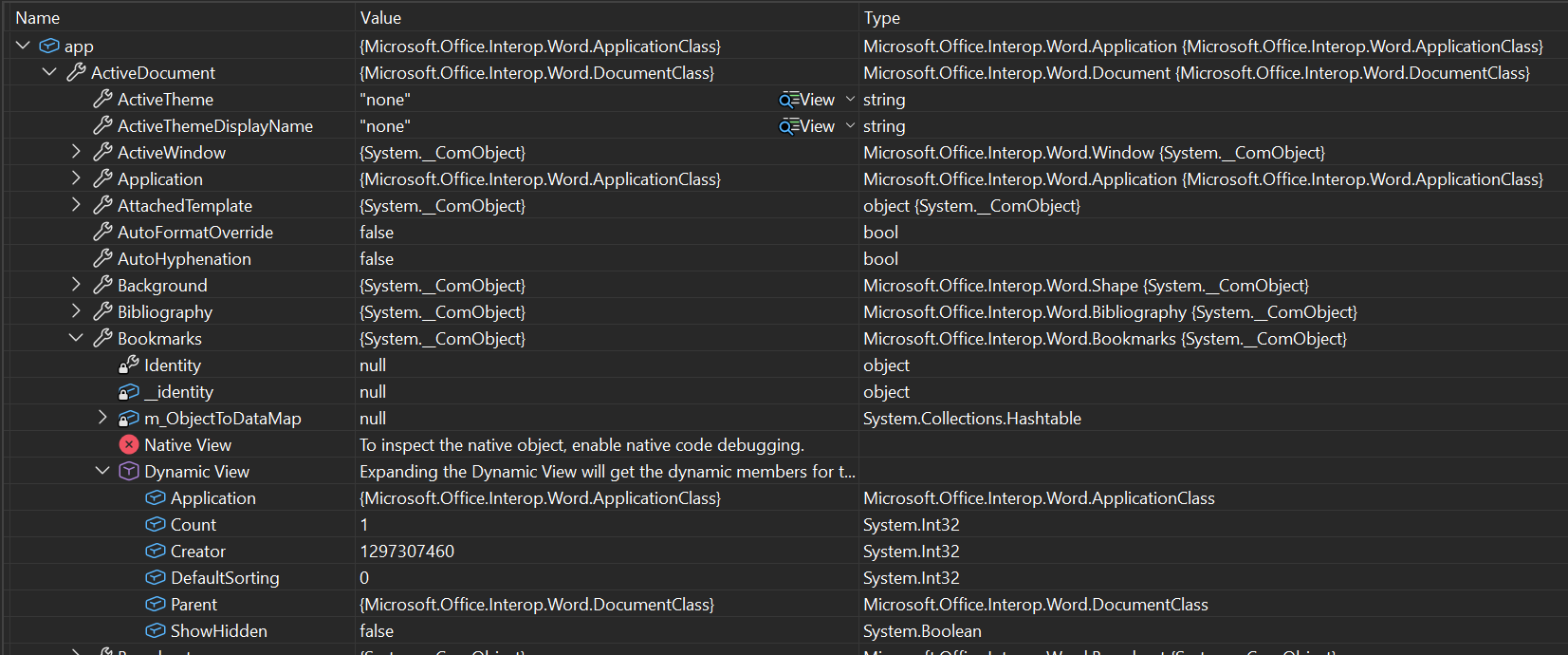
QuickWatch Window in PIA
Size of Adobe UIA Adapter of 41 libraries is 4.73 MB Size of AutoCAD UIA Adapter of 22 libraries is 2.26 MB
Autodesk AutoCAD & CAD Automation
UIAGen resolves multi-resource binaries (acad.exe), split Common Files\Autodesk Shared type libraries (acax*.tlb, axdb*.tlb), and implicit MSForms (FM20.DLL) dependencies automatically:
# List or generate & compile adapters for all installed Autodesk COM libraries
uiagen -all -filter "C:\Program Files\Autodesk,C:\Program Files\Common Files\Autodesk Shared" -list
uiagen -all ./AutodeskUIA -filter "C:\Program Files\Autodesk,C:\Program Files\Common Files\Autodesk Shared" -compile
uiagen -acad ./AutodeskUIA -compile
See the AutoCAD Type Library Dependency Graph Case Study in ARCHITECTURE.md for a full breakdown of the 22 Autodesk COM libraries and their cross-library dependencies.
Deep Dive
- Technical Architecture & CLI Reference: Ready to see how vtable binding,
VARIANTstack marshaling, and debugger proxies work under the hood? Read ARCHITECTURE.md.
License
- Generator (
UIAGen): GNU Lesser General Public License v3. See LICENSE and LICENSE.GPL. - Generated output: The Code Generation Exception permits distribution of the generated output under terms of your choice, subject to the exception's scope. It does not relicense the generator itself.
| Product | Versions Compatible and additional computed target framework versions. |
|---|---|
| .NET | net8.0 is compatible. net8.0-android was computed. net8.0-browser was computed. net8.0-ios was computed. net8.0-maccatalyst was computed. net8.0-macos was computed. net8.0-tvos was computed. net8.0-windows was computed. net9.0 was computed. net9.0-android was computed. net9.0-browser was computed. net9.0-ios was computed. net9.0-maccatalyst was computed. net9.0-macos was computed. net9.0-tvos was computed. net9.0-windows was computed. net10.0 was computed. net10.0-android was computed. net10.0-browser was computed. net10.0-ios was computed. net10.0-maccatalyst was computed. net10.0-macos was computed. net10.0-tvos was computed. net10.0-windows was computed. |
This package has no dependencies.