Umbraco.Community.AdvancedPermissions.AI
17.0.0
dotnet add package Umbraco.Community.AdvancedPermissions.AI --version 17.0.0
NuGet\Install-Package Umbraco.Community.AdvancedPermissions.AI -Version 17.0.0
<PackageReference Include="Umbraco.Community.AdvancedPermissions.AI" Version="17.0.0" />
<PackageVersion Include="Umbraco.Community.AdvancedPermissions.AI" Version="17.0.0" />
<PackageReference Include="Umbraco.Community.AdvancedPermissions.AI" />
paket add Umbraco.Community.AdvancedPermissions.AI --version 17.0.0
#r "nuget: Umbraco.Community.AdvancedPermissions.AI, 17.0.0"
#:package Umbraco.Community.AdvancedPermissions.AI@17.0.0
#addin nuget:?package=Umbraco.Community.AdvancedPermissions.AI&version=17.0.0
#tool nuget:?package=Umbraco.Community.AdvancedPermissions.AI&version=17.0.0

Advanced Permissions for Umbraco — AI Copilot Tools
Let editors ask the Umbraco backoffice copilot who can do what, and why, and get an answer computed by your actual permission setup instead of guessed by the language model.



Who this is for
This is an optional companion to Advanced Permissions for Umbraco. Install it when you use both of these:
- Advanced Permissions for Umbraco, to manage who may do what in your content tree.
- Umbraco AI with its Copilot chat, so there is a copilot in the backoffice for this package to plug into.
If you do not run Umbraco AI, this package has nothing to add. It ships no screens of its own and adds nothing to the Users section. Everything it does happens inside the copilot chat, and it only reads your permission setup. It never changes it.
The problem it solves
Advanced Permissions gives you Allow and Deny entries per user group, each with its own scope, inherited down the content tree, with an override for when a user's groups disagree. That is exactly the control you want, and it also means a simple question like "why can't I publish this page?" stops having a simple answer. Working it out means knowing which groups the person is in, what is set where above the node, how far each of those entries reaches, and whether an override is deciding it.
Today an editor asks an administrator, and the administrator traces it by hand in the Access Viewer. That costs someone else's time for a question the system can already answer.
It gets worse once a copilot is in the backoffice. An editor will simply ask the chat, and the chat will answer from general Umbraco knowledge. That answer is confident, fluent, and wrong, because this package's rules are not Umbraco's built-in rules. A plain Allow does not beat a Deny here. Leaving a permission blank is not the same as denying it. An override is about disagreeing groups, not about parents and children.
This package closes both gaps. It gives the copilot a way to ask your permission engine directly, so editors get a correct answer in plain language without going through an administrator, and the copilot stops inventing one when it does not know.
What you can ask
Once it is set up, editors can ask the copilot things like:
Why is something blocked
- "Why can't I delete this page?"
- "Why can't Jane delete this page?"
- "Why is this editor read-only?"
- "Why can't I create an Article here?"
Who can do what
- "Who can publish here?"
- "What can the Editors group do on this page?"
- "Which document types can I create under News?"
How the permission system works
- "What is a Priority Override?"
- "What happens if I leave a permission unset?"
- "How do I change a permission?"
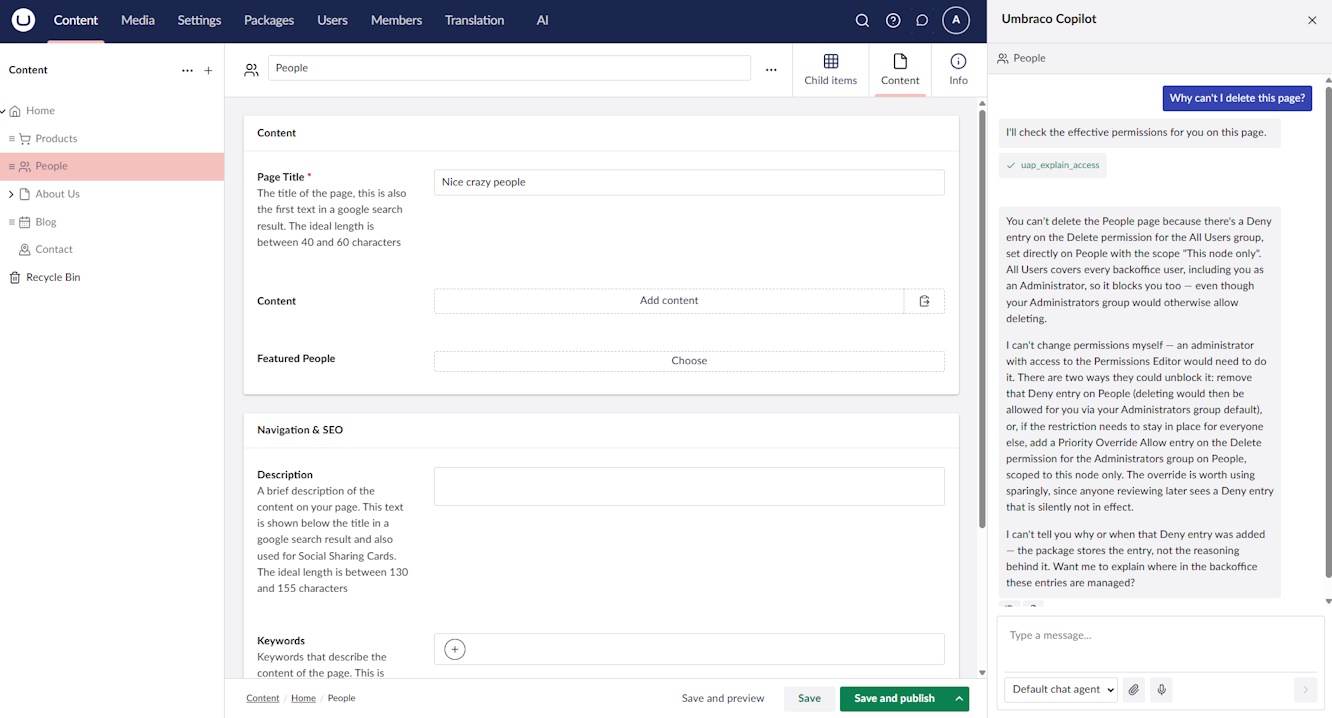
When the answer is no, editors can also ask what would change it. The copilot works out which permission changes would genuinely grant the action, by trying each candidate change against the permission engine and keeping only the ones that actually flip the result. It then describes those changes so an administrator can make them, cheapest and least far-reaching first. It never makes a change itself, and it never offers a fix it has not confirmed.
Every answer comes from your own permission setup, together with the reasoning behind it. The model does not decide anything. It picks the right question to ask, then puts the result into a sentence.
Requirements
- Umbraco CMS 17.4.0 or newer, on .NET 10. This floor comes from Umbraco AI.
- Umbraco AI on the 17 line, installed and configured, with a
working copilot chat. The chat itself comes from the
Umbraco.AI.Agent.Copilotpackage. - Advanced Permissions for Umbraco, which arrives automatically as a dependency.
Installation
dotnet add package Umbraco.Community.AdvancedPermissions.AI
There is no setup code to write. Installing the package is not enough on its own, though: you also have to allow the copilot to use it, which is the next section.
Setting up Umbraco AI
All of this happens in the backoffice AI section. If you already have a working copilot chat, skip to step 5, which is the only step specific to this package.
- Create a connection. Pick your provider (OpenAI, Anthropic, and so on) and give it an API key.
This needs the matching provider package installed, such as
Umbraco.AI.OpenAIorUmbraco.AI.Anthropic. - Create a profile. A profile sets the model to use, along with any guardrails, on top of that connection.
- Set a default chat profile in the AI settings, choosing one of the profiles you created.
- Set up a default chat agent for the copilot. Without one there is no chat for these tools to be called from.
- Allow this package's tools on that agent. Open the chat agent, go to Governance, and under Allowed Tool Scopes tick "Advanced Permissions (read)". All three tools sit under that one scope.
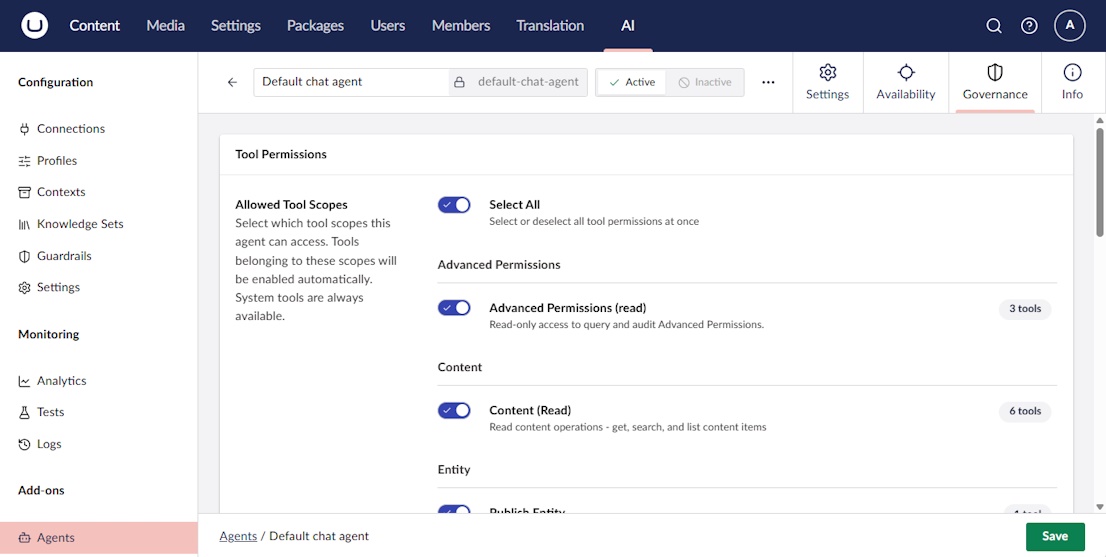
Step 5 is the one people miss. The tools are discovered automatically, so they appear in the list as soon as you install the package, but until the agent is allowed to call them the copilot will keep answering permission questions from its own general knowledge. Because it sits under a single scope, that same tick is also how you take the tools away again, and Umbraco AI's per-user-group governance applies to it like any other scope.
To confirm it works, open a content node, start a copilot chat and ask "who can publish here?". The answer should name your real user groups.
The tools
Three tools are registered, all under the advanced-permissions:read scope. The copilot picks between
them; you never call them yourself.
uap_explain_access
Answers what the effective permission is at a content node, and why. A subject argument chooses whose
access to evaluate: the current user, a specific user, a single user group (including "All Users"), or
every user group at once. An aspect argument chooses which dimension: node for action permissions
such as edit, delete and publish, or type-create for the Insert Options question of which document
types may be created under a node. For type-create the nodeKey is the parent node. Supply a
contentTypeKey to focus one document type, or leave it out for the full roster. Document types that
Umbraco's own allowed-child-types configuration rules out come back as "Not applicable", kept separate
from a permission Deny.
Set suggestFix=true to get the confirmed fixes described above. The package builds a small,
case-specific set of candidate changes, simulates each one against its own pure resolver, and returns
only those that actually flip the verdict to allowed, ranked least-privileged first: remove the Deny
entry, add an Allow on the node, add an Allow on an ancestor, add a priority-override Allow. This exists
because a language model left to itself will claim a plain Allow entry can beat a Deny entry on the same
node. It cannot, and the simulation throws that suggestion away. Re-resolution runs directly against the
pure resolver on an in-memory copy of the entries, never the cached service, and uses the same set of
user groups the original verdict used. suggestFix applies to the node aspect, to the current-user, user
and user-group subjects, and only when a single permission is in focus.
uap_audit_permissions
Scans stored permission entries against four checks: All Users allowed a write permission across the
whole site from the root, an Allow entry and a Deny entry for the same permission on the same node, a
user group able to manage permissions across a node and its descendants, and Priority Override entries. A
scope argument audits one user group (the default), everything under a node, or the whole
configuration, with an optional minimum-severity filter.
Those four checks are the entire rule set, so a clean result means those four found nothing rather than that the configuration is correct in general. The whole-configuration scope is best-effort: it sweeps every live document node plus the root-level defaults, so entries left behind on deleted or trashed nodes are not included. It covers node permission entries only. Auditing the document-type Insert Options entries is planned.
uap_explain_concepts
Takes no arguments and reads nothing. It returns the conceptual reference: how permissions are stored, how competing entries are resolved, what each scope reaches, what Priority Override actually is, how Insert Options differ, and where to change a permission in the backoffice. It exists because the copilot answered these questions confidently and wrongly when left to its own knowledge. The wording comes from the base package's own help documentation, so the copilot explains the model exactly as the in-product help does.
Security
- Nothing here writes data. The fix suggestions depend only on the pure resolver, a single read from the repository, and a local copy of the entry list. No save or delete path is ever called, and a simulated change is never persisted.
- No privilege escalation by design. Answers come from the same resolver the backoffice itself uses, so the model cannot invent or grant a permission. It can only report what your engine computes, and a suggested fix names only user groups and nodes already present in the reasoning.
- Everything sits under the
advanced-permissions:readscope, so Umbraco AI's per-user-group governance can allow or deny it like any other tool.
Contributing
Issues and pull requests are welcome. See CONTRIBUTING.md.
Feedback
Found a bug or have a feature request? Please open an issue on GitHub.
License
Licensed under the MIT License.
| Product | Versions Compatible and additional computed target framework versions. |
|---|---|
| .NET | net10.0 is compatible. net10.0-android was computed. net10.0-browser was computed. net10.0-ios was computed. net10.0-maccatalyst was computed. net10.0-macos was computed. net10.0-tvos was computed. net10.0-windows was computed. |
-
net10.0
- Umbraco.AI.Core (>= 17.0.0 && < 18.0.0)
- Umbraco.Community.AdvancedPermissions (>= 17.2.0 && < 18.0.0)
NuGet packages
This package is not used by any NuGet packages.
GitHub repositories
This package is not used by any popular GitHub repositories.
| Version | Downloads | Last Updated |
|---|---|---|
| 17.0.0 | 98 | 8/20/2026 |
| 17.0.0-beta.1 | 67 | 8/10/2026 |