VL.Audio
1.9.17
dotnet add package VL.Audio --version 1.9.17
NuGet\Install-Package VL.Audio -Version 1.9.17
<PackageReference Include="VL.Audio" Version="1.9.17" />
<PackageVersion Include="VL.Audio" Version="1.9.17" />
<PackageReference Include="VL.Audio" />
paket add VL.Audio --version 1.9.17
#r "nuget: VL.Audio, 1.9.17"
#:package VL.Audio@1.9.17
#addin nuget:?package=VL.Audio&version=1.9.17
#tool nuget:?package=VL.Audio&version=1.9.17
VL.Audio
Record, play, filter, synthesize and analyse sound.
For use with vvvv, the visual live-programming environment for .NET: https://vvvv.org
Getting started
- Ships with vvvv
- Usage examples and more information are included in the pack and can be found via the Help Browser
Audio driver selection and configuration
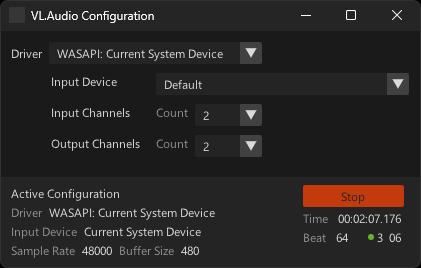
As soon as VL.Audio is referenced in a document, the Settings UI is available via Quad -> Extensions -> VL.Audio.Configuration or <span class="keyseq"><kbd>Alt</kbd><kbd>C</kbd></span>. Here you can choose between the system default WASAPI driver or any installed ASIO driver and configure its inputs and outputs. Changing the sample rate for the WASAPI driver is only possible via the Windows Sound Settings!
You can also offer this UI in exported applications, see "HowTo Use ConfigurationUI in your patch".
As an alternative to a UI based driver selection have a look at the DriverSettings [Audio] node.
ASIO driver options
In case you want to use an ASIO driver with your soundcard that doesn't come with dedicated ASIO drivers, here are some options:
- FlexASIO and FlexASIO GUI
- ASIO4All
- FL Studio ASIO as included with the free download of FL Studio
Related useful tools
- Dante Via Versatile Audio Networking
- Virtual Audio Cable
Contributing
- Report issues on the vvvv forum
- For custom development requests, please get in touch
- When making a pull-request, please make sure to read the general guidelines on contributing to vvvv libraries
Credits
Based on NAudio.
| Product | Versions Compatible and additional computed target framework versions. |
|---|---|
| .NET | net8.0-windows7.0 is compatible. net9.0-windows was computed. net10.0-windows was computed. |
NuGet packages (7)
Showing the top 5 NuGet packages that depend on VL.Audio:
| Package | Downloads |
|---|---|
|
VL.Audio.UI
Extension pack for VL.Audio that brings in UI's for driver configuration and more |
|
|
VL.HapPlayer
Hap GPU video playback implementation for VL/Stride |
|
|
VL.Wekinator
A set of nodes to easily interact with The Wekinator in VL |
|
|
VL.Audio.GPL
GPL licensed extensions for VL.Audio |
|
|
VL.Meta.Gamma
Meta package referencing all the libraries shipped with vvvv gamma |
GitHub repositories
This package is not used by any popular GitHub repositories.
| Version | Downloads | Last Updated |
|---|---|---|
| 1.9.17 | 377 | 11/25/2025 |
| 1.9.16 | 280 | 10/17/2025 |
| 1.9.15 | 308 | 9/24/2025 |
| 1.9.14 | 581 | 5/6/2025 |
| 1.9.13 | 451 | 4/28/2025 |
| 1.9.12 | 361 | 4/11/2025 |
| 1.9.11 | 334 | 4/11/2025 |
| 1.9.10 | 313 | 4/11/2025 |
| 1.9.9 | 454 | 2/17/2025 |
| 1.9.8 | 330 | 2/17/2025 |
| 1.9.7 | 374 | 1/30/2025 |
| 1.9.6 | 330 | 1/23/2025 |
| 1.9.5 | 312 | 1/21/2025 |
| 1.9.4 | 287 | 1/20/2025 |
| 1.9.3 | 705 | 12/9/2024 |
| 1.9.2 | 405 | 11/8/2024 |
| 1.9.1 | 347 | 11/5/2024 |
| 1.9.0 | 323 | 11/4/2024 |
| 1.8.4 | 514 | 8/19/2024 |
| 1.8.3 | 306 | 8/5/2024 |