WinTrace.Appium
0.8.1
dotnet add package WinTrace.Appium --version 0.8.1
NuGet\Install-Package WinTrace.Appium -Version 0.8.1
<PackageReference Include="WinTrace.Appium" Version="0.8.1" />
<PackageVersion Include="WinTrace.Appium" Version="0.8.1" />
<PackageReference Include="WinTrace.Appium" />
paket add WinTrace.Appium --version 0.8.1
#r "nuget: WinTrace.Appium, 0.8.1"
#:package WinTrace.Appium@0.8.1
#addin nuget:?package=WinTrace.Appium&version=0.8.1
#tool nuget:?package=WinTrace.Appium&version=0.8.1
WinTrace



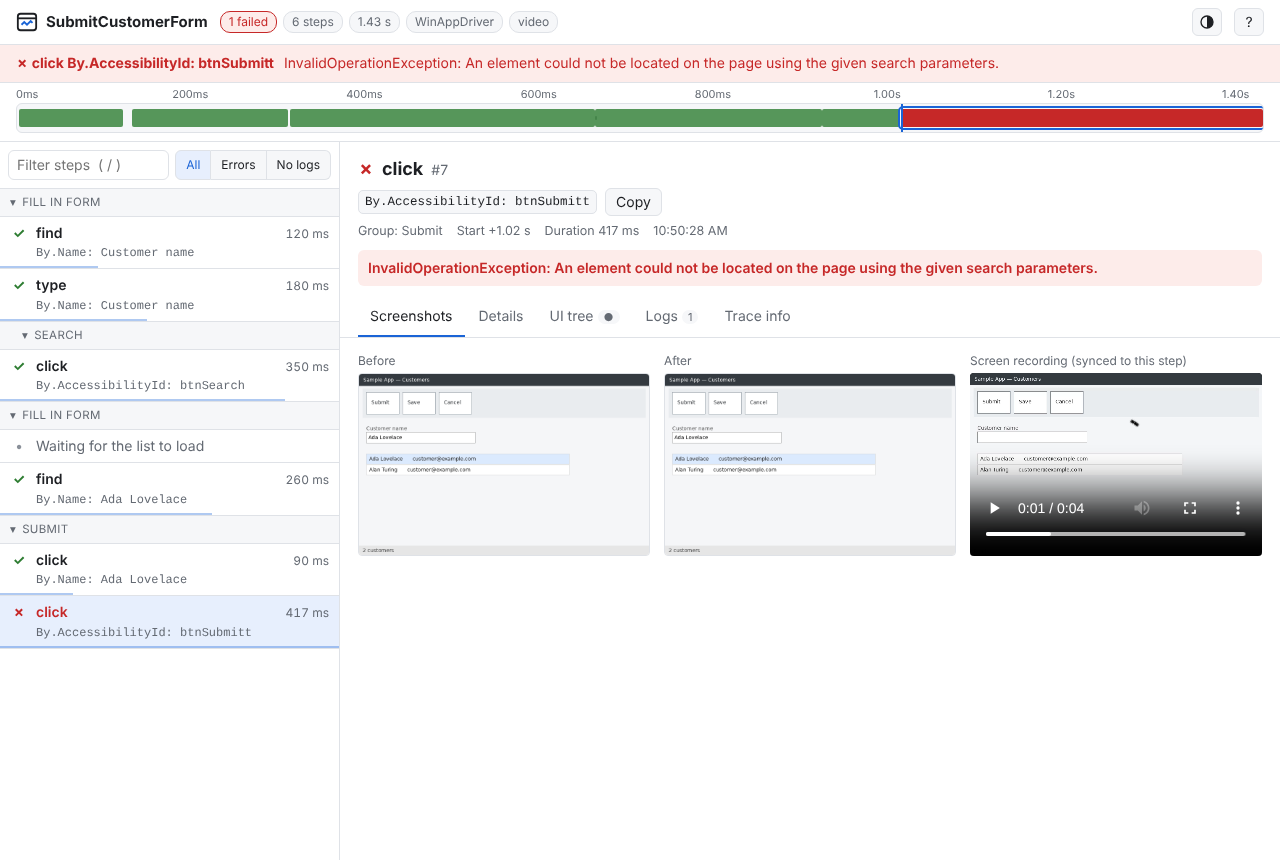
Playwright-style traces for Windows desktop UI tests. When a test fails, open one HTML file and see every step: screenshots before and after, timings, the error and stack trace, the UI Automation tree at the moment of failure, and an optional screen recording synced to the steps.
Works with WinAppDriver and NovaWindowsDriver (any Appium/Selenium Windows driver), and with any test framework: MSTest, NUnit, xUnit.
Why
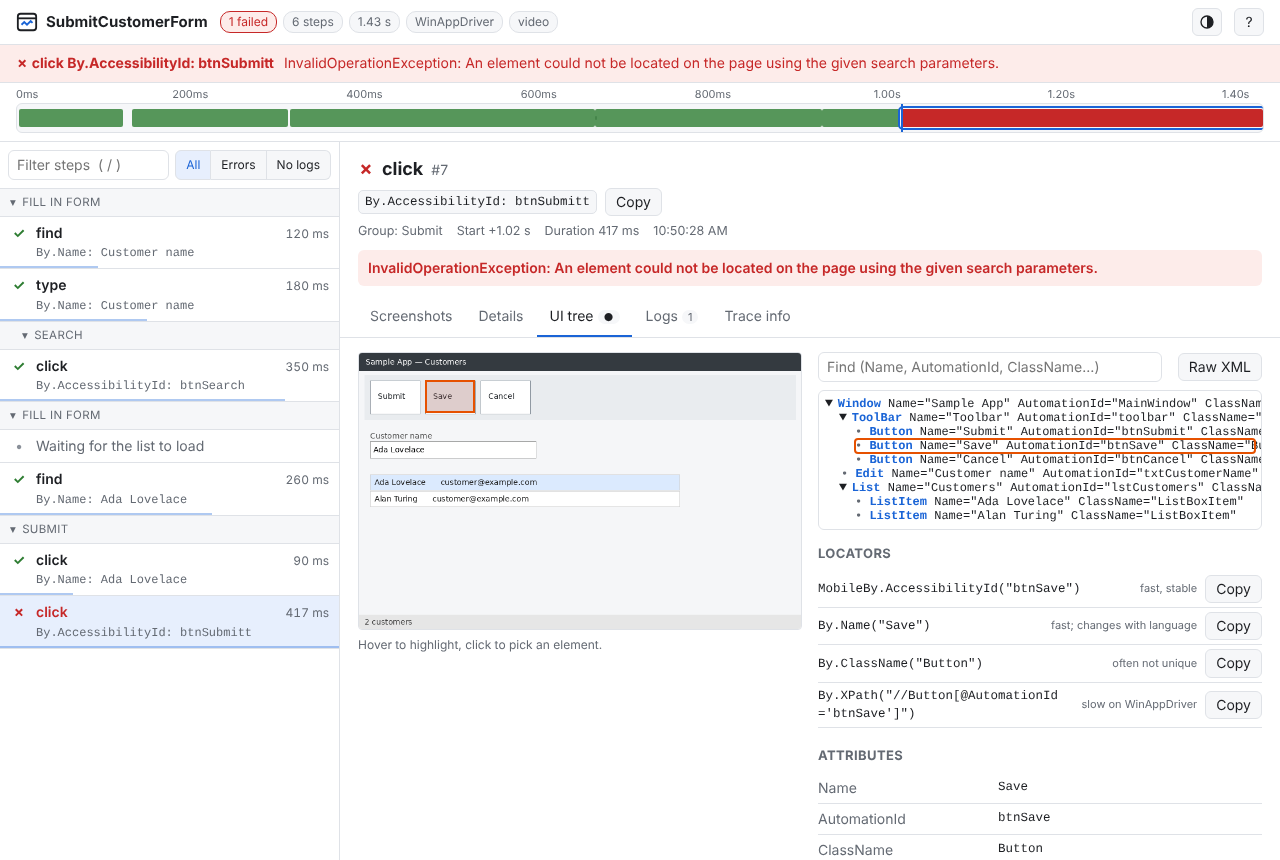
Desktop UI tests fail with messages like "An element could not be located". Finding out why means re-running the test and watching it. WinTrace records what happened, so the trace shows which step failed, what the screen looked like and what the UI tree actually contained. A typo in a locator stands out at once:
Install
dotnet add package WinTrace.Appium        # adapter for WinAppDriver / NovaWindowsDriver (brings WinTrace.Core)
dotnet tool install -g WinTrace.Cli       # optional: wintrace show / summary
Five-minute setup (MSTest)
using WinTrace;
using WinTrace.Appium;

[TestClass]
public class CustomerFormTests
{
    public TestContext TestContext { get; set; } = null!;
    TraceSession _trace = null!;

    [TestInitialize]
    public void Init() =>
        _trace = new TraceSession(TestContext.TestName!, new AppiumTraceSource(() => Driver));

    [TestMethod]
    public void SubmitCustomer()
    {
        var rec = _trace.Recorder;
        using (rec.Group("Fill in form"))
        {
            rec.SendKeys(rec.Find(Driver, By.Name("Customer name")), "Ada Lovelace");
            rec.Click(rec.Find(Driver, MobileBy.AccessibilityId("btnSave")));
        }
        rec.Step("submit form", "toolbar/Submit", () => page.Submit());   // any code can be a step
    }

    // Saved only when the test fails, and attached to the .trx so CI publishes it with the results.
    [TestCleanup]
    public void Done() =>
        _trace.Finish(TestContext.CurrentTestOutcome != UnitTestOutcome.Passed, TestContext.AddResultFile);
}
A failing run writes TestResults/WinTrace/<test>_<time>_failed.zip and a .html next to it. Open the
HTML in any browser.
After the run
wintrace report <folder> --history <archive> --trx <TestResults> summarizes a whole run: failures grouped by cause,
each marked new, recurring or intermittent against earlier runs, TRX totals, environment warnings. Inside
Azure Pipelines it goes straight to the run's Summary tab. See
Run report.
Web + desktop in one trace
Tests that use Playwright for a web app and WinAppDriver for a desktop app can merge the Playwright trace into the
WinTrace one: one timeline with web and desktop steps, browser console errors and failed requests, and the original
Playwright trace kept whole to open in Playwright's viewer (DOM snapshots, network, console).
_trace.Recorder.ImportPlaywrightTrace(path) in the test, or wintrace merge afterwards.
See Combining with Playwright.
Using an AI coding agent?
WinTrace is built to be added and used by coding agents (Claude Code, Copilot, Cursor, Codex...). Ask yours:
Add WinTrace to this test project. Follow https://raw.githubusercontent.com/TugaInVegas/WinTrace/main/docs/ai-agents.md
What agents get:
- A Markdown report and the failure screenshot next to every failed trace: read them, no tool needed.
wintrace list TestResults --failedandwintrace inspect TestResults: failed tests after a run and the newest failure in detail (similar elements with suggested locators, stack trace,--tree,--extract,--json).wintrace snapshot --window "<title>" --find <text>: the live UI tree of the running app with a locator per element, to write new tests with real locators instead of guesses;--verify accessibilityid=<id>measures a locator (how many matches, native vs XPath lookup time).wintrace tailfor a live view of a running test, andwintrace recoverfor a trace of a test that crashed or was stopped.- Per-step diagnostics (app not responding, app CPU, screen unchanged) and the app's popups in the UI tree, to tell a wrong locator from a busy app.
- Claude Code skills (integrations) for
debugging a failed UI test and writing a new one, and an
llms.txt(also inside each package).
Documentation
| Guide | What it covers |
|---|---|
| AI agents | Recipe for coding agents to integrate WinTrace, and to debug failures from traces |
| Getting started | MSTest, NUnit and xUnit setup; page objects; publishing traces from Azure DevOps and GitHub Actions |
| Using the viewer | Timeline, tabs, UI tree picker, keyboard shortcuts, sharing links |
| Configuration | TraceOptions, TraceSession, video, privacy and performance tuning |
| Run report | Summarize a run: failures by cause, new / recurring / intermittent, comparison with the last passing run, Azure DevOps summary |
| Combining with Playwright | Merge Playwright traces into WinTrace traces, keep the originals for Playwright's viewer |
| Writing an adapter | Support another tool (e.g. FlaUI) in two methods |
| API stability | What will not change before 1.0, and how versions are numbered |
| Trace format | What is inside trace.zip, for tools that read it |
| Troubleshooting | Slow snapshots, missing screenshots, video out of sync, highlight offset |
Packages
| Package | Purpose |
|---|---|
WinTrace.Core |
Recorder, TraceSession, trace format, HTML viewer, ffmpeg recorder. netstandard2.0, no UI-automation dependency. |
WinTrace.Appium |
AppiumTraceSource and traced Find, FindAll, Click, SendKeys, Clear. |
WinTrace.Cli |
wintrace list, summary, inspect, show, report, merge, tail, recover for traces, and snapshot for the live UI tree (console or --json, for CI and AI agents). |
Contributing
Issues and pull requests are welcome; see CONTRIBUTING.md and the changelog.
License: Apache-2.0
| Product | Versions Compatible and additional computed target framework versions. |
|---|---|
| .NET | net8.0 is compatible. net8.0-android was computed. net8.0-browser was computed. net8.0-ios was computed. net8.0-maccatalyst was computed. net8.0-macos was computed. net8.0-tvos was computed. net8.0-windows was computed. net9.0 was computed. net9.0-android was computed. net9.0-browser was computed. net9.0-ios was computed. net9.0-maccatalyst was computed. net9.0-macos was computed. net9.0-tvos was computed. net9.0-windows was computed. net10.0 was computed. net10.0-android was computed. net10.0-browser was computed. net10.0-ios was computed. net10.0-maccatalyst was computed. net10.0-macos was computed. net10.0-tvos was computed. net10.0-windows was computed. |
-
net8.0
- Appium.WebDriver (>= 4.4.5)
- System.Drawing.Common (>= 8.0.33)
- WinTrace.Core (>= 0.8.1)
NuGet packages
This package is not used by any NuGet packages.
GitHub repositories
This package is not used by any popular GitHub repositories.