WinUI.AvalonDock
0.1.0-alpha
dotnet add package WinUI.AvalonDock --version 0.1.0-alpha
NuGet\Install-Package WinUI.AvalonDock -Version 0.1.0-alpha
<PackageReference Include="WinUI.AvalonDock" Version="0.1.0-alpha" />
<PackageVersion Include="WinUI.AvalonDock" Version="0.1.0-alpha" />
<PackageReference Include="WinUI.AvalonDock" />
paket add WinUI.AvalonDock --version 0.1.0-alpha
#r "nuget: WinUI.AvalonDock, 0.1.0-alpha"
#:package WinUI.AvalonDock@0.1.0-alpha
#addin nuget:?package=WinUI.AvalonDock&version=0.1.0-alpha&prerelease
#tool nuget:?package=WinUI.AvalonDock&version=0.1.0-alpha&prerelease
WinUI.AvalonDock

WinUI.AvalonDock is an unofficial WinUI 3 port of AvalonDock for Windows desktop applications. It provides document tabs and dockable tool panes for IDEs, editors, and other applications with customizable workspaces.
AI leads the development and ongoing maintenance of this project, including feature implementation, bug fixes, refactoring, and documentation.
Features
- Classic document and tool docking with
DockingManager. - Six-zone tool layouts with
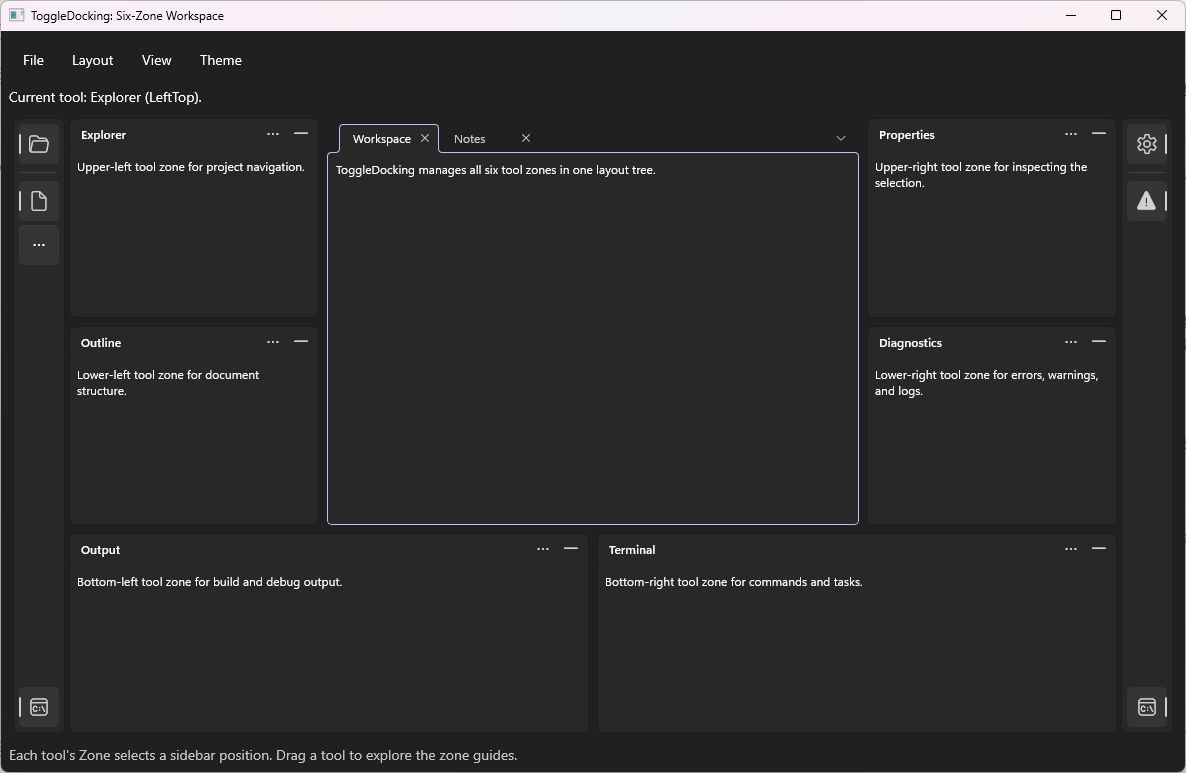
ToggleDockingManager: upper and lower areas on each side, plus left and right areas along the bottom. - Drag-and-drop docking, floating windows, independent tool windows, and resizable panes.
- Auto-hide and tool visibility controls.
- Light and dark themes, custom styles, and content templates.
- Collection binding and integration with AvalonDock's MVVM models and layout service.
- XML layout saving and loading through AvalonDock's serialization package.
Requirements
- Windows 10 build 19041 or later.
- .NET 10 and a WinUI 3 desktop application using the Windows App SDK.
The library targets net10.0-windows10.0.19041.0.
Installation
dotnet add package WinUI.AvalonDock --prerelease
Quick start
Add a DockingManager to your WinUI window or page. The AvalonDock namespace contains the controls, and AvalonDock.Layout contains the layout models:
<dock:DockingManager x:Name="Manager"
                     xmlns:dock="using:AvalonDock"
                     xmlns:layout="using:AvalonDock.Layout">
    <layout:LayoutRoot>
        <layout:LayoutPanel Orientation="Horizontal">
            <layout:LayoutAnchorablePane DockWidth="240">
                <layout:LayoutAnchorable Title="Explorer" ContentId="explorer"
                                         Content="Tool content" />
            </layout:LayoutAnchorablePane>
            <layout:LayoutDocumentPane>
                <layout:LayoutDocument Title="Document" ContentId="document"
                                       Content="Document content" />
            </layout:LayoutDocumentPane>
        </layout:LayoutPanel>
    </layout:LayoutRoot>
</dock:DockingManager>
For a collection-based workspace, bind documents and tools through DocumentsSource and AnchorablesSource. For a six-zone workspace, use ToggleDockingManager and set each tool model's initial placement through IToolbox.Zone.
MVVM and layout serialization
Add the upstream packages for the integrations your application uses:
dotnet add package Dirkster.AvalonDock.Mvvm --version 5.0.0
dotnet add package Dirkster.AvalonDock.Serializer.Xml --version 5.0.0
The MVVM integration uses DockLayout with AvalonDock's models and DockLayoutService. XML layouts use XmlLayoutSerializer; assign a stable, unique ContentId to each document and tool. The serializer reuses existing content with matching identifiers, and LayoutSerializationCallback supplies content that needs to be created or retrieved.
See the sample applications for complete workspace setup and integration examples.
Samples
| Application | Demonstrates |
|---|---|
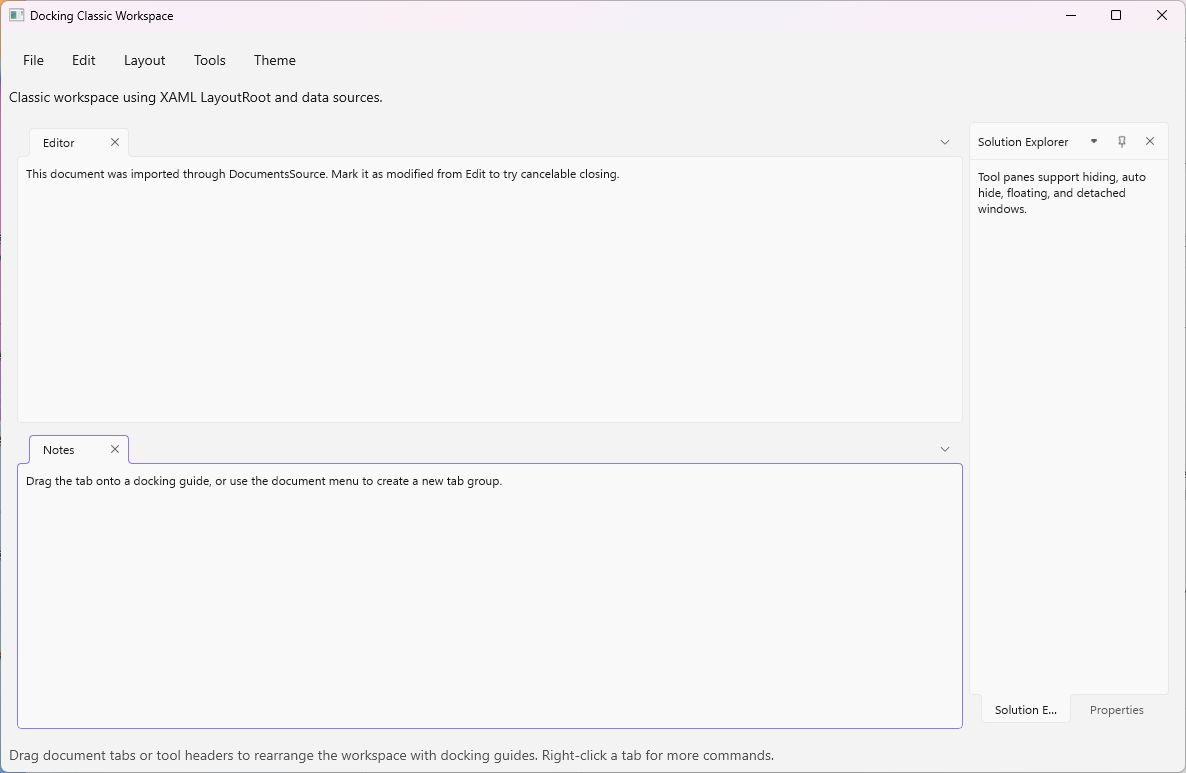
| Docking | Classic document and tool docking, collection binding, auto-hide, floating windows, themes, and XML layout saving and loading. |
| ToggleDocking | Six-zone tools, zone movement, independent windows, layout priorities, and themes. |
| Mvvm | View models, commands, document and tool collections, active-item binding, and XML layout saving and loading. |
Build and run instructions are available in the samples README.
Screenshots
Classic workspace in the light theme, with horizontal document groups and docked tool panes.
Toggle workspace in the dark theme, with six tool zones surrounding the document area.
Feedback
Report bugs and request features through GitHub Issues. For a bug report, include your package version, Windows version, and a minimal example or steps to reproduce the issue.
License
WinUI.AvalonDock is distributed under the Microsoft Public License (Ms-PL). The project builds on AvalonDock.
| Product | Versions Compatible and additional computed target framework versions. |
|---|---|
| .NET | net10.0-windows10.0.19041 is compatible. |
-
net10.0-windows10.0.19041
- Dirkster.AvalonDock.Core (>= 5.0.0)
- Microsoft.WindowsAppSDK (>= 2.5.1)
NuGet packages
This package is not used by any NuGet packages.
GitHub repositories
This package is not used by any popular GitHub repositories.
| Version | Downloads | Last Updated |
|---|---|---|
| 0.1.0-alpha | 36 | 10/1/2026 |