WpfxCustomControls.ClockControl
0.1.0-alpha.2
See the version list below for details.
dotnet add package WpfxCustomControls.ClockControl --version 0.1.0-alpha.2
NuGet\Install-Package WpfxCustomControls.ClockControl -Version 0.1.0-alpha.2
<PackageReference Include="WpfxCustomControls.ClockControl" Version="0.1.0-alpha.2" />
<PackageVersion Include="WpfxCustomControls.ClockControl" Version="0.1.0-alpha.2" />
<PackageReference Include="WpfxCustomControls.ClockControl" />
paket add WpfxCustomControls.ClockControl --version 0.1.0-alpha.2
#r "nuget: WpfxCustomControls.ClockControl, 0.1.0-alpha.2"
#:package WpfxCustomControls.ClockControl@0.1.0-alpha.2
#addin nuget:?package=WpfxCustomControls.ClockControl&version=0.1.0-alpha.2&prerelease
#tool nuget:?package=WpfxCustomControls.ClockControl&version=0.1.0-alpha.2&prerelease
Lookless clock custom control
WPF custom control built entirely in C# with WPFX.
ClockControl
Lookless clock custom control.
- A single DependencyProperty / CLR property:
Timestamp(DateTime) - A RoutedEvent / CLR event:
TimestampChanged - Static getter
DefaultStyle, used when customizing the default values viaStyleXwith thebasedOnparameter (also works in XAML)
ControlTemplate
The default template visual tree contains a single TextBlock that displays the template-bound Timestamp value as a date/time string.
How to use
The control can be used in its default state. However, the ControlTemplate can be fully customised to suit your own applications.
The demo app provides two example templates:
- A 7-segment LED clock
- A weekday clock
Customising the ControlTemplate
- Provide a user-defined visual tree,
ControlTemplate, andStyle - Bind elements in the visual tree to the
Timestampproperty usingRelativeSourceMode.TemplatedParent - Use associated
Converterobjects to transformTimestampinto the target dependency property, e.g.TextProperty,FillProperty,VisibilityPropertyetc.
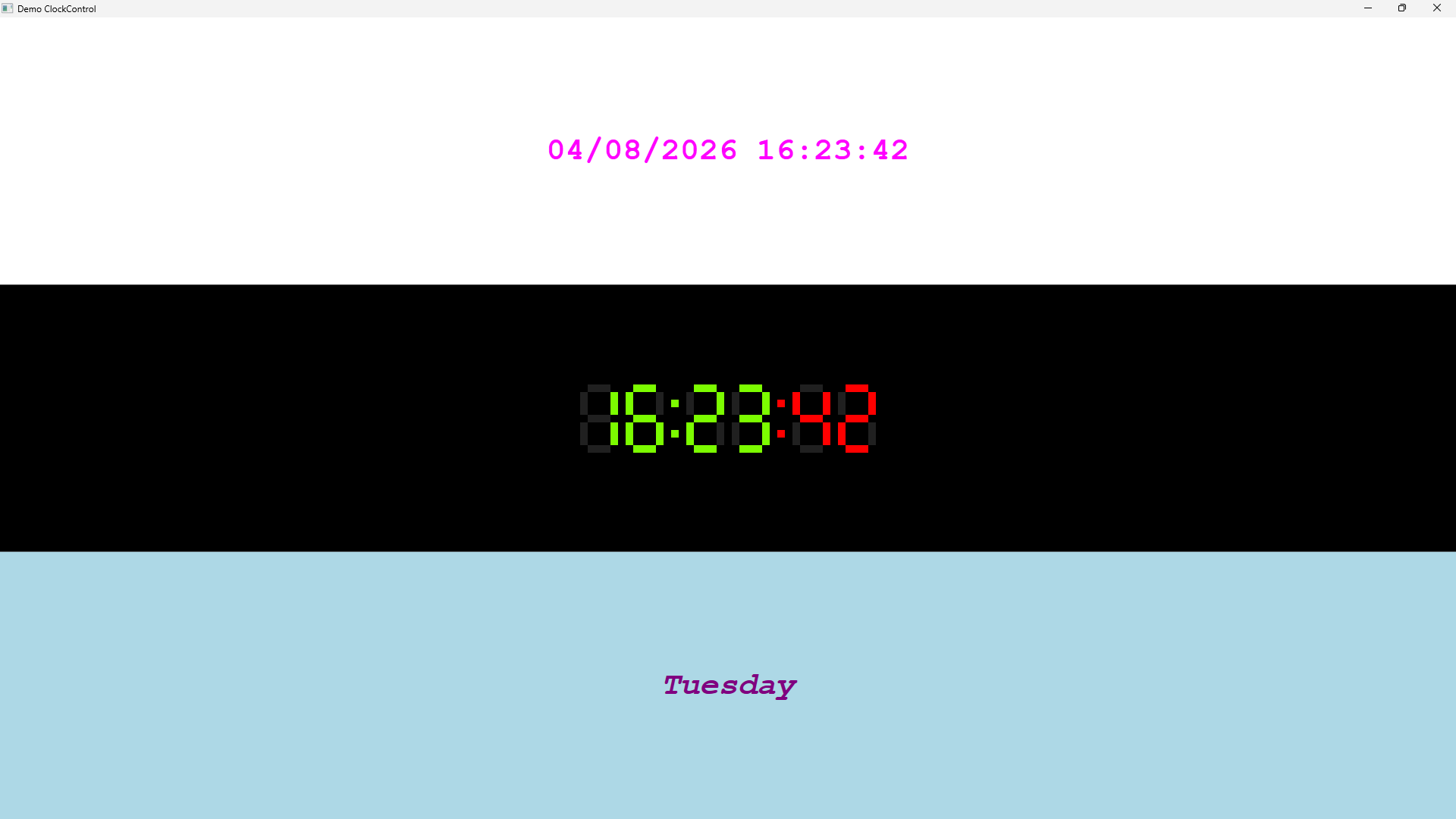
Example demo app
The demo app uses the NuGet package UserExtensions.Wpfx to create and display a WPF Window containing three ClockControl instances, each using a different ControlTemplate:
- Row 0: Built-in default template rendering
Timestampas"dd/MM/yyyy HH:mm:ss" - Row 1: A 7-segment LED template and style built programmatically (
LedClockStyle/LedClockFillConverter) - Row 2: A template that formats the Timetamp to display the weekday (
WeekdayClockStyle/WeekdayConverter)
| Product | Versions Compatible and additional computed target framework versions. |
|---|---|
| .NET | net10.0-windows7.0 is compatible. |
-
net10.0-windows7.0
- UserExtensions.Wpfx (>= 0.1.0-alpha.10)
NuGet packages
This package is not used by any NuGet packages.
GitHub repositories
This package is not used by any popular GitHub repositories.
| Version | Downloads | Last Updated |
|---|---|---|
| 0.1.0-alpha.3 | 57 | 9/19/2026 |
| 0.1.0-alpha.2 | 76 | 8/26/2026 |
| 0.1.0-alpha.1 | 72 | 8/23/2026 |