XperienceCommunity.ProjectSettings
1.0.0
dotnet add package XperienceCommunity.ProjectSettings --version 1.0.0
NuGet\Install-Package XperienceCommunity.ProjectSettings -Version 1.0.0
<PackageReference Include="XperienceCommunity.ProjectSettings" Version="1.0.0" />
<PackageVersion Include="XperienceCommunity.ProjectSettings" Version="1.0.0" />
<PackageReference Include="XperienceCommunity.ProjectSettings" />
paket add XperienceCommunity.ProjectSettings --version 1.0.0
#r "nuget: XperienceCommunity.ProjectSettings, 1.0.0"
#:package XperienceCommunity.ProjectSettings@1.0.0
#addin nuget:?package=XperienceCommunity.ProjectSettings&version=1.0.0
#tool nuget:?package=XperienceCommunity.ProjectSettings&version=1.0.0
Xperience Community: Project Settings
A comprehensive settings management system for Xperience by Kentico applications, supporting both global settings and/or channel-specific settings with automatic fallback.
⚠️ Internal API Warning: This library depends on
Kentico.Xperience.Admin.Base.Forms.Internal. This namespace is not part of Kentico's public API surface and may change between Xperience by Kentico versions without notice. Upgrading to a newer version of Xperience by Kentico may temporarily break this library until a compatible update is released.
Description
This module provides strongly-typed project settings that can be:
- Global - Application-wide settings (stored with
channelId = 0) - Channel-specific - Per website channel settings with automatic fallback to global
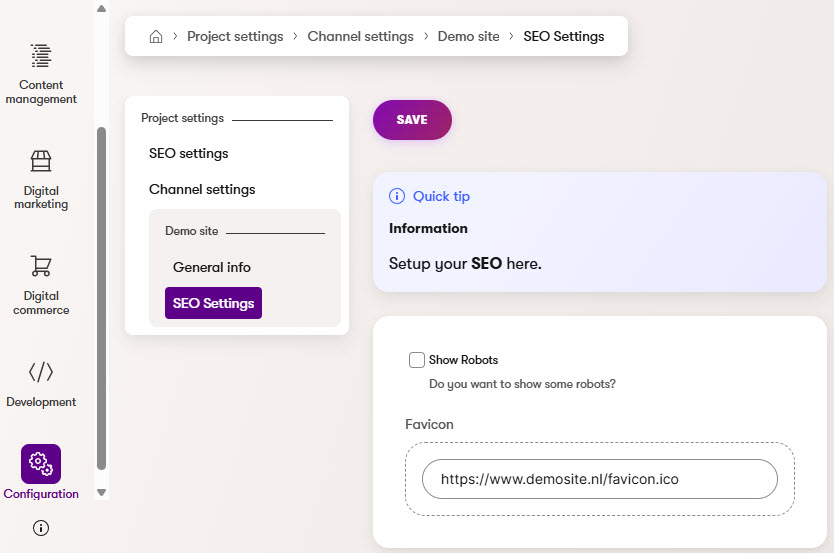
Settings are managed through the Kentico admin interface and retrieved programmatically using ASP.NET Core's IOptions<T> pattern.
Key Concept: Whether settings are global or channel-specific is determined by which admin UI page you create. The same settings class can be used for both contexts.
Requirements
Library Version Matrix
| Xperience Version | Library Version |
|---|---|
| >= 31.3.0 | 1.0.0 |
Dependencies
Package Installation
Add the package to your application using the .NET CLI
dotnet add package XperienceCommunity.ProjectSettings
Quick Start
1. Define Your Settings Class
Create a class that implements IProjectSettingsType:
using XperienceCommunity.ProjectSettings.Classes;
using Kentico.Xperience.Admin.Base.FormAnnotations;

namespace MyProject.Settings;

public class SeoSettings : IProjectSettingsType
{
    public string SettingsSlug => "seo-settings";
    public string SettingsName => "Seo.Settings";
    public string SettingsDisplayName => "SEO Settings";
    public string SettingsExplanation => "Configure SEO settings for your website.";

    [TextInputComponent(Label = "Meta Title Suffix", Order = 1)]
    public virtual string MetaTitleSuffix { get; set; } = "";

    [CheckBoxComponent(Label = "Enable Open Graph", Order = 2)]
    public virtual bool EnableOpenGraph { get; set; } = true;
}
2. Register in Program.cs
using XperienceCommunity.ProjectSettings;

builder.Services.AddProjectSettings<SeoSettings>();
3. Create Admin UI Pages
See the Usage Guide for detailed instructions on creating global and channel settings admin pages.
4. Use Settings in Your Code
using Microsoft.Extensions.Options;

public class SeoService(IOptions<SeoSettings> settings)
{
    public string GetPageTitle(string baseTitle)
        => $"{baseTitle} {settings.Value.MetaTitleSuffix}";
}
Full Instructions
View the Usage Guide for complete documentation including:
- Creating global and channel settings admin pages
- Settings resolution and fallback behavior
- Using both global and channel settings together
- Direct service access for multi-channel scenarios
- Available form components
- Key types reference
- Troubleshooting
Contributing
Feel free to submit issues or pull requests to the repository, this is a community package and everyone is welcome to support.
License
Distributed under the MIT License. See LICENSE.md for more information.
| Product | Versions Compatible and additional computed target framework versions. |
|---|---|
| .NET | net8.0 is compatible. net8.0-android was computed. net8.0-browser was computed. net8.0-ios was computed. net8.0-maccatalyst was computed. net8.0-macos was computed. net8.0-tvos was computed. net8.0-windows was computed. net9.0 was computed. net9.0-android was computed. net9.0-browser was computed. net9.0-ios was computed. net9.0-maccatalyst was computed. net9.0-macos was computed. net9.0-tvos was computed. net9.0-windows was computed. net10.0 was computed. net10.0-android was computed. net10.0-browser was computed. net10.0-ios was computed. net10.0-maccatalyst was computed. net10.0-macos was computed. net10.0-tvos was computed. net10.0-windows was computed. |
-
net8.0
- Kentico.Xperience.Admin (>= 31.3.0)
NuGet packages
This package is not used by any NuGet packages.
GitHub repositories
This package is not used by any popular GitHub repositories.
| Version | Downloads | Last Updated |
|---|---|---|
| 1.0.0 | 84 | 3/25/2026 |
| 1.0.0-alpha.1 | 36 | 3/24/2026 |