sBurger256 2.0.4
dotnet add package sBurger256 --version 2.0.4
NuGet\Install-Package sBurger256 -Version 2.0.4
<PackageReference Include="sBurger256" Version="2.0.4" />
<PackageVersion Include="sBurger256" Version="2.0.4" />
<PackageReference Include="sBurger256" />
paket add sBurger256 --version 2.0.4
#r "nuget: sBurger256, 2.0.4"
#:package sBurger256@2.0.4
#addin nuget:?package=sBurger256&version=2.0.4
#tool nuget:?package=sBurger256&version=2.0.4
🔐 sBurger-256
A custom symmetric block cipher for .NET with a 256-bit key and substitution-permutation network.


📋 Table of Contents
- 📖 About
- ✨ Features
- 🚀 Getting Started
- 💡 Usage
- 📚 API Reference
- 🧪 Running Tests
- 🏗️ Project Structure
- 🤝 Contributing
- 📄 License
📖 About
sBurger-256 is a custom symmetric encryption algorithm built as a .NET class library. It uses a 256-bit key and a substitution-permutation network to encrypt and decrypt data in blocks of up to 32 bytes.
The cipher derives internal transformation parameters from the key, then applies a sequence of XOR, bit-rotation, and bit-inversion operations to each byte of the data block.
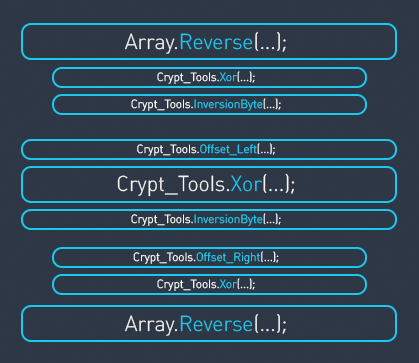
⚠️ Note: This is an author's experimental cipher created for educational purposes. It has not been formally audited. Do not use it for protecting sensitive data in production.
✨ Features
| Characteristic | Value |
|---|---|
| Created | 2020 |
| Key size | 256 bits (32 bytes) |
| Block size | 8 .. 256 bits (1 .. 32 bytes) |
| Rounds | 1 round per byte |
| Type | Substitution-permutation network |
| Capability | Description |
|---|---|
Encryption |
Encrypts a data block (1–32 bytes) in place |
Decryption |
Decrypts a data block (1–32 bytes) in place |
GenerationSettings |
Derives internal cipher parameters from the key |
Input validation |
Guards against null, wrong-length keys, and out-of-range data blocks |
🚀 Getting Started
📌 Prerequisites
- Using the NuGet package: .NET 8 or later
- Building this repository: .NET 10 SDK or later
- Repository language version: C# 14
📦 Installation
NuGet Package Manager
dotnet add package sBurger256
Or via the Package Manager Console in Visual Studio:
Install-Package sBurger256
Or add directly to your .csproj:
<PackageReference Include="sBurger256" Version="2.0.4" />
💡 Usage
using System.Security.Cryptography;
using System.Text;

// 1. Create a 256-bit key (e.g. from a passphrase via SHA-256).
byte[] key = SHA256.HashData(Encoding.UTF8.GetBytes("your passphrase"));

// 2. Initialize the cipher. The key constructor generates settings automatically.
using var cipher = new sBurger256.sBurger256(key);

// 3. Encrypt a 32-byte block.
byte[] data = Encoding.UTF8.GetBytes("Hello, sBurger-256 cipher test!!");  // 32 bytes
cipher.Encryption(data);
Console.WriteLine($"Ciphertext: {Convert.ToHexString(data)}");

// 4. Decrypt back.
cipher.Decryption(data);
Console.WriteLine($"Plaintext:  {Encoding.UTF8.GetString(data)}");
👉 See the full working demo in examples/sBurger256.Example/Program.cs.
📚 API Reference
🔨 Constructors
public sBurger256()
Creates a new cipher instance. Set the Key property and call GenerationSettings() before encrypting or decrypting.
public sBurger256(byte[] key)
Creates a new cipher instance with a non-zero 32-byte key and generates settings immediately.
🏷️ Properties
| Property | Type | Description |
|---|---|---|
Key |
byte[] |
The 256-bit (32-byte) encryption key. Validated on set; internally copied. All-zero keys are rejected. |
📏 Constants
| Constant | Type | Value | Description |
|---|---|---|---|
KeyLength |
int |
32 |
Required key length in bytes. |
MaxBlockSize |
int |
32 |
Maximum data block size in bytes. |
⚙️ Methods
🔧 GenerationSettings
public void GenerationSettings()
Derives internal cipher parameters from the current key. Must be called once after setting the key and before any encryption or decryption unless using the sBurger256(byte[] key) constructor. Throws InvalidOperationException if the key has not been set, and ObjectDisposedException after disposal.
🔒 Encryption
public byte[] Encryption(byte[] data)
Encrypts the data block in place and returns the same array. Data length must be between 1 and 32 bytes. Throws ArgumentException for invalid length, InvalidOperationException if settings were not generated, and ObjectDisposedException after disposal.
Also throws ArgumentNullException when data is null.
🔓 Decryption
public byte[] Decryption(byte[] data)
Decrypts the data block in place and returns the same array. Data length must be between 1 and 32 bytes. Throws ArgumentException for invalid length, InvalidOperationException if settings were not generated, and ObjectDisposedException after disposal.
Also throws ArgumentNullException when data is null.
🧹 Dispose
public void Dispose()
Zeroes key material and derived settings. Prefer using var or call Dispose() when done. Encryption, decryption, key changes, and settings generation throw ObjectDisposedException after disposal.
🧪 Running Tests
dotnet test
Tests are located in tests/sBurger256.Tests/ and use xUnit. They cover key validation, roundtrip encryption/decryption, deterministic known-answer vectors, boundary conditions, and wrong-key scenarios.
🏗️ Project Structure
sBurger-256/
├── 📁 src/
│   ├── 📄 sBurger256.cs              # Library source
│   └── 📄 sBurger256.csproj
├── 📁 tests/
│   └── 📁 sBurger256.Tests/          # xUnit tests
│       ├── 📄 sBurger256Tests.cs
│       └── 📄 sBurger256.Tests.csproj
├── 📁 examples/
│   └── 📁 sBurger256.Example/        # Console demo app
│       ├── 📄 Program.cs
│       └── 📄 sBurger256.Example.csproj
├── 📄 Directory.Packages.props        # Central package management
├── 📄 sBurger256.slnx                 # Solution file
└── 📄 README.md
🤝 Contributing
Contributions are welcome! To get started:
- 🍴 Fork the repository
- 🌿 Create a feature branch (
git checkout -b feature/my-feature) - ✏️ Make your changes and add tests
- ✅ Run
dotnet testto verify everything passes - 📬 Open a Pull Request
📄 License
This project is licensed under the MIT License.
| Product | Versions Compatible and additional computed target framework versions. |
|---|---|
| .NET | net8.0 is compatible. net8.0-android was computed. net8.0-browser was computed. net8.0-ios was computed. net8.0-maccatalyst was computed. net8.0-macos was computed. net8.0-tvos was computed. net8.0-windows was computed. net9.0 was computed. net9.0-android was computed. net9.0-browser was computed. net9.0-ios was computed. net9.0-maccatalyst was computed. net9.0-macos was computed. net9.0-tvos was computed. net9.0-windows was computed. net10.0 is compatible. net10.0-android was computed. net10.0-browser was computed. net10.0-ios was computed. net10.0-maccatalyst was computed. net10.0-macos was computed. net10.0-tvos was computed. net10.0-windows was computed. |
-
net10.0
- No dependencies.
-
net8.0
- No dependencies.
NuGet packages
This package is not used by any NuGet packages.
GitHub repositories
This package is not used by any popular GitHub repositories.