CodeExplorer.Cli
1.3.4
dotnet tool install --global CodeExplorer.Cli --version 1.3.4
dotnet new tool-manifest
dotnet tool install --local CodeExplorer.Cli --version 1.3.4
#tool dotnet:?package=CodeExplorer.Cli&version=1.3.4
nuke :add-package CodeExplorer.Cli --version 1.3.4
CodeExplorer (ce) 🔍


CodeExplorer (ce) is a fast, single-file CLI and Model Context Protocol (MCP) server for deep codebase intelligence. It transforms polyglot repositories into a rich, queryable knowledge graph stored in an embedded SQLite graph database (with native Cypher query compilation) — with zero external dependencies, no Docker containers, and no complex configuration.
With ce, both developers and AI agents (Claude, Cursor, Copilot, ChatGPT, Antigravity) can perform architectural discovery, trace cross-service dependency topologies, analyze refactoring blast radiuses, and run Cypher graph queries directly from their terminal or editor.
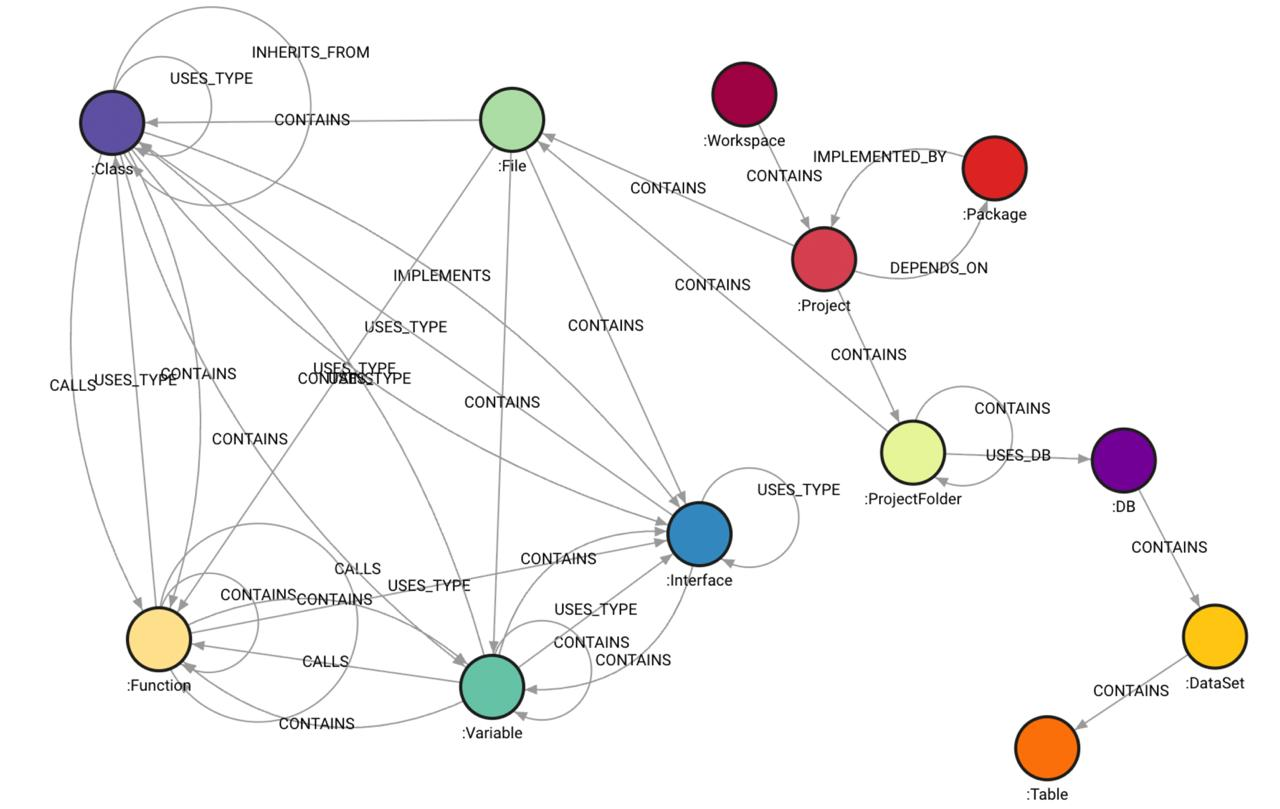
🔍 CodeExplorer vs. Classic LSP (Language Server Protocol)
They serve fundamentally different purposes:
- Classic LSP is designed for active human interaction in text editors (real-time autocompletions, diagnostics, and active inline linting as you type).
- CodeExplorer is a global codebase knowledge graph designed for structural reasoning, architectural mapping, and multi-hop relationship queries by AI agents and LLMs.
While classic LSPs are optimized for local, real-time editing experiences, CodeExplorer is architected for AI-native code reasoning and cross-project indexing:
| Dimension | Classic LSP (e.g., gopls, Pyright) |
CodeExplorer (Embedded SQLite + MCP) |
|---|---|---|
| Primary Consumer | Humans (real-time IDE autocompletion/linting). | AI Agents / LLMs (autonomous workspace exploration). |
| Storage Strategy | Stateful, in-memory AST caches per editor session. | Embedded Graph Database (SQLite, zero external dependencies). |
| Polyglot Scope | Single-language boundary per server instance. | Unified Cross-Language Graph (bridges C#, Java, Go, Python, TS, and SQL). |
| Querying | Fixed RPC methods (goto definition, find references). |
Arbitrary Cypher Queries (unlimited multi-hop semantic traversal). |
| Update Loop | Instantaneous, keystroke-by-keystroke. | Fast index scan via ce scan (CLI, CI, or agent task). |
🧠 Core Architectural Differences
Language-Agnostic Knowledge Graph vs. Compiler Isolated ASTs
- Classic LSP: Operates strictly within compile-time boundaries. A C# compiler knows C#, and a database server knows SQL, but they cannot talk to one another.
- CodeExplorer: Normalizes ASTs from multiple languages (via Tree-sitter and SQL ScriptDom) into a single, unified taxonomy inside a graph database. This lets you trace connections from a React frontend HTTP post to an Express route, to a database connection write.
Querying Capabilities
- Classic LSP: Provides predefined features (Find References, Rename, Signature Help).
- CodeExplorer: Enables graph traversal algorithms. You can write Cypher queries to detect cyclic dependencies, find unreachable code paths, count coupling metrics between folders, and extract semantic context.
LLM-Native Optimization
- Classic LSP: Emits details focused on IDE presentation (ranges, lines, hovers).
- CodeExplorer: Emits structured JSON representing architectural layout (e.g., Taxonomy, entry points, dependencies) designed to fit directly into the context window of LLM reasoning engines.
🚀 Key Features
- Zero-Dependency Single-File Executable: Distributed as a self-contained binary (
ce.exe/ce) for Windows, Linux, and macOS. No .NET runtime or SDK installation required. - Local
.codeexplorerWorkspace Auto-Discovery: Initialized once per repository or mono-repo withce init. Automatically discovered by walking up the directory tree — run commands from any subfolder without specifying paths. - Embedded SQLite Graph with Cypher: Uses a high-performance embedded SQLite database compiled with custom graph indices and an optimized AST-to-SQL Cypher compiler.
- Multi-Language AST Parsing: Full AST-level parsing powered by Tree-sitter and Microsoft SQL ScriptDom:
- C# (
.cs) - Java (
.java, Mavenpom.xml, Gradlebuild.gradle/build.gradle.kts) - TypeScript (
.ts,.tsx) - JavaScript (
.js,.jsx) - Go (
.go) - Python (
.py) - SQL & Embedded SQL (
.sqlscripts, and inline SQL queries in C#, Java, JS, TS, Python, Go)
- C# (
- Rich Structural Ontology: Maps codebases across a 5-layer decoupled graph architecture (see Ontology Model and Live Schema Reference):
- Physical Layer (Layer 1): Workspace, projects (
.csproj,pom.xml,build.gradle,go.mod,package.json), folders, files, configuration files (appsettings.json,application.properties/.yml,docker-compose.yml,.env), and git topology. - Project Layer (Layer 2): Logical compilation units, project boundaries, and package dependencies.
- Syntactic Layer (Layer 3): Classes, interfaces, methods, functions, structs, fields, and calls.
- Semantic Layer (Layer 4): Ingress endpoints (REST, gRPC, GraphQL, WebSocket) with security boundaries (
roles,policies,is_anonymous), Egress callers, Code-First ORM entities (EF Core, JPA, TypeORM) mapped to:Tablenodes, and message queues. - Late-Bound Layer (Layer 5): Cross-project call chains, interface implementations, service-to-service links, and CQRS / Event pipelines (MediatR, Spring Events, NestJS CQRS).
- Physical Layer (Layer 1): Workspace, projects (
- Built-in & Custom Query Catalog:
- 22 Built-in Queries: Architecture maps, entry points, dependencies, CQRS pipelines, refactoring (dead code, god objects), symbol lookup, and graph taxonomy.
- Extensible Domain Queries: Save custom queries in
.codeexplorer/queries/*.cypherwith companion.jsonmetadata sidecars, automatically available to CLI and AI agents.
- Automated Diagram Generation (Mermaid & C4): Export high-level architecture maps, container diagrams, ORM data lineage, and event pipelines with
ce exportor through MCP. - Model Context Protocol (MCP) Server:
- stdio mode (default): Seamless integration with Cursor, Claude Desktop, VS Code, Windsurf, and Antigravity.
- HTTP mode (
--port <p>): Exposes standard MCP endpoint at/mcpwith SSE streaming.
🏛️ Architecture: Two-Pass Semantic Pipeline
CodeExplorer uses a decoupled two-pass pipeline to ingest and analyze codebases safely, isolating AST parsing from database mapping and resolution.
graph TD
    A[Source File] -->|Parse AST| B[Tree-sitter Root Node]
    B -->|Pass 1: AST Visitors| C[In-Memory SyntacticSymbol Tree]
    C -->|Pass 2: Map to Ontology| D[FileNode, ClassNode, FunctionNode...]
    D -->|Post-Index Analyzer| E[Embedded SQLite Graph]
    E -->|Late Binding Resolution| F[Semantic Graph with CALLS & IMPLEMENTS]
1. Pass 1: Pure Syntactic AST Visitors
AST parsing is performed in isolation. Language-specific visitor classes (e.g., CSharpFileVisitor, TypeScriptFileVisitor) inherit from BaseParserVisitor.
- In-Memory Isolation: Visitors have no access to database classes, file system IO, or ontology nodes. They process the syntax tree entirely in memory.
- Node Extensions: Employs safety-first helper extension methods (via
NodeExtensions) to query Tree-sitter nodes safely, handle nullable nodes, extract named field text, and resolve function targets cleanly. - Syntactic Symbol Output: Visitors output a pure in-memory
SyntacticSymboltree describing the hierarchical structure of declarations and references found in the AST.
2. Pass 2: Ontology Mapping & Resolution
Once the syntactic structure is captured:
- Ontology Mapping: The parser maps
SyntacticSymboltrees into concrete database ontology models (FileNode,ClassNode,EntryPointNode,QueryNode, etc.). - Late-Bound Resolution: A post-index analysis pass executes Cypher queries to link cross-file, late-bound dependencies (e.g., connecting a frontend HTTP call to its backend controller endpoint, or resolving interface implementations).
🛠️ Tech Stack & Requirements
- Runtime: .NET 10.0 SDK
- Database: Embedded SQLite (zero external services or containers required)
- AST Parser: Tree-Sitter & Microsoft T-SQL ScriptDom
- Deployment: Standalone executable / .NET tool
📦 Quick Installation
CodeExplorer (ce) is distributed as a zero-dependency, single-file self-contained binary with embedded Tree-sitter parsers and SQLite engine. No .NET runtime or SDK installation is required.
⚡ One-Line Install (Recommended)
macOS & Linux (Bash / Zsh):
curl -fsSL https://raw.githubusercontent.com/vmikhailov/code-explorer/main/scripts/install.sh | bash
Windows (PowerShell as Administrator or User):
irm https://raw.githubusercontent.com/vmikhailov/code-explorer/main/scripts/install.ps1 | iex
📦 .NET Global Tool
If you have .NET SDK installed:
# Install globally
dotnet tool install -g CodeExplorer.Cli

# Update to latest version
dotnet tool update -g CodeExplorer.Cli
🍺 Homebrew (macOS & Linux)
brew tap vmikhailov/tap
brew install ce
📥 Manual Download
Download the pre-compiled binary for your platform from GitHub Releases:
| Platform | Architecture | Binary Asset |
|---|---|---|
| macOS | Apple Silicon (M1/M2/M3/M4) | ce-osx-arm64.tar.gz |
| macOS | Intel x64 | ce-osx-x64.tar.gz |
| Linux | x86_64 | ce-linux-x64.tar.gz |
| Linux | ARM64 | ce-linux-arm64.tar.gz |
| Windows | x86_64 | ce-win-x64.zip |
🛠️ Build from Source
If you have .NET 10.0 SDK installed:
# 1. Build and run all unit tests
./scripts/build.sh

# 2. Publish single-file binary for your current machine
./scripts/publish.sh

# Or publish for all supported platforms
./scripts/publish.sh all
Targets produced in .Build/bin/:
- Windows x64:
.Build/bin/win-x64/ce.exe - Linux x64 / ARM64:
.Build/bin/linux-x64/ce,.Build/bin/linux-arm64/ce - macOS (ARM64 / x64):
.Build/bin/osx-arm64/ce,.Build/bin/osx-x64/ce
Add ce (or ce.exe) to your system PATH to use it from anywhere.
🏁 Quick Start Workflow
Run ce in your terminal to see the interactive status and workspace overview:
# 1. Initialize a .codeexplorer workspace in your repository root
ce init MyProject

# 2. Scan and index code topology, AST, dependencies, and semantic graph
ce scan

# 3. View workspace health, indexed projects, node kinds, and statistics
ce status

# 4. List all built-in and workspace-custom Cypher queries
ce queries

# 5. Execute a query by name or run ad-hoc Cypher
ce query -n get_architecture_map_workspace
ce query "MATCH (p:Project) RETURN p.name, p.project_type"

# 6. Start the MCP server for AI coding assistants
ce mcp
💻 CLI Command Reference
ce init [name]
Initializes a .codeexplorer/ workspace directory in the target folder with an empty SQLite graph database and queries catalog.
ce init
ce init MyProject -d /path/to/repo
ce scan [path] (alias: ce index)
Scans source files, parses ASTs (Tree-sitter & ScriptDom), builds structural relationships, and resolves semantic boundaries.
ce scan                     # Index entire workspace
ce scan ./src/AuthService   # Index a specific project subfolder
ce scan -c                  # Clear previous data for path before re-indexing
ce status (alias: ce info)
Displays workspace statistics, database size, indexed projects by language, node counts, and available queries.
ce status
ce status --json            # Output structured JSON for automation
ce queries (alias: ce query -l)
Displays all available Cypher queries grouped into categories ([Architecture], [Refactoring], [Symbols], [Taxonomy]) along with any custom workspace queries from .codeexplorer/queries/.
ce queries
ce queries --format json
ce query [options]
Executes a read-only Cypher query against the knowledge graph with formatted tabular or JSON output.
# Execute named built-in or custom query
ce query -n get_architecture_map_workspace -j      # View full structured JSON tree
ce query -n get_project_dependencies_all

# Inspect Cypher source code of any query
ce query --show get_architecture_map_workspace

# Execute raw Cypher string with formatted JSON output
ce query "MATCH (t:Type {kind: 'interface'}) RETURN t.name" -j

# Execute table view without column truncation
ce query "MATCH (p:Project)-[:DEPENDS_ON]->(d) RETURN p.name, d.name" --no-truncate

# Execute query from file
ce query -f ./custom_audit.cypher
ce mcp [options]
Starts the Model Context Protocol (MCP) server exposing CodeExplorer graph tools directly to AI assistants.
ce mcp                      # stdio mode (default for Cursor, Claude, Antigravity)
ce mcp --port 8085          # HTTP mode with SSE endpoint at http://localhost:8085/mcp
ce export [options]
Exports architecture and system topology diagrams directly from the knowledge graph in Mermaid or C4 syntax.
# Export Mermaid system architecture diagram to terminal or file
ce export --format mermaid
ce export -f mermaid -o architecture.mmd

# Export C4 Container diagram
ce export --format c4 -o c4_containers.mmd

# Export ORM Data Lineage diagram (Entities -> Tables)
ce export --type lineage -o data_lineage.mmd

# Export CQRS & Event Pipeline diagram (Producers -> Topics -> Consumers)
ce export --type cqrs -o event_pipeline.mmd
ce clear [path]
Selectively wipes a subfolder from the index or clears the entire graph database.
ce clear ./src/OldModule    # Remove specific subfolder
ce clear -y                 # Reset entire graph database
🤖 Model Context Protocol (MCP) Setup
Connect ce to your favorite AI development environment:
Cursor
Add to your Cursor MCP settings (~/.cursor/mcp.json or Cursor Settings → MCP):
{
  "mcpServers": {
    "code-explorer": {
      "command": "ce",
      "args": ["mcp"]
    }
  }
}
Claude Desktop
Add to your claude_desktop_config.json:
{
  "mcpServers": {
    "code-explorer": {
      "command": "ce",
      "args": ["mcp"]
    }
  }
}
VS Code (with Roo Code / Continue / Cline)
Configure the tool command as ce with arguments ["mcp"].
Google Antigravity / Gemini CLI
Add to your .gemini/antigravity-ide/mcp/code-explorer or workspace MCP configuration.
🧠 AI Agent Instructions & System Prompts
To enable AI coding agents (Claude, Cursor, Copilot, ChatGPT, Antigravity, Roo Code) to effectively leverage ce, add the following instructions to your project's agent rules file (e.g. .cursorrules, CLAUDE.md, .windsurfrules, or .agents/rules/code-explorer.md):
📋 Copy-Pasteable Agent Prompt / Rules
# Codebase Exploration with CodeExplorer (`ce`)

This repository uses **CodeExplorer (`ce`)** as an embedded SQLite codebase knowledge graph and MCP server.

## When and How to Use CodeExplorer MCP Tools:

1. **Architecture Discovery (Start of Task)**:
   - When asked to explore the repository, understand high-level architecture, or find microservice boundaries, **DO NOT** run blind file searches or scan directory trees.
   - Call `get_architecture_map` or `get_architecture_overview` to obtain a structured breakdown of projects, frameworks, dependencies, ingress endpoints, and egress callers.
   - Call `get_project_entry_points` with `projectName` to discover HTTP controllers, routes, CLI commands, and message listeners.

2. **Symbol & File Inspection (Low-Token Context)**:
   - Instead of reading entire files into context, call `get_file_outline` with `filePath` to inspect declared classes, methods, and line numbers.
   - Use `find_symbol` (with optional `symbolType`: `class`, `interface`, `function`) to pinpoint exact symbol locations and signatures.
   - Use `resolve_call_target` to locate concrete implementations of an interface method.

3. **Refactoring & Blast Radius Analysis**:
   - Before modifying or deleting a symbol, class, or method, call `analyze_code_impact` with `symbolName` to identify all downstream files and callers affected.
   - Before altering database queries or schema models, call `inspect_data_lineage` with `tableName` to trace all queries, ORM entities, and functions accessing that table.
   - Call `find_refactoring_opportunities` with `projectName` to detect unreferenced dead code or high-coupling god objects.

4. **Diagram Generation & Event Tracing**:
   - Call `export_architecture_diagram` with `format: "mermaid"` or `"c4"` and `type: "architecture"` | `"lineage"` | `"cqrs"` to generate visual topology diagrams.

5. **Multi-Hop Graph Queries (Custom Cypher)**:
   - Use `execute_custom_read_cypher` to execute read-only `MATCH` queries for complex questions (e.g. cross-project dependency paths, unreferenced interfaces, or circular references).
   - Use `list_project_queries` to inspect saved workspace domain queries, and `execute_project_query` to run them.
   - Run `get_taxonomy` or `get_node_definition` if you need schema details for any graph node or relationship kind.
🛠️ MCP Tools Reference
When running as an MCP server, ce registers the following tools for AI assistants:
| Tool Name | Parameters | Description |
|---|---|---|
get_taxonomy |
None | Structural taxonomy database schema mapping all active node types and relationship counts. |
get_architecture_map |
projectName (opt) |
Workspace architecture map: projects, dependencies, database nodes, Ingress, and Egress. |
get_project_dependencies |
projectFilter (opt) |
Complete dependency graph between projects, including direct and transitive links. |
get_file_outline |
filePath |
AST outline of a file (classes, interfaces, functions, variables, queries) without reading full text. |
find_symbol |
name, symbolType (opt) |
Search semantic graph for symbols (Class, Interface, Function, Struct) matching a pattern. |
get_call_chain |
startFunction, endFunction, maxDepth |
Trace and return sequential invocation call graph between starting and target function. |
resolve_call_target |
interfaceName, methodName |
Find all concrete classes implementing an interface and point to physical method implementations. |
analyze_code_impact |
symbolName |
Downstream blast-radius analysis tracking all files and symbols affected by modifying a symbol. |
inspect_data_lineage |
tableName |
Trace database entity blast radius: SQL queries, functions, and files referencing a table. |
export_architecture_diagram |
format (opt), type (opt), projectName (opt) |
Generate visual architecture, ORM data lineage, or CQRS/Saga event diagrams in Mermaid or C4 PlantUML. |
get_project_entry_points |
projectName |
Find architectural entry points (REST endpoints, GraphQL Queries/Mutations, gRPC RPCs, event listeners) with strongly-typed request/response payload schemas and security boundaries. |
find_refactoring_opportunities |
projectName, metricType |
Detect dead code, unreferenced symbols, and god objects with high coupling. |
list_project_queries |
None | Discover custom parameterized project queries saved in .codeexplorer/queries/. |
save_project_query |
name, description, cypher, metadata |
Validate syntax/safety and persist reusable domain Cypher query into .codeexplorer/queries/. |
execute_project_query |
name, parameters (opt) |
Execute a workspace custom or built-in query by name with automatic workspace parameter binding. |
execute_custom_read_cypher |
query, parameters (opt) |
Execute arbitrary read-only Cypher (MATCH only) directly against the graph database. |
fetch_code_snippets |
nodesJson |
Fetch source code snippets for a list of node URN contexts (file path, start line, end line). |
get_node_definition |
kind |
Retrieve documentation and schema details for an ontological Node Kind. |
init_workspace |
name (opt), force (opt) |
Initialize a new .codeexplorer workspace in the target folder. |
scan_workspace |
path (opt), clear (opt) |
Scan and index/reindex source files, ASTs, and dependencies into the graph database. |
get_workspace_status |
None | Get workspace health status, SQLite DB size, indexed projects by language, and node counts. |
clear_workspace_index |
path (opt) |
Clear indexed graph data for a specific subpath or the entire workspace database. |
ingest_graph_data |
nodesJson, relationshipsJson (opt) |
Direct batch ingestion of custom/external nodes and relationships into SQLite graph. |
📂 Project Structure
├── docs/                        # Architectural, ontology, and query specifications
├── scripts/                     # Cross-platform single-file publish scripts (publish.cmd, publish.sh, publish.ps1)
├── src/
│   ├── Core/
│   │   └── CodeExplorer.Core/   # Graph database client, ontology definitions, parser pipeline, and MCP tools
│   ├── Cypher/
│   │   └── CodeExplorer.Cypher/ # Cypher query parser, AST transformer, and SQLite SQL compiler
│   ├── Parsers/
│   │   ├── CodeExplorer.Parser.CSharp/       # C# AST Parser (Tree-sitter)
│   │   ├── CodeExplorer.Parser.Go/           # Go AST Parser (Tree-sitter)
│   │   ├── CodeExplorer.Parser.Java/         # Java AST Parser (Tree-sitter)
│   │   ├── CodeExplorer.Parser.Python/       # Python AST Parser (Tree-sitter)
│   │   ├── CodeExplorer.Parser.SQL/          # SQL ScriptDom Parser
│   │   └── CodeExplorer.Parser.TypeScript/   # TypeScript & JavaScript AST Parser (Tree-sitter)
│   ├── Tools/
│   │   └── CodeExplorer.OntologyGen/         # Ontological markdown generation tool
│   └── UI/
│       └── CodeExplorer/        # 'ce' CLI tool and MCP host (stdio & HTTP)
├── tests/
│   ├── CodeExplorer.Cypher.Tests/ # Cypher compiler unit & regression tests
│   └── CodeExplorer.Tests/        # CLI, indexing, integration, and MCP tests
└── CodeExplorer.slnx            # Solution layout file
📄 License
This project is licensed under the MIT License.
| Product | Versions Compatible and additional computed target framework versions. |
|---|---|
| .NET | net10.0 is compatible. net10.0-android was computed. net10.0-browser was computed. net10.0-ios was computed. net10.0-maccatalyst was computed. net10.0-macos was computed. net10.0-tvos was computed. net10.0-windows was computed. |
This package has no dependencies.