CodeExplorer.Cli
1.0.2
See the version list below for details.
dotnet tool install --global CodeExplorer.Cli --version 1.0.2
dotnet new tool-manifest
dotnet tool install --local CodeExplorer.Cli --version 1.0.2
#tool dotnet:?package=CodeExplorer.Cli&version=1.0.2
nuke :add-package CodeExplorer.Cli --version 1.0.2
CodeExplorer (ce) 🔍


CodeExplorer (ce) is a fast, single-file CLI and Model Context Protocol (MCP) server for deep codebase intelligence. It transforms polyglot repositories into a rich, queryable knowledge graph stored in an embedded SQLite graph database (with native Cypher query compilation) — with zero external dependencies, no Docker containers, and no complex configuration.
With ce, both developers and AI agents (Claude, Cursor, Copilot, ChatGPT, Antigravity) can perform architectural discovery, trace cross-service dependency topologies, analyze refactoring blast radiuses, and run Cypher graph queries directly from their terminal or editor.
🔍 CodeExplorer vs. Classic LSP (Language Server Protocol)
They serve fundamentally different purposes:
- Classic LSP is designed for active human interaction in text editors (real-time autocompletions, diagnostics, and active inline linting as you type).
- CodeExplorer is a global codebase knowledge graph designed for structural reasoning, architectural mapping, and multi-hop relationship queries by AI agents and LLMs.
While classic LSPs are optimized for local, real-time editing experiences, CodeExplorer is architected for AI-native code reasoning and cross-project indexing:
| Dimension | Classic LSP (e.g., gopls, Pyright) |
CodeExplorer (Embedded SQLite + MCP) |
|---|---|---|
| Primary Consumer | Humans (real-time IDE autocompletion/linting). | AI Agents / LLMs (autonomous workspace exploration). |
| Storage Strategy | Stateful, in-memory AST caches per editor session. | Embedded Graph Database (SQLite, zero external dependencies). |
| Polyglot Scope | Single-language boundary per server instance. | Unified Cross-Language Graph (bridges C#, Go, Python, TS, and SQL). |
| Querying | Fixed RPC methods (goto definition, find references). |
Arbitrary Cypher Queries (unlimited multi-hop semantic traversal). |
| Update Loop | Instantaneous, keystroke-by-keystroke. | Fast index scan via ce scan (CLI, CI, or agent task). |
🧠 Core Architectural Differences
Language-Agnostic Knowledge Graph vs. Compiler Isolated ASTs
- Classic LSP: Operates strictly within compile-time boundaries. A C# compiler knows C#, and a database server knows SQL, but they cannot talk to one another.
- CodeExplorer: Normalizes ASTs from multiple languages (via Tree-sitter and SQL ScriptDom) into a single, unified taxonomy inside a graph database. This lets you trace connections from a React frontend HTTP post to an Express route, to a database connection write.
Querying Capabilities
- Classic LSP: Provides predefined features (Find References, Rename, Signature Help).
- CodeExplorer: Enables graph traversal algorithms. You can write Cypher queries to detect cyclic dependencies, find unreachable code paths, count coupling metrics between folders, and extract semantic context.
LLM-Native Optimization
- Classic LSP: Emits details focused on IDE presentation (ranges, lines, hovers).
- CodeExplorer: Emits structured JSON representing architectural layout (e.g., Taxonomy, entry points, dependencies) designed to fit directly into the context window of LLM reasoning engines.
🚀 Key Features
- Zero-Dependency Single-File Executable: Distributed as a self-contained binary (
ce.exe/ce) for Windows, Linux, and macOS. No .NET runtime or SDK installation required. - Local
.codeexplorerWorkspace Auto-Discovery: Initialized once per repository or mono-repo withce init. Automatically discovered by walking up the directory tree — run commands from any subfolder without specifying paths. - Embedded SQLite Graph with Cypher: Uses a high-performance embedded SQLite database compiled with custom graph indices and an optimized AST-to-SQL Cypher compiler.
- Multi-Language AST Parsing: Full AST-level parsing powered by Tree-sitter and Microsoft SQL ScriptDom:
- C# (
.cs) - TypeScript (
.ts,.tsx) - JavaScript (
.js,.jsx) - Go (
.go) - Python (
.py) - SQL & Embedded SQL (
.sqlscripts, and inline SQL queries in C#, JS, TS, Python, Go)
- C# (
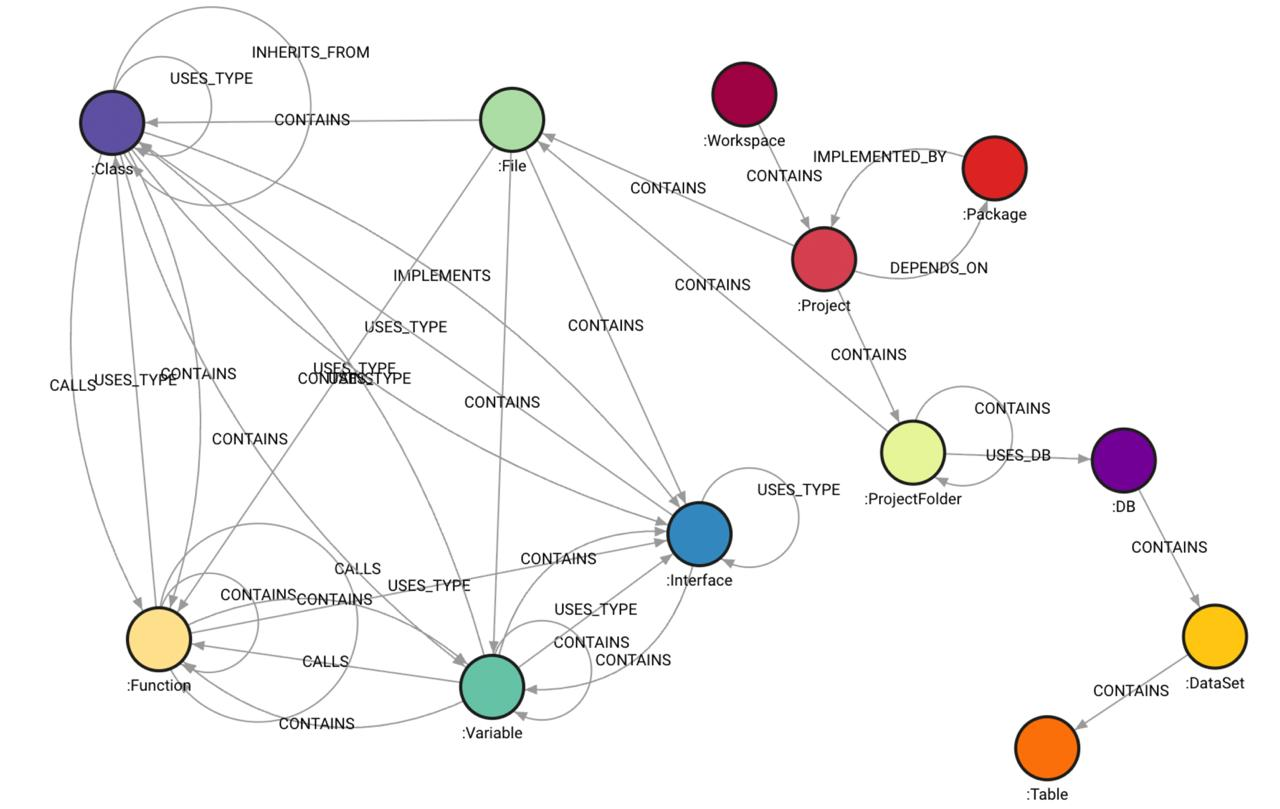
- Rich Structural Ontology: Maps codebases across a 5-layer decoupled graph architecture (see Ontology Model and Live Schema Reference):
- Physical Layer (Layer 1): Workspace, projects (
.csproj,go.mod,package.json), folders, files, and git topology. - Project Layer (Layer 2): Logical compilation units, project boundaries, and package dependencies.
- Syntactic Layer (Layer 3): Classes, interfaces, methods, functions, structs, fields, and calls.
- Semantic Layer (Layer 4): Ingress (API endpoints, controllers, event handlers), Egress (HTTP clients, RPC callers), databases, tables, and message queues.
- Late-Bound Layer (Layer 5): Cross-project call chains, interface implementations, and service-to-service links.
- Physical Layer (Layer 1): Workspace, projects (
- Built-in & Custom Query Catalog:
- 21 Built-in Queries: Architecture maps, entry points, dependencies, refactoring (dead code, god objects), symbol lookup, and graph taxonomy.
- Extensible Domain Queries: Save custom queries in
.codeexplorer/queries/*.cypherwith companion.jsonmetadata sidecars, automatically available to CLI and AI agents.
- Model Context Protocol (MCP) Server:
- stdio mode (default): Seamless integration with Cursor, Claude Desktop, VS Code, Windsurf, and Antigravity.
- HTTP mode (
--port <p>): Exposes standard MCP endpoint at/mcpwith SSE streaming.
🏛️ Architecture: Two-Pass Semantic Pipeline
CodeExplorer uses a decoupled two-pass pipeline to ingest and analyze codebases safely, isolating AST parsing from database mapping and resolution.
graph TD
    A[Source File] -->|Parse AST| B[Tree-sitter Root Node]
    B -->|Pass 1: AST Visitors| C[In-Memory SyntacticSymbol Tree]
    C -->|Pass 2: Map to Ontology| D[FileNode, ClassNode, FunctionNode...]
    D -->|Post-Index Analyzer| E[Embedded SQLite Graph]
    E -->|Late Binding Resolution| F[Semantic Graph with CALLS & IMPLEMENTS]
1. Pass 1: Pure Syntactic AST Visitors
AST parsing is performed in isolation. Language-specific visitor classes (e.g., CSharpFileVisitor, TypeScriptFileVisitor) inherit from BaseParserVisitor.
- In-Memory Isolation: Visitors have no access to database classes, file system IO, or ontology nodes. They process the syntax tree entirely in memory.
- Node Extensions: Employs safety-first helper extension methods (via
NodeExtensions) to query Tree-sitter nodes safely, handle nullable nodes, extract named field text, and resolve function targets cleanly. - Syntactic Symbol Output: Visitors output a pure in-memory
SyntacticSymboltree describing the hierarchical structure of declarations and references found in the AST.
2. Pass 2: Ontology Mapping & Resolution
Once the syntactic structure is captured:
- Ontology Mapping: The parser maps
SyntacticSymboltrees into concrete database ontology models (FileNode,ClassNode,EntryPointNode,QueryNode, etc.). - Late-Bound Resolution: A post-index analysis pass executes Cypher queries to link cross-file, late-bound dependencies (e.g., connecting a frontend HTTP call to its backend controller endpoint, or resolving interface implementations).
🛠️ Tech Stack & Requirements
- Runtime: .NET 10.0 SDK
- Database: Embedded SQLite (zero external services or containers required)
- AST Parser: Tree-Sitter & Microsoft T-SQL ScriptDom
- Deployment: Standalone executable / .NET tool
📦 Quick Installation
CodeExplorer (ce) is distributed as a zero-dependency, single-file self-contained binary with embedded Tree-sitter parsers and SQLite engine. No .NET runtime or SDK installation is required.
⚡ One-Line Install (Recommended)
macOS & Linux (Bash / Zsh):
curl -fsSL https://raw.githubusercontent.com/vmikhailov/code-explorer/main/scripts/install.sh | bash
Windows (PowerShell as Administrator or User):
irm https://raw.githubusercontent.com/vmikhailov/code-explorer/main/scripts/install.ps1 | iex
📦 .NET Global Tool
If you have .NET SDK installed:
# Install globally
dotnet tool install -g CodeExplorer.Cli

# Update to latest version
dotnet tool update -g CodeExplorer.Cli
🍺 Homebrew (macOS & Linux)
brew tap vmikhailov/tap
brew install ce
📥 Manual Download
Download the pre-compiled binary for your platform from GitHub Releases:
| Platform | Architecture | Binary Asset |
|---|---|---|
| macOS | Apple Silicon (M1/M2/M3/M4) | ce-osx-arm64.tar.gz |
| macOS | Intel x64 | ce-osx-x64.tar.gz |
| Linux | x86_64 | ce-linux-x64.tar.gz |
| Linux | ARM64 | ce-linux-arm64.tar.gz |
| Windows | x86_64 | ce-win-x64.zip |
🛠️ Build from Source
If you have .NET 10.0 SDK installed:
# 1. Build and run all unit tests
./scripts/build.sh

# 2. Publish single-file binary for your current machine
./scripts/publish.sh

# Or publish for all supported platforms
./scripts/publish.sh all
Targets produced in .Build/bin/:
- Windows x64:
.Build/bin/win-x64/ce.exe - Linux x64 / ARM64:
.Build/bin/linux-x64/ce,.Build/bin/linux-arm64/ce - macOS (ARM64 / x64):
.Build/bin/osx-arm64/ce,.Build/bin/osx-x64/ce
Add ce (or ce.exe) to your system PATH to use it from anywhere.
🏁 Quick Start Workflow
Run ce in your terminal to see the interactive status and workspace overview:
# 1. Initialize a .codeexplorer workspace in your repository root
ce init MyProject

# 2. Scan and index code topology, AST, dependencies, and semantic graph
ce scan

# 3. View workspace health, indexed projects, node kinds, and statistics
ce status

# 4. List all built-in and workspace-custom Cypher queries
ce queries

# 5. Execute a query by name or run ad-hoc Cypher
ce query -n get_architecture_map_workspace
ce query "MATCH (p:Project) RETURN p.name, p.project_type"

# 6. Start the MCP server for AI coding assistants
ce mcp
💻 CLI Command Reference
ce init [name]
Initializes a .codeexplorer/ workspace directory in the target folder with an empty SQLite graph database and queries catalog.
ce init
ce init MyProject -d /path/to/repo
ce scan [path] (alias: ce index)
Scans source files, parses ASTs (Tree-sitter & ScriptDom), builds structural relationships, and resolves semantic boundaries.
ce scan                     # Index entire workspace
ce scan ./src/AuthService   # Index a specific project subfolder
ce scan -c                  # Clear previous data for path before re-indexing
ce status (alias: ce info)
Displays workspace statistics, database size, indexed projects by language, node counts, and available queries.
ce status
ce status --json            # Output structured JSON for automation
ce queries (alias: ce query -l)
Displays all available Cypher queries grouped into categories ([Architecture], [Refactoring], [Symbols], [Taxonomy]) along with any custom workspace queries from .codeexplorer/queries/.
ce queries
ce queries --format json
ce query [options]
Executes a read-only Cypher query against the knowledge graph with formatted tabular or JSON output.
# Execute named built-in or custom query
ce query -n get_architecture_map_workspace -j      # View full structured JSON tree
ce query -n get_project_dependencies_all

# Inspect Cypher source code of any query
ce query --show get_architecture_map_workspace

# Execute raw Cypher string with formatted JSON output
ce query "MATCH (t:Type {kind: 'interface'}) RETURN t.name" -j

# Execute table view without column truncation
ce query "MATCH (p:Project)-[:DEPENDS_ON]->(d) RETURN p.name, d.name" --no-truncate

# Execute query from file
ce query -f ./custom_audit.cypher
ce mcp [options]
Starts the Model Context Protocol (MCP) server exposing CodeExplorer graph tools directly to AI assistants.
ce mcp                      # stdio mode (default for Cursor, Claude, Antigravity)
ce mcp --port 8085          # HTTP mode with SSE endpoint at http://localhost:8085/mcp
ce clear [path]
Selectively wipes a subfolder from the index or clears the entire graph database.
ce clear ./src/OldModule    # Remove specific subfolder
ce clear -y                 # Reset entire graph database
🤖 Model Context Protocol (MCP) Setup
Connect ce to your favorite AI development environment:
Cursor
Add to your Cursor MCP settings (~/.cursor/mcp.json or Cursor Settings → MCP):
{
  "mcpServers": {
    "code-explorer": {
      "command": "ce",
      "args": ["mcp"]
    }
  }
}
Claude Desktop
Add to your claude_desktop_config.json:
{
  "mcpServers": {
    "code-explorer": {
      "command": "ce",
      "args": ["mcp"]
    }
  }
}
VS Code (with Roo Code / Continue / Cline)
Configure the tool command as ce with arguments ["mcp"].
🛠️ MCP Tools Reference
When running as an MCP server, ce registers the following tools for AI assistants:
| Tool Name | Parameters | Description |
|---|---|---|
get_taxonomy |
None | Structural taxonomy database schema mapping all active node types and relationship counts. |
get_architecture_map |
projectName (opt) |
Workspace architecture map: projects, dependencies, database nodes, Ingress, and Egress. |
get_project_dependencies |
projectFilter (opt) |
Complete dependency graph between projects, including direct and transitive links. |
get_file_outline |
filePath |
AST outline of a file (classes, interfaces, functions, variables, queries) without reading full text. |
find_symbol |
name, symbolType (opt) |
Search semantic graph for symbols (Class, Interface, Function, Struct) matching a pattern. |
get_call_chain |
startFunction, endFunction, maxDepth |
Trace and return sequential invocation call graph between starting and target function. |
resolve_call_target |
interfaceName, methodName |
Find all concrete classes implementing an interface and point to physical method implementations. |
analyze_code_impact |
symbolName |
Downstream blast-radius analysis tracking all files and symbols affected by modifying a symbol. |
inspect_data_lineage |
tableName |
Trace database entity blast radius: SQL queries, functions, and files referencing a table. |
get_project_entry_points |
projectName |
Find architectural entry points (API controllers, HTTP routes, CLI commands, event handlers). |
find_refactoring_opportunities |
projectName, metricType |
Detect dead code, unreferenced symbols, and god objects with high coupling. |
list_project_queries |
None | Discover custom parameterized project queries saved in .codeexplorer/queries/. |
save_project_query |
name, description, cypher, metadata |
Validate syntax/safety and persist reusable domain Cypher query into .codeexplorer/queries/. |
execute_project_query |
name, parameters (opt) |
Execute a workspace custom or built-in query by name with automatic workspace parameter binding. |
execute_custom_read_cypher |
query, parameters (opt) |
Execute arbitrary read-only Cypher (MATCH only) directly against the graph database. |
fetch_code_snippets |
nodesJson |
Fetch source code snippets for a list of node URN contexts (file path, start line, end line). |
get_node_definition |
kind |
Retrieve documentation and schema details for an ontological Node Kind. |
📂 Project Structure
├── docs/                        # Architectural, ontology, and query specifications
├── scripts/                     # Cross-platform single-file publish scripts (publish.cmd, publish.sh, publish.ps1)
├── src/
│   ├── Core/
│   │   └── CodeExplorer.Core/   # Graph database client, ontology definitions, parser pipeline, and MCP tools
│   ├── Cypher/
│   │   └── CodeExplorer.Cypher/ # Cypher query parser, AST transformer, and SQLite SQL compiler
│   ├── Parsers/
│   │   ├── CodeExplorer.Parser.CSharp/       # C# AST Parser (Tree-sitter)
│   │   ├── CodeExplorer.Parser.Go/           # Go AST Parser (Tree-sitter)
│   │   ├── CodeExplorer.Parser.Python/       # Python AST Parser (Tree-sitter)
│   │   ├── CodeExplorer.Parser.SQL/          # SQL ScriptDom Parser
│   │   └── CodeExplorer.Parser.TypeScript/   # TypeScript & JavaScript AST Parser (Tree-sitter)
│   ├── Tools/
│   │   └── CodeExplorer.OntologyGen/         # Ontological markdown generation tool
│   └── UI/
│       └── CodeExplorer/        # 'ce' CLI tool and MCP host (stdio & HTTP)
├── tests/
│   ├── CodeExplorer.Cypher.Tests/ # Cypher compiler unit & regression tests
│   └── CodeExplorer.Tests/        # CLI, indexing, integration, and MCP tests
└── CodeExplorer.slnx            # Solution layout file
📄 License
This project is licensed under the MIT License.
| Product | Versions Compatible and additional computed target framework versions. |
|---|---|
| .NET | net10.0 is compatible. net10.0-android was computed. net10.0-browser was computed. net10.0-ios was computed. net10.0-maccatalyst was computed. net10.0-macos was computed. net10.0-tvos was computed. net10.0-windows was computed. |
This package has no dependencies.