FFmpegVideoPlayer.Avalonia
2.8.0
dotnet add package FFmpegVideoPlayer.Avalonia --version 2.8.0
NuGet\Install-Package FFmpegVideoPlayer.Avalonia -Version 2.8.0
<PackageReference Include="FFmpegVideoPlayer.Avalonia" Version="2.8.0" />
<PackageVersion Include="FFmpegVideoPlayer.Avalonia" Version="2.8.0" />
<PackageReference Include="FFmpegVideoPlayer.Avalonia" />
paket add FFmpegVideoPlayer.Avalonia --version 2.8.0
#r "nuget: FFmpegVideoPlayer.Avalonia, 2.8.0"
#:package FFmpegVideoPlayer.Avalonia@2.8.0
#addin nuget:?package=FFmpegVideoPlayer.Avalonia&version=2.8.0
#tool nuget:?package=FFmpegVideoPlayer.Avalonia&version=2.8.0


FFmpegVideoPlayer.Avalonia
Self-contained FFmpeg video player for Avalonia UI.
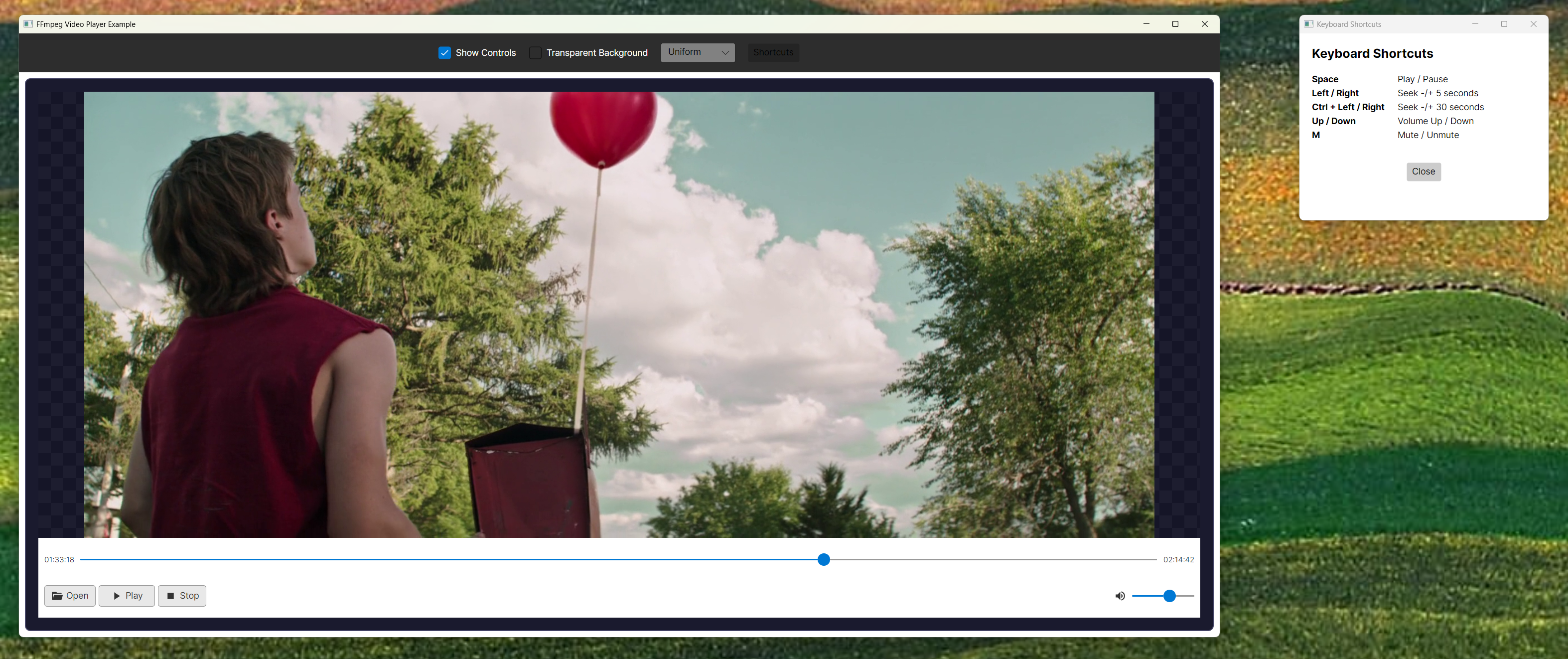
Installation
Basic Installation (Video Only)
dotnet add package FFmpegVideoPlayer.Avalonia
The core package works without any additional dependencies. Audio playback is optional.
FFmpeg Binaries
By default, the NuGet package includes FFmpeg binaries for Windows x64. macOS and Linux users should install FFmpeg via their system package manager — on macOS the initializer will auto-install via Homebrew if autoInstall is left at its default (true). You can also:
Use your own FFmpeg binaries (recommended to avoid conflicts):
// In Program.cs or before creating VideoPlayerControl
FFmpegInitializer.Initialize(customPath: @"C:\ffmpeg\bin", useBundledBinaries: false);
Disable bundled binaries to reduce package size:
FFmpegInitializer.Initialize(useBundledBinaries: false);
// Will search system PATH and common installation locations
Use bundled binaries (default behavior):
FFmpegInitializer.Initialize(); // Uses bundled binaries if available
Priority order when initializing:
- Custom path (if provided) - highest priority
- Bundled binaries (if
useBundledBinaries=trueand present) - System discovery (PATH, common installation locations)
With Audio Support (Optional)
To enable audio playback, also install the OpenTK audio package:
dotnet add package FFmpegVideoPlayer.Audio.OpenTK
Then set the AudioPlayerFactory property on VideoPlayerControl:
using FFmpegVideoPlayer.Audio.OpenTK;
using FFmpegVideoPlayer.Core;

// In your window/control initialization
VideoPlayer.AudioPlayerFactory = (sampleRate, channels) =>
    AudioPlayerFactory.Create(sampleRate, channels);
If AudioPlayerFactory is not set (or set to null), the player will work in video-only mode without crashing.
Troubleshooting Audio Issues
If audio is not working, check the following:
OpenAL Native Libraries (Windows): OpenTK 4.x does not bundle OpenAL native libraries on Windows. You need to install OpenAL Soft separately:
- Download the Windows installer from OpenAL Soft Downloads
- Install it system-wide (places
openal32.dllin System32) - OR copy
openal32.dllto your application's output directory - The
AudioPlayerFactory.Create()method will returnnullif OpenAL is not available, allowing the player to continue in video-only mode
Error Handling: The
AudioPlayerFactory.Create()method returnsnullif initialization fails, allowing the player to continue in video-only mode. Check debug output for detailed error messages.Sample Rate/Format: Ensure your media file has a supported audio format. The player will automatically resample to stereo S16 format.
Alternative Solutions:
- If you cannot install OpenAL system-wide, you can download
openal32.dllfrom OpenAL Soft and place it in your application's output directory (next to your .exe) - For distribution, include
openal32.dllwith your application
- If you cannot install OpenAL system-wide, you can download
Try the Example
git clone https://github.com/jojomondag/FFmpegVideoPlayer.Avalonia.git
cd FFmpegVideoPlayer.Avalonia/examples/FFmpegVideoPlayerExample
dotnet run
FFmpegMediaPlayer API
Properties
| Property | Type | Default | Description |
|---|---|---|---|
Source |
string? |
null |
Video file path or URL |
AutoPlay |
bool |
false |
Auto-play when media is loaded |
Volume |
int |
100 |
Volume level (0-100) |
ShowBuiltInControls |
bool |
true |
Show/hide control bar |
ShowOpenButton |
bool |
true |
Show/hide file picker button |
ControlPanelBackground |
IBrush? |
White |
Control bar background brush |
VideoBackground |
IBrush? |
Black |
Video area background (set to Transparent for overlays) |
VideoStretch |
Stretch |
Uniform |
Video stretch mode (None, Fill, Uniform, UniformToFill) |
EnableKeyboardShortcuts |
bool |
true |
Enable keyboard controls (Space, Arrow keys, M) |
AudioPlayerFactory |
Func<int, int, IAudioPlayer?>? |
null |
Optional factory for audio playback. Set to enable audio, leave null for video-only mode. |
IconProvider |
IIconProvider? |
null |
Optional custom icon provider. If null, default Avalonia shapes are used. |
CurrentMediaPath |
string? |
null |
Full path of currently loaded media (read-only) |
HasMediaLoaded |
bool |
false |
Whether media is currently loaded (read-only) |
IsPlaying |
bool |
false |
Whether playback is active (read-only) |
Position |
long |
0 |
Current playback position in milliseconds (read-only) |
Duration |
long |
0 |
Total media duration in milliseconds (read-only) |
Methods
| Method | Parameters | Description |
|---|---|---|
Open(string path) |
path: File path or URL |
Opens and loads a media file |
OpenUri(Uri uri) |
uri: Media URI |
Opens media from a URI |
Play() |
- | Starts or resumes playback |
Pause() |
- | Pauses playback |
Stop() |
- | Stops playback and resets position |
TogglePlayPause() |
- | Toggles between play and pause |
Seek(float positionPercent) |
positionPercent: 0.0 to 1.0 |
Seeks to specific position |
ToggleMute() |
- | Toggles mute state |
Events
| Event | EventArgs | Description |
|---|---|---|
PlaybackStarted |
EventArgs |
Raised when playback starts |
PlaybackPaused |
EventArgs |
Raised when playback is paused |
PlaybackStopped |
EventArgs |
Raised when playback is stopped |
MediaOpened |
MediaOpenedEventArgs |
Raised when media is successfully opened |
MediaEnded |
EventArgs |
Raised when media reaches the end |
Custom Icons
The player uses standard Avalonia shapes for icons by default (no Material.Icons dependency). To use custom icons, implement IIconProvider:
public class MyIconProvider : IIconProvider
{
    public Geometry CreatePlayIcon() => /* your custom geometry */;
    public Geometry CreatePauseIcon() => /* your custom geometry */;
    // ... implement other methods
}

// Then set it on the control
VideoPlayer.IconProvider = new MyIconProvider();
Dependencies
Required
- Avalonia (11.3.6+) - UI framework
- FFmpegVideoPlayer.Core - Core player logic (included)
Optional
- FFmpegVideoPlayer.Audio.OpenTK - Audio playback support (optional, video-only mode works without it)
- Material.Icons.Avalonia - Not required. Icons use standard Avalonia shapes by default.
Platform Support
| Platform | Bundled Binaries | System FFmpeg | Auto-install |
|---|---|---|---|
| Windows x64 | ✅ Bundled | ✅ Supported | n/a |
| macOS ARM64 / x64 | ⚠️ Not bundled | ✅ /opt/homebrew/lib, /usr/local/lib, Cellar |
✅ Homebrew (no sudo) |
| Linux (apt / dnf / pacman) | ⚠️ Not bundled | ✅ /usr/lib, /usr/local/lib, arch-specific dirs |
✅ If passwordless sudo; otherwise prints exact install command |
Note: Bundled binaries are optional. You can use your own FFmpeg installation by providing a customPath to FFmpegInitializer.Initialize(). This avoids conflicts with other libraries and reduces package size.
Why macOS binaries are not bundled: A dylib copied out of /opt/homebrew/Cellar/ffmpeg/*/lib has LC_LOAD_DYLIB entries hardcoded to paths like /opt/homebrew/opt/<formula>/lib/.... On any Mac without the exact same set of Homebrew formulae, dlopen fails silently — FFmpeg.AutoGen then replaces every FFmpeg function with a stub that throws NotSupportedException: Specified method is not supported. at call time (for example, when calling avformat_open_input). Rather than ship dylibs that only work on the author's machine, macOS users install FFmpeg via Homebrew (brew install ffmpeg); FFmpegInitializer.Initialize() will do this automatically with autoInstall: true (the default).
License
MIT
| Product | Versions Compatible and additional computed target framework versions. |
|---|---|
| .NET | net8.0 is compatible. net8.0-android was computed. net8.0-browser was computed. net8.0-ios was computed. net8.0-maccatalyst was computed. net8.0-macos was computed. net8.0-tvos was computed. net8.0-windows was computed. net9.0 was computed. net9.0-android was computed. net9.0-browser was computed. net9.0-ios was computed. net9.0-maccatalyst was computed. net9.0-macos was computed. net9.0-tvos was computed. net9.0-windows was computed. net10.0 was computed. net10.0-android was computed. net10.0-browser was computed. net10.0-ios was computed. net10.0-maccatalyst was computed. net10.0-macos was computed. net10.0-tvos was computed. net10.0-windows was computed. |
-
net8.0
- Avalonia (>= 11.3.6)
- FFmpegVideoPlayer.Audio.OpenTK (>= 2.1.8)
- FFmpegVideoPlayer.Core (>= 2.7.0)
NuGet packages
This package is not used by any NuGet packages.
GitHub repositories
This package is not used by any popular GitHub repositories.
| Version | Downloads | Last Updated |
|---|---|---|
| 2.8.0 | 93 | 4/24/2026 |
| 2.7.1 | 81 | 4/24/2026 |
| 2.7.0 | 81 | 4/24/2026 |
| 2.6.3 | 218 | 3/31/2026 |
| 2.6.2 | 94 | 3/31/2026 |
| 2.6.1 | 103 | 3/25/2026 |
| 2.6.0 | 87 | 3/25/2026 |
| 2.5.8 | 93 | 3/25/2026 |
| 2.5.7 | 92 | 3/25/2026 |
| 2.5.6 | 89 | 3/25/2026 |
| 2.5.5 | 85 | 3/25/2026 |
| 2.5.4 | 91 | 3/25/2026 |
| 2.5.3 | 90 | 3/25/2026 |
| 2.5.2 | 93 | 3/25/2026 |
| 2.5.1 | 89 | 3/25/2026 |
| 2.5.0 | 87 | 3/25/2026 |
| 2.4.3 | 88 | 3/25/2026 |
| 2.4.2 | 90 | 3/25/2026 |
| 2.4.1 | 96 | 3/25/2026 |
| 2.4.0 | 90 | 3/25/2026 |
v2.8.0: Close #1 — Linux auto-install via apt/dnf/pacman (with sudo -n), matching the existing macOS Homebrew flow. macOS x64 (Intel) Homebrew was already supported. v2.7.1: Fix #3 — frame-accurate slider seeking. v2.7.0: Fix #2 — macOS NotSupportedException at avformat_open_input (bundled osx-arm64 dylibs removed; initializer validates load and falls back). v2.6.3: OpenAL default audio.