Hlibz.Redoc.AspNetCore
2.0.0
dotnet add package Hlibz.Redoc.AspNetCore --version 2.0.0
NuGet\Install-Package Hlibz.Redoc.AspNetCore -Version 2.0.0
<PackageReference Include="Hlibz.Redoc.AspNetCore" Version="2.0.0" />
<PackageVersion Include="Hlibz.Redoc.AspNetCore" Version="2.0.0" />
<PackageReference Include="Hlibz.Redoc.AspNetCore" />
paket add Hlibz.Redoc.AspNetCore --version 2.0.0
#r "nuget: Hlibz.Redoc.AspNetCore, 2.0.0"
#:package Hlibz.Redoc.AspNetCore@2.0.0
#addin nuget:?package=Hlibz.Redoc.AspNetCore&version=2.0.0
#tool nuget:?package=Hlibz.Redoc.AspNetCore&version=2.0.0

Hlibz.Redoc.AspNetCore
ReDoc 3, served by your own app. No Redoc.AspNetCore, no Swashbuckle — this package embeds
the ReDoc 3.0.1 bundle and serves its own page, so it owns the things middleware someone else wrote
can't give you:
- Authorization per document.
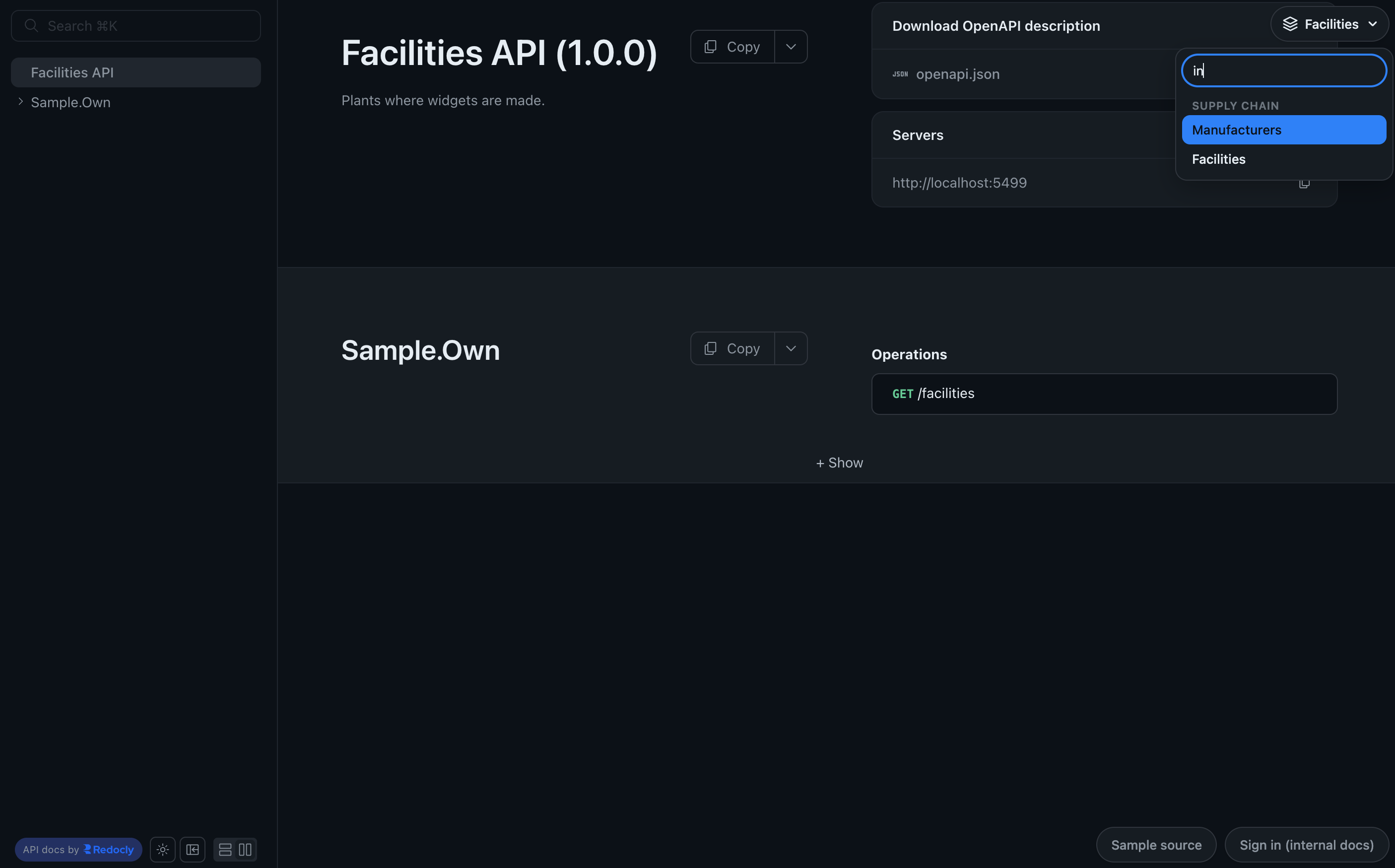
.RequireAuthorization()on aReDocDocumentcovers its page, the OpenAPI document it renders and the link to it. One call, three ends closed. - Several OpenAPI documents, with a picker — groups, optional search, and placement in a corner or in ReDoc's sidebar. ReDoc has nothing like it on any version.
- A bundle that caches. 507 KB brotli, pre-compressed,
max-age=31536000, immutableand a strong ETag, served once for the whole site. - A strict CSP with no nonce. Nothing on the page is inline — not the config, not the picker,
not the color-mode bootstrap — so
script-src 'self'holds. - No third-party requests. System fonts, and ReDoc's telemetry off by default.


Keeping an existing
UseReDocpage and just want it dark? That's ReDoc 2, and it's the other half of this project:Hlibz.Redoc.Extensions.SwashbuckleorHlibz.Redoc.Extensions.RedocAspNetCore.
Install
dotnet add package Hlibz.Redoc.AspNetCore
using Hlibz.Redoc.Extensions;
Targets net8.0; works in apps on net8.0, net9.0 and net10.0. Depends on nothing but ASP.NET Core.
Quick start
builder.Services.AddOpenApi();

// ...

app.MapOpenApi();
app.MapReDocDocuments([new ReDocDocument("v1", "My API")]);
That serves the page at /api-docs/v1/, and /api-docs redirects to it. The spec is read from
/openapi/{documentName}.json, which is where MapOpenApi() puts it.
Any OpenAPI generator will do
The page just needs a spec URL, so AddOpenApi(), AddSwaggerGen() and NSwag all work. Point
SpecUrlTemplate at wherever your generator serves documents:
// Swashbuckle's UseSwagger
app.MapReDocDocuments(documents, docs =>
    docs.SpecUrlTemplate = "/swagger/{documentName}/swagger.json");
The two features that read documents rather than link to them — the startup name check, and pages
serving their own specs — go through Microsoft.Extensions.ApiDescriptions.IDocumentProvider, which
AddOpenApi, Swashbuckle and NSwag all register. So ServeSpecs and .RequireAuthorization() work
on a Swashbuckle app too, without MapOpenApi().
Several OpenAPI documents
One page per document, with a picker to switch between them:
builder.Services.AddOpenApi("widgets");
builder.Services.AddOpenApi("manufacturers");

// ...

app.MapOpenApi();
app.MapReDocDocuments(
    [
        new ReDocDocument("widgets", "Widget Catalog"),
        new ReDocDocument("manufacturers", "Manufacturers"),
    ],
    docs => docs.DefaultColorMode = ReDocColorMode.System);

app.MapGet("/widgets", GetWidgets).WithGroupName("widgets");
app.MapGet("/manufacturers", GetManufacturers).WithGroupName("manufacturers");
Tag every endpoint with .WithGroupName(...) — an endpoint without a group name appears in every
document.
Groups
Give documents a Group and the picker puts them under a heading, as an <optgroup>:
app.MapReDocDocuments(
    [
        new ReDocDocument("overview", "Overview"),
        new ReDocDocument("payments-v1", "Payments v1", Group: "Payments"),
        new ReDocDocument("payments-v2", "Payments v2", Group: "Payments"),
    ]);
Documents keep the order you give them, and a group appears where its first member does, so grouped
and ungrouped ones mix freely — Overview stays at the top of the list above.
Search
Past a handful of documents a dropdown stops being a way to find anything:
docs.SearchablePicker = true;
That swaps the native <select> for a combobox. Typing filters on a document's display name and
its Group, so a group name brings up everything under it — supply finds both documents in a
"Supply chain" group without either being named for it. Links entries, which have no group, filter
on their label.
The keyboard owns it: Enter or Space opens, typing filters, ↑/↓ and Home/End move, Enter follows the
highlighted entry, Escape closes and returns focus to the button. The list is a listbox with
aria-activedescendant.
It's off by default: while the whole list fits on screen a native <select> is the better control,
not least because a phone renders it with its own picker instead of a dropdown.
Toolbar links
Links of your own, beside the picker:
docs.AddToolbarItem("Postman collection", "~/postman/widgets.json", newTab: true)
    .AddToolbarItem("Changelog", "/changelog");
They render as buttons in the order you add them and take their colors from the same tokens the
picker does, so they follow the color mode and your accent. A ~/ URL resolves against the app's
base path, so it survives a PathBase or a path-rewriting proxy; absolute and root-relative URLs
are used as-is.
This is for the links a documentation site wants and this package shouldn't ship one at a time: a
Postman collection, a changelog, a dev portal. For a link to another ReDoc page of your own,
prefer Links, which lists it inside the picker where a reader is already looking for documents.
A toolbar item is a link and nothing else — there is deliberately no HTML, CSS or JS escape hatch,
because anything inline would cost the script-src 'self' property this package exists to keep.
AdditionalCss is served as a file and can restyle these buttons as far as CSS reaches.
Where the controls sit
The picker and the toolbar links are placed independently, and both default to the top right:
docs.PickerPlacement = ReDocToolbarPlacement.Sidebar;
docs.ToolbarItemsPlacement = ReDocToolbarPlacement.BottomRight;
TopRight |
Floating over ReDoc's content, in the corner. The default. |
BottomRight |
The other corner — clear of the page title and of ReDoc's own buttons. |
Sidebar |
A row across the top of ReDoc's sidebar, above its search box. |
Give both the same placement and they share one strip; give them different ones and each gets its own. In a corner they read links first, then picker; in the sidebar, which is a column, the picker leads.
TopRight / BottomRight ─ [ Changelog ] [ Postman ] [ ◆ Widget Catalog ▾ ]
Sidebar ───────────────  [ ◆ Widget Catalog ▾ ]
                         [ Changelog ] [ Postman ]
Sidebar is the one to reach for once there are more documents than a pill in the corner can show,
or once their names are long enough to be cut off at 280px — there the picker takes the sidebar's
full width. On a narrow screen every strip leaves its corner and stacks in the page flow above the
content, so none of them covers the title, and BottomRight stays off the floating menu button a
phone puts in that corner.
Remembering the last document
docs.RememberLastDocument = true;
/{RoutePrefix} then sends a returning viewer back to the document they were last reading instead
of always to the first one. It's off unless you ask for it, because it costs a cookie:
hlibz.redoc.document, holding a document name, HttpOnly, SameSite=Lax, Secure over HTTPS,
scoped to the route prefix, expiring after a year.
The cookie is a name to look up, never a path to follow, so a stale or hand-edited one falls back to
the first document. Unlisted documents aren't remembered.
Mistyped document names fail at startup
When the document list and your AddOpenApi(name) calls drift apart, the page still serves fine and
only its spec request 404s — so the app starts clean, the log says nothing, and the mistake surfaces
when someone opens the page. The names are checked at startup instead:
MapReDocDocuments was given OpenAPI document names that aren't registered:
  - 'wigets': page '/api-docs/wigets/' would load an empty spec from '/openapi/wigets.json'.
Registered documents: 'facilities', 'manufacturers', 'widgets'.
AddOpenApi(name) and Swashbuckle's SwaggerDoc(name, …) are both recognized, matched
case-insensitively. A document is only checked when its name actually builds its spec URL, so one
with its own SpecUrl — or any document when SpecUrlTemplate has no {documentName} — is left
alone. Set ValidateDocumentNames = false if your specs come from somewhere the check can't see.
Authorization
MapReDocDocuments returns a convention builder over every endpoint it added — the pages, their
stylesheet, their scripts and the shared bundle. That is the reason to map endpoints rather than add
middleware: with the existing ReDoc hosts the page is middleware, which carries no metadata, so
there is nowhere for a policy to attach. Everything endpoints carry works here:
.RequireAuthorization(), .CacheOutput(), rate limiting, CORS, .RequireHost(), your own
metadata.
A documentation site is set up one of three ways. Only the third needs anything new:
| Pages | Specs | What you write | |
|---|---|---|---|
| 1. All public | open | open | nothing |
| 2. All internal | gated together | gated together | .RequireAuthorization() on the builder, and on MapOpenApi() |
| 3. Mixed: public API, internal document beside it | one gated | that one gated | .RequireAuthorization(…) on the document |
Each is asserted as a test, as the status codes an anonymous caller gets, so the examples can't drift from what the package does — and so is shape 2 behind a browser password prompt, for a test server, below.
1. All public — the default, unchanged by any of this:
app.MapOpenApi();
app.MapReDocDocuments([new ReDocDocument("public", "Public API")]);
2. All internal — the whole site behind a policy. MapOpenApi maps one endpoint for every
document, which is the right granularity when every document is internal, so this needs no new
option. Two calls, both ends closed:
app.MapOpenApi().RequireAuthorization();
app.MapReDocDocuments(documents).RequireAuthorization();
2a. All internal, behind a password prompt — the same shape for a test server you'd rather not
put behind a VPN: the browser asks for a username and password before showing anything under
/api-docs, and the API itself is left as it was. ASP.NET Core has no Basic authentication handler
of its own, so this is one you copy:
using System.Security.Claims;
using System.Security.Cryptography;
using System.Text;
using System.Text.Encodings.Web;
using Microsoft.AspNetCore.Authentication;
using Microsoft.Extensions.Options;

// One username and password from configuration (Docs:User, Docs:Password), for the docs only.
// Serve it over HTTPS: Basic sends both, merely base64-encoded, with every request.
public sealed class DocsBasicAuthenticationHandler(
    IOptionsMonitor<AuthenticationSchemeOptions> options,
    ILoggerFactory logger,
    UrlEncoder encoder,
    IConfiguration configuration)
    : AuthenticationHandler<AuthenticationSchemeOptions>(options, logger, encoder)
{
    public const string SchemeName = "DocsBasic";

    protected override Task<AuthenticateResult> HandleAuthenticateAsync()
    {
        string header = Request.Headers.Authorization.ToString();
        if (!header.StartsWith("Basic ", StringComparison.OrdinalIgnoreCase))
        {
            return Task.FromResult(AuthenticateResult.NoResult());
        }

        string? user = configuration["Docs:User"];
        string? password = configuration["Docs:Password"];
        if (string.IsNullOrEmpty(user) || string.IsNullOrEmpty(password))
        {
            // Unconfigured means nobody gets in, never that anybody does.
            return Task.FromResult(AuthenticateResult.Fail("Docs:User/Password not set."));
        }

        byte[] given;
        try
        {
            given = Convert.FromBase64String(header["Basic ".Length..].Trim());
        }
        catch (FormatException)
        {
            return Task.FromResult(AuthenticateResult.Fail("Malformed Basic credentials."));
        }

        byte[] expected = Encoding.UTF8.GetBytes($"{user}:{password}");
        if (!CryptographicOperations.FixedTimeEquals(given, expected))
        {
            return Task.FromResult(AuthenticateResult.Fail("Wrong username or password."));
        }

        ClaimsIdentity identity = new([new Claim(ClaimTypes.Name, user)], SchemeName);
        return Task.FromResult(AuthenticateResult.Success(
            new AuthenticationTicket(new ClaimsPrincipal(identity), SchemeName)));
    }

    // The WWW-Authenticate header is what makes the browser show its password prompt.
    protected override Task HandleChallengeAsync(AuthenticationProperties properties)
    {
        Response.StatusCode = StatusCodes.Status401Unauthorized;
        Response.Headers.WWWAuthenticate = "Basic realm=\"API docs\", charset=\"UTF-8\"";
        return Task.CompletedTask;
    }
}
Then register it under a policy that names the scheme, so it touches nothing but the docs — the API keeps whatever authentication it already had, or none:
builder.Services.AddAuthentication()
    .AddScheme<AuthenticationSchemeOptions, DocsBasicAuthenticationHandler>(
        DocsBasicAuthenticationHandler.SchemeName, configureOptions: null);
builder.Services.AddAuthorizationBuilder()
    .AddPolicy("Docs", policy => policy
        .AddAuthenticationSchemes(DocsBasicAuthenticationHandler.SchemeName)
        .RequireAuthenticatedUser());

app.UseAuthentication();
app.UseAuthorization();

// No MapOpenApi(): with ServeSpecs each page serves its own document, so this one policy covers
// the pages, their scripts, the ReDoc bundle and every spec.
app.MapReDocDocuments(documents, options => options.ServeSpecs = true)
   .RequireAuthorization("Docs");
Without the right password, that serves:
GET /api-docs                              401   (WWW-Authenticate: Basic)
GET /api-docs/public/                      401
GET /api-docs/public/openapi.json          401
GET /api-docs/_redoc/redoc.standalone.js   401
GET /openapi/public.json                   404   (not mapped)
With it, everything answers as it would unprotected. The browser resends the credentials on every
request to the site, so the page's own fetch of openapi.json needs nothing extra. If you keep
MapOpenApi() for a client generator, gate it with the same .RequireAuthorization("Docs"). Basic
authentication has no sign-out: a browser keeps the credentials until it is closed. And a password
in the URL (https://user:pass@host/…) gets the page but not the spec, because browsers refuse to
fetch a URL carrying credentials — type it into the prompt instead.
3. Mixed — a public API with an internal document beside it. This is the one MapOpenApi can't
express, because it has no per-document seam: gating there is every spec or none. Say it on the
document instead:
builder.Services.AddOpenApi("public");
builder.Services.AddOpenApi("internal");

// No MapOpenApi(): every page here serves its own document, so the one URL that would
// have leaked the internal spec is simply not mapped.
app.MapReDocDocuments(
[
    new ReDocDocument("public", "Public API"),
    new ReDocDocument("internal", "Internal API").RequireAuthorization("Employees"),
]);
Anonymously, that serves:
GET /api-docs/public/                   200
GET /api-docs/public/openapi.json       200
GET /api-docs/internal/                 302 → /sign-in
GET /api-docs/internal/openapi.json     302 → /sign-in
GET /openapi/internal.json              404   (not mapped)
One call, because the three parts are only ever wanted together. It puts the policy on that document's page, stylesheet, scripts and spec; it has the page serve that spec itself, since a policy can only cover a document this package serves; and it drops the document from the other pages' pickers, so a public dropdown doesn't name your internal APIs to everyone who loads it.
Three consequences worth knowing:
- The shared ReDoc bundle stays open. One endpoint serves it to the whole site, so gating it with a single document would stop every other page rendering — and it's ReDoc's own published JavaScript rather than anything of yours.
- One gated document makes every page in that call serve its own spec, not just the gated one.
The public pages can't be left reading
MapOpenApi()'s endpoint, because that single endpoint serves the internal document too. So every document in the call has to be one a registered provider offers, or carry its ownSpecUrl. MapOpenApi()left mapped and ungated still hands out the internal spec, and nothing here detects that. If you need/openapi/{documentName}.jsonto stay mapped for a linter or a client generator, gate it:app.MapOpenApi().RequireAuthorization(). The public pages still render, because they read their own copy.
For anything else endpoint routing can do to one document — output caching, rate limiting, a policy object rather than a name, or gating a document while leaving it listed — the convention builder is there and composes with the above:
ReDocDocumentsConventionBuilder docs = app.MapReDocDocuments(documents);

docs.ForDocument("internal").CacheOutput().RequireAuthorization(policy);
An unknown document name throws rather than silently protecting nothing. What ForDocument can't do
is the other two parts: by the time MapReDocDocuments has returned, the specs are mounted and the
pickers rendered, so a policy applied there covers the page alone.
Pages serving their own specs
A policy on a page alone is worth little: the page is only a renderer, and the document it reads is
what you didn't want handed out. So a gated document serves its own spec at openapi.json beside
its page, where the same policy covers it. The document is generated through the same provider
dotnet getdocument uses, so it doesn't go through MapOpenApi() and what the page gets is
byte-for-byte what that endpoint would have served.
ServeSpecs = true turns the same thing on for a site with nothing gated. You don't need it to gate
a document — that's implied — so it's for the other reasons to serve specs yourself: dropping
MapOpenApi(), keeping specs on the same routes as the pages so one proxy rule covers both, or
putting a whole site behind one policy without a second gated endpoint.
Either way this adds a URL and takes none away. While /openapi/internal.json is mapped and
ungated it still answers 200. Deleting MapOpenApi() or gating it is the step that closes that
door; deleting it costs you the conventional URL at runtime, which a linter, a client generator,
Postman or a second UI may be pointed at — those move to {route}/openapi.json. Build-time
generation (dotnet getdocument, the ApiDescription.Server targets) never used that endpoint and
is unaffected.
Points worth knowing:
- The spec URL on the page is relative, like every other href here, so it survives a path-rewriting proxy. ReDoc's own "Download OpenAPI description" button follows it, so that is gated too.
- It is generated per request, like
MapOpenApi's, and sentCache-Control: no-storeso a shared cache can't hand a gated document to the next caller. serverscomes from the addresses the server is listening on, not from the request — behind a reverse proxy that's the internal address. Set it with anAddDocumentTransformer; that's the fix for a proxiedMapOpenApi()too.- A document with its own
SpecUrlis left alone, andSpecUrlTemplateset as well throws, since the two can't both decide where a page reads its spec. For a gated document both throw instead: a locked page in front of a spec this package doesn't serve is the outcome the feature exists to rule out.
What gating does to the picker
A gated document is left out of the picker, so you don't reach for Unlisted as well. It is left
out on listed pages only — hidden pages list everything, so a viewer who signs in and reaches one
can still navigate. And if a public page ends up with nowhere to go, it gets no picker at all rather
than a dropdown holding only itself.
The picker can't be audience-aware: each page is built once at startup and served as a fixed string
to everyone, which is also why nothing here is per-request. Unlisted is still there for a document
you serve but would rather not advertise — a superseded version existing links should keep reaching,
say. On this host, don't use it to hide an internal document: you'd get the hiding without the
protection.
Hiding a specification is discretion, not access control. It keeps your internal surface off the open web; it is not what keeps the endpoints it describes safe.
Without endpoint routing
app.UseReDocDocuments(documents, ...) serves the same pages as middleware and takes the same
options. Nothing can attach a policy to middleware, so a gated document throws there rather than
quietly coming out public; Unlisted is all you get.
Theming
ReDoc 3 themes itself through CSS custom properties — there is no theme config object any more —
and ships light and dark modes plus a system font stack. So there is no UseDarkTheme here: what
this package adds is the first-time default, an accent, named dark palettes and a place to put your
own CSS.
Color mode
ReDoc 3 has its own light/dark toggle and remembers the viewer's choice in localStorage. All this
package decides is what a first-time viewer sees:
docs.DefaultColorMode = ReDocColorMode.Dark; // System (default), Light or Dark
System follows prefers-color-scheme. The mode is stamped on <html> before the first byte goes
out, and a served script does the rest from ReDoc's own storage key — ReDoc does that part with an
inline script, which a strict CSP blocks, so without this the page would render light for a
moment first. A viewer who has already chosen a mode keeps it.
Accent color
docs.PrimaryColor = "#c026d3";
docs.DarkModePrimaryColor = "#e879f9";   // optional; a hue picked for a white page is
                                         // usually too dark on a near-black one
Any CSS color works — hex, rgb(), oklch(), a named color, or a var() pointing at your own
design tokens. DarkModePrimaryColor is the whole accent while html.dark is in effect, not a
darker shade of one. Each property writes two variables, --color-primary-base and
--link-color-primary, because ReDoc's link text reads a different token from everything else.
A color value lands in a stylesheet, so it's checked when you set it: anything that could end the declaration or open a new rule throws there rather than serving a page with a broken stylesheet. It is not a color parser, though — a value CSS doesn't understand is ignored by the browser, like any other typo in CSS.
Named dark palettes
For when you want a different dark mode rather than a different accent:
docs.DarkThemePreset = ReDocDarkThemePreset.Nord; // or Midnight, or GitHubDark
Midnight |
Near-black with a sky accent — this project's ReDoc 2 dark theme as a ReDoc 3 palette, so a site moving off one of the adapters can keep looking like itself. |
Nord |
Polar Night surfaces, Snow Storm text, a Frost accent. |
GitHubDark |
GitHub's canvas and border greys with its blue accent. |
Each is eleven greys and an accent, and that is a whole theme rather than a tint: ReDoc 3's dark mode is its grey ramp reversed, so the page background, the panels, both border weights, primary and secondary text and the code blocks all follow those eleven values.
A preset paints dark mode only — all three are dark palettes — so set
DefaultColorMode = ReDocColorMode.Dark if a first-time viewer on a light OS should see it too.
Setting PrimaryColor or DarkModePrimaryColor takes the accent over from the preset.
Your own CSS
docs.AdditionalCss = """
    :root     { --bg-color: #fffdf7; }
    html.dark { --bg-color: #0b0b0f; }
    """;
That CSS is appended to the page's stylesheet, which is served as a file like everything else, and comes after the accent and the preset, so it wins at equal specificity. This package's own controls read ReDoc's variables rather than carrying a palette, so they follow the color mode and your accent without being told.
There are around 2,900 of these variables and no published map of them, so for anything beyond the accent, inspect the element in devtools and override the variable it actually reads.
Printing
Printed pages come out light whatever mode the screen is in, and without the picker or the toolbar.
Set PrintStyles = false to leave printing entirely to ReDoc.
ReDoc 3 does most of this itself; what it doesn't handle is color. Browsers drop background colors
when printing but keep text colors, so a page printed from dark mode would be near-white text on
white paper. Putting the light grey ramp back for the printed copy fixes text, borders, panels and
code blocks in one go. If you set both accents, the printed copy uses PrimaryColor.
The bundle, and how it's served
| ReDoc | 3.0.1, MIT, checked into the repo pre-compressed and embedded in the assembly |
| Served as | the stored bytes for whichever encoding the request accepts — nothing is compressed per request |
| Size on the wire | 507 KB brotli, 634 KB gzip, 2.2 MB for a client that takes neither |
| Caching | Cache-Control: public, max-age=31536000, immutable, Vary: Accept-Encoding, a strong ETag per encoding |
| URL | {RoutePrefix}/_redoc/redoc.standalone.js, once for the whole site — switching documents re-downloads nothing |
Both encodings are built at quality 11 before the file is checked in, which is affordable exactly
because the bundle is fixed for the life of a package version. Response-compression middleware in
your pipeline has nothing to do here — the response already carries a Content-Encoding. Brotli is
preferred wherever the request accepts it, and Accept-Encoding is parsed rather than searched, so
br;q=0 means what it says.
For comparison: Redoc.AspNetCore sends its bundle uncompressed with no Cache-Control at all, and
Swashbuckle sends max-age=0.
No Node and no network are involved in building this package.
assets/README.md
records the version, the npm tarball's published SHA-512 and how to upgrade it; ReDoc's MIT licence
is packed alongside as THIRD-PARTY-NOTICES.txt.
ReDoc 3's telemetry is off: the generated config carries disableTelemetry: true unless you set
EnableTelemetry = true. A documentation page served out of your own app shouldn't call a third
party unless you asked for it.
Content Security Policy
One call serves the pages under the policy they are known to work under:
app.MapReDocDocuments(documents, docs => docs.UseDefaultContentSecurityPolicy());
default-src 'self';
script-src 'self';
style-src 'self' 'unsafe-inline';
img-src 'self' data: https://cdn.redoc.ly;
font-src 'self' data:;
worker-src 'self' blob:;
child-src 'self' blob:;
connect-src 'self';
object-src 'none';
base-uri 'none'
That is the policy the pages are actually served under in
samples/Sample.Own,
so a running sample proves it. Every allowance beyond default-src 'self' is there because a
blocked request said so.
It is sent with the pages and nothing else — the page's own policy already decides what the page may load. A policy your own middleware has already set is left alone, since yours covers the whole app and should be the one that holds; this is for the case where these pages are the only ones with a policy, not a way to override one.
Set ContentSecurityPolicy yourself for anything else;
ReDocDocumentsOptions.DefaultContentSecurityPolicy is the string above, to start from. Two
allowances in it depend on things outside this package:
connect-src 'self'assumes the spec is served from this origin. A spec elsewhere needs that origin added, or ReDoc can't fetch it.img-src … https://cdn.redoc.lyis the "API docs by Redocly" badge, which ReDoc's own bundle fetches from there. Drop it and the badge quietly removes itself; the words "API docs by" remain, and no third-party request is made.
Two things worth knowing:
- No nonce, anywhere.
script-src 'self'is enough because nothing is inline: the ReDoc config, the color-mode bootstrap, the picker and all CSS are served as their own files. That is the whole reason to own the page template. style-src 'unsafe-inline'is not negotiable. ReDoc renders through styled-components, which injects stylesheet rules at runtime. Handing it a nonce viawindow.__webpack_nonce__does not reach them on ReDoc 3 — measured, the page dies with styled-components error #17 and renders nothing. A nonce-onlystyle-srcis not an option, and owning the template changes nothing there.
Options
ReDocDocumentsOptions |
|
|---|---|
RoutePrefix |
Where pages go by default. Defaults to "api-docs". |
RedirectToFirstDocument |
Redirect /{RoutePrefix} to the first document. Defaults to true. |
SpecUrlTemplate |
Where pages read specs. Defaults to "/openapi/{documentName}.json". |
ServeSpecs |
Each page serves its own document at openapi.json beside it instead. Not needed to gate a document — that implies it. Defaults to false. |
ValidateDocumentNames |
Check at startup that every name is a registered document. Defaults to true. |
DefaultColorMode |
What a first-time viewer sees: System (default), Light or Dark. |
PrimaryColor |
The accent, as any CSS color. |
DarkModePrimaryColor |
The accent while html.dark is in effect. Defaults to PrimaryColor. |
DarkThemePreset |
A named dark palette: None (default), Midnight, Nord or GitHubDark. |
AdditionalCss |
Appended to the page's stylesheet, after the accent and the preset. |
Favicon |
href for the page's <link rel="icon">. Unset, browsers ask for /favicon.ico. |
SearchablePicker |
Make the picker a searchable list. Defaults to false. |
PickerPlacement |
TopRight (default), BottomRight or Sidebar. |
ToolbarItemsPlacement |
The same, for the toolbar links, set independently. |
AddToolbarItem(label, url, newTab) |
Adds a link button to the toolbar. ToolbarItems is the list behind it. |
Links |
Entries listed in the picker after the documents, e.g. new ReDocLink("Swagger UI", "~/swagger"). |
RememberLastDocument |
/{RoutePrefix} returns you to the document you were last reading. Defaults to false; sets a cookie when on. |
ContentSecurityPolicy |
Sent with each page. Unset, none is sent. A policy your own middleware set is left alone. |
UseDefaultContentSecurityPolicy() |
Sets the verified policy above. |
PrintStyles |
Print the page light, without the toolbar. Defaults to true. |
HideDownloadButton |
Hide ReDoc's "Download OpenAPI description" button. |
RequiredPropsFirst |
List required properties before optional ones in schemas. |
EnableTelemetry |
Defaults to false, which emits disableTelemetry: true. |
AdditionalConfigJson |
Escape hatch for ReDoc options this package doesn't surface, e.g. """{"showExtensions": true}""". Parsed when you set it, so a malformed value throws at startup instead of blanking the page. |
ReDocDocument |
|
|---|---|
Name |
The OpenAPI document name, as passed to AddOpenApi(name). |
DisplayName |
Label in the picker and the browser tab. Defaults to Name. |
SpecUrl |
This document's spec URL, if it isn't at SpecUrlTemplate. |
Route |
The page's path, e.g. "reference/v2/taxes". Defaults to {RoutePrefix}/{Name}. |
Unlisted |
Keep this document out of the picker on listed pages. Hides the link; protects nothing. |
Group |
Heading this document sits under in the picker. |
.RequireAuthorization(policies) |
Gate this document: its page, its scripts and its own spec, and drop it from other pages' pickers. |
Troubleshooting
| Symptom | Cause | Fix |
|---|---|---|
| ReDoc's "No page at this address" on an old link | a ReDoc 2 deep link like #tag/widgets/operation/GetWidget |
ReDoc 3 routes a page per operation; old bookmarks don't carry over |
| ReDoc's "Something went wrong…" | the spec URL 404s | check SpecUrlTemplate against where your generator serves specs, or set ServeSpecs = true |
| App throws at startup naming unregistered documents | a document name doesn't match an AddOpenApi / SwaggerDoc call |
fix the name, or ValidateDocumentNames = false |
Gated page redirects, but /openapi/{name}.json still answers 200 |
MapOpenApi() is still mapped and ungated |
remove it, or app.MapOpenApi().RequireAuthorization() |
| Gating throws at startup | the document has its own SpecUrl, or a non-default SpecUrlTemplate is set, or it was handed to UseReDocDocuments |
a gated page must sit in front of a spec this package serves |
servers in a served spec points at an internal address |
it comes from the listening addresses, not the request | set it with an AddDocumentTransformer |
| Blank page under a strict CSP | style-src has no 'unsafe-inline' |
styled-components needs it; the nonce stays on script-src |
AmbiguousMatchException on a page request |
another endpoint of yours matches the same route | move the page with Route, or change RoutePrefix |
| Page renders, picker never appears in the sidebar | ReDoc's bundle didn't boot | the strip falls back to sitting over the page; check the console |
| An endpoint shows up in every document | it has no group name | .WithGroupName(...) |
What this doesn't do
- It doesn't generate OpenAPI documents —
AddOpenApi(), Swashbuckle or NSwag still does that. - No "Try it" console: that's a Redocly commercial feature on both ReDoc 2 and 3.
- No dark theme of its own beyond the palettes: ReDoc 3's own dark mode is the thing being configured here.
- Hiding or gating a documentation page is not API security. The endpoints a document describes need their own authorization.
Migrating
From one of the adapters, or from ReDoc 2 generally
ReDoc 3 is not a drop-in for ReDoc 2 in one respect that will bite you if anyone has bookmarks.
ReDoc 2 renders one long scrolling page with anchors like #tag/widgets/operation/GetWidget; ReDoc
3 renders a page per tag and operation behind a hash router, so that old anchor renders ReDoc 3's
own "No page at this address". Verified, not inferred.
Otherwise: UseReDoc(...) becomes MapReDocDocuments([...]), UseReDocDocuments(...) keeps its
shape, and UseDarkTheme has no counterpart — the theme selector, the fonts feature and the dark
theme config are all ReDoc 2 concerns. DarkThemePreset = ReDocDarkThemePreset.Midnight is this
project's ReDoc 2 palette, for a site that wants to keep looking like itself.
What ReDoc 3 adds, beyond dark mode and CSS-variable theming: a real search index, OpenAPI 3.2, AsyncAPI and GraphQL support, and "Copy / Open in ChatGPT / Open in Claude" actions on every page.
License
MIT — ReDoc itself is MIT too, embedded here with its notice as THIRD-PARTY-NOTICES.txt.
| Product | Versions Compatible and additional computed target framework versions. |
|---|---|
| .NET | net8.0 is compatible. net8.0-android was computed. net8.0-browser was computed. net8.0-ios was computed. net8.0-maccatalyst was computed. net8.0-macos was computed. net8.0-tvos was computed. net8.0-windows was computed. net9.0 was computed. net9.0-android was computed. net9.0-browser was computed. net9.0-ios was computed. net9.0-maccatalyst was computed. net9.0-macos was computed. net9.0-tvos was computed. net9.0-windows was computed. net10.0 was computed. net10.0-android was computed. net10.0-browser was computed. net10.0-ios was computed. net10.0-maccatalyst was computed. net10.0-macos was computed. net10.0-tvos was computed. net10.0-windows was computed. |
-
net8.0
- Hlibz.Redoc.Extensions.Core (>= 2.0.0)
NuGet packages
This package is not used by any NuGet packages.
GitHub repositories
This package is not used by any popular GitHub repositories.
| Version | Downloads | Last Updated |
|---|---|---|
| 2.0.0 | 53 | 10/26/2026 |
| 2.0.0-preview.1 | 50 | 10/26/2026 |