Hlibz.Redoc.Extensions.RedocAspNetCore
2.0.0
dotnet add package Hlibz.Redoc.Extensions.RedocAspNetCore --version 2.0.0
NuGet\Install-Package Hlibz.Redoc.Extensions.RedocAspNetCore -Version 2.0.0
<PackageReference Include="Hlibz.Redoc.Extensions.RedocAspNetCore" Version="2.0.0" />
<PackageVersion Include="Hlibz.Redoc.Extensions.RedocAspNetCore" Version="2.0.0" />
<PackageReference Include="Hlibz.Redoc.Extensions.RedocAspNetCore" />
paket add Hlibz.Redoc.Extensions.RedocAspNetCore --version 2.0.0
#r "nuget: Hlibz.Redoc.Extensions.RedocAspNetCore, 2.0.0"
#:package Hlibz.Redoc.Extensions.RedocAspNetCore@2.0.0
#addin nuget:?package=Hlibz.Redoc.Extensions.RedocAspNetCore&version=2.0.0
#tool nuget:?package=Hlibz.Redoc.Extensions.RedocAspNetCore&version=2.0.0

Hlibz.Redoc.Extensions.RedocAspNetCore
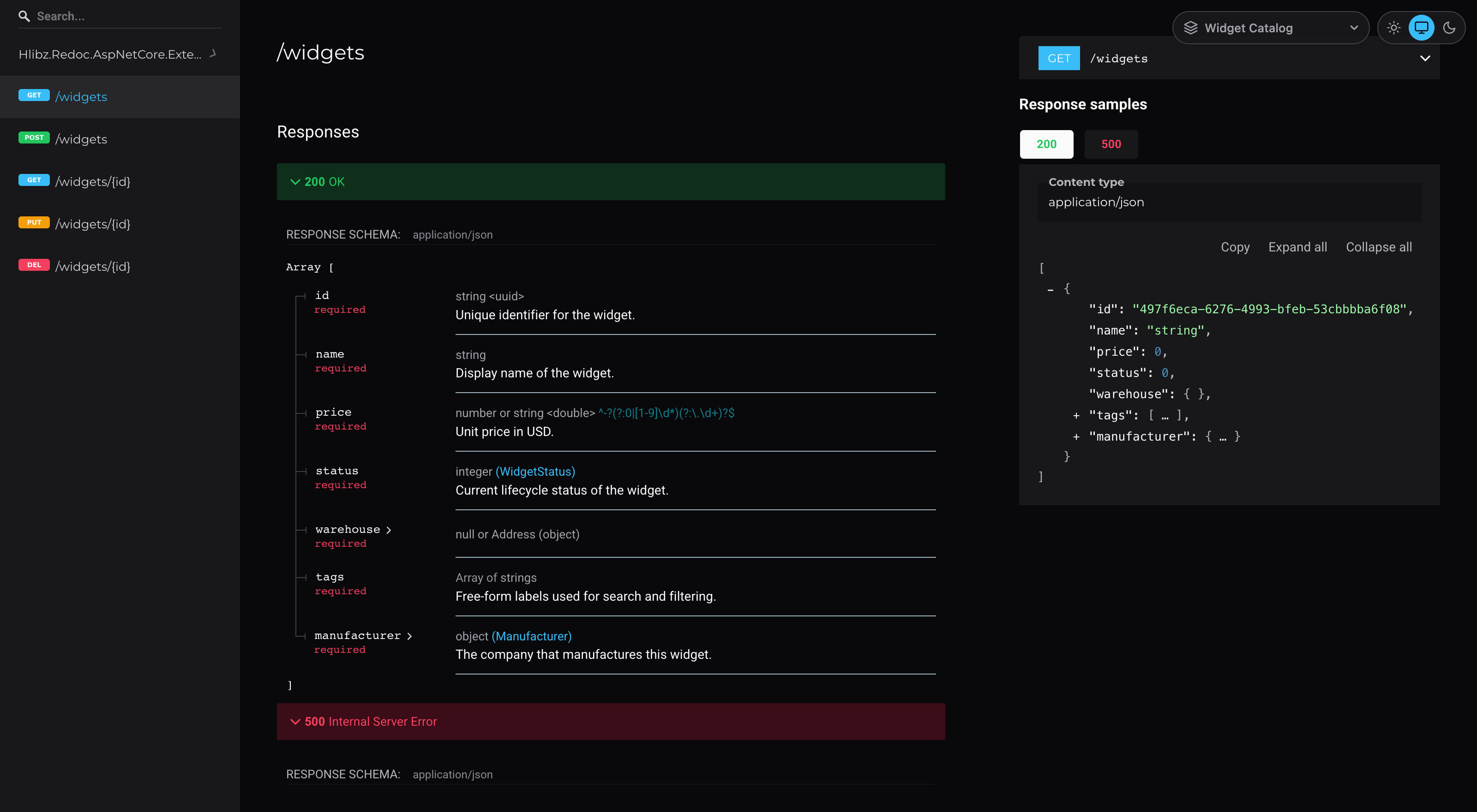
A dark theme and a multi-document picker for Redoc.AspNetCore.
Two lines in the UseReDoc call you already have give you a proper dark ReDoc page, an optional
Light/System/Dark switcher, system fonts instead of a request to Google, a print stylesheet — and
several OpenAPI documents as ReDoc pages with a dropdown between them, the definition selector
Swagger UI has and ReDoc has on no version.


Successor to
Hlibz.Redoc.AspNetCore.Extensions1.x — renamed, same code. Swap the package reference; the namespace and the API are unchanged.
Install
dotnet add package Hlibz.Redoc.Extensions.RedocAspNetCore
using Hlibz.Redoc.Extensions;
Requires Redoc.AspNetCore ≥ 1.0.0, which embeds ReDoc 2.0.0. Targets net8.0; works in apps on
net8.0, net9.0 and net10.0.
On
Swashbuckle.AspNetCore.ReDocinstead? InstallHlibz.Redoc.Extensions.Swashbuckle. Same API, same namespace — only the package reference differs.
Dark theme
app.UseReDoc(options =>
{
    options.SpecUrl("/openapi/v1.json");
    options.UseDarkTheme();
});
That's the whole zero-config path.
What it fixes
ReDoc 2's own theme config object covers most of its UI, but a few things are hardcoded to
light-theme colors outside it and stay light no matter what the config says:
- The scrollbar, text selection, and the small section captions above "Query Parameters" / "Request Body schema" / "Response Schema".
- Every other level of a nested schema. ReDoc alternates nested-schema backgrounds between the
theme's
schema.nestedBackgroundand a hardcoded#ffffff, so a deeply nested schema flashes white partway down. - The selected tab in the request/response sample panel. Its selected state pairs the theme's own light foreground color with a light background, so the label is invisible.
UseDarkTheme fixes them with a small <style> override on top of a full dark theme config
(colors, sidebar, right panel, code blocks, typography, schema).
Accent color
options.UseDarkTheme(theme =>
{
    theme.PrimaryColor = "#a78bfa";   // links, active sidebar items, the GET badge, etc.
    // theme.PrimaryColorLight / theme.PrimaryColorDark — optional, computed if omitted
    // theme.AdditionalCss = ".my-rule { ... }";   // appended after the built-in overrides
});
Everything else in the palette (success/warning/error, greys, backgrounds) is intentionally fixed: this is a themed package, not a general theming engine.
Light/System/Dark switcher
Not everyone on your team wants dark docs. Turn on the selector and each viewer gets a small toggle in the top-right corner:
options.UseDarkTheme(theme => theme.EnableThemeSelector(defaultTheme: ReDocTheme.System));
Light is ReDoc's stock theme, exactly as it renders without this package. System follows
prefers-color-scheme and switches live when the OS setting changes. defaultTheme (default
Dark) is what viewers see until they pick; their choice is then remembered in localStorage, and
switching re-renders ReDoc in place, keeping the scroll position.
With the selector on, the dark overrides are scoped under html[data-redoc-theme="dark"].
AdditionalCss is not scoped and applies to both themes, so prefix your rules with that selector
if they should be dark-only.
DarkThemeOptions |
|
|---|---|
PrimaryColor |
The accent. Defaults to this package's blue. |
PrimaryColorLight / PrimaryColorDark |
Lighter/darker shades. Computed from PrimaryColor if omitted. |
AdditionalCss |
Appended after the built-in overrides, so it wins at equal specificity. |
EnableThemeSelector(defaultTheme) |
Adds the Light/System/Dark toggle. |
UseSystemFonts() |
OS fonts, and drops the Google Fonts <link>. |
FontFamily / HeadingsFontFamily / CodeFontFamily |
Your own stacks. |
LoadGoogleFonts |
Set false to drop the <link> without changing the fonts. |
Favicon |
href for the page's <link rel="icon">. |
PrintStyles |
Print black-on-white, without the sidebar. Defaults to true. |
Multiple OpenAPI documents
One ReDoc page per document, with a picker in the top-right corner to switch between them:
builder.Services.AddOpenApi("widgets");
builder.Services.AddOpenApi("manufacturers");

// ...

app.MapOpenApi();
app.UseReDocDocuments(
    [
        new ReDocDocument("widgets", "Widget Catalog"),
        new ReDocDocument("manufacturers", "Manufacturers"),
    ],
    docs =>
    {
        docs.ConfigureReDoc = (redoc, _) =>
            redoc.UseDarkTheme(theme => theme.EnableThemeSelector(defaultTheme: ReDocTheme.System));
    });

app.MapGet("/widgets", GetWidgets).WithGroupName("widgets");
app.MapGet("/manufacturers", GetManufacturers).WithGroupName("manufacturers");
That serves /api-docs/widgets/ and /api-docs/manufacturers/, with /api-docs redirecting to
the first. Each page reads its spec from /openapi/{documentName}.json, which is where
MapOpenApi() serves it. Tag every endpoint with .WithGroupName(...) — an endpoint without a
group name appears in every document.
The theme goes on through ConfigureReDoc, which runs for every page's ReDocOptions.
Grouping documents
Give documents a Group and the picker puts them under a heading, as an <optgroup> — what you
want once there are several versions of one API:
app.UseReDocDocuments(
    [
        new ReDocDocument("overview", "Overview"),
        new ReDocDocument("payments-v1", "Payments v1", Group: "Payments"),
        new ReDocDocument("payments-v2", "Payments v2", Group: "Payments"),
    ]);
Documents keep the order you give them, and a group appears where its first member does, so grouped
and ungrouped ones mix freely — Overview stays at the top of the list above. The heading is a
label: it isn't selectable and changes no route.
Reference
ReDocDocument |
|
|---|---|
Name |
The OpenAPI document name, as passed to AddOpenApi(name). |
DisplayName |
Label in the picker and the browser tab. Defaults to Name. |
SpecUrl |
This document's spec URL, if it isn't at SpecUrlTemplate. |
Route |
The page's path, e.g. "reference/v2/taxes". Defaults to {RoutePrefix}/{Name}. |
Unlisted |
Keep this document out of the picker on other pages. Hides the link; protects nothing. |
Group |
Heading this document sits under in the picker. |
ReDocDocumentsOptions |
|
|---|---|
RoutePrefix |
Where pages go by default. Defaults to "api-docs". |
RedirectToFirstDocument |
Redirect /{RoutePrefix} to the first document. Defaults to true. |
SpecUrlTemplate |
Defaults to "/openapi/{documentName}.json", where MapOpenApi() serves specs. Swashbuckle's UseSwagger serves /swagger/{documentName}/swagger.json. |
ValidateDocumentNames |
Check at startup that every name is a registered document. Defaults to true. |
Links |
Plain entries listed after the documents, e.g. new ReDocLink("Swagger UI", "~/swagger"). |
ConfigureReDoc |
Action<ReDocOptions, ReDocDocument>, run for every page: theme, extra HeadContent, and so on. |
Picker links are relative, so they keep working under a PathBase or behind a path-rewriting
proxy. A link URL starting with ~/ is resolved against the app's base path; absolute and
root-relative URLs are used as-is.
To move a page, set its Route. Don't change RoutePrefix inside ConfigureReDoc — the pickers
on the other pages would link to the old path, so it throws if you do.
Mistyped document names fail at startup
The document list has to mirror your AddOpenApi(name) calls. When the two drift, the page still
serves fine and only its spec request 404s — so the app starts clean, the log says nothing, and the
mistake surfaces when someone opens the page and finds ReDoc's "Something went wrong…". The names
are checked at startup instead:
UseReDocDocuments was given OpenAPI document names that aren't registered:
  - 'wigets': page '/api-docs/wigets/' would load an empty spec from '/openapi/wigets.json'.
Registered documents: 'facilities', 'manufacturers', 'widgets'.
Both AddOpenApi(name) and Swashbuckle's SwaggerDoc(name, …) are recognized, matched
case-insensitively, the same way MapOpenApi matches them. A document is only checked when its
name actually builds its spec URL, so one with its own SpecUrl — or any document when
SpecUrlTemplate has no {documentName} — is left alone. Nothing is checked if the app registers
no document provider the check recognizes.
Set ValidateDocumentNames = false if your specs come from somewhere the check can't see, e.g.
static files served alongside documents you do register.
Fonts: no request to Google
ReDoc 2's page pulls Montserrat and Roboto from fonts.googleapis.com at runtime.
UseSystemFonts() renders the docs in the viewer's own OS fonts and removes that <link> from the
page, so it makes no third-party request at all:
options.UseDarkTheme(theme => theme.UseSystemFonts());
That's one style-src/font-src entry you no longer need in a strict CSP, docs that render the
same on an air-gapped network, and no viewer IP addresses reaching Google — which LG München I
ruled a GDPR violation in 2022 (3 O 17493/20) when it happens without consent.
Name your own stacks instead, or mix and match:
options.UseDarkTheme(theme =>
{
    theme.UseSystemFonts();                          // sets all three, and drops the <link>
    theme.FontFamily = "Inter, system-ui, sans-serif";
    theme.HeadingsFontFamily = "Lora, Georgia, serif";
    theme.CodeFontFamily = "Fira Code, ui-monospace, monospace";
    // theme.LoadGoogleFonts = false;                // drop the <link>, keep the fonts
});
Self-hosted or bundled fonts go in AdditionalCss as @font-face rules, with the family name then
listed in the stacks above.
Two constraints. Keep stacks to plain ASCII names: ReDoc's page carries its theme config inside a
JavaScript string literal, so a character that has to be escaped there breaks the whole page —
quotes are allowed and dropped (CSS doesn't need them), anything else unusable throws at startup.
And dropping the <link> rewrites ReDoc's index.html, so if you set your own IndexStream, set
it before calling UseDarkTheme.
Favicon
ReDoc's page declares no icon, so browsers fall back to /favicon.ico. To point it elsewhere:
options.UseDarkTheme(theme => theme.Favicon = "/favicon.svg");
Use an absolute URL or a root-relative path — pages are served at /{route}/index.html, so a
relative one would resolve against the page's own folder.
Printing
Dark docs print badly: the page comes out either a black rectangle or near-white text on white
paper, depending on the browser's "background graphics" setting. UseDarkTheme therefore ships a
print stylesheet that prints the documentation black-on-white and leaves out the sidebar and this
package's own controls. Turn it off with theme.PrintStyles = false.
It only changes colors and hides page furniture. Sections collapsed on screen stay collapsed on paper — ReDoc doesn't render their content until they're opened, so CSS can't reach it.
Content Security Policy
If your site doesn't send a strict Content-Security-Policy, skip this section.
This package adds inline tags through ReDocOptions.HeadContent: a <style> for the dark theme, a
<style> and <script> for the theme selector, and a <style> and <script> for the picker on
every UseReDocDocuments page. A strict policy blocks inline tags without a nonce. The nonce
recipe in the Redoc.AspNetCore README doesn't reach these tags, because it rewrites the
IndexStream template and the middleware only fills in %(HeadContent) afterwards. That recipe
also misses the host's own inline <script> calling Redoc.init, so under a strict policy the page
stays blank even without this package.
Start from a policy that works here:
default-src 'self';
script-src 'self' 'nonce-{nonce}';
style-src 'self' 'unsafe-inline';
img-src 'self' data: https://cdn.redoc.ly;
font-src 'self' data:;
worker-src 'self' blob:;
object-src 'none';
base-uri 'none'
Then fill in HeadContent yourself, so this package's tags get the nonce too:
builder.Services.AddHttpContextAccessor();
// ...
IHttpContextAccessor accessor = app.Services.GetRequiredService<IHttpContextAccessor>();

app.UseReDoc(options =>
{
    options.SpecUrl("/openapi/v1.json");
    options.UseDarkTheme();

    Func<Stream> original = options.IndexStream;
    options.IndexStream = () =>
    {
        string nonce = GetNonce(accessor.HttpContext!); // however your app issues its CSP nonce
        using StreamReader reader = new(original());

        // Fill in HeadContent before the middleware does, so its tags get the nonce too.
        string html = reader.ReadToEnd().Replace("%(HeadContent)", options.HeadContent);

        // Add the nonce to every inline <script>. Tags with src= are covered by 'self'.
        html = Regex.Replace(
            html, @"<script\b(?![^>]*\bsrc=)", m => $"{m.Value} nonce=\"{nonce}\"");

        return new MemoryStream(Encoding.UTF8.GetBytes(html));
    };
});
With UseReDocDocuments, put the same code in ConfigureReDoc. The picker's tags are appended to
HeadContent after ConfigureReDoc runs, but the IndexStream above reads HeadContent per
request, so they get the nonce too.
Unless you call UseSystemFonts(), also allow https://fonts.googleapis.com in style-src and
https://fonts.gstatic.com in font-src, or ReDoc's font request is blocked.
Why style-src keeps 'unsafe-inline'. ReDoc renders through styled-components, which injects
stylesheet rules at runtime. On ReDoc 2.0.0 — the version this host embeds — setting
window.__webpack_nonce__ does get the nonce to most of them: measured in a browser, the page
renders under style-src 'self' 'nonce-…', with two static inline styles still blocked. Allow
those by hash if you want the stricter variant:
'sha256-47DEQpj8HBSa+/TImW+5JCeuQeRkm5NMpJWZG3hSuFU='
'sha256-DLDPR1ic47WIdK2WyeLkblb/tm2mQH+Jt/NNhZWu1k0='
It works today, but it stops working the moment this host updates its bundle: on ReDoc 2.5.4 the
same policy gives a blank page (styled-components error #17 — that bundle doesn't contain
__webpack_nonce__ at all). 'unsafe-inline' in style-src is the portable answer. Also note
that a style-src listing a nonce or a hash makes browsers ignore 'unsafe-inline' in the
same directive — these are two recipes, not two halves of one.
A page with nothing inline at all, served under script-src 'self' with no nonce, is what
Hlibz.Redoc.AspNetCore exists for.
Troubleshooting
| Symptom | Cause | Fix |
|---|---|---|
Blank page, CSP errors about inline <script> |
the host's Redoc.init and this package's tags have no nonce |
the IndexStream recipe above |
| Blank page, styled-components error #17 | a strict style-src with a nonce or hash |
put 'unsafe-inline' in style-src |
| ReDoc's "Something went wrong…" | the spec URL 404s | check SpecUrlTemplate against where your specs are served |
| App throws at startup naming unregistered documents | a document name doesn't match an AddOpenApi call |
fix the name, or ValidateDocumentNames = false |
| Picker links 404 behind a reverse proxy | the proxy rewrites paths and a link was absolute | use ~/ URLs in Links; the document links are already relative |
| An endpoint shows up in every document | it has no group name | .WithGroupName(...) |
| Fonts still requested from Google | families set, but the <link> is separate |
UseSystemFonts() or LoadGoogleFonts = false |
Your own IndexStream has no effect |
UseDarkTheme wraps it |
set IndexStream before calling UseDarkTheme |
What this doesn't do
- It doesn't generate OpenAPI documents —
AddOpenApi()or Swashbuckle still does that. - No "Try it" console: that's a Redocly commercial feature.
- It doesn't change ReDoc's version. The page is ReDoc 2.0.0, whatever this package adds to it.
Unlistedhides a document from the picker. It is not access control, and this host cannot attach a policy to a page at all — its ReDoc page is middleware, which carries no metadata.
Migrating
From Hlibz.Redoc.AspNetCore.Extensions 1.x
This is that package, renamed. Swap the reference:
dotnet remove package Hlibz.Redoc.AspNetCore.Extensions
dotnet add package Hlibz.Redoc.Extensions.RedocAspNetCore
The namespace stays Hlibz.Redoc.Extensions and nothing in the API changed — UseDarkTheme() and
UseReDocDocuments() behave as they did.
To ReDoc 3
Hlibz.Redoc.AspNetCore serves ReDoc 3
from your own app: dark mode built in, per-document authorization, immutable cache headers, a
page with nothing inline. What changes: UseReDoc(...) becomes MapReDocDocuments([...]), there is
no UseDarkTheme (ReDoc 3 has its own color modes), and ReDoc 2 deep links like
#tag/widgets/operation/GetWidget stop resolving — ReDoc 3 renders a page per operation behind a
hash router.
License
MIT. ReDoc itself is MIT too, and is shipped by Redoc.AspNetCore, not by this package.
| Product | Versions Compatible and additional computed target framework versions. |
|---|---|
| .NET | net8.0 is compatible. net8.0-android was computed. net8.0-browser was computed. net8.0-ios was computed. net8.0-maccatalyst was computed. net8.0-macos was computed. net8.0-tvos was computed. net8.0-windows was computed. net9.0 was computed. net9.0-android was computed. net9.0-browser was computed. net9.0-ios was computed. net9.0-maccatalyst was computed. net9.0-macos was computed. net9.0-tvos was computed. net9.0-windows was computed. net10.0 was computed. net10.0-android was computed. net10.0-browser was computed. net10.0-ios was computed. net10.0-maccatalyst was computed. net10.0-macos was computed. net10.0-tvos was computed. net10.0-windows was computed. |
-
net8.0
- Hlibz.Redoc.Extensions.Core (>= 2.0.0)
- Redoc.AspNetCore (>= 1.0.0)
NuGet packages
This package is not used by any NuGet packages.
GitHub repositories
This package is not used by any popular GitHub repositories.
| Version | Downloads | Last Updated |
|---|---|---|
| 2.0.0 | 52 | 10/26/2026 |
| 2.0.0-preview.1 | 47 | 10/26/2026 |