ImApp 2.0.2
dotnet add package ImApp --version 2.0.2
NuGet\Install-Package ImApp -Version 2.0.2
<PackageReference Include="ImApp" Version="2.0.2" />
<PackageVersion Include="ImApp" Version="2.0.2" />
<PackageReference Include="ImApp" />
paket add ImApp --version 2.0.2
#r "nuget: ImApp, 2.0.2"
#:package ImApp@2.0.2
#addin nuget:?package=ImApp&version=2.0.2
#tool nuget:?package=ImApp&version=2.0.2
ImApp
ImApp is a lightweight C# application framework for building native desktop applications with Dear ImGui, GLFW, and OpenGL.
It provides a small application/window layer while keeping Dear ImGui as the main UI API.
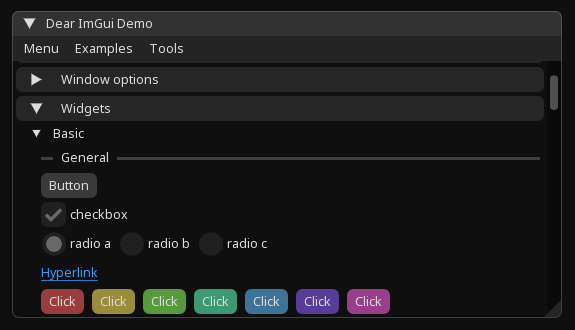
Status: Early development
Features
- Native desktop windows via GLFW
- Dear ImGui integration
- OpenGL rendering
- Configurable window options
- Borderless and resizable windows
- Maximized windows
- Transparent windows
- Topmost windows
- Mouse passthrough
- Dear ImGui docking
- Optional full-window host
- Target FPS limiter
- Embedded Noto Sans font
- .NET 10
Requirements
- .NET 10 SDK/runtime
- OpenGL 3.2+
- GLFW-compatible desktop environment
Installation
Install ImApp using the .NET CLI:
dotnet add package ImApp
Or add it directly to your .csproj:
<PackageReference Include="ImApp" Version="0.2.0" />
Quick Start
using Hexa.NET.ImGui;
using ImApp;

using var app = new App(new WindowOptions
{
    Title = "My Window",
    Width = 800,
    Height = 600
});

app.Run(() =>
{
    ImGui.Begin("Hello");

    ImGui.Text("Hello from ImApp!");

    if (ImGui.Button("Click Me"))
    {
        Console.WriteLine("Button clicked");
    }

    ImGui.End();
});
Window Options
ImApp provides a WindowOptions class for configuring the application window.
| Property | Default |
|---|---|
Title |
"ImApp Window" |
Width |
800 |
Height |
600 |
Decorated |
true |
Resizable |
true |
Transparent |
false |
Topmost |
false |
Maximized |
false |
Visible |
true |
Focused |
true |
MousePassthrough |
false |
DockingEnabled |
false |
HostWindow |
true |
TargetFps |
100 |
FontSize |
17 |
Example:
using var app = new App(new WindowOptions
{
    Title = "ImApp Window",
    Width = 1200,
    Height = 800,

    Decorated = true,
    Resizable = true,

    TargetFps = 144,
    FontSize = 18
});
Host Window
By default, ImApp provides a host ImGui window.
HostWindow = true
You can disable the host window and manage ImGui windows yourself:
using var app = new App(new WindowOptions
{
    HostWindow = false
});
This is useful when you want complete control over the Dear ImGui layout.
Docking
Dear ImGui docking can be enabled through WindowOptions.
using Hexa.NET.ImGui;
using ImApp;

using var app = new App(new WindowOptions
{
    Title = "ImApp Docking",
    Width = 1200,
    Height = 800,
    DockingEnabled = true
});

app.Run(() =>
{
    ImGui.ShowDemoWindow();
});
Transparent / Borderless Window
ImApp supports transparent and borderless windows.
using var app = new App(new WindowOptions
{
    Decorated = false,
    Transparent = true,
    MousePassthrough = true
});
This can be useful for overlays and custom desktop UI.
Font
ImApp includes Noto Sans Regular and loads it automatically.
You can configure the font size through WindowOptions:
using var app = new App(new WindowOptions
{
    FontSize = 18
});
This avoids requiring Noto Sans to be installed on the user's system.
Dependencies
ImApp is built using:
- Dear ImGui
- Hexa.NET.ImGui
- Hexa.NET.GLFW
- Hexa.NET.OpenGL
- Hexa.NET.ImGui.Backends.GLFW
- Hexa.NET.ImGui.Backends.OpenGL3
- HexaGen.Runtime
License
ImApp is released under the MIT License.
| Product | Versions Compatible and additional computed target framework versions. |
|---|---|
| .NET | net10.0 is compatible. net10.0-android was computed. net10.0-browser was computed. net10.0-ios was computed. net10.0-maccatalyst was computed. net10.0-macos was computed. net10.0-tvos was computed. net10.0-windows was computed. |
-
net10.0
- Hexa.NET.GLFW (>= 1.0.5)
- Hexa.NET.ImGui (>= 2.2.9)
- Hexa.NET.ImGui.Backends (>= 1.0.18)
- Hexa.NET.ImGui.Backends.GLFW (>= 1.0.18)
- Hexa.NET.OpenGL3 (>= 1.1.0)
NuGet packages
This package is not used by any NuGet packages.
GitHub repositories
This package is not used by any popular GitHub repositories.