JetPack.Web
0.2.2
dotnet add package JetPack.Web --version 0.2.2
NuGet\Install-Package JetPack.Web -Version 0.2.2
<PackageReference Include="JetPack.Web" Version="0.2.2" />
<PackageVersion Include="JetPack.Web" Version="0.2.2" />
<PackageReference Include="JetPack.Web" />
paket add JetPack.Web --version 0.2.2
#r "nuget: JetPack.Web, 0.2.2"
#:package JetPack.Web@0.2.2
#addin nuget:?package=JetPack.Web&version=0.2.2
#tool nuget:?package=JetPack.Web&version=0.2.2
JetPack for the web
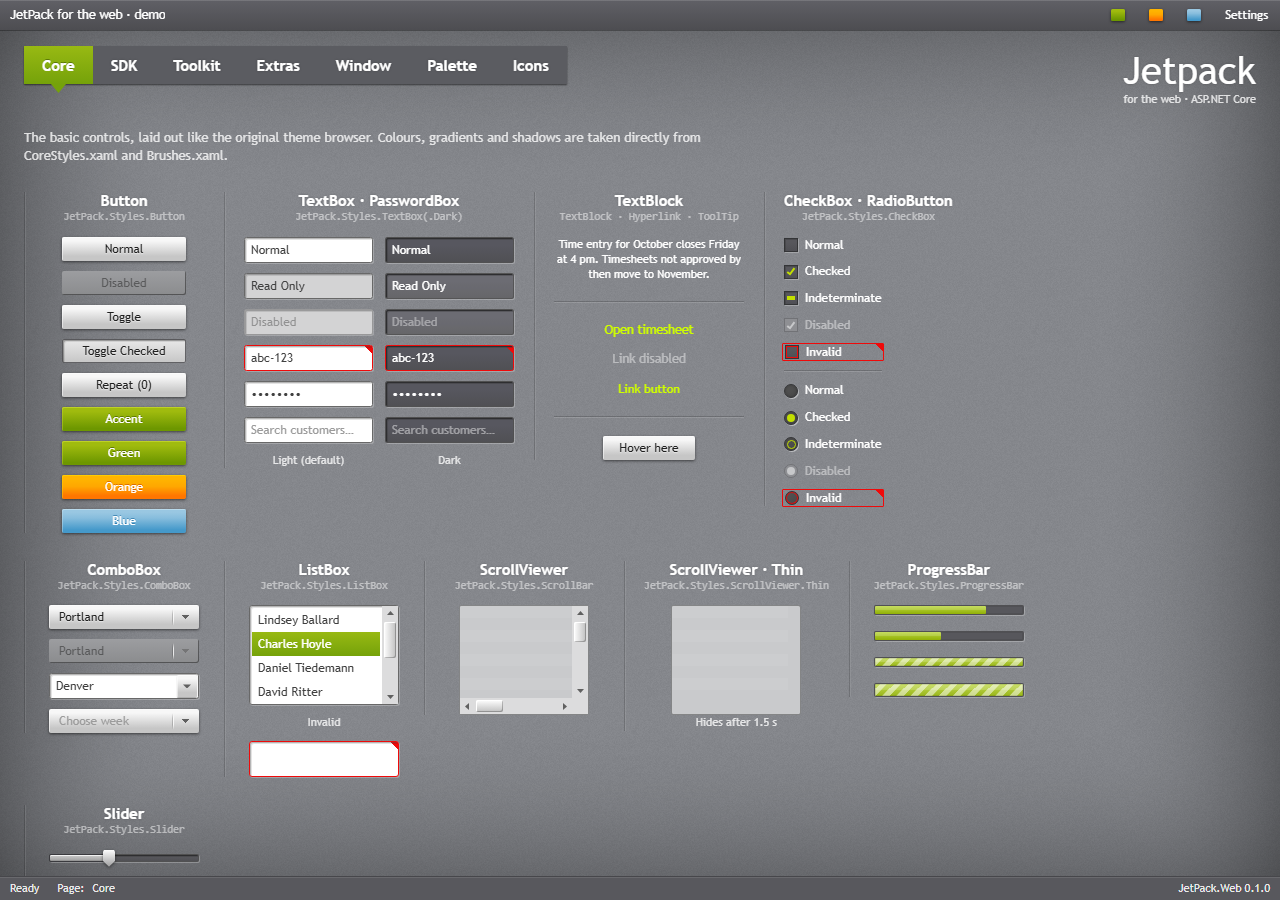
The JetPack look of JetPack.Wpf in HTML and CSS, for admin portals and other business sites on ASP.NET Core. The package is a Razor class library with:
jetpack.css: every control of the WPF library as CSS classes named after the WPF controls and style keys (.jp-combo-box,.jp-button--accent). The rules sit in cascade layers, so Tailwind or your own utility classes still win.jetpack.js: drop-downs, calendar, date and time pickers, sliders, menus, tabs, flyouts, dialogs, tool tips, validation call-outs, accents and the vignette. It has no dependencies.- Tag helpers for every control:
<jp-combo-box>,<jp-tab-control>,<jp-date-picker>,<jp-data-grid>… Their attributes are the WPF property names in kebab case. - Icons: Material Design Icons as an SVG sprite, with the same names as
JetPackIconin WPF.
Getting started
dotnet add package JetPack.Web
Add the tag helpers in _ViewImports.cshtml:
@addTagHelper *, JetPack.Web
@using JetPack.Web.TagHelpers
Load the theme in the layout's <head>, before Tailwind if you use it. Leave defer off the script,
because it sets the stored accent before the page is drawn:
<link rel="stylesheet" href="~/_content/JetPack.Web/css/jetpack.css" asp-append-version="true" />
<script src="~/_content/JetPack.Web/js/jetpack.js" asp-append-version="true"></script>
Then write the controls as you would in XAML:
<jp-button button-style="Accent">Save</jp-button>
<jp-text-box asp-for="Name" watermark="Search…" clear-text-button="true" />
<jp-tab-control tab-control-style="Strip">
    <jp-tab-item header="Core">…</jp-tab-item>
    <jp-tab-item header="SDK">…</jp-tab-item>
</jp-tab-control>
Switch the accent from script:
JetPack.ThemeManager.changeAccent('orange'); // green, orange, blue or any #hex colour
Documentation
Tag helpers, classes, icons and ThemeManager: https://montago.github.io/JetPackTheme/web.html
Source, the web demo and issues: https://github.com/Montago/JetPackTheme
License
MIT, except the icons (img/icons.svg), which are Material Design Icons under the Apache License 2.0
(icons/ in the package). See NOTICE.md in the package for where the look comes from.
| Product | Versions Compatible and additional computed target framework versions. |
|---|---|
| .NET | net8.0 is compatible. net8.0-android was computed. net8.0-browser was computed. net8.0-ios was computed. net8.0-maccatalyst was computed. net8.0-macos was computed. net8.0-tvos was computed. net8.0-windows was computed. net9.0 was computed. net9.0-android was computed. net9.0-browser was computed. net9.0-ios was computed. net9.0-maccatalyst was computed. net9.0-macos was computed. net9.0-tvos was computed. net9.0-windows was computed. net10.0 was computed. net10.0-android was computed. net10.0-browser was computed. net10.0-ios was computed. net10.0-maccatalyst was computed. net10.0-macos was computed. net10.0-tvos was computed. net10.0-windows was computed. |
-
net8.0
- No dependencies.
NuGet packages
This package is not used by any NuGet packages.
GitHub repositories
This package is not used by any popular GitHub repositories.