MiniPty.Capture
1.7.1
dotnet add package MiniPty.Capture --version 1.7.1
NuGet\Install-Package MiniPty.Capture -Version 1.7.1
<PackageReference Include="MiniPty.Capture" Version="1.7.1" />
<PackageVersion Include="MiniPty.Capture" Version="1.7.1" />
<PackageReference Include="MiniPty.Capture" />
paket add MiniPty.Capture --version 1.7.1
#r "nuget: MiniPty.Capture, 1.7.1"
#:package MiniPty.Capture@1.7.1
#addin nuget:?package=MiniPty.Capture&version=1.7.1
#tool nuget:?package=MiniPty.Capture&version=1.7.1


MiniPty
A cross-platform, NativeAOT-ready pseudo-terminal (PTY) library for .NET that hosts thousands of shells per process for browsers, editors, and AI agents.
Motivation
I needed a PTY library for high-performance NativeAOT projects. MiniPty provides a simple API, no third-party dependencies, and in-process backends built for NativeAOT publishing.
Features
- NativeAOT ready: No dependencies, no winpty, and no helper process running beside a session.
- Cross-platform: Windows, Linux, and macOS (FreeBSD is experimental)
- Scaling: Scales to thousands of sessions. 1,000 idle shells use no thread per shell and no CPU, and add 6.4 MiB (Linux) to 10.3 MiB (Windows) to the host process.
- Allocation-free steady state: Reading chunks, writing input, and waiting for exit allocate nothing after the first call.
- Safe signal, file descriptor handling: Handles signals and file descriptors safely, avoiding issues with PID reuse and ensuring proper cleanup.
- Metrics: Meters report open sessions, start time, output bytes, and stalls.
Not supported
- Remote shells (
ssh) or tunneling a PTY over the network - Full terminal emulation, TUI replay, or faithfully preserving
\roverwrite lines - Pipe redirection when PTY creation fails
Platforms
MiniPty creates a real PTY on each supported OS. See Backends for how each OS creates the PTY.
| OS | Architectures | Status |
|---|---|---|
| Windows 10 1809+ / Windows 11 / Windows Server 2019+ | x64, arm64, x86 (32-bit processes on x64 Windows tested) | Supported |
| Linux, glibc 2.27+ | x64, arm64 | Supported |
| Linux, musl 1.2.3+ (Alpine) | x64, arm64 | Supported |
| macOS 12.0+ | x64, arm64 | Supported |
| FreeBSD 14.4+ | x64 (tested), arm64 (compiled only) | Experimental |
The Linux and macOS minimums apply to the native files. They cover at least the OS versions that .NET 10 supports. Windows requires ConPTY, introduced in Windows 10 1809 and Windows Server 2019. .NET 10 also supports earlier builds, such as Windows 10 1607 and Windows Server 2016. On those builds, Pty.IsSupported is false and Pty.Start throws PlatformNotSupportedException. The FreeBSD support is experimental, it compiles & tests on Container & CI for 14.4 and 15.1.
Native files
Your application needs these files in addition to the MiniPty assembly. The package and dotnet publish place them for you.
| OS | Files beside the application | Under NativeAOT |
|---|---|---|
| Windows | None: ConPTY comes with Windows. The out-of-band ConPTY is optional and supplied by your application | None |
| Linux (x64, arm64, glibc and musl) | libminipty_unix.so |
None. The shim links into the executable. |
| macOS (x64, arm64) | libminipty_unix.dylib and minipty_spawn_helper |
minipty_spawn_helper only. The shim links into the executable. The launcher must remain beside the executable, where MiniPty searches for it. |
| FreeBSD (experimental) | libminipty_unix.so. The package does not include it. Building MiniPty from source on FreeBSD compiles it with cc. |
Not supported by the package |
Performance
The numbers below are from run 43832148088 on 2026-11-16, with .NET 10.0.15 on GitHub Actions hosted runners:
- Linux (
ubuntu-24.04): Intel Xeon 6975P-C 2.84GHz, 1 CPU, 4 logical and 2 physical cores - macOS (
macos-26): Apple M1 (Virtual), 1 CPU, 3 logical and 3 physical cores - Windows (
windows-2025): INTEL XEON PLATINUM 8573C 2.30GHz, 1 CPU, 4 logical and 2 physical cores
PtyLatencyBenchmarks benchmarks the keystroke round trip, time from writing one byte to reading the child's echo. On Windows, the ConPty parameter selects either ConPTY implementation for each library. The in-box ConPTY repaints on its own frame schedule, which determines round-trip latency for any library. The out-of-band ConPTY removes that wait.
| Runner | ConPty |
MiniPty P50 / P95 |
PortaPty P50 / P95 |
Allocated (MiniPty / PortaPty) |
|---|---|---|---|---|
| Linux | none | 53.75 μs / 85.93 μs | 54.05 μs / 90.26 μs | 0 B / 680 B |
| macOS | none | 52.71 μs / 287.28 μs | 38.23 μs / 71.72 μs | 0 B / 680 B |
| Windows | out-of-band | 215.8 μs / 317.3 μs | 202.9 μs / 237.8 μs | 0 B / 376 B |
| Windows | in-box | 11,835.1 μs / 21,266.8 μs | 14,304.4 μs / 21,819.4 μs | 0 B / 0 B |
PtyThroughputBenchmarks measures output throughput, the child writes 1 MiB of 77-character lines, read until its end marker. On Windows, the ConPty renders the child's output and sends its own VT stream. On Windows, this benchmark mainly measures ConPTY rendering speed rather than byte-pipe throughput.
| Runner | ConPty |
MiniPty MiB/s |
PortaPty MiB/s |
Allocated (MiniPty / PortaPty) |
|---|---|---|---|---|
| Linux | none | 398.8 | 407.6 | 0 B / 65679 B |
| macOS | none | 57.1 | 74.7 | 0 B / 492200 B |
| Windows | out-of-band | 4.8 | 5.1 | 0 B / 884757 B |
| Windows | in-box | 3.8 | 4.3 | 548 B / 53 B |
PtyStartupBenchmarks measures session start time, one session from Pty.Start to exit. It uses the OS shell (cmd.exe /c on Windows, sh -c elsewhere), so process creation accounts for most of the time. Session_Exit0_WaitForExit runs exit 0 and waits for exit. Session_Echo_Bytes runs echo and reads all output.
| Runner | Session_Exit0_WaitForExit Mean / Allocated |
Session_Echo_Bytes Mean / Allocated |
|---|---|---|
| Linux | 509.1 μs / 1.29 KB | 525.8 μs / 1.84 KB |
| macOS | 6.222 ms / 1.3 KB | 8.361 ms / 1.84 KB |
| Windows | 17.33 ms / 1.26 KB | 20.66 ms / 1.9 KB |
PtyStartupHostMemoryBenchmarks measures session start in a large host with the same Session_Exit0_WaitForExit operation with extra host memory. The host holds either 0 or 2 GiB of resident memory beyond the runtime's own, as an IDE backend or web terminal may.
| Runner | HostResidentMiB 0: Mean / Allocated |
HostResidentMiB 2048: Mean / Allocated |
|---|---|---|
| Linux | 508.1 μs / 1.29 KB | 511.2 μs / 1.29 KB |
| macOS | 6.193 ms / 1.3 KB | 6.383 ms / 1.3 KB |
| Windows | 18.97 ms / 1.3 KB | 19.25 ms / 1.26 KB |
Scaling is what MiniPty performs efficiently. On Linux, threads in the host process go from 9 to 11 with 3,000 idle shells. A thread per shell would need more than 3,000.
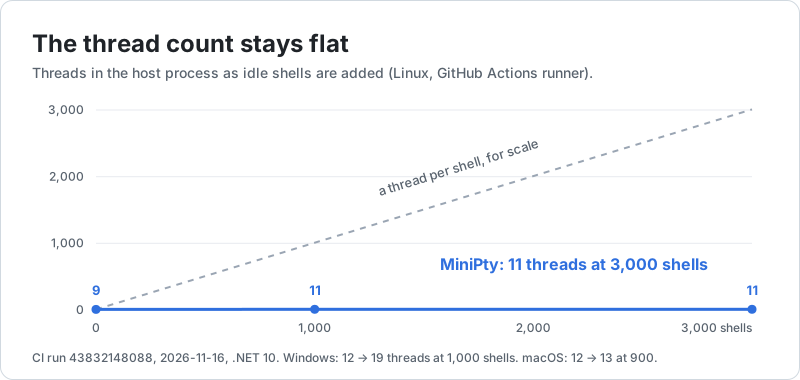
The idle probe ran after the benchmarks in run 43832148088, on the same runners:
| Runner | Library | Sessions | All prompts shown | Threads | Working set | Managed heap | Idle CPU | Idle allocations |
|---|---|---|---|---|---|---|---|---|
| Linux | MiniPty |
1000 | 0.4 s | 9 → 11 | +6.4 MiB | +1.2 MiB | 0.0 ms/s | 0 B |
| Linux | MiniPty |
3000 | 1.2 s | 9 → 11 | +12.9 MiB | +2.9 MiB | 0.0 ms/s | 0 B |
| Linux | PortaPty |
1000 | 196 of 1000 after 120 s | 9 → 1255 | +120.4 MiB | +5.6 MiB | 2.0 ms/s | 53640 B |
| Linux | PortaPty, UseAsyncIo |
1000 | 1.7 s | 11 → 13 | +95.1 MiB | +5.0 MiB | 0.0 ms/s | 0 B |
| macOS | MiniPty |
900 | 5.5 s | 12 → 13 | +3.2 MiB | +0.9 MiB | 0.1 ms/s | 0 B |
| macOS | PortaPty |
900 | 237 of 900 after 120 s | 13 → 1195 | +48.7 MiB | +5.2 MiB | 7.5 ms/s | 65960 B |
| macOS | PortaPty, UseAsyncIo |
900 | 15.6 s | 14 → 14 | +21.2 MiB | +4.4 MiB | 0.1 ms/s | 0 B |
| Windows | MiniPty |
1000 | 7.4 s | 12 → 19 | +10.3 MiB | +4.6 MiB | 0.0 ms/s | 0 B |
| Windows | PortaPty |
1000 | 132 of 1000 after 120 s | 12 → 185 | +62.7 MiB | +5.9 MiB | 0.0 ms/s | 26488 B |
| Windows | PortaPty, UseAsyncIo |
1000 | 8.8 s | 13 → 35 | +92.3 MiB | +6.0 MiB | 0.0 ms/s | 0 B |
- Sessions is 1,000 on Linux and Windows. Linux also runs MiniPty with 3,000. macOS allows at most 999 PTYs on the whole machine (
kern.tty.ptmx_max, 511 by default). So the workflow sets the limit to 999 and runs 900 sessions there. - Threads counts all the threads of the process, before the first session and with all sessions open. MiniPty adds no thread per session. Its few more threads are thread-pool threads from the start of the sessions.
- All prompts shown is the time from the first start until the last session shows its prompt. With its default options, Porta.Pty serves each pending
ReadAsyncon a thread-pool thread, as itsUseAsyncIodocumentation says. On Linux and macOS it also starts a watcher thread for each child. The pool adds threads slowly, so most sessions had not shown a prompt when the probe stopped waiting. WithUseAsyncIo = true, Porta.Pty holds no thread per session either. MiniPty needs no such option (Coming from Porta.Pty). Working setandManaged heapare the growth of the host process. On Windows each session also has a console host process (conhost.exe) beside the shell, which the table does not count. On the Windows runner, most of MiniPty's managed heap is 16 KiB output buffers. MiniPty rents one while output waits, and its pool keeps the ones that the prompts used at the same time (PinnedHeapGrowthMiBin the probe's report). In a local run with 3,000 sessions on Windows, the machine had about 13 GB less free memory, most of it in those processes.
To confirm on your machine, run the following command. Use --library porta or --library porta-async to measure Porta.Pty.
dotnet run -c Release --project src/MiniPty.Benchmarks -- --idle-probe --library minipty --sessions 1000
Quick start
dotnet add package MiniPty            # PTY sessions
dotnet add package MiniPty.Capture    # timestamped output capture
dotnet add package MiniPty.Console    # attach the host terminal (vim, etc.)
dotnet add package MiniPty.Terminal   # backend for xterm.js and editor terminals
MiniPty
Start a child with Pty.Start. Use CompleteAsync to collect its result, or use WriteInputAsync and ReadOutputAsync to interact with it. Run this example with dotnet samples/SingleFiles/README_MiniPty.cs. For more examples, run a command with stdin and EOF. Or control an interactive program by waiting for output before sending input.
using MiniPty;

var shell = OperatingSystem.IsWindows() ? "cmd.exe" : "/bin/sh";

// Run a command for its result: CompleteAsync drains the output and waits for exit.
// KillProcessTree also ends what the command started when the session ends, so nothing outlives the result.
await using (var run = Pty.Start(new PtyStartInfo
{
    FileName = shell,
    Arguments = [OperatingSystem.IsWindows() ? "/c" : "-c", "echo hello"],
    KillProcessTree = true,
}))
{
    var result = await run.CompleteAsync();
    Console.WriteLine($"exit={result.ExitCode}: {PtyOutput.ToDisplayText(result.GetText(), PtyOutputDisplayMode.PlainText).Trim()}");
}

// Drive a session: write input, resize at any time, and stream output until the child exits.
await using var session = Pty.Start(new PtyStartInfo { FileName = shell, Size = new PtySize(120, 30) });
await session.WriteInputAsync("echo hello\r");
await session.WriteInputAsync("exit\r");
session.Resize(new PtySize(100, 40));

using var stdout = Console.OpenStandardOutput();
await foreach (var chunk in session.ReadOutputAsync())
    await stdout.WriteAsync(chunk.Data);

Console.WriteLine($"exit={(await session.WaitForExitAsync()).ExitCode}");
MiniPty.Capture
Run a child and collect its output, exit code, and each read's time since Pty.Start. Run this example with dotnet samples/SingleFiles/README_MiniPty.Capture.cs. For an example with stdin and a printed timeline, see Capture output with timing.
using MiniPty;
using MiniPty.Capture;

var result = await PtyCapture.RunAsync(new PtyStartInfo
{
    FileName = OperatingSystem.IsWindows() ? "cmd.exe" : "/bin/sh",
    Arguments = [OperatingSystem.IsWindows() ? "/c" : "-c", "echo hello"],
});

foreach (var chunk in result.Chunks)
    Console.WriteLine($"{chunk.Time.TotalSeconds:F3}s: {chunk.Data.Length} bytes");

Console.WriteLine(result.ToDisplayText(PtyOutputDisplayMode.PlainText));
MiniPty.Console
Attach the host terminal to a session to send keyboard input and window size changes to interactive programs such as vim. Your application must read the output. Run dotnet samples/SingleFiles/README_MiniPty.Console.cs from an interactive terminal. See Hand your terminal to a program for status messages and shell prompt alignment after exit. See the TUI demo for full-screen programs.
On Windows, the host console reads input as UTF-8 while attached and restores the previous input code page on detach. Non-ASCII input, such as Japanese text, reaches the PTY as UTF-8. A legacy console output code page misdecodes the PTY's UTF-8 bytes. Set Console.OutputEncoding = Encoding.UTF8 while copying output.
using MiniPty;
using MiniPty.Console;

await using var session = Pty.Start(new PtyStartInfo { FileName = OperatingSystem.IsWindows() ? "cmd.exe" : "/bin/bash" });

// Keyboard input and window resizes now go to the PTY.
using var input = PtyConsoleInput.Attach(session);

// MiniPty.Console does not read output: copy it to stdout yourself.
var output = CopyOutputAsync(session);

// Forward keys until the child exits.
using var exited = new CancellationTokenSource();
_ = session.WaitForExitAsync().ContinueWith(_ => exited.Cancel());
input.PumpInputUntil(exited.Token);
await output;

static async Task CopyOutputAsync(PtySession session)
{
    using var stdout = Console.OpenStandardOutput();
    await foreach (var chunk in session.ReadOutputAsync())
    {
        await stdout.WriteAsync(chunk.Data);
        await stdout.FlushAsync();
    }
}
MiniPty.Terminal
Connect a PTY to xterm.js or an editor terminal, as node-pty does for VS Code. Run the complete server with dotnet samples/SingleFiles/WebTerminal.cs. Open the address it prints. This integration snippet requires an existing webSocket and cancellation token ct. It starts Bash on Unix.
using MiniPty;
using MiniPty.Terminal;

// webSocket: any System.Net.WebSockets.WebSocket (Kestrel, HttpListener, ...)
// ct: cancel it when the connection ends (for example HttpContext.RequestAborted)
var status = await PtyWebSocketBridge.RunAsync(
    new PtyStartInfo { FileName = "/bin/bash", Size = new PtySize(120, 30) },
    webSocket,
    cancellationToken: ct);
Console.WriteLine($"shell exited: {status.ExitCode}");
See the web terminal guide for authentication, browser code, and flow control. See also the VS Code terminal backend.
Other entry points:
PtyWebSocketSessionManager: reconnectable browser sessions with authentication and replay.PtyStdioBridge: length-prefixed frames over stdio, for a helper process such as VsCodeTerminalHelper.cs behind the VS Code extension sample.PtyTerminal: a node-pty-style push API with pause/resume flow control, for your own transport.
To open read-only terminals, pass new PtyBridgeOptions { ReadOnly = true } to any bridge (read-only terminals).
Protocol and bridging details: terminal.md.
Backends
Each OS has its own backend behind the same API. No backend uses winpty or keeps a helper process running beside a session.
Windows: ConPTY
MiniPty calls Win32 ConPTY (CreatePseudoConsole) directly through P/Invoke. It attaches the child with PROC_THREAD_ATTRIBUTE_PSEUDOCONSOLE and resizes with ResizePseudoConsole. One background loop waits on MiniPty's I/O completion port and reads output from all sessions. An idle session holds no thread and no output buffer. Applications can supply the out-of-band ConPTY (conpty.dll + OpenConsole.exe) per session through PtyStartInfo.ConPty. See Out-of-band ConPTY.
Linux: clone
The small libminipty_unix native shim opens the PTY. It starts the child with clone(CLONE_VM | CLONE_VFORK), as posix_spawn does, then calls execve inside the PTY. Unlike fork, this does not copy the host, so startup costs remain the same with a large host heap. Resize uses TIOCSWINSZ.
One background loop uses epoll on the exit watcher's thread to read output and write queued input for all sessions. An idle session holds no thread and no output buffer.
macOS: posix_spawn + launcher
MiniPty uses the Unix backend through libminipty_unix.dylib. It starts each child through minipty_spawn_helper, using posix_spawn rather than forkpty. This small launcher takes the terminal as its controlling terminal, then replaces itself with the child through exec. No helper process remains. Resize uses TIOCSWINSZ. Input and output use the same single loop as on Linux, with kqueue instead of epoll.
FreeBSD (experimental): fork
MiniPty uses the Unix backend through libminipty_unix.so. Building MiniPty from source on FreeBSD compiles this shim with cc. It opens the terminal with close-on-exec and starts each child with fork. The child takes the terminal as its controlling terminal and calls exec, as on Linux. Input and output use the same single kqueue loop as on macOS.
Advanced
Good to know
- Keep reading output. An unread PTY fills its buffer and blocks the child.
ReadOutputAsync,CompleteAsync, and theOutputstream all drain it. CompleteAsyncandPtyCapture.RunAsynckeep all output in memory. They take about six times the output's size until the result is built (about twice withDecodeOutput = false). For a child whose output you do not control, setPtyCompleteOptions.MaxOutputBytes: past it the child is killed and the call throwsIOException(Output limit).- A chunk is not one write of the child. It is the output waiting when you read. On Windows
ReadOutputAsyncjoins a burst, such as a flood or a large repaint, into chunks of up to 8 KiB, handed out at most about 2 ms after the read asked, so a flood wakes your reader a few times per 32 KiB instead of once per ConPTY piece of about 256 B. A keystroke's echo after idle is handed out at once (Backpressure). - Disposal ends the child. Windows terminates it. Unix sends
SIGHUPso a shell can save its history, then kills the child if it does not exit within one second (Session contract). To end what the child started too, see Process tree. Environmentoverlays the parent's. A null value removes a variable. On Unix,TerminalNamesetsTERM, which defaults toxterm-256color(Spawn environment). To keep your process's variables out of the child, see Environment for shared hosts.- MiniPty is not a sandbox. The child runs with your permissions. If a program name, path, or argument comes from untrusted input, read Untrusted program names and paths and Batch files first.
Out-of-band ConPTY for Windows
Use the out-of-band ConPTY library for terminal emulators on Windows.
In-box means the ConPTY that comes with Windows itself.
The in-box ConPTY drops graphics protocols (Sixel, Kitty) and some terminal queries. It forwards mouse tracking only to programs that read VT input. Its behavior changes with Windows updates. Windows Terminal ships the ConPTY that Microsoft publishes as Microsoft.Windows.Console.ConPTY. This version forwards everything and behaves the same on every Windows build.
Before Windows 11 24H2, the in-box host also has the following differences. Only Windows Server 2022 (build 20348) was measured among those builds (verification):
- It does not forward alternate-screen switches or cursor hiding. Full-screen programs therefore draw on the main screen with the cursor visible.
- After a full-width row, it assumes that pending wrap survives
ESC[K. xterm clears pending wrap, so the next row starts one column to the left.
MiniPty cannot change either behavior. Terminal emulators on these builds should use the out-of-band ConPTY. Also await DisposeAsync before your process exits on these builds. Disposal keeps the in-box host's output open until the host exits, for at most one second. If the output closes too early, the host can run indefinitely.
# Use the out-of-band ConPTY library, 1.25 or later (older ones can stall three seconds at startup)
dotnet add package Microsoft.Windows.Console.ConPTY --version 1.25.260930003
MiniPty's build targets copy OpenConsole.exe where conpty.dll looks for it: beside it, or, for a 32-bit application, into a subdirectory per Windows architecture, because a 32-bit application on 64-bit Windows needs the 64-bit host. Both run native code with your application's permissions. Store them with the same protection as your application binaries. Update the package to receive security fixes (details and measurements).
using MiniPty;

// Null on Unix, or when conpty.dll is not beside your application: the session then uses the in-box ConPTY.
var conpty = ConPtyLibrary.TryLoadFromApplicationDirectory();
if (conpty is { HasConsoleHost: false })
    Console.Error.WriteLine("OpenConsole.exe is missing; sessions fall back to conhost.exe");

await using var session = Pty.Start(new PtyStartInfo { FileName = "cmd.exe", ConPty = conpty });
Process tree
KillProcessTree = true ends every process the child started, not only the child. Enable it for commands whose results you collect, such as CI steps, test runners, and agent tool calls. Leave it disabled for interactive terminals where a program that the user started (code .) should outlive the tab (process tree).
- Windows: the child runs in a job. Disposal,
Kill, and the end of your process close the job, also when your process crashes. This also ends programs with their own console. - Unix: disposal,
Kill, and a normal exit of your process signal the child's process group, so a descendant started withnohupends too. MiniPty does not reach a descendant that moves to a process group of its own, for example a job of an interactive shell. A crash of your process ends nothing. After the child exits, MiniPty keeps its zombie until it kills the group, so no other process can get the group's id.
await using var session = Pty.Start(new PtyStartInfo
{
    FileName = OperatingSystem.IsWindows() ? "cmd.exe" : "/bin/sh",
    Arguments = OperatingSystem.IsWindows() ? ["/c", "npm test"] : ["-c", "npm test"],
    KillProcessTree = true,
});
Windows options
InheritCursor = true preserves the frontend's screen contents instead of letting ConPTY clear them. The frontend must answer ConPTY's cursor position query, or the child waits (inherited cursor). Unix ignores it.
Signals and descriptors
The child gets only its terminal and default signal handling, even while other threads start processes. Your process keeps its own signal handlers (child setup). If other code in your process reaps every child (waitpid(-1, ...)), ExitCode is 0.
await using var session = Pty.Start(new PtyStartInfo { FileName = "sleep", Arguments = ["60"] });
session.Kill(PtySignal.Terminate); // Linux 5.2+: sent through the child's pidfd, never to a reused PID

var status = await session.WaitForExitAsync();
Console.WriteLine(status.ExitCode);        // 143 = 128 + SIGTERM
Console.WriteLine(status.Signal);          // 15, or null when the child exits by itself (even with 143)
Console.WriteLine(status.NodePtyExitCode); // 0, as node-pty reports a signal
| Signal | Number | ExitCode |
Typical cause |
|---|---|---|---|
SIGHUP |
1 | 129 | Disposal, Kill(PtySignal.Hangup) |
SIGINT |
2 | 130 | Ctrl+C (0x03) written to the session, Kill(PtySignal.Interrupt) |
SIGQUIT |
3 | 131 | Ctrl+\ (0x1C) written to the session, Kill(PtySignal.Quit) |
SIGABRT |
6 | 134 | abort() in the child |
SIGKILL |
9 | 137 | Kill(), Kill(PtySignal.Kill), disposal when the child still runs 1 s after SIGHUP |
SIGUSR1 |
10 (Linux), 30 (macOS, FreeBSD) | 138, 158 | Kill(PtySignal.User1) |
SIGSEGV |
11 | 139 | Invalid memory access in the child |
SIGUSR2 |
12 (Linux), 31 (macOS, FreeBSD) | 140, 159 | Kill(PtySignal.User2) |
SIGPIPE |
13 | 141 | A write to a closed pipe or socket |
SIGTERM |
15 | 143 | Kill(PtySignal.Terminate) |
Windows Signal is always null, and Kill ends the child with exit code 1.
Environment for shared hosts
A web host's environment contains connection strings and cloud credentials that its shells should not receive. InheritEnvironment = false gives the child only the required environment: SystemRoot on Windows, and TERM on Unix. Additional variables reach the child only through Environment. Pass the variables your shells need explicitly (spawn environment).
This does not isolate the child. A child running as the same user can still read your process's environment through the OS, such as /proc/<pid>/environ on Linux. Run shells for untrusted users as another user or in a container.
await using var session = Pty.Start(new PtyStartInfo
{
    FileName = "bash",
    InheritEnvironment = false,
    Environment = new Dictionary<string, string?>
    {
        ["PATH"] = Environment.GetEnvironmentVariable("PATH"),
        ["HOME"] = "/home/tenant",
        ["LANG"] = "C.UTF-8",
    },
});
Shells in a process of their own
A web host can keep its shells in a separate PTY host process that owns them with PtyWebSocketSessionManager, and relay each browser's WebSocket to it. The web server can then be redeployed or crash without ending the shells: the page reconnects, and the PTY host replays what the page has not received. The PTY host can also run as the shells' own account or in their container, away from the web server's secrets. WebTerminalPtyHost shows both processes and the relay (design).
Password prompts
On Unix, InputMode reports whether the terminal echoes what is typed and whether it reads a line at a time. A program that reads a password, such as sudo or ssh, turns echo off and keeps line input. A host that types for a user, such as an agent or a test script, can check this before it types:
if (session.InputMode is { Echo: false, Canonical: true })
{
    // What is typed next will not be shown: ask a person for it, and keep it out of logs.
}
InputMode is null on Windows, whose pseudo-console offers no way to read the input mode, and after the child exits. It sees only this terminal: a password read inside tmux, or on a remote host through ssh, is not reported (session contract).
Metrics
The MiniPty meter reports open sessions, start time and failures, output bytes, and stalls caused by a full output buffer. On Unix, it also reports the consumer's native waits for output. Without listeners, MiniPty only tracks the open session count. It takes no timestamps and allocates nothing (metrics).
With OpenTelemetry, add the meter as shown below. AspireTerminal uses this configuration to export metrics to the Aspire dashboard.
builder.Services.AddOpenTelemetry().WithMetrics(metrics => metrics.AddMeter("MiniPty"));
Use dotnet-counters to read the meter from a running process without application configuration:
dotnet-counters monitor --counters MiniPty --process-id <pid>
Use a MeterListener to read metrics without OpenTelemetry. WebTerminalScale displays them beside host thread and memory usage. WinUiTerminal and AvaloniaTerminal display them in their status lines.
GUI hosts
WinUI, WPF, WinForms, and Avalonia can call every MiniPty API on the UI thread without blocking it or requiring marshaling. For full terminal emulators, see WinUiTerminal (Windows) and AvaloniaTerminal (Windows, Linux, macOS). See also GUI hosts.
This integration snippet uses your application's shell, dimensions, view, and window.
// All on the UI thread.
var session = Pty.Start(new PtyStartInfo
{
    FileName = shell,
    Size = new PtySize(columns, rows),
    ConPty = ConPtyLibrary.TryLoadFromApplicationDirectory(),   // null on Unix, so the same line works everywhere
});

view.SizeChanged += (_, _) => session.Resize(new PtySize(view.Columns, view.Rows));
view.TextInput   += async (_, text) => await session.WriteInputAsync(text);
window.Closed    += async (_, _) => await session.DisposeAsync();

await foreach (var chunk in session.ReadOutputAsync())
    view.Feed(chunk.Data.Span);   // your VT parser and renderer
Samples
Each guide explains how to build that kind of application with MiniPty.
| Building | Guide | Package |
|---|---|---|
| A tool that runs commands, drives programs, or records their output | Single-file samples | MiniPty, MiniPty.Capture |
| A host that reads the screen a program draws, with Ghostty's or another VT engine | VT engine samples | MiniPty |
| A program that connects your terminal to a shell or editor | ConsoleAttach.cs | MiniPty.Console |
| A full-screen TUI in your current terminal | TuiDemo | MiniPty.Console |
| A terminal window on Windows | WinUiTerminal | MiniPty |
| A terminal window on Windows, Linux, and macOS | AvaloniaTerminal | MiniPty |
| A terminal in the browser (xterm.js) | Web terminal | MiniPty.Terminal |
| A browser terminal whose shells survive a web server restart | WebTerminalPtyHost | MiniPty.Terminal |
| A browser terminal with metrics in the Aspire dashboard | AspireTerminal | MiniPty.Terminal |
| A VS Code terminal backend | VsCodeExtension | MiniPty.Terminal |
Run them locally (JIT):
dotnet samples/SingleFiles/Session.cs
# open the http://localhost:5170/#token=... address it prints
dotnet samples/SingleFiles/WebTerminal.cs
# interactive terminal
dotnet run --project samples/TuiDemo -c Release
# Windows only
dotnet run --project samples/WinUiTerminal
# Windows, Linux, macOS GUI terminal
dotnet run --project samples/AvaloniaTerminal
# browser terminal and the Aspire dashboard with MiniPty's metrics
dotnet run samples/AspireTerminal/apphost.cs
Publish with NativeAOT using the same flags as CI. On Linux and macOS, first run bash scripts/build-native.sh <rid> for the target runtime identifier.
dotnet publish samples/SingleFiles/Session.cs -c Release -r linux-x64 --self-contained true -p:PublishAot=true -p:StripSymbols=true -p:DebugType=None
Coming from Porta.Pty
Porta.Pty and MiniPty do the same core work. Both start a real PTY on Windows, Linux, and macOS, and both work with NativeAOT. Both report the signal that ended the child, and both can start a child without the parent's environment. Speed depends on the runner, and neither library leads on all of them (Performance).
| Porta.Pty | MiniPty |
|---|---|
await PtyProvider.SpawnAsync(options, ct) |
Pty.Start(startInfo), which returns at once |
PtyOptions.App, CommandLine |
PtyStartInfo.FileName, Arguments |
VerbatimCommandLine = true |
CommandLine, a command line that MiniPty does not escape (Windows only) |
Cols, Rows |
Size = new PtySize(cols, rows) |
Cwd |
WorkingDirectory |
Environment: an empty value removes a variable |
Environment: a null value removes a variable |
InheritEnvironment |
InheritEnvironment |
WriterStream.WriteAsync and FlushAsync |
WriteInputAsync(bytes) or WriteInputAsync(text) |
ReaderStream.ReadAsync(buffer) |
await foreach (var chunk in session.ReadOutputAsync()), or the Output stream |
UseAsyncIo = true, SupportsCancellableRead |
Not needed. On every OS a session that waits for output holds no thread, and you can cancel ReadOutputAsync with its token. |
Resize(cols, rows) |
Resize(new PtySize(cols, rows)) |
ProcessExited, ExitCode, ExitSignal, HasExited |
await WaitForExitAsync(), HasExited, or ExitStatus, with ExitCode and Signal |
WaitForExit(ms) |
WaitForExitAsync(cancellationToken) |
Kill() |
Kill(), or Kill(PtySignal.Terminate) and the other signals on Unix |
KillAsync(entireProcessTree, grace) |
Disposal sends SIGHUP on Unix, then SIGKILL after one second. For another grace, call Kill(PtySignal.Hangup), wait, and call Kill(). To end the whole tree, set KillProcessTree = true at start: Kill() and disposal then end the tree, on Unix through the child's process group (Process tree). |
Pid |
ProcessId |
Dispose() |
await DisposeAsync() or Dispose() |
| The out-of-band ConPTY, used when it is present | Add the package and set ConPty = ConPtyLibrary.TryLoadFromApplicationDirectory(). Without ConPty, MiniPty uses the in-box ConPTY. |
MiniPty also has these features:
InputModeshows when a program on Unix turns off echo for a password.CompleteAsyncandMiniPty.Capturerun a command for its result.MiniPty.Terminalconnects a session to a browser or an editor terminal, and reconnects with replay.MiniPty.Consoleattaches the host terminal to a session.- The
MiniPtymeter reports open sessions, start time, output bytes, and stalls.
The playground replays real sessions with each MiniPty call, such as the InputMode change at a password prompt.
Development
Use dotnet for local development, debugging, or publishing.
Documentation
- Specification — API contracts, scope, document map, lessons learned
- Lifecycle — responsibility split, session flow diagram, cancellation, EOF, drain, disposal
- Implementation reference — ConPTY, Unix process start, EOF staging
Build
dotnet build
dotnet test
dotnet pack
| Product | Versions Compatible and additional computed target framework versions. |
|---|---|
| .NET | net10.0 is compatible. net10.0-android was computed. net10.0-browser was computed. net10.0-ios was computed. net10.0-maccatalyst was computed. net10.0-macos was computed. net10.0-tvos was computed. net10.0-windows was computed. |
-
net10.0
- MiniPty (>= 1.7.1)
NuGet packages
This package is not used by any NuGet packages.
GitHub repositories
This package is not used by any popular GitHub repositories.