MiniPty.Console
1.2.0
See the version list below for details.
dotnet add package MiniPty.Console --version 1.2.0
NuGet\Install-Package MiniPty.Console -Version 1.2.0
<PackageReference Include="MiniPty.Console" Version="1.2.0" />
<PackageVersion Include="MiniPty.Console" Version="1.2.0" />
<PackageReference Include="MiniPty.Console" />
paket add MiniPty.Console --version 1.2.0
#r "nuget: MiniPty.Console, 1.2.0"
#:package MiniPty.Console@1.2.0
#addin nuget:?package=MiniPty.Console&version=1.2.0
#tool nuget:?package=MiniPty.Console&version=1.2.0



MiniPty
NativeAOT-friendly minimal cross-platform pseudo-terminal library for .NET.
Motivation
I needed a PTY library for NativeAOT projects, but existing .NET PTY libraries don't reliably work with NativeAOT. MiniPty is a minimal PTY library with a simple API, no third-party dependencies, and in-process backends built for AOT publish.
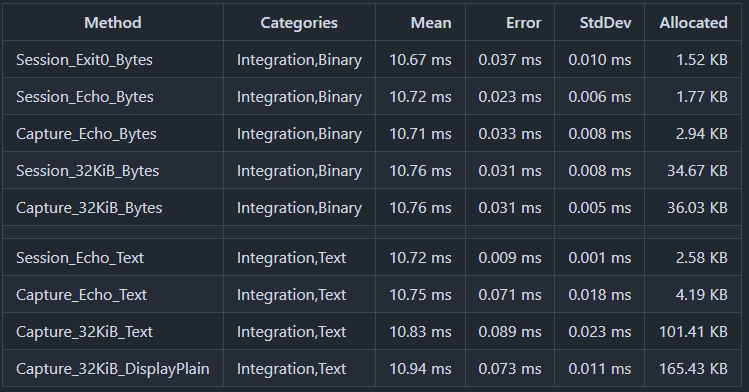
Benchmarks
You can check various benchmark patterns at GitHub Actions/Benchmark.
Ubuntu 24.04, .NET 10
Features
- NativeAOT ready, in-process backends only, no winpty or bundled helpers
- Multi-platform ready, Windows, Linux, macOS, and FreeBSD
- Spawn a child in a pseudo-terminal (
Pty.Start) - Overlay child environment variables and set Unix
TERM Input/Outputbyte streams; stdout and stderr merged onOutput- Persistent bytes-only output streaming (
ReadOutputAsync) - One-shot run with optional stdin and drained output (
CompleteAsync) - Resize the terminal after spawn (
PtySession.Resize) - Per-read timestamps for observation or recording (MiniPty.Capture,
PtyCapture.RunAsync) - Host terminal input attach for interactive programs (MiniPty.Console,
PtyConsoleInput.Attach) - Plain or colored host output from PTY bytes (
PtyOutput.ToDisplayText)
Not supported
- Remote shells (
ssh) or tunneling a PTY over the network - Full terminal emulation, TUI replay, or faithfully preserving
\roverwrite lines - Falling back to pipe redirect when PTY creation fails—if you need a PTY, MiniPty either gives you one or throws
Platform backends
MiniPty creates a real PTY on each supported OS; it does not fall back to redirected pipes when PTY creation fails.
| OS | Backend | Notes |
|---|---|---|
| Windows | ConPTY (CreatePseudoConsole) |
Uses Win32 ConPTY directly through P/Invoke, attaches the child with PROC_THREAD_ATTRIBUTE_PSEUDOCONSOLE, and resizes with ResizePseudoConsole. Requires Windows 10 1809+ / Windows 11. No winpty or helper process is used. |
| Ubuntu / Linux | forkpty |
Uses the small libminipty_unix native shim to call the platform PTY API, then execve the child inside the PTY. Resize uses TIOCSWINSZ. |
| macOS | posix_spawn + helper |
Uses the Unix backend through libminipty_unix.dylib with a posix_spawn helper process (not forkpty). Resize uses TIOCSWINSZ. |
| FreeBSD | forkpty |
Uses the Unix backend through libutil, matching the Linux/macOS PTY lifecycle. |
Quick start
Install NuGet packages by running the following commands.
# PTY session management and lifecycle
dotnet add package MiniPty

# Timestamped PTY output observation (per-read chunks)
dotnet add package MiniPty.Capture

# Host terminal input attach for interactive sessions (vim, etc.)
dotnet add package MiniPty.Console
MiniPty start a session with Pty.Start, then either call ReadOutputAsync for persistent bytes-only output streaming or call CompleteAsync for a one-shot run. Disposing the session kills the child if it is still running. If nobody reads output while the child writes, the PTY buffer can fill and the child will block; ReadOutputAsync, CompleteAsync, and continuous Output stream reads avoid that.
using MiniPty;

// Disposing a pty session kills the child process if it is still running. Use `WaitForExitAsync` to wait for the child to exit without killing it.
await using var session = Pty.Start(new PtyStartInfo
{
    FileName = "/bin/bash",
    Arguments = ["-lc", "stty size && echo hello"],
    Size = new PtySize(120, 30),
    TerminalName = "xterm-256color",
    Environment = new Dictionary<string, string?>
    {
        ["NO_COLOR"] = null,
        ["MINIPTY_SAMPLE"] = "true",
    },
});

var outputTask = Task.Run(async () =>
{
    var stdout = Console.OpenStandardOutput();
    await foreach (var chunk in session.ReadOutputAsync())
        await stdout.WriteAsync(chunk.Data);
});

await session.WriteInputAsync("echo ok\n");
session.SendEof();
var exitCode = await session.WaitForExitAsync();
await outputTask;
Console.WriteLine($"Exit code: {exitCode}");

// Use `CompleteAsync` to drain output without timestamps:
var result = await session.CompleteAsync(new PtyCompleteOptions
{
    Input = "echo ok\n",
});
Console.WriteLine(result.GetTextString());
Console.WriteLine(result.ExitCode);

// For host-readable logs, transform control sequences first:
Console.WriteLine(PtyOutput.ToDisplayText(result.GetText(), PtyOutputDisplayMode.PlainText));

// Raw bytes: result.Output, or skip pump decoding with DecodeOutput = false
Console.WriteLine(result.Output.Length);
PtyStartInfo.Environment overlays the parent environment. A null value removes a variable; an empty string sets an empty variable on platforms that preserve empty environment values. On Unix, TerminalName sets TERM; if no TERM remains, MiniPty defaults it to xterm-256color. On Windows, TerminalName is currently ignored and TERM is only passed when explicitly set in Environment.
MiniPty is not a sandbox. Processes run with the parent process permissions unless the host application isolates them with OS users, containers, or another security boundary.
MiniPty.Capture one call that runs the child, pumps output, and returns merged text, exit code, and per-read chunks. Each chunk's timestamp is elapsed time since Pty.Start.
using MiniPty;
using MiniPty.Capture;

var result = await PtyCapture.RunAsync(new PtyStartInfo
{
    FileName = "/bin/bash",
    Arguments = ["-lc", "printf '\\e[31mred\\e[0m\\n'"],
    Size = new PtySize(120, 30),
});

// Chunk timestamps are measured from session start (immediately after `Pty.Start`).
foreach (var chunk in result.Chunks)
    Console.WriteLine($"{chunk.Time.TotalSeconds:F3}: {chunk.Data.Length} bytes");

foreach (var textChunk in result.GetTextChunks())
    Console.WriteLine($"{textChunk.Time.TotalSeconds:F3}: {textChunk.Text.Span}");

// Or plain text for logging:
Console.WriteLine(result.ToDisplayText(PtyOutputDisplayMode.PlainText));
MiniPty.Console attaches the host terminal to a running session for interactive programs (vim, etc.). It forwards raw keyboard bytes to the PTY and syncs host resize events. It does not read PTY output — the embedder remains the sole output consumer via ReadOutputAsync and writes bytes to host stdout.
using MiniPty;
using MiniPty.Console;

await using var session = Pty.Start(new PtyStartInfo
{
    FileName = "/bin/bash",
    Arguments = ["-i"],
});

using var attachCts = new CancellationTokenSource();
var pumpTask = PumpOutputAsync(session);
using var consoleInput = PtyConsoleInput.Attach(session);

var exitTask = session.WaitForExitAsync(attachCts.Token);
_ = exitTask.ContinueWith(_ => attachCts.Cancel(), attachCts);

consoleInput.PumpInputUntil(attachCts.Token);
await exitTask;
await pumpTask;

static async Task PumpOutputAsync(PtySession session)
{
    var stdout = Console.OpenStandardOutput();
    await foreach (var chunk in session.ReadOutputAsync())
        await stdout.WriteAsync(chunk.Data);
}
On Unix, write status messages to stderr before Attach and emit \r\n on stdout after dispose if the parent shell prompt drifts (see ConsoleAttach.cs).
Samples
| Sample | Shows |
|---|---|
| Capture.cs | Minimal MiniPty.Capture smoke |
| Session.cs | Pty.Start, background Output reads, WriteInputAsync / SendEof, CompleteAsync, Resize |
| Interactive.cs | ReadOutputAsync persistent loop, marker-driven writes, mid-session Resize, natural child exit |
| ConsoleAttach.cs | MiniPty.Console host attach: keyboard → PTY, ReadOutputAsync → host display (requires interactive TTY) |
| Observe.cs | PtyCapture.RunAsync, per-read chunk timelines, stdin via PtyCaptureOptions.Completion |
Run a sample locally (JIT):
dotnet samples/Session.cs
dotnet samples/Interactive.cs
dotnet samples/ConsoleAttach.cs
dotnet samples/Observe.cs
dotnet samples/Capture.cs
NativeAOT publish (same flags as CI):
dotnet samples/Session.cs -c Release --self-contained true -p:PublishAot=true -p:StripSymbols=true -p:DebugType=None
Development
Use dotnet for local development, debugging, or publishing.
Documentation
- Specification — API contracts, scope, document map, lessons learned
- Lifecycle — responsibility split, session flow diagram, cancellation, EOF, drain, disposal
- Implementation reference — ConPTY,
forkpty, EOF staging
Build
dotnet build
dotnet test
dotnet pack
| Product | Versions Compatible and additional computed target framework versions. |
|---|---|
| .NET | net10.0 is compatible. net10.0-android was computed. net10.0-browser was computed. net10.0-ios was computed. net10.0-maccatalyst was computed. net10.0-macos was computed. net10.0-tvos was computed. net10.0-windows was computed. |
-
net10.0
- MiniPty (>= 1.2.0)
NuGet packages
This package is not used by any NuGet packages.
GitHub repositories
This package is not used by any popular GitHub repositories.