Muggle.TsExtensions.CodingHelper
2.1.0-beta.2
dotnet add package Muggle.TsExtensions.CodingHelper --version 2.1.0-beta.2
NuGet\Install-Package Muggle.TsExtensions.CodingHelper -Version 2.1.0-beta.2
<PackageReference Include="Muggle.TsExtensions.CodingHelper" Version="2.1.0-beta.2" />
<PackageVersion Include="Muggle.TsExtensions.CodingHelper" Version="2.1.0-beta.2" />
<PackageReference Include="Muggle.TsExtensions.CodingHelper" />
paket add Muggle.TsExtensions.CodingHelper --version 2.1.0-beta.2
#r "nuget: Muggle.TsExtensions.CodingHelper, 2.1.0-beta.2"
#:package Muggle.TsExtensions.CodingHelper@2.1.0-beta.2
#addin nuget:?package=Muggle.TsExtensions.CodingHelper&version=2.1.0-beta.2&prerelease
#tool nuget:?package=Muggle.TsExtensions.CodingHelper&version=2.1.0-beta.2&prerelease
Muggle.TsExtensions.CodingHelper
- Muggle.TsExtensions.CodingHelper
Generator for plugin data class
Apply these attributes to plugin data class to auto generate fields (with StructuresFieldAttribute):
- GeneralFieldsAttribute
- PartFieldsAttribute
- PlateFieldsAttribute
- WeldFieldsAttribute
- BoltFieldsAttribute
- BoltCircleFieldsAttribute
- ChamferFieldsAttribute
Note: Mapping relationship between model object properties and plugin attribute names see here.
Example
The source codes by hand:
// in PluginData.cs

using Muggle.TsExtensions.CodingHelper.Generators;

[GeneralFields(typeof(int), "num")]
[PlateFields("Stiffener")]
public partial class PluginData { }
Then it will auto generate codes behind like this:
//  in PluginData.g.cs

public partial class PluginData {

        [global::Tekla.Structures.Plugins.StructuresField("num")]
        public int Num;

        [global::Tekla.Structures.Plugins.StructuresField("PLStiffenerNAME")]
        public string PlateStiffenerName;

        [global::Tekla.Structures.Plugins.StructuresField("PLStiffenerT")]
        public double PlateStiffenerThickness;

        [global::Tekla.Structures.Plugins.StructuresField("PLStiffenerB")]
        public double PlateStiffenerBreadth;

        [global::Tekla.Structures.Plugins.StructuresField("PLStiffenerH")]
        public double PlateStiffenerHeight;

        [global::Tekla.Structures.Plugins.StructuresField("PLStiffenerMATL")]
        public string PlateStiffenerMaterial;

        [global::Tekla.Structures.Plugins.StructuresField("PLStiffenerFNSH")]
        public string PlateStiffenerFinish;

        [global::Tekla.Structures.Plugins.StructuresField("PLStiffenerCLS")]
        public int PlateStiffenerClass;

        [global::Tekla.Structures.Plugins.StructuresField("PLStiffenerASMP")]
        public string PlateStiffenerAssemblyPrefix;

        [global::Tekla.Structures.Plugins.StructuresField("PLStiffenerASMN")]
        public int PlateStiffenerAssemblyStartNumber;

        [global::Tekla.Structures.Plugins.StructuresField("PLStiffenerPTP")]
        public string PlateStiffenerPartPrefix;

        [global::Tekla.Structures.Plugins.StructuresField("PLStiffenerPTN")]
        public int PlateStiffenerPartStartNumber;
}
Generator for plugin class
Fields and "GetFieldValuesFrom" method
Apply "FieldsFromAttribute" on the plugin class and input the plugin data type, then it will auto generate private fields one-to-one corresponds with each public fields (including manually written fields and generated fields) in data type. And it will also generate a "GetFieldValuesFrom" method, you need to manually call this method at an appropriate location.
Example
The source codes by hand:
// in PluginData.cs

using Muggle.TsExtensions.CodingHelper.Generators;

[PlateFields("Stiffener")]
public partial class PluginData {

    [StructuresField("UselessAttribute")]
    public int UselessAttribute;
}


// in Plugin.cs

using Muggle.TsExtensions.CodingHelper.Generators;

[Plugin("Plugin")]
[PluginUserInterface("Plugin.View")]
[FieldsFrom(typeof(PluginData))]
public partial class Plugin : PluginBase {

    public Plugin(PluginData data) {
        GetFieldValuesFrom(data);
    }
}
Then it will auto generate codes behind like this:
// in Plugin.g.cs

public partial class Plugin {

    private int _uselessAttribute;

    private string _plateStiffenerName;
    private double _plateStiffenerThickness;
    private double _plateStiffenerBreadth;
    private double _plateStiffenerHeight;
    private string _plateStiffenerMaterial;
    private string _plateStiffenerFinish;
    private int _plateStiffenerClass;
    private string _plateStiffenerAssemblyPrefix;
    private int _plateStiffenerAssemblyStartNumber;
    private string _plateStiffenerPartPrefix;
    private int _plateStiffenerPartStartNumber;

    private void GetFieldValuesFrom(PluginData data) {
        _uselessAttribute = data.UselessAttribute;

        _plateStiffenerName = data.PlateStiffenerName;
        _plateStiffenerThickness = data.PlateStiffenerThickness;
        _plateStiffenerBreadth = data.PlateStiffenerBreadth;
        _plateStiffenerHeight = data.PlateStiffenerHeight;
        _plateStiffenerMaterial = data.PlateStiffenerMaterial;
        _plateStiffenerFinish = data.PlateStiffenerFinish;
        _plateStiffenerClass = data.PlateStiffenerClass;
        _plateStiffenerAssemblyPrefix = data.PlateStiffenerAssemblyPrefix;
        _plateStiffenerAssemblyStartNumber = data.PlateStiffenerAssemblyStartNumber;
        _plateStiffenerPartPrefix = data.PlateStiffenerPartPrefix;
        _plateStiffenerPartStartNumber = data.PlateStiffenerPartStartNumber;
    }
}
"SetDataToDefaultIfUnset" method, "Creat**" methods and "ModifyTo**" methods
Apply these attributes on the plugin class or its data field or property, then it will auto generate a "SetDataToDefaultIfUnset" method, a series of "Creat**" methods and "ModifyTo**" methods:
- GeneralFieldDefaultValuesAttribute
- PartFieldDefaultValuesAttribute
- PlateFieldDefaultValuesAttribute
- WeldFieldDefaultValuesAttribute
- BoltFieldDefaultValuesAttribute
- BoltCircleFieldDefaultValuesAttribute
- ChamferFieldDefaultValuesAttribute
The "SetDataToDefaultIfUnset" used to set fields of plugin or fields of plugin data member to default value, if they are not set form user interface.
The "Creat**" method only need to pass in generic parameter to automatically use the associated fields to create model object.
The "ModifyTo**" method only need to pass in existing object to automatically use the associated fields to modify it.
Note: When applied on class, you need to apply "FieldsFromAttribute" also.
Note: You need to pay attention to the order of calling the "SetDataToDefaultIfUnset" method and the "GetFieldValuesFrom" method. Otherwise, you might not get the correct values.
Applied "FieldsFromAttribute" Place "***FieldDefaultValuesAttribute" applied on Calling order Way to access value Yes Class GetFieldValuesFrom(data);<br/>SetDataToDefaultIfUnset(); Only fields Yes Data member (field or property) SetDataToDefaultIfUnset();<br/>GetFieldValuesFrom(data); Both fields and data member No Data member (field or property) SetDataToDefaultIfUnset();<br/> //GetFieldValuesFrom(data);Only data member
Example
The source codes by hand:
// in Plugin.cs

using Muggle.TsExtensions.CodingHelper.Generators;

[Plugin("Plugin")]
[PluginUserInterface("Plugin.View")]
[FieldsFrom(typeof(PluginData))]
public partial class Plugin : PluginBase {

    [PlateFieldDefaultValues("Stiffener", breadth: 300, Thickness = 14, Material = "Q235")]
    public PluginData Data { get; set; }

    public Plugin(PluginData data) {
        Data = data;
        SetDataToDefaultIfUnset();
        GetFieldValuesFrom(Data);
    }

    public override List<InputDefinition> DefineInput() {
        /* ... */
    }

    public override bool Run(List<InputDefinition> input) {
        /* ... */
        var stif = CreatPlateStiffener<ContourPlate>();
        stif.Insert();

        var plate = new Beam();
        ModifyToPlateStiffener(ref plate);
        /* ... */
    }
}
Then it will auto generate codes behind like this:
// in Plugin.g.cs

public partial class Plugin {

    private void SetDataToDefaultIfUnset() {

        if (Data.PlateStiffenerThickness <= 0)
            Data.PlateStiffenerThickness = 14;
        if (Data.PlateStiffenerBreadth <= 0)
            Data.PlateStiffenerBreadth = 300;
        if (Data.PlateStiffenerHeight <= 0)
            Data.PlateStiffenerHeight = 0;
        if (IsDefaultValue(Data.PlateStiffenerMaterial))
            Data.PlateStiffenerMaterial = "Q235";
        if (IsDefaultValue(Data.PlateStiffenerName))
            Data.PlateStiffenerName = "";
        if (IsDefaultValue(Data.PlateStiffenerFinish))
            Data.PlateStiffenerFinish = "";
        if (IsDefaultValue(Data.PlateStiffenerClass))
            Data.PlateStiffenerClass = 99;
        if (IsDefaultValue(Data.PlateStiffenerAssemblyPrefix))
            Data.PlateStiffenerAssemblyPrefix = "A";
        if (IsDefaultValue(Data.PlateStiffenerAssemblyStartNumber))
            Data.PlateStiffenerAssemblyStartNumber = 1;
        if (IsDefaultValue(Data.PlateStiffenerPartPrefix))
            Data.PlateStiffenerPartPrefix = "P";
        if (IsDefaultValue(Data.PlateStiffenerPartStartNumber))
            Data.PlateStiffenerPartStartNumber = 1;
    }

    private T CreatPlateStiffener<T>() where T : global::Tekla.Structures.Model.Part, new() {
        if (typeof(T) == typeof(global::Tekla.Structures.Model.Brep))
            throw new global::System.NotSupportedException($"Type \"{typeof(global::Tekla.Structures.Model.Brep)}\" not supported.");

        T plate = new T();
        plate.Name = Data.PlateStiffenerName;
        switch (typeof(T).ToString()) {
        case "Tekla.Structures.Model.Beam":
        case "Tekla.Structures.Model.PolyBeam":
        case "Tekla.Structures.Model.SpiralBeam":
            plate.Profile.ProfileString = $"PL{Data.PlateStiffenerThickness}*{Data.PlateStiffenerBreadth}";
            break;
        case "Tekla.Structures.Model.BentPlate":
        case "Tekla.Structures.Model.ContourPlate":
        case "Tekla.Structures.Model.LoftedPlate":
            plate.Profile.ProfileString = $"PL{Data.PlateStiffenerThickness}";
            break;
        }
        plate.Material.MaterialString = Data.PlateStiffenerMaterial;
        plate.Finish = Data.PlateStiffenerFinish;
        plate.Class = Data.PlateStiffenerClass.ToString();
        plate.AssemblyNumber.Prefix = Data.PlateStiffenerAssemblyPrefix;
        plate.AssemblyNumber.StartNumber = Data.PlateStiffenerAssemblyStartNumber;
        plate.PartNumber.Prefix = Data.PlateStiffenerPartPrefix;
        plate.PartNumber.StartNumber = Data.PlateStiffenerPartStartNumber;
        return plate;
    }

    private void ModifyToPlateStiffener<T>(ref T plate) where T : global::Tekla.Structures.Model.Part {
        if (typeof(T) == typeof(global::Tekla.Structures.Model.Brep))
            throw new global::System.NotSupportedException($"Type \"{typeof(global::Tekla.Structures.Model.Brep)}\" not supported.");

        plate.Name = Data.PlateStiffenerName;
        switch (typeof(T).ToString()) {
        case "Tekla.Structures.Model.Beam":
        case "Tekla.Structures.Model.PolyBeam":
        case "Tekla.Structures.Model.SpiralBeam":
            plate.Profile.ProfileString = $"PL{Data.PlateStiffenerThickness}*{Data.PlateStiffenerBreadth}";
            break;
        case "Tekla.Structures.Model.BentPlate":
        case "Tekla.Structures.Model.ContourPlate":
        case "Tekla.Structures.Model.LoftedPlate":
            plate.Profile.ProfileString = $"PL{Data.PlateStiffenerThickness}";
            break;
        }
        plate.Material.MaterialString = Data.PlateStiffenerMaterial;
        plate.Finish = Data.PlateStiffenerFinish;
        plate.Class = Data.PlateStiffenerClass.ToString();
        plate.AssemblyNumber.Prefix = Data.PlateStiffenerAssemblyPrefix;
        plate.AssemblyNumber.StartNumber = Data.PlateStiffenerAssemblyStartNumber;
        plate.PartNumber.Prefix = Data.PlateStiffenerPartPrefix;
        plate.PartNumber.StartNumber = Data.PlateStiffenerPartStartNumber;
    }
}
Generator for view model class
System preset properties
Inherit view model from preset view model base to make it has ability to notify when its property changed and has some Tekla Structures preset properties.
NotificationObject
A simple abstract class which implement INotifyPropertyChanged, inherit from it so you can use OnPropertyChanged method directly.
ConnectionViewModel
An abstract class inherit from NotificationObject, and has a several Tekla Structures preset properties for connection type plugin. The usage of properties is consistent with the options in Tekla Structures system connection component general tab.
DetailViewModel
An abstract class inherit from NotificationObject, and has a several Tekla Structures preset properties for detail type plugin. The usage of properties is consistent with the options in Tekla Structures system detail component general tab.
CustomPartViewModel
An abstract class inherit from NotificationObject, and has a several Tekla Structures preset properties for custom part type plugin. The usage of properties is consistent with the options in Tekla Structures system part component general tab.
Specific properties
Apply these attributes to view model class to auto generate properties (with StructuresDialogAttribute) and set default values at the same time:
- GeneralPropertiesAttribute
- PartPropertiesAttribute
- PlatePropertiesAttribute
- WeldPropertiesAttribute
- BoltPropertiesAttribute
- BoltCirclePropertiesAttribute
- ChamferPropertiesAttribute
Note: Mapping relationship between model object properties and plugin attribute names see here.
Example
The source codes by hand:
// in MainWindowViewModel.cs

using Muggle.TsExtensions.CodingHelper.Generators;
using Tekla.Structures.Datatype;

[GeneralProperties(typeof(Integer), "num", 10)]
[PlatePropertiesWithDefaultValues("Stiffener", 10, breadth: 200.0, Height = 300.00,)]
public partial class MainWindowViewModel : ConnectionViewModel {
    // ...
}
Then it will auto generate codes behind like this:
// in MainWindowViewModel.g.cs

using System;

public partial class MainWindowViewModel {

    private global::Tekla.Structures.Datatype.Integer _num;
    private global::Tekla.Structures.Datatype.Double _plateStiffenerThickness;
    private global::Tekla.Structures.Datatype.Double _plateStiffenerBreadth;
    private global::Tekla.Structures.Datatype.Double _plateStiffenerHeight;
    private global::Tekla.Structures.Datatype.String _plateStiffenerMaterial;
    private global::Tekla.Structures.Datatype.String _plateStiffenerName;
    private global::Tekla.Structures.Datatype.String _plateStiffenerFinish;
    private global::Tekla.Structures.Datatype.Integer _plateStiffenerClass;
    private global::Tekla.Structures.Datatype.String _plateStiffenerAssemblyPrefix;
    private global::Tekla.Structures.Datatype.Integer _plateStiffenerAssemblyStartNumber;
    private global::Tekla.Structures.Datatype.String _plateStiffenerPartPrefix;
    private global::Tekla.Structures.Datatype.Integer _plateStiffenerPartStartNumber;

    [global::Tekla.Structures.Dialog.StructuresDialog("num", typeof(global::Tekla.Structures.Datatype.Integer))]
    public global::Tekla.Structures.Datatype.Integer Num {
        get {
            return _num;
        }
        set {
            _num = value == int.MinValue ? 10 : value;
            OnPropertyChanged();
        }
    }

    [global::Tekla.Structures.Dialog.StructuresDialog("PLStiffenerT", typeof(global::Tekla.Structures.Datatype.Double))]
    public global::Tekla.Structures.Datatype.Double PlateStiffenerThickness {
        get {
            return _plateStiffenerThickness;
        }
        set {
            _plateStiffenerThickness = value == int.MinValue ? 10 : value;
            OnPropertyChanged();
        }
    }

    [global::Tekla.Structures.Dialog.StructuresDialog("PLStiffenerB", typeof(global::Tekla.Structures.Datatype.Double))]
    public global::Tekla.Structures.Datatype.Double PlateStiffenerBreadth {
        get {
            return _plateStiffenerBreadth;
        }
        set {
            _plateStiffenerBreadth = value == int.MinValue ? 0 : value;
            OnPropertyChanged();
        }
    }

    [global::Tekla.Structures.Dialog.StructuresDialog("PLStiffenerH", typeof(global::Tekla.Structures.Datatype.Double))]
    public global::Tekla.Structures.Datatype.Double PlateStiffenerHeight {
        get {
            return _plateStiffenerHeight;
        }
        set {
            _plateStiffenerHeight = value == int.MinValue ? 0 : value;
            OnPropertyChanged();
        }
    }

    [global::Tekla.Structures.Dialog.StructuresDialog("PLStiffenerMATL", typeof(global::Tekla.Structures.Datatype.String))]
    public global::Tekla.Structures.Datatype.String PlateStiffenerMaterial {
        get {
            return _plateStiffenerMaterial;
        }
        set {
            _plateStiffenerMaterial = string.IsNullOrEmpty(value) ? "" : value;
            OnPropertyChanged();
        }
    }

    [global::Tekla.Structures.Dialog.StructuresDialog("PLStiffenerNAME", typeof(global::Tekla.Structures.Datatype.String))]
    public global::Tekla.Structures.Datatype.String PlateStiffenerName {
        get {
            return _plateStiffenerName;
        }
        set {
            _plateStiffenerName = string.IsNullOrEmpty(value) ? "" : value;
            OnPropertyChanged();
        }
    }

    [global::Tekla.Structures.Dialog.StructuresDialog("PLStiffenerFNSH", typeof(global::Tekla.Structures.Datatype.String))]
    public global::Tekla.Structures.Datatype.String PlateStiffenerFinish {
        get {
            return _plateStiffenerFinish;
        }
        set {
            _plateStiffenerFinish = string.IsNullOrEmpty(value) ? "" : value;
            OnPropertyChanged();
        }
    }

    [global::Tekla.Structures.Dialog.StructuresDialog("PLStiffenerCLS", typeof(global::Tekla.Structures.Datatype.Integer))]
    public global::Tekla.Structures.Datatype.Integer PlateStiffenerClass {
        get {
            return _plateStiffenerClass;
        }
        set {
            _plateStiffenerClass = value == int.MinValue ? 99 : value;
            OnPropertyChanged();
        }
    }

    [global::Tekla.Structures.Dialog.StructuresDialog("PLStiffenerASMP", typeof(global::Tekla.Structures.Datatype.String))]
    public global::Tekla.Structures.Datatype.String PlateStiffenerAssemblyPrefix {
        get {
            return _plateStiffenerAssemblyPrefix;
        }
        set {
            _plateStiffenerAssemblyPrefix = string.IsNullOrEmpty(value) ? "A-" : value;
            OnPropertyChanged();
        }
    }

    [global::Tekla.Structures.Dialog.StructuresDialog("PLStiffenerASMN", typeof(global::Tekla.Structures.Datatype.Integer))]
    public global::Tekla.Structures.Datatype.Integer PlateStiffenerAssemblyStartNumber {
        get {
            return _plateStiffenerAssemblyStartNumber;
        }
        set {
            _plateStiffenerAssemblyStartNumber = value == int.MinValue ? 1 : value;
            OnPropertyChanged();
        }
    }

    [global::Tekla.Structures.Dialog.StructuresDialog("PLStiffenerPTP", typeof(global::Tekla.Structures.Datatype.String))]
    public global::Tekla.Structures.Datatype.String PlateStiffenerPartPrefix {
        get {
            return _plateStiffenerPartPrefix;
        }
        set {
            _plateStiffenerPartPrefix = string.IsNullOrEmpty(value) ? "P" : value;
            OnPropertyChanged();
        }
    }

    [global::Tekla.Structures.Dialog.StructuresDialog("PLStiffenerPTN", typeof(global::Tekla.Structures.Datatype.Integer))]
    public global::Tekla.Structures.Datatype.Integer PlateStiffenerPartStartNumber {
        get {
            return _plateStiffenerPartStartNumber;
        }
        set {
            _plateStiffenerPartStartNumber = value == int.MinValue ? 1 : value;
            OnPropertyChanged();
        }
    }
}
Generator for user interface
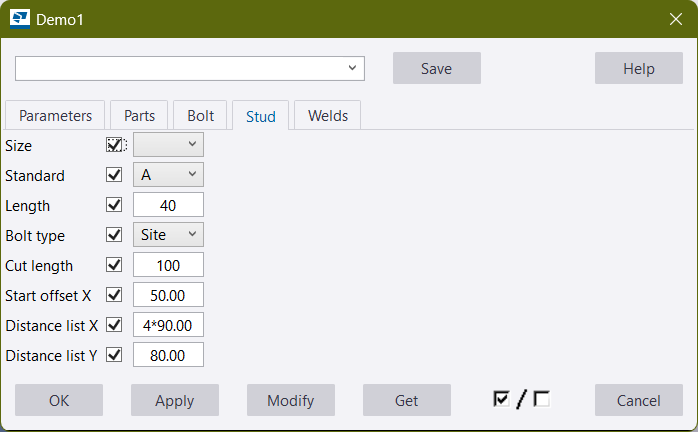
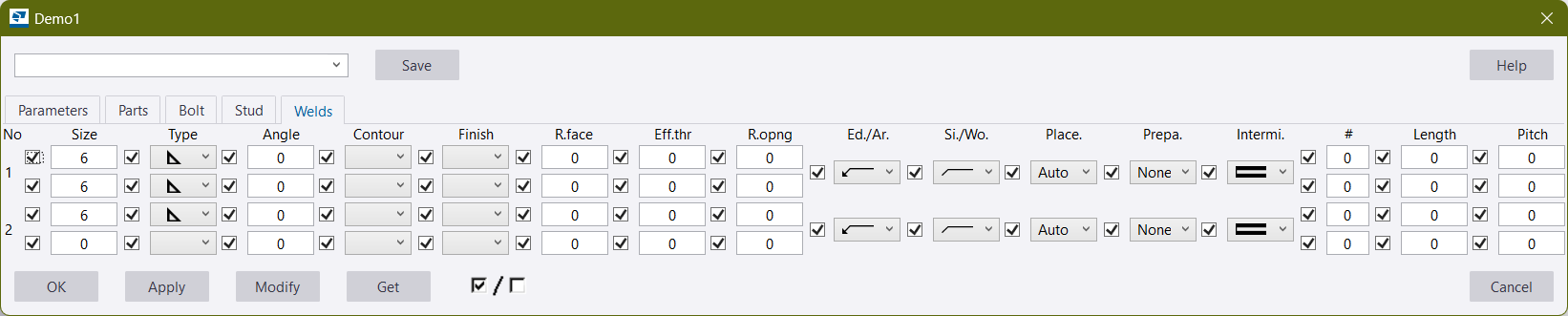
Apply "UserInterfaceAttribute" to plugin data class to generate a simple UI for plugin. On one hand it makes debugging easier during the core logic development stage, and on the other hand it reduces workload during the UI development stage because you can edit based on the generated files.
Currently, it only supports WPF, but INP and WinForm will be supported later.
Note: Since the official implementation of source generators can't output files with non-.cs extensions, this generator bypasses the official method to output a "WpfUi.g.xaml" file in the project directory (although it is possible write WPF UIs purely in C# code, but doing that would lose the convenience mentioned in the second point). However, this approach also introduces a drawback – when you no longer need the generated WPF UI, you'll have to manually delete the "WpfUi.g.xaml" file.
Example
// in PluginData.cs

using Muggle.TsExtensions.CodingHelper.Generators;

[GeneralFields(typeof(int), "num")]
[PlateFields("Stiffener")]
// [UserInterface(UserInterfaceType.INP, "")]
// [UserInterface(UserInterfaceType.WinForm, "")]
[UserInterface(UserInterfaceType.WPF, "Plugin.MainWindowViewModel")]
public partial class PluginData { }


// in Plugin.cs

using Muggle.TsExtensions.CodingHelper.Generators;

[Plugin("Plugin")]
// [PluginUserInterface(InpUi.Definition)]
// [PluginUserInterface("Plugin.WinFormUi")]
[PluginUserInterface("Plugin.WpfUi")]
public partial class Plugin : PluginBase {
    /* ... */
}
Demo
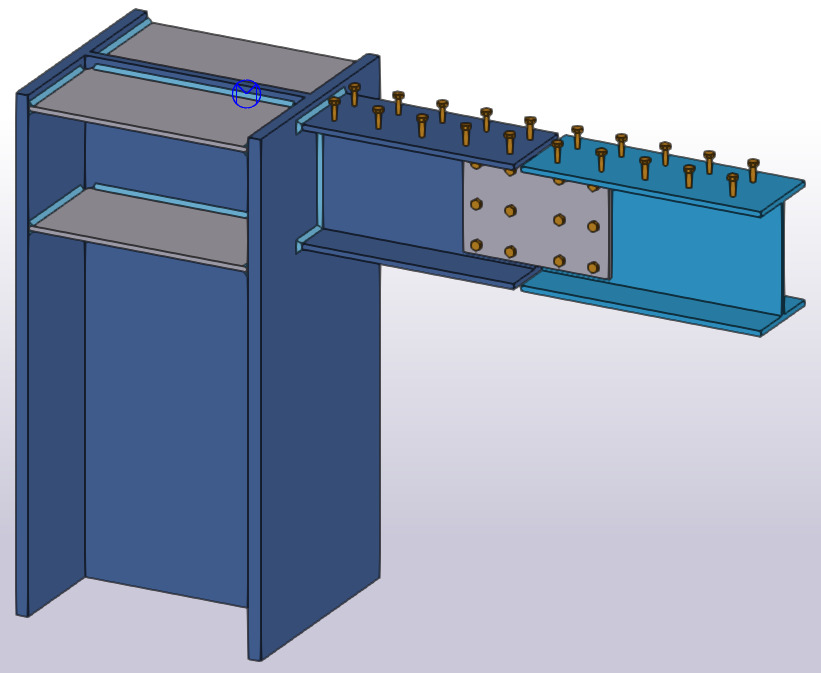
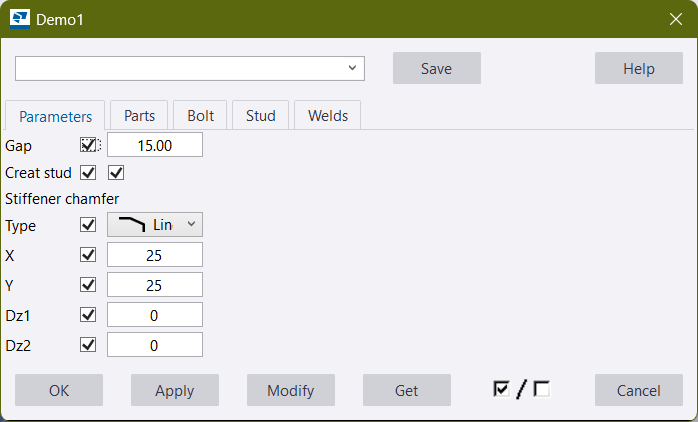
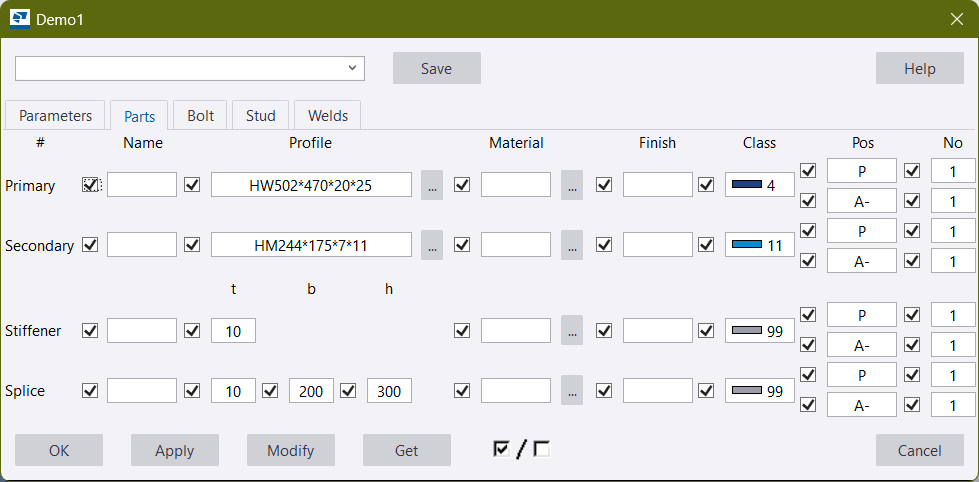
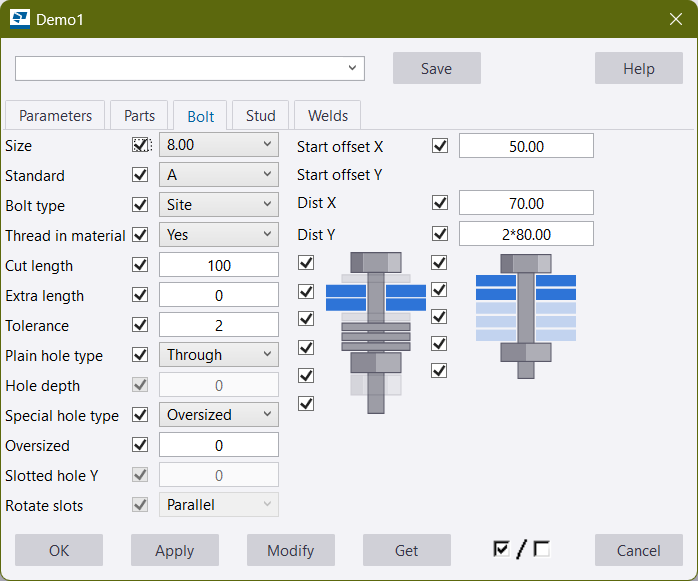
You can get a complete demo project from here.
Learn more about Target Frameworks and .NET Standard.
-
.NETStandard 2.0
- No dependencies.
NuGet packages
This package is not used by any NuGet packages.
GitHub repositories
This package is not used by any popular GitHub repositories.
| Version | Downloads | Last Updated |
|---|---|---|
| 2.1.0-beta.2 | 57 | 9/28/2026 |
| 2.1.0-beta.1 | 66 | 9/18/2026 |
| 2.0.0 | 99 | 9/18/2026 |
| 2.0.0-beta.4 | 77 | 7/3/2026 |
| 2.0.0-beta.3 | 69 | 6/26/2026 |
| 2.0.0-beta.1 | 71 | 6/5/2026 |
| 1.4.1 | 131 | 5/15/2026 |
| 1.4.0 | 113 | 5/11/2026 |
| 1.3.3 | 126 | 5/10/2026 |
| 1.3.2 | 121 | 4/27/2026 |
File "WpfUi.xaml" renamed to "WpfUi.g.xaml";
Fix wrong binding with BoltCircle properties in "WpfUi.g.xaml";